The complete instructor guide to ACLSMED™ SIM — the tablet clinical suite — and ACLSMED™ CPR, the free compression-quality trainer for your learners' phones and Apple Watch. From the first sign-in to the debrief, one screen and one button at a time.
Paid — one plan per account; every tablet in the room signs into it (§ 01)
Free no account, no ads
Held by
You + student roles
One per learner at the manikin
Does
Monitor/defib, instructor remote, IV pump, ventilator, CPR test board, 33 MegaCodes
Measures compression rate, depth & hands-on time on a manikin
Worn or placed
Stood at the bedside
Phone on the chest, or the watch on the compressing wrist — § 07
Network
Local, tablet to tablet — no internet once signed in
Local, phone to tablet
Why the split matters
Because CPR needs no account, you can tell twenty learners to install it in the parking lot and it just works. Nothing they do touches your seat count, and nothing leaves their phone.
ACLSMED™ Instructor ManualStart here
Start here
How this manual is built
§
Chapter
Read it when
01
Accounts, plans & seats
Setting up a new tablet, or a role "won't claim"
02
The room
Roles, pairing, the ten-minute build
03
MONITOR
Every button on the patient's screen
04
ORCHESTRATOR / REMOTE
Driving the patient from your iPad
05
IVmed
Programming the pump (Clinical Suite)
06
RESPmed
Running the ventilator (Clinical Suite)
07
CPR
Phones, watches and the six-station test
08
Playbooks
Timed lesson plans
09
Reference
Troubleshooting, checklists, scenario catalog
Reading on screen
←→ or space to move · Home / End · P prints · F fullscreen. Add #n to the address to open slide n. The PDF is the same deck, one slide per page.
Every figure is real
Each picture is a capture of the shipping app, not a mockup. Numbered markers on a figure match the numbered list beside it.
What is not here
Prices — they live at aclsmed.com/#pricing and inside the app, so this manual never goes stale. Nothing here is medical advice: ACLSMED is training software, never a medical device.
ACLSMED™ Instructor ManualHow to read
Start here
The room at a glance
One ACLSMED account runs the room. Each tablet signs into it and takes one role; learners' phones join with the free CPR app and never touch the account.
The orchestrator remote: vitals, rhythms, MegaCodes, meds, patient voices, the log.
CPR SIMULATOR
iPad · Pro & Suite
Six-station timed compression test with a scored debrief for each learner.
IVmed
iPad · Clinical Suite
Dual-channel infusion pump with a drug library and dose guardrails.
RESPmed
iPad · Clinical Suite
Ventilator with nine modes, lung pathologies and an ABG drawer.
ACLSMED™ CPR
Phone or watch · free · learners
Measures each learner's compressions on the manikin and streams them to the Monitor or CPR Simulator.
Pro licenses two tablets · Clinical Suite licenses four · learner phones are unlimited
ACLSMED™ Instructor ManualAt a glance
§ 01
Accounts, plans & seats
One account for the whole room. Ten minutes once — then every tablet you add is a sign-in and a tap.
§ 01.01 — Before you sign in
What you need first
ONE ACCOUNT PER ROOM
The plan and the seats live on the account, not on the tablet
Every tablet in a room signs into the same ACLSMED account. Create it once, on whichever tablet you set up first.
AN EMAIL YOU CAN OPEN TODAY
Account creation sends a confirmation link
Use an address you can check from the room — you'll tap the link before your first log-in.
STORE ACCESS ON EACH TABLET
App Store on iPad · Google Play on Android
Install ACLSMED™ SIM on every tablet. Learners install ACLSMED™ CPR on their own phones — no account needed.
KNOW WHICH TABLET IS WHICH
Roles persist
Decide now which iPad is the Monitor and which is yours. A tablet keeps its role until you change it in Settings.
Same account everywhere
The account you create in the app is the same one that works at aclsmed.com — the web simulator, the web checkout and the app all read one profile.
Accounts, plans & seatsBefore you sign in
§ 01.02 — Create an account
Create your account, step by step
Open ACLSMED™ SIM. A fresh install lands on the Welcome back sign-in card.
Tap New here? Create an account under the LOG IN button.
Enter your EMAIL, a PASSWORD of at least 8 characters, and re-enter it under CONFIRM PASSWORD.
CREATE ACCOUNT stays grey until the two passwords match. Tap it.
The card changes to Confirmation email sent. Open the email on any device, tap the link, then tap BACK TO LOG IN and sign in.
If no email arrives
Check spam, then try Forgot password? on the sign-in card — it resends a link to the same address. The Back arrow at the top left returns to log in at any time.
Accounts, plans & seatsCreate an account
§ 01.03 — Sign in
Sign in on every tablet
Enter the room account's EMAIL and PASSWORD. LOG IN lights up only when both fields are filled.
Tap LOG IN. The first time on a tablet, the app needs internet to fetch your plan; after that it remembers you.
A wrong password shows a red message under the fields — retype it, or use Forgot password? (next slide).
Next stop is the Terms of Use (§ 01.05), then your plan (§ 01.06), then the units question (§ 01.09), then the role picker.
Same account, every tablet
Sign every tablet into the same account. Tablets on different accounts are in different rooms and will never find each other.
Accounts, plans & seatsSign in
§ 01.04 — Forgot password
Reset a password
On the sign-in card, tap Forgot password?
Enter the account's EMAIL and tap SEND RESET LINK.
The card reads Check your email for a reset link. Open the email and tap the link — it opens a page on aclsmed.com where you type a new password.
Back in the app, tap BACK TO LOG IN and sign in with the new password.
Other tablets keep working
Changing the password does not sign the other tablets out or release their seats. They stay in the room until you sign them out yourself.
Accounts, plans & seatsForgot password
§ 01.05 — Terms of Use
The terms gate, once per account
After the first sign-in the app shows the Terms of Use (version and date at the top) with seven short sections: educational use only, no patient-care reliance, clinical accuracy, subscription & refunds, account security, intellectual property, CPR measurement & wearables.
Scroll the terms. Links to the full terms, privacy, refunds and support sit at the bottom.
Tick the box: "I have read and agree to the Terms of Use and acknowledge ACLSMED is for educational use only and is not a medical device."
Tap I Agree — Continue. Cancel signs you out instead.
Why it comes back
The gate is remembered per account. When the terms are revised it appears once more, on every tablet. If it fails to load, tap Retry — the app also carries a built-in copy for offline first runs.
In the app (App Store or Google Play billing) or at aclsmed.com/#pricing — same account either way
Learner phones
Unlimited, free, no seat used
Which one?
Two-iPad code room — Monitor plus your remote — is Pro. Add the pump and the ventilator as separate task-load stations, or run two Monitors, and you need Clinical Suite. You can upgrade later from inside the app without losing anything.
Accounts, plans & seatsPlans
§ 01.07 — Buying in the app
CHOOSE YOUR PLAN, step by step
After the terms, an account with no active plan lands on CHOOSE YOUR PLAN.
Pick a cadence at the top: Monthly, Annual or Lifetime. The two columns update with the matching product and its localized price.
Tap SUBSCRIBE (or the lifetime buy button) under Pro or Clinical Suite. Apple or Google confirms the purchase.
The role picker opens. Every other tablet signed into the account now sees the plan too — no purchase on those.
Restore purchases
Reinstalled, or the store says you already own it? Tap Restore purchases at the top right of the plan screen. Sign out at the top left leaves the account without buying.
Accounts, plans & seatsBuying in the app
§ 01.08 — One plan, many tablets
The plan lives on the account, not the iPad
SECOND TABLET
Sign in, done
Install SIM, sign into the room account, accept the terms, answer the units question. The plan is already there. Pick a role.
BOUGHT ON THE WEB
aclsmed.com/#pricing
A web checkout activates the same account automatically. Sign into the app and the paywall is gone. Institutions and discount codes go through the web checkout too.
ANDROID TABLETS
Same account
Buy through Google Play or on the web. One account can hold an iPad room and an Android room, but the two never pair with each other.
UPGRADE LATER
Pro → Clinical Suite
Settings → ACCOUNT → UPGRADE TO CLINICAL SUITE, or tap a locked role tile. The store handles the change; nothing is repurchased.
Departments & programs
Site licences and humanitarian rates are arranged by email — support@aclsmed.com. They activate on a normal account exactly like a web purchase.
Accounts, plans & seatsOne plan, many tablets
§ 01.09 — Measurement system
The units question, asked once
Between the terms and the role picker, every tablet asks "How should this iPad display vitals?" There is no default — pick one.
Card
What every number becomes
METRIC
°C · kg · cm · SI labs (mmol/L)
IMPERIAL
°F · lb · ft/in · conventional labs (mg/dL)
Tap a card — each one previews a temperature, weight, height, glucose and creatinine so you can see the difference.
Tap CONTINUE.
Change it any time
Both settings menus carry a UNITS switch, and the choice syncs to the paired iPad. Scenarios are authored in metric and converted for display only — both systems describe the same patient.
Accounts, plans & seatsUnits
§ 01.10 — Seats
How seats work
A tablet takes a seat the moment it picks a role. Seats belong to the account, so the caps below apply across every tablet signed into it — that is what stops one login from running a whole building.
Plan
Tablets at once
MONITOR
INSTRUCTOR
IVmed
RESPmed
CPR SIMULATOR
Pro
2
1
1
—
—
1
Clinical Suite
4
2
1
1
1
1
Re-picking a role on the same tablet moves its seat — it never spends a second one.
Both caps apply. On Clinical Suite a fifth tablet is refused even if a role is free; a second Instructor is refused even with seats to spare.
Learner phones never use a seat. The CPR app has no account at all.
Signing out gives the seat back. So does a role swap, and so does RELEASE (next slide).
Accounts, plans & seatsSeats
§ 01.11 — When a role won't claim
"Monitor is held by…" — release a seat
You tap a role and the picker answers with a panel: MONITOR IS HELD BY another iPad, or ACCOUNT FULL — RELEASE AN IPAD. That other tablet is usually one that went home still signed in. You do not have to walk to it.
RELEASE ONE IPAD
Role picker · conflict panel
The panel lists each blocking iPad by name with when it claimed the role. Tap RELEASE beside it — that iPad is signed out of the account from here and the seat is yours. Then tap the role again.
RELEASE ALL DEVICES
Two taps · role picker or Settings → ACCOUNT
Empties every seat on the account in one go. This iPad keeps its role; every other device is evicted and must sign in again. Tap once to arm (TAP AGAIN — RELEASES EVERY DEVICE), again within four seconds to fire.
Mid-class
RELEASE ALL DEVICES kicks live rooms off the account — the Monitor in the next bay goes back to the sign-in card. Use it between sessions, or release one iPad at a time.
Accounts, plans & seatsReleasing a seat
§ 01.12 — Managing the account
The ACCOUNT section, in every role's Settings
Control
What it does
Email · Plan
Who this tablet is signed in as, and the plan it resolved to (Pro or Clinical Suite).
Manage subscription in the App Store
Opens Apple's subscription sheet — change cadence, cancel, or request a refund. Google Play does the same on Android.
UPGRADE TO CLINICAL SUITE / CHANGE PLAN
Reopens the plan screen in manage mode with your current plan marked. Upgrades, downgrades and cadence switches happen in the store; the app follows.
RELEASE ALL DEVICES
The seat failsafe from § 01.11 — this iPad keeps its role, all others are signed out.
SIGN OUT
Releases this iPad's seat, signs out, forgets the cached plan and terms, drops the role, and disconnects from the room. The next launch starts at the sign-in card.
DELETE ACCOUNT & DATA
Two taps (TAP AGAIN TO CONFIRM ACCOUNT DELETION). Permanently deletes the account, its seats and its remote data. Also available at aclsmed.com/privacy.html.
Where is it?
Tap the gear on any role — Monitor, Instructor, IVmed, RESPmed, CPR Simulator — and scroll to ACCOUNT. The role picker's own gear (top right) offers Sign Out only.
Accounts, plans & seatsManaging the account
§ 01.13 — Offline
What needs the internet, and what doesn't
ONLINE ONCE
First sign-in on each tablet
Account, terms and plan are fetched and then cached. A basement classroom works fine after that.
NEVER ONLINE
The simulation itself
Tablets pair with each other locally. Rhythms, shocks, drugs and CPR data never leave the room.
THE 7 / 14 DAY RULE
Cached plans expire
After 7 days without reaching the server the gear icon gets a yellow dot and Settings shows RECONNECT WITHIN N DAYS. At 14 days the tablet asks you to sign in again.
Resetting the clock
Any launch with internet re-verifies silently and restarts the count. A tablet that comes online before day 14 is never asked to log in again. If it does hit the gate, one sign-in with internet restores everything — the role and the room are remembered.
Accounts, plans & seatsOffline
§ 02
The room
Roles, pairing, and the ten minutes that decide whether the session runs clean.
§ 02.01 — Room kit
What you need in the room
iPad · MONITOR
The patient
Place it where a real monitor lives — head of the bed, screen out. This is what the team treats.
iPad · INSTRUCTOR
Yours only
Never in a learner's line of sight. Everything you touch appears on their monitor as if the patient did it.
iPad · IVmed and RESPmed
Clinical Suite task load
Optional third and fourth tablets, stood where the pump and the ventilator would stand. A learner runs each one.
Manikin or mat · a local network
Any compression surface · or no network at all
The suite never talks to manikin hardware. Tablets find each other peer-to-peer; no internet once signed in.
Do this before every class
Charge above 80%, set Auto-Lock → Never, turn on Do Not Disturb. A monitor that sleeps mid-arrest is the most common avoidable failure in a live session.
The roomRoom kit
§ 02.02 — Roles
PICK A ROLE FOR THIS iPAD — one instrument each
MONITOR
Patient monitor + defib
INSTRUCTOR
Orchestrator remote
IVMED
IV pump · Clinical Suite
RESPMED
Ventilator · Clinical Suite
CPR SIMULATOR
Multi-student CPR test
Tap a tile and the tablet claims that seat and opens the role. This setting persists — a tablet labelled "Monitor" stays the Monitor across restarts until you change it under Settings → DEVICE ROLE. The gear at the top right offers Sign Out.
The roomRoles
§ 02.03 — Locked roles
A tile that says NOT IN YOUR PLAN
On a Pro account, IVmed and RESPmed carry a lock and read NOT IN YOUR PLAN. Every other tile works.
Tapping a locked tile shows the notice — "IVmed is part of the Clinical Suite plan and is not included in your current subscription." — and an UPGRADE TO CLINICAL SUITE button.
That button opens the plan screen in upgrade mode (with a Close button). Complete the purchase and the tile unlocks on this tablet and every other one on the account.
Monitor is never locked
Any signed-in tablet can be a Monitor. What the plan limits is how many — one on Pro, two on Clinical Suite (§ 01.10).
The roomLocked roles
§ 02.04 — Pairing
No codes to type
Every tablet announces its role on the local network and looks for the others. Two tablets on the same account and the same Wi-Fi connect by themselves within seconds, and every message between them is signed — a stray tablet next door cannot drive your patient.
Same Wi-Fi on every tablet, Bluetooth on, Airplane Mode off.
Allow "Local Network" when iPadOS asks on first launch. Without it the tablet is deaf.
Pick Monitor on the patient iPad, Instructor on yours.
Watch the roster turn green.
Where to look
What "paired" looks like
Monitor · CONNECTION panel (right column)
One row per role; a green dot beside the Instructor row.
Remote · CONNECTION strip (bottom)
Role names light up; an unpaired role reads "Monitor offline". Beneath: HMAC hb 5s · uptime · seat usage.
Settings · CONNECTIONS + PAIRING DIAGNOSTICS
Transport in use, peers by name, last error, and a RECONNECT button.
The roomPairing
§ 02.05 — When they don't find each other
Pairing, symptom by symptom
Symptom
Cause
Fix
Nothing ever appears in CONNECTION
"Local Network" was declined on this iPad
Gear → PAIRING DIAGNOSTICS → Open ACLSMED Settings → turn Local Network on. Relaunch.
Both tablets say Searching… forever
Guest or enterprise Wi-Fi blocks device-to-device traffic
Put both on a phone hotspot — or turn Wi-Fi off on both and let them pair directly over Bluetooth.
Each tablet sees itself only
Different accounts
Sign out (Settings → ACCOUNT) and sign into the room account.
"MONITOR IS HELD BY…" when picking a role
Another iPad still holds the seat
RELEASE it from the panel (§ 01.11).
Your remote drives the wrong Monitor
Two rooms share one account
One account per room. Tablets on one account will pair with each other across a corridor.
An Android tablet never appears
iPad and Android never mix
Rooms are iPad-only or Android-only. Use one platform per room.
Paired, then dropped mid-code
Wi-Fi roamed or the iPad slept
Settings → CONNECTIONS → RECONNECT. Auto-Lock → Never. If it stays stuck: force-quit both, launch the Monitor first.
The roomPairing problems
§ 02.06 — Setup
The ten-minute room build
Power and unlock. Charged, Auto-Lock → Never, Do Not Disturb on.
Same Wi-Fi on every tablet; Bluetooth on.
Sign in on every tablet with the room account. First time on a tablet: terms → plan (already active) → units.
Roles. Patient iPad → MONITOR. Yours → INSTRUCTOR. Suite: IVmed and RESPmed on the task-load tablets.
Confirm the link. Green dot per role in the Monitor's CONNECTION panel.
Rehearse one beat. Change a rhythm from your remote; watch the Monitor follow. If it does, the room is live.
Seat the learners. Phones get ACLSMED™ CPR; brief the scope: manikin only.
Reset before the first case. Gear → Reset Scenario clears the log and returns the patient to baseline.
The roomTen-minute build
§ 02.07 — Changing roles
Swap roles without walking across the room
On either tablet, tap the gear → DEVICE ROLE. Your current role is marked CURRENT; the roles other iPads hold show their names.
Tap the tile of a role another iPad holds. The app asks "Swap roles?" — "Your iPad becomes Instructor, and Mikko's iPad becomes Monitor. Both iPads update immediately."
Tap SWAP. Both tablets switch at once and keep their seats; nothing is signed out.
Tap a free role instead and this tablet simply moves to it — its old seat is released in the same step.
Why swap instead of re-pick
Re-picking on both tablets one at a time briefly leaves the room with two Monitors or none. A swap is a single change on the account, so the caps in § 01.10 are never tripped mid-class.
The roomChanging roles
§ 02.08 — On Android
The same room on Android tablets
SAME ACCOUNT, SAME ROLES
Tablets only — 7-inch and up
Sign in with the room account; the five roles, the terms gate and the units question are the same. Plans are bought through Google Play or on the web.
PAIRING
Same Wi-Fi
Android tablets on the same Wi-Fi join each other automatically — the CONNECTIONS panel reads LAN (Wi-Fi) with a green dot per peer, Searching… while it looks, and offers RECONNECT.
ONE PLATFORM PER ROOM
iPad ↔ iPad · Android ↔ Android
An Android tablet cannot join an iPad room, and an iPad cannot join an Android one. Learner phones follow the same rule: iPhone to iPad, Android phone to Android tablet (§ 07).
HOTSPOT RULE
Guest Wi-Fi
Android pairs over the router only, so client-isolated Wi-Fi needs a phone hotspot that every tablet joins.
The roomOn Android
§ 03
MONITOR
The instrument the team treats. Every key on it belongs to the learners — this chapter tells you what each one does before they press it.
§ 03.01 — Anatomy
The Monitor, region by region
12345678
Top bar — wordmark, ♩ metronome, the code timer, ⚙ Settings.
Waveforms — ECG, arterial or cuff pressure, PA, CVP, SpO₂ pleth and EtCO₂ capnogram, each with its numeric and alarm range.
Vitals column — HR, pressure, SpO₂, EtCO₂, respiration tiles. Tap the NIBP tile to cycle the cuff.
CONNECTION — the paired-device roster; a green dot per live role (§ 02.04).
PACER — on/off, RATE and mA steppers.
Simulator zone — POWER, MEGA CODES, RHYTHM SELECT, CODE SUMMARY.
Defib zone — DEFIB / AED / SYNC / ANALYZE, the energy dial and presets, CHARGE, SHOCK.
MONITORAnatomy
§ 03.02 — Device shells
One engine, four housings
MONITOR
Original full-bleed layout
Every key visible at once. The layout this chapter is drawn from.
HOSPITAL DEFIB
White/Blue · Yellow/Black
Hardware rail plus an 11-key softkey strip along the bottom.
MEDIC DEFIB
Orange/Black · White/Blue
Machined deck with a rotary ENERGY SELECT dial and a hidden drawer under a pull-tab.
TRANSPORT DEFIB
Red · Beige
Field unit: numbered 1 ENERGY · 2 CHARGE · 3 SHOCK rail, a printer deck, and a drawer.
Pick the face that matches the machine your learners will meet: ⚙ → DEVICE SHELL, then a colour swatch. The patient, the keys and the sounds are identical underneath.
MONITORDevice shells
§ 03.03 — Device shells
Where each key lives, shell by shell
Key
Monitor
Hospital Defib
MEDIC Defib
Transport Defib
MEGA CODES · RHYTHM · SUMMARY
Simulator zone, bottom left
Softkey strip
Hidden drawer
MEGA CODES + SUMMARY on the printer deck · RHYTHM in the drawer
12-LEAD · X-RAY · LABS · MEDS
Quick actions
Softkey strip
Hidden drawer
12-LEAD on the deck · X-RAY, LABS, MEDS in the drawer
CPR · PADS · NIBP
Quick actions
Softkey strip
Hidden drawer
Printer deck
SILENCE
Quick actions
Softkey strip
Hidden drawer
Drawer
Energy
− / + and 120 · 200 · 300 · 360
− / + and presets
ENERGY SELECT dial: tap = next detent, drag = turn · −50 J / +50 J keys
1 ENERGY SELECT: −50 J / +50 J around the joule LCD
CHARGE · SHOCK
Defib zone
Chassis keys
Deck keys
2 CHARGE · 3 SHOCK on the rail
Mode tabs · PACER
DEFIB / AED / SYNC / ANALYZE and the pacer controls sit beside the defib keys on every shell
POWER · ♩ · timer · ⚙
Present on every shell; the top bar carries the metronome, code timer and gear
The hidden drawer
MEDIC: a pull-tab at the top of the glass — tap it or drag down to open; tap outside, tap the handle, or swipe up to close. Transport: a five-key drawer (RHYTHM · X-RAY · LABS · MEDS · SILENCE) beside the six-key printer deck. Nothing is missing on the compact shells; it is just folded away.
MONITORShell map
§ 03.04 — Power and the top bar
Power on, and the three keys up top
POWER ON / POWER OFF
Simulator zone
Boots the monitor to its baseline: sinus 60, 120/80, SpO₂ 100, EtCO₂ 40, energy 150 J, DEFIB mode, alarms normal — with the power-on chime. Off blanks every channel and stops every sound. The Remote's power key does the same thing from across the room.
♩ METRONOME
Top bar
A continuous 110/min click — compression-only guidance, no ventilation pause. Independent of the CPR key; the AED cycle turns it on for you.
CODE TIMER
Top bar · mm:ss
Tap to start or stop. Double-tap to reset to 00:00. (On the Remote the timer resets on a long-press only, so a stray tap never zeroes a running code.)
⚙ SETTINGS
Top bar
Device role, Reset Scenario, audio switches, device shell, units, connections, the CPR device, pairing diagnostics and your account (§ 03.18). A yellow dot on the gear means the tablet has been offline for a week — reconnect (§ 01.13).
Power-off is a reset
Turning the Monitor off wipes the Code Summary and drops SILENCE, CPR and any charge. Debrief or screenshot the summary before you power down.
MONITORPower & top bar
§ 03.05 — Buttons reference 1 / 4
Simulator zone & top bar
Button
Where
Press → what happens
Ignored or locked when
What you hear
POWER ON / OFF
simulator zone
Boots to baseline, or blanks the screen. Broadcast to the room.
—
Power-on chime · "powering off"
MEGA CODES
simulator zone
Opens MEGA CODE SCENARIOS — 33 cases. Tap a card, read the chart, ▶ the handoff, START SCENARIO.
—
The recorded handoff plays here
RHYTHM SELECT
simulator zone
Opens the rhythm catalog — 47 rhythms in five columns. A tap applies the rhythm and its preset vitals at once.
—
Alarm if the new rhythm is out of range
CODE SUMMARY
simulator zone
The timestamped event log: shocks with energy and mode, CPR intervals with duration, AED cycles, drugs, rhythm changes.
Wiped by POWER OFF and Reset Scenario
—
♩ Metronome
top bar
Toggles the 110/min click.
—
Click, continuous
Code timer
top bar
Tap: start / stop. Double-tap: reset to 00:00.
—
—
⚙ Gear
top bar
Opens Settings (§ 03.18).
—
—
MONITORButtons 1 / 4
§ 03.06 — Buttons reference 2 / 4
Quick actions
Button
Where
Press → what happens
Ignored or locked when
What you hear
12-LEAD
quick actions
Generates a 12-lead from the rhythm on screen and opens the viewer (§ 03.15).
Power off · arrest rhythm (no perfusing rate to trace)
—
X-RAY
quick actions
Shows the loaded case's chest film.
Dims when the case carries no film
—
LABS
quick actions
Shows the case's LABORATORY RESULTS with high/low flags.
Dims with no case loaded; "NO LABS AVAILABLE AT THIS TIME" if the case has none
—
CPR
quick actions
Toggles CPR: compression artifact on the ECG, the tile pulses at 110/min, the interval is logged.
—
— (turn ♩ on separately)
PADS
quick actions
Attaches or removes the pads. Removing them while charged disarms. Attaching them in AED mode starts an analysis.
—
"Pads detected"
MEDS
quick actions
Opens MEDS · BEDSIDE DRAWER — 54 drugs by category. Tapping a drug records it as given and raises a banner.
—
—
SILENCE
quick actions
Mutes the alarm tone; the key reads SILENCED with a red ring. The visual alarm keeps flashing.
Cleared by Reset Scenario and power-off
Alarm stops
NIBP
quick actions · or tap the NIBP tile
Runs a cuff cycle — about 8 s — and posts the reading on the completion beep.
—
Cuff inflating, then the beep
MONITORButtons 2 / 4
§ 03.07 — Buttons reference 3 / 4
Defib zone
Button
Where
Press → what happens
Ignored or locked when
What you hear
DEFIB · AED · SYNC · ANALYZE
mode tabs
Sets the mode. Leaving SYNC cancels a shock that was waiting for an R-wave. AED with pads on starts analysing by itself.
Locked while charging or charged
"Defib selected" · "AED mode" · "Sync mode"
− / +
energy
Steps the energy: 1 J at a time below 100 J, 10 J above, 0–360 J. (MEDIC dial: tap = next detent; ±50 J keys on MEDIC and Transport.)
Locked while charging or charged
—
120 · 200 · 300 · 360
presets
Jumps to that energy.
Locked while charging or charged
—
CHARGE
defib zone
A 2-second ramp to the selected energy; the key reads CHARGING… then DISARM. Press again to dump the charge without a shock.
Pads off — nothing charges
Charge whine · "Pads not detected — place pads on the patient" if pads are off
⚡ SHOCK
defib zone
Delivers the energy: flash, tone, log entry Shock #n delivered · J · mode. In SYNC it waits for the next R-wave. In AED it starts the two-minute CPR cycle.
Dead until charged
Shock thump · "Shock delivered"
Pads first, then mode, then energy
While the machine is charged the mode tabs, dial and presets are all frozen — exactly like a real unit. To change anything, DISARM first.
MONITORButtons 3 / 4
§ 03.08 — Buttons reference 4 / 4
Pacer, cuff & the things that aren't keys
Control
Where
Press → what happens
Ignored or locked when
What you hear
PACER / PACER ON
side panel
Toggles transcutaneous pacing; the LED lights while it runs. Power-up defaults: rate 30, output 5 mA.
—
"Pacer on" / "Pacer off"
RATE − / +
side panel
Pacing rate, 30–180/min in steps of 5.
—
—
mAMP − / +
side panel
Output, 0–200 mA in steps of 5. Capture from 40 mA: below it the spike fires and nothing follows.
—
—
NIBP tile
vitals column
Same as the NIBP key — a cuff cycle.
—
Cuff, then the beep
CONNECTION
side panel
Not a key. One row per role; a green dot means that role is paired (§ 02.04).
—
—
CPR bar
below the chassis
Appears when a learner's ACLSMED™ CPR phone is streaming: a colour-banded bar with a one-word verdict, and real compressions drive the ECG artifact, the pressure pulse and EtCO₂ (§ 07).
Reads NO PHONE until one connects
—
Vent badge
top of the waveforms
Not a key. When a RESPmed is paired: mode · rate · volume · PEEP · FiO₂ ride onto the Monitor (§ 06).
—
—
MONITORButtons 4 / 4
§ 03.09 — Defibrillation
Manual defibrillation, key by key
PADS — "Pads detected". Nothing below works without this.
DEFIB is the default mode after power-on.
Set the energy with −+ or a preset. The baseline is 150 J.
CHARGE — two seconds of rising whine; the key turns into DISARM and the mode tabs and dial lock.
"Clear" — then SHOCK. The screen flashes, the tone fires, and the log gains Shock #1 delivered · 150 J · MANUAL.
The machine returns to idle at the same energy. Change the rhythm from the Remote to show the result; charge again for the next one.
Dumping a charge
Press DISARM, or take the PADS off — both drop the charge without a shock. Watch who reaches for which.
MONITORDefibrillation
§ 03.10 — Synchronized cardioversion
SYNC: the shock that waits
Pads on. Tap SYNC — "Sync mode".
Set the energy and CHARGE as usual.
Press SHOCK. Nothing happens yet: the shock is held until the next R-wave the engine detects, then fires on it. On a fast rhythm that is a fraction of a second; learners who let go early miss the point.
Leaving SYNC for any other mode cancels a shock that is still waiting.
TEACH THE PAUSE
The held shock is the lesson: the unit is looking for a QRS to land on. In VF there is no QRS to find — which is why SYNC is the wrong mode for an arrest.
SEDATE FIRST
The patient with a pulse is awake. Push the analgesia and sedation from MEDS before the charge — the log will show whether the team did.
MONITORSynchronized cardioversion
§ 03.11 — AED mode
The AED loop, prompt by prompt
What happens
What the room hears
Tap AED with pads on — or attach pads with AED already selected.
"No shockable rhythm — no shock advised", or "…with pulse"
Operator presses SHOCK. Three seconds of quiet so the post-shock rhythm can be read.
Shock tone · "Shock delivered"
Still pulseless: CPR and the metronome switch on and a 117-second countdown runs, then the AED re-analyses on its own (if the pads are still on).
"Resume CPR" · click at 110
Rhythm converted (the Remote queued a ROSC rhythm on the shock): the loop stops.
"Pulse detected"
What ends the loop
Switching mode, removing the pads, POWER OFF, or Reset Scenario. Otherwise it repeats — analyse, shock, two minutes of CPR — exactly like the unit on the wall.
MONITORAED mode
§ 03.12 — Transcutaneous pacing
Pacing to capture
Pads on. Set RATE first — the power-up default is 30, so step it to the rate you want (60–80 is the usual teaching target).
Tap PACER — "Pacer on", the LED lights, spikes appear on the ECG.
Climb mAMP in fives. Below 40 mA every spike fires into nothing. From 40 mA each spike is followed by a paced QRS and the HR tile follows the pacer rate.
Now check the patient: cycle the cuff. Electrical capture is not the goal — a pressure is.
The teaching beat
Learners stop at the first captured spike. Ask for the blood pressure. Then ask what they gave for pain before they turned the current up.
MONITORPacing
§ 03.13 — Alarms, the cuff and SILENCE
What alarms, and what SILENCE really does
Channel
Alarm band
HR
50–120
Pressure
SYS below 160 · DIA above 30 at power-on; 90–160 / 60–90 when the Remote drives it
SpO₂
90–100 at power-on · 92–100 once a rhythm or case is loaded · 90–100 from the Remote
EtCO₂
35–45 at power-on · 30–45 once a rhythm or case is loaded · 30–50 from the Remote
The band in force is printed on each tile ("normal · 92–100"), so read it there.
Out of range
The tile flags, the alarm tone sounds and the display flashes. A rhythm change from the Remote can trip several at once — that is the point.
SILENCE ≠ fixed
SILENCE mutes the tone only. The flash continues, the patient is unchanged, and the key reads SILENCED until someone presses it again — or the scenario is reset. Watch who reaches for it first.
NIBP
The cuff cycle takes about 8 seconds and the reading lands on the completion beep. Press the key or tap the tile. With an arterial line up, the cuff still works — two pressures, two lessons.
"WHY IS THE CUFF SILENT?"
Three switches in ⚙ → AUDIO: mute-all must be off, Master volume up, and NIBP cycle on. Then the cuff inflates out loud and beeps when the reading posts.
MONITORAlarms & cuff
§ 03.14 — CPR
CPR on the Monitor, with and without a phone
CPR KEY
No phone
Toggles simulated compressions: artifact rides the ECG, the tile pulses at 110/min, and the interval — start to stop, with its duration — lands in the Code Summary.
♩ METRONOME
Separate switch
Turn it on when you want the click. The AED cycle turns both on together.
A LEARNER'S PHONE
ACLSMED™ CPR paired to this Monitor
Their real compressions drive the artifact, the pressure pulse and the EtCO₂, and the CPR bar under the chassis grades them live. Pause the compressions and the trace goes flat — no key needed.
Which phone feeds this Monitor is set on the phone (CONNECT) and released here under ⚙ → CPR DEVICE → Release CPR device.
MONITORCPR
§ 03.15 — 12-lead, X-ray, labs
Give them data when they ask
Key
What opens
12-LEAD
12-LEAD ECG traced from the rhythm on screen on true-millimetre paper. Pinch to zoom, drag to pan; −+ with the zoom %, fit, share (save or AirDrop), print, ✕.
X-RAY
CHEST X-RAY for the loaded case.
LABS
LABORATORY RESULTS — the case's panel with high/low flags, in the units this tablet was set to.
Two doors to the same data
The team opens these here; you can push the same 12-lead, film or panel onto this screen from the Remote's LIBRARY the moment they ask (§ 04). The 12-lead needs a perfusing rhythm and power on — in an arrest the key is dark.
MONITORData
§ 03.16 — MEDS and the Code Summary
What was given, and when — on the record
MEDS · Bedside drawer — 54 drugs by category; a tap records the dose
CODE SUMMARY — every shock, CPR interval, AED cycle and drug, newest first
Before you power down
The summary is cleared by POWER OFF and by Reset Scenario, and it reads "Log starts when a scenario is running" until a case or a rhythm is live. Screenshot it or read it aloud in the debrief first.
MONITORMEDS & summary
§ 03.17 — Cases and rhythms from the Monitor
Running a case without a Remote
MEGA CODES — tap a case · read the chart · ▶ the handoff · START SCENARIO
RHYTHM SELECT — 47 rhythms; a tap applies the rhythm and its preset vitals immediately
One iPad, whole lesson
A single Monitor runs any of the 33 cases: the patient chart, the recorded EMS handoff and the opening rhythm all live on this screen. With a Remote you gain a hidden hand — queued rhythms, slider-driven vitals, patient voices (§ 04).
MONITORCases from the Monitor
§ 03.18 — Settings
The gear menu, top to bottom
Section
What it does
DEVICE ROLE
Switch this iPad's role, or swap with another iPad (§ 02.07).
RESET TO DEFAULTS
Reset Scenario — confirm, then vitals return to sinus 60 · 120/80 · 100 · 40, the case is cleared, the log restarts.
AUDIO
Mute-all switch, Master volume %, and one switch each for Alarm · HR beep · SpO₂ pulse · NIBP cycle · Voice cues · Patient sounds.
DEVICE SHELL
Monitor · Hospital Defib · MEDIC Defib · Transport Defib, with colour swatches (§ 03.02).
UNITS
METRIC / IMPERIAL (§ 01.09).
CONNECTIONS · PAIRING DIAGNOSTICS
Peers, transport, last error, RECONNECT, Open ACLSMED Settings (§ 02.05).
CPR DEVICE
The learner phone feeding this Monitor — Release CPR device to free it.
ACCOUNT · DEVICE INFO
Plan, subscription, release all devices, sign out, delete account (§ 01.12); version and the training-only notice.
MONITORSettings
§ 03.19 — Teaching with the Monitor
This machine is theirs
You set the patient from the Remote; the team operates the instrument. Three keys teach more than any lecture:
SYNC EXISTS
A synchronized shock waits for a QRS. Whether they choose it — and whether they sedate first — is graded reality.
AED IS A MODE
The same iPad becomes an AED with voice prompts, so one Monitor covers BLS and ACLS audiences.
SILENCE ≠ FIXED
It mutes the alarm without fixing the patient. Who reaches for it first is the best teaching moment in the app.
Learners ask
Answer
"Why won't it charge?"
Pads. Always pads.
"Why is 12-LEAD dark?"
No perfusing rhythm — or the monitor is off. Get a pulse, then trace.
"The shock didn't fire."
SYNC is waiting for an R-wave; in VF it never comes. Change the mode.
"The cuff isn't reading."
Give it eight seconds — the number posts on the beep.
MONITORTeaching
§ 04
ORCHESTRATOR / REMOTE
Your private control surface. Everything you touch here appears on their Monitor as if the patient did it.
§ 04.01 — Anatomy
The Remote, top to bottom
Top bar — CPR, PADS, ♩ metronome, 🔊 sounds, ⏻ power, the code timer, ⚙.
Monitor mirror — the learners' traces and numerics, live. EXPAND / COLLAPSE MIRROR.
Tabs — HUB · RHYTHMS · CODES · MEDS · LOG, plus the LIBRARY folder.
Vitals grid — a card and slider per channel; ADVANCED LINES adds PA, CVP and TEMP; DEFIB & PACER folds out below.
RHYTHM ON MONITOR — the current rhythm, ‹ › to step, CHANGE RHYTHM to pick.
Quick actions — 12-LEAD · X-RAY · LABS · VOICE open the library.
CONNECTION — who is paired, and the seat count.
Action dock — NIBP · CYCLE CUFF, CHARGE, SHOCK, and the bell.
12345678
REMOTEAnatomy
§ 04.02 — Buttons reference
Top bar & action dock
Button
Where
Press → what happens on the Monitor
Ignored or locked when
CPR
top bar
Starts or stops simulated compressions room-wide — artifact on the ECG, the interval in the log.
—
PADS
top bar
Puts the pads on or takes them off, exactly as the PADS key on the Monitor does.
—
♩
top bar
Toggles the 110/min metronome on the Monitor.
—
🔊
top bar
Opens the SOUNDS sheet (§ 04.13).
—
⏻
top bar
Powers the Monitor on or off from across the room.
—
Code timer
top bar
Long-press (about half a second) resets it. A tap does nothing on purpose — a stray thumb never zeroes a running code.
Tap ignored
⚙
top bar
Opens the Remote's SETTINGS (§ 04.13).
—
NIBP · CYCLE CUFF
dock
Runs a cuff cycle on the Monitor — about 8 s, the number posts on the beep.
—
CHARGE · nnn J
dock
Charges the Monitor's defib to its selected energy; reads CHARGING… then DISARM. Press again to dump it.
Monitor's pads off — nothing charges
⚡ SHOCK · nnn J
dock
Delivers the shock — and fires any rhythm you armed with TRIGGER (§ 04.07).
Dark until the Monitor reports it is charged
🔔
dock
SILENCE on the Monitor — mutes the alarm tone, not the flash.
—
REMOTETop bar & dock
§ 04.03 — Monitor mirror
Watch the mirror, not their hands
The strip under the top bar is the learners' Monitor, live: mini traces for ECG, ABP, PA and CVP, and tiles for HR, ABP or NIBP, SpO₂ and EtCO₂. When something is out of range it shows ⚠ ALARMS · n active, how long, and which channels.
EXPAND MIRROR grows the strip to nearly three times its height with bigger numerals; COLLAPSE MIRROR shrinks it back.
Shocks, energy and the pacer state also show in the DEFIB & PACER header (§ 04.05) — so you know what the team did without walking over.
Habit worth building
During an arrest read the mirror, not the students' narration. Shock count and energy tell you whether they are following the algorithm better than their words do.
REMOTEMonitor mirror
§ 04.04 — Vitals
Every vital is a slider
Control
What it does
HR · SpO₂ · ABP/NIBP · EtCO₂ · RR
Drag the slider; the Monitor follows a moment later. The alarm band is marked on each card, and a card flashes when its value is out of range.
Enable dot
Turns the channel off — the trace and numeric leave the Monitor entirely — or back on.
ABP → / NIBP
Switches the pressure lane between an arterial line and the cuff.
Adds PA, CVP and TEMP cards. HIDE ADVANCED LINES folds them away.
DEFIB & PACER
Folds out the defib and pacer cards (§ 04.05); the header shows the energy and PACER ON / OFF at a glance.
REMOTEVitals
§ 04.05 — Defib & pacer cards
Preset the machine before a beat
Control
Card
Press → what happens
Ignored or locked when
50J · 150J · 200J · 360J
DEFIB
Sets the Monitor's energy.
Locked while the Monitor is charging or charged
DEFIB RESET
DEFIB
Back to 50 J, DEFIB mode, disarmed.
—
RATE − / + · mA − / +
PACER
Steps the pacer rate (30–180) and output (0–200 mA) in fives.
—
PACER on / off
PACER
Starts or stops pacing on the Monitor — capture from 40 mA (§ 03.12).
—
RESET
PACER
Pacer back to its power-up defaults.
—
CHARGE · SHOCK
dock
The charge and the shock themselves live in the action dock (§ 04.02), so they are one thumb away from any tab.
—
Who presses what
Normally the team charges and shocks on the Monitor. Use the dock when you are running a demo alone, or to show a capture failing at too low an output.
REMOTEDefib & pacer
§ 04.06 — Rhythms
Picking a rhythm
On the HUB, RHYTHM ON MONITOR shows the current rhythm. ‹› step through the 47 in catalog order.
CHANGE RHYTHM or the RHYTHMS tab opens the catalog grid. Each tile carries a badge: CURRENT on the Monitor, SELECTED waiting for your decision, QUEUED parked for later.
Tapping a tile selects it — nothing changes on the Monitor yet. The state bar (next slide) asks what you want to do with it.
Nothing auto-plays
A selected rhythm never reaches the Monitor by itself. Every change is a deliberate PLAY, PLAY NOW, or a TRIGGER fired by a shock — so a stray tap in the catalog cannot arrest your patient.
REMOTERhythms
§ 04.07 — The rhythm state bar
QUEUE, TRIGGER or PLAY
Bar reads
Keys
What each does
SELECTED · name
QUEUE · TRIGGER · PLAY
QUEUE parks it for later. TRIGGER arms it to fire on the Monitor's next shock. PLAY sends it now.
SELECTED while one is queued
CANCEL · REPLACE · PLAY NOW
REPLACE swaps the queued rhythm for this one. PLAY NOW skips the queue.
QUEUED · name
CLEAR · TRIGGER · PLAY
Play the parked rhythm now, arm it on the next shock, or clear it.
ARMED ⚡
CLEAR · DISARM · PLAY NOW
Waiting for the shock. DISARM keeps it queued but stops it firing.
THE CONVERSION MOVE
Select NSR / ROSC, tap TRIGGER, sit back. The instant the team delivers a shock the rhythm converts — no reaction time, no "did you see that". In AED mode the Monitor then announces "Pulse detected".
THE OTHER CONVERSION
Arm coarse VF on the next shock instead, and the "shock" was the thing that degraded the patient. Same three taps, opposite lesson.
REMOTEState bar
§ 04.08 — CODES tab
Loading a MegaCode
Open CODES — MEGA CODE SCENARIOS · 33 clinical training cases, grouped by category.
Tap a case (#01 · Pulseless Ventricular Tachycardia…). The card opens with the patient chart, the dispatch scene and history, the expected findings, and a XRAY chip where the case has a film.
▶ plays the recorded EMS handoff — on the Monitor, at the bedside, with the chart on the learners' screen. ⏸ and ■ pause and stop it.
START SCENARIO applies the opening rhythm and vitals and jumps you back to the HUB. The chart clears from the Monitor at this moment — so brief first, then start.
Back to Scenarios returns to the list without starting.
You are the algorithm engine
Loading a case sets the stage — patient, opening rhythm, vitals. It does not step forward or grade anyone. You decide when the patient deteriorates, converts or achieves ROSC (§ 04.16).
REMOTECODES
§ 04.09 — MEDS tab
Giving a drug
Open MEDS — 54 drugs grouped by category, each with its usual dose and route.
Tap the drug when the team calls for it. The Monitor raises a given banner and the dose lands in the log with the time.
Drugs that left the 2025 algorithm are still listed, dimmed and labelled PRE-2025 — so you can walk learners through what changed without pretending it was never there.
Nothing changes by itself
Giving epinephrine records epinephrine. The pressure rises when you slide it. Keep the physiology in your hands and the log honest: "epi at 4:10" is a fact the team can debrief against.
REMOTEMEDS
§ 04.10 — LIBRARY
12-lead, X-ray, labs — on their screen
Key
What it does
12-LEAD · X-RAY · LABS · VOICE
The quick actions on the HUB open the four library folders: 12-LEAD ECG LIBRARY (36 tracings), CHEST X-RAY LIBRARY (9 films), LABORATORY LIBRARY, PATIENT VOICE. HUB brings you back; LIBRARY reopens the last folder.
Tap a row
Preview — opens it on this iPad only, so you can read it before the team does.
SHOW
Mirror — sends it to the Monitor. The header then reads ON MONITOR · name.
CLEAR
Takes it off the Monitor again. Two verbs, never merged: an instructor reads first, then decides.
Two doors to the same data
The team can open the loaded case's 12-lead, film and labs on the Monitor themselves (§ 03.15). The library lets you push any tracing or film — including one that contradicts what they expect.
REMOTELIBRARY
§ 04.11 — Patient voice
Let the patient speak
Quick actions → VOICE. Pick a voice — MALE · FEMALE · CHILD — and a group: CARDIAC, AIRWAY / BREATHING, NEURO, SHOCK / BLEEDING, METABOLIC / SEPSIS, NON-VERBAL.
Tap a line — "There's a weight on my chest. It feels heavy and it doesn't go away." It plays on the Monitor, at the Monitor's volume, exactly as recorded. Nothing plays on your iPad.
Loading a case pre-selects the matching voice and group, so the lines fit the patient in the chart.
"Nothing is playing"
If the Monitor's Patient sounds switch is off the folder shows PATIENT SOUNDS ARE OFF — NOTHING WILL PLAY with a TURN ON key. Tap it; the switch flips on the Monitor.
REMOTEPatient voice
§ 04.12 — LOG tab
Debrief from data
The LOG tab is the same CODE SUMMARY the Monitor keeps — every rhythm change, shock with its energy and mode, drug, CPR start and stop with duration, and AED cycle, each stamped HH:mm:ss, newest first. Until something happens it reads "No events yet".
Capture it before you reset
Reset Scenario and a Monitor power-off both clear it. Open the LOG the moment you call the code; screenshot it if you want to keep it.
"You gave epi at 4:10 and the second shock at 4:55" is a conversation. "I think you were slow" is an argument.
REMOTELOG
§ 04.13 — Sounds and Settings
The two sheets behind 🔊 and ⚙
SOUNDS (🔊)
ALARM VOLUME
Slider with presets LOW 25 · TEACH 40 · NORMAL 70 · MAX 100 — sets the Monitor's master volume.
SILENCED / ACTIVE
The same silence as the dock bell.
SOUND ENABLES
One switch per cue — Alarm, Heart Beep, NIBP Cycle, SpO₂ pulse, voice cues, patient sounds — mirrored to the Monitor.
SETTINGS (⚙)
DEVICE ROLE
Switch or swap roles (§ 02.07).
RESET TO DEFAULTS
Reset Scenario: sliders back to sinus 60 · 120/80 · 100 · 40; log cleared.
AUDIO
Mute all sound, six cue switches, Master volume — the Monitor's switches, reachable from here.
INSTRUCTOR DISPLAY
Disable Alarm Flashing — stops the cards on your Remote flashing out of range. The Monitor keeps alarming.
CONNECTIONS · DEVICE INFO · ACCOUNT
Peers and RECONNECT; this iPad and the paired Monitor's name; plan and sign-out (§ 01.12).
"How do I stop the flashing on my controller?"
⚙ → INSTRUCTOR DISPLAY → Disable Alarm Flashing. Comfort for you only. It is separate from SILENCE, which mutes the alarm sound on the Monitor and never the flash.
REMOTESounds & settings
§ 04.14 — Driving the patient
Two ways to move a patient
Slide a vital
Gradual
Drag HR, SpO₂, ABP, EtCO₂, RR or Temp. Small increments simulate a decline; large ones an event. The Monitor follows a moment behind your thumb.
Change the rhythm
Discrete
Step with ‹ › or pick from the 47 — sinus, blocks, tachycardias, arrest rhythms, artifact — then PLAY, or arm it on the next shock.
Make deterioration believable
Real patients don't jump. Drop pressure and saturation first, give the team a beat to notice, and only then convert to VF. When they shock, have ROSC armed on the trigger — or don't.
Tension pneumo · Tamponade · Hyperkalemia · PE · Hypothermia
Medical Emergencies
4
Anaphylaxis · Sepsis · Submassive PE · TCA overdose
Advanced Resuscitation
1
Post-ROSC / post-cardiac-arrest care
Each ships with a patient record, dispatch scene, history, opening vitals, expected monitor interpretation, labs, an optional chest film, and learning objectives.
REMOTEScenario library
§ 04.16 — Important
You are the algorithm engine
Read this before your first session
ACLSMED does not step a scenario forward on its own and does not score the team's decisions. Loading a MegaCode sets the stage — patient, starting rhythm, opening vitals. You decide when the patient deteriorates, converts, or achieves ROSC.
This is deliberate. It keeps clinical judgment with the instructor instead of with a script — which is why the same scenario can teach a first-year nurse and a senior resident differently. The cost is that you must plan your beats before class.
REMOTEHow scenarios work
§ 04.17 — Structure
The five-beat code
Beat
You do
You're testing
1 · Present
Load the scenario, read the dispatch scene, let them assess.
Primary survey, rhythm recognition
2 · Confirm
Fire the 12-lead or labs when asked — not before.
Whether they ask for the right data
3 · Pressure
Slide pressure and saturation down. Say nothing.
Trend recognition, closed-loop comms
4 · Event
Convert the rhythm — arrest, block, tachyarrhythmia.
Algorithm execution, shock/drug timing
5 · Resolve
Reward correct care with ROSC, or continue the arrest.
Post-ROSC thinking — or an honest debrief
REMOTEFive-beat structure
§ 05 · Clinical Suite
IVmed
A dual-channel infusion pump on its own tablet. Someone has to program it while the code runs — that task load is the point.
§ 05.01 — Anatomy
The pump, key by key
LCD — the pump's screen: one of 17 pages, from self-diagnostics to the infusing view. A prompt line at the bottom tells you what the softkeys do.
Four softkeys — the nubs beside the LCD. Their meaning changes with the page (§ 05.03); the LCD labels them.
Control column — START (green), STOP (red), AUDIO PAUSED (amber), BACK PRIME, ON / OFF.
Keypad — 1–9, 0, decimal point, C to clear, ▲ ▼ to move through lists and fields. The digits double as letters (2 = ABC…) to jump through the drug list.
Gear — device info only; the pump's own settings live on the LCD's Settings page.
BACK PRIME
Present on the panel, not active in 2.5.0. Teach it as "a real pump has one"; nothing happens when it is pressed.
12345
IVmedAnatomy
§ 05.02 — Buttons reference
Hard keys
Key
Press → what happens
Ignored or locked when
What you hear
ON / OFF
Boots the pump — a screen sweep, then SELF-DIAGNOSTICS (cassette, sensors, battery, memory). Off blanks it.
—
Power chime
START
From Program Line: straight to the confirm page without the dose guardrails (use softkey 3 Confirm instead). From the confirm page: starts the line. From an infusing line: nothing (it is already running).
Pump off · line already PUMPING or KVO
Start tone
STOP
Stops the selected line, or clears an alarm, or returns to the main page. On the KVO alarm page it finishes the line.
—
Alarm stops
AUDIO PAUSED
Silences the current alarm tone without clearing the alarm.
—
Tone stops
BACK PRIME
Not active in 2.5.0.
Always
—
1–9 · 0 · .
Type a value into the active field (Rate, Volume, Dose, Weight). In the drug list the letters on each key jump to that initial.
—
Key click
C
Clears the field you are typing. On a HARD LIMIT page it returns you to the entry page.
—
—
▲ ▼
Scroll a list (care areas, drugs, settings), move between entry fields, or select Line A / B.
—
—
Softkeys 1–4
Whatever the LCD labels them on that page — next slide.
—
—
IVmedHard keys
§ 05.03 — Softkey map
What the four softkeys mean, page by page
LCD page
Key 1
Key 2
Key 3
Key 4
Prompt line
SELF-DIAGNOSTICS
—
—
—
Continue
Press any softkey to continue
New patient?
—
Yes
No
—
Select Yes or No
Select Clinical Care Area
—
—
Choose
Back
Use arrows to select, then Choose
Main · Infusing
Line A
Line B
Settings
Clear
Select Line A or B to program
Drug Library
—
—
Choose
Back
Arrows to scroll, Choose to select
Program Line · Delivery mode
—
—
Confirm
Back
Enter value, arrow to next field
Confirm
—
Yes
No
—
Press Yes to start, No to go back
SOFT LIMIT
—
Yes
No
—
Yes to override, No to re-enter
HARD LIMIT
—
—
Clear
—
Press Clear to re-enter
KVO alarm
Line A
Line B
Silence
Clear
Press Clear to finish, or select a line to reprogram
Settings
—
—
Choose
Back
Arrows to select, Choose to enter
Volume Log
—
Clear All
—
Back
—
IVmedSoftkey map
§ 05.04 — Power-on
From cold to the main page
ON / OFF. The LCD sweeps, then SELF-DIAGNOSTICS runs: Cassette OK · Sensors OK · Battery 100% · Memory OK · All tests passed. Softkey 4 Continue.
Is this a new patient?Yes or No — either goes on to the care area; 2.5.0 does not treat the two answers differently.
Select Clinical Care Area — ▲ ▼ through Emergency Dept · Critical Care · Medical-Surgical · Pediatrics · Labor & Delivery · Perioperative, then Choose. The care area decides which drugs the library offers and which limits apply.
The main page shows Line A and Line B with their state — OFF, STOPPED, PUMPING, KVO, STANDBY or ALARM — and the prompt Select Line A or B to program.
Teaching cue
Pick the wrong care area on purpose once. The drug the team wants is missing, and they have to notice why.
IVmedPower-on
§ 05.05 — Program a line
Line A, from library to PUMPING
On the main page, softkey 1 Line A.
Drug Library — <care area>: ▲ ▼ scroll, or type a letter on the keypad to jump. Choose.
Program Line A — the fields the drug needs: Rate (mL/hr), Volume (mL), and for dosed drugs Dose in the drug's unit and Weight (kg). Type a value, ▲ ▼ to the next field. Weight-based drugs insist on a weight first.
Softkey 3 Confirm — this is where the dose guardrails run (§ 05.06) — then the confirm page reads the programme back. Yes or START starts the line. Pressing START from the entry page skips the guardrail check: teach Confirm for anything dosed.
The line shows PUMPING with Rate, Dose, VTBI remaining, Vol Inf and Time. The room is told the infusion has started.
Line B
Softkey 2 Line B programs the second channel. It first asks the delivery mode — piggyback (Line A pauses, then resumes when B completes) or concurrent (both run through a Y-site) — then runs the same pages. Line A is always primary and is never asked.
IVmedProgram a line
§ 05.06 — Dose guardrails
SOFT LIMIT you can override; HARD LIMIT you can't
SOFT LIMIT — Yes to override, No to re-enter
HARD LIMIT — Clear is the only way out
How the library decides
Every dosed drug carries a fixed soft maximum and hard maximum — the same limit wherever the drug appears. Confirm a rate above the soft line and the pump asks Yes to override, No to re-enter — a real dose-error-reduction prompt, and the override is remembered on the line. Above the hard line the pump refuses: Clear and re-enter. Titration becomes a teachable moment instead of a guess.
IVmedGuardrails
§ 05.07 — Running lines
Titrate, stop, and the KVO alarm
Situation
What the pump does
What you press
Change the rate
Select the line, re-enter the value, Confirm — the room hears it as a titration.
Line A / B → new Rate → Confirm → Yes
Stop a line
The line reads STOPPED; the VTBI and Vol Inf are kept.
STOP with the line selected
Volume runs out
The line drops to KVO and the KVO alarm page opens with the tone.
Silence · Line A / Line B to reprogram · Clear to finish
Any alarm
The line reads ALARM; the prompt line names the alarm.
AUDIO PAUSED to hush it · STOP to clear
Settings page
Volume Log (what each line has delivered; Clear All resets it) · Change CCA · Switch Role.
Softkey 3 Settings → ▲ ▼ → Choose
STANDBY
Line A pauses itself while a piggyback Line B runs, then resumes when B completes. A programmed line that has not started reads STOPPED.
Nothing — it resumes by itself
What the room sees
Starting, stopping or titrating a line sends the event to the Monitor and the Remote, so the log can carry norepinephrine started next to the shocks. The pump does not move the vitals — you do that from the Remote when the drip should be working.
IVmedRunning lines
§ 05.08 — The library, and a lab to run
Sixty-odd drugs and fluids, by care area
VASOPRESSORS & ANTIARRHYTHMICS
Norepinephrine, epinephrine, vasopressin, dopamine, dobutamine, phenylephrine; amiodarone, lidocaine, procainamide, esmolol and more — dosed in mcg/min, mcg/kg/min or mg/min with guardrails.
FLUIDS, BLOOD, ELECTROLYTES
Crystalloids and colloids in mL/hr, blood products, potassium, magnesium, calcium, bicarbonate.
Load a septic-shock case on the Remote, pressure 75/41. Learner one programs norepinephrine at the starting dose. You hold the pressure. They titrate up; you raise the pressure only when the dose is right — and push a SOFT LIMIT on the way. Debrief from the pump's rate history and the Remote's log together.
IVmedLibrary & lab
§ 06 · Clinical Suite
RESPmed
A ventilator with real lung mechanics on its own tablet. Nine modes, seventeen pathologies, and an ABG to prove whether the settings are working.
§ 06.01 — Anatomy
The ventilator, region by region
1234567
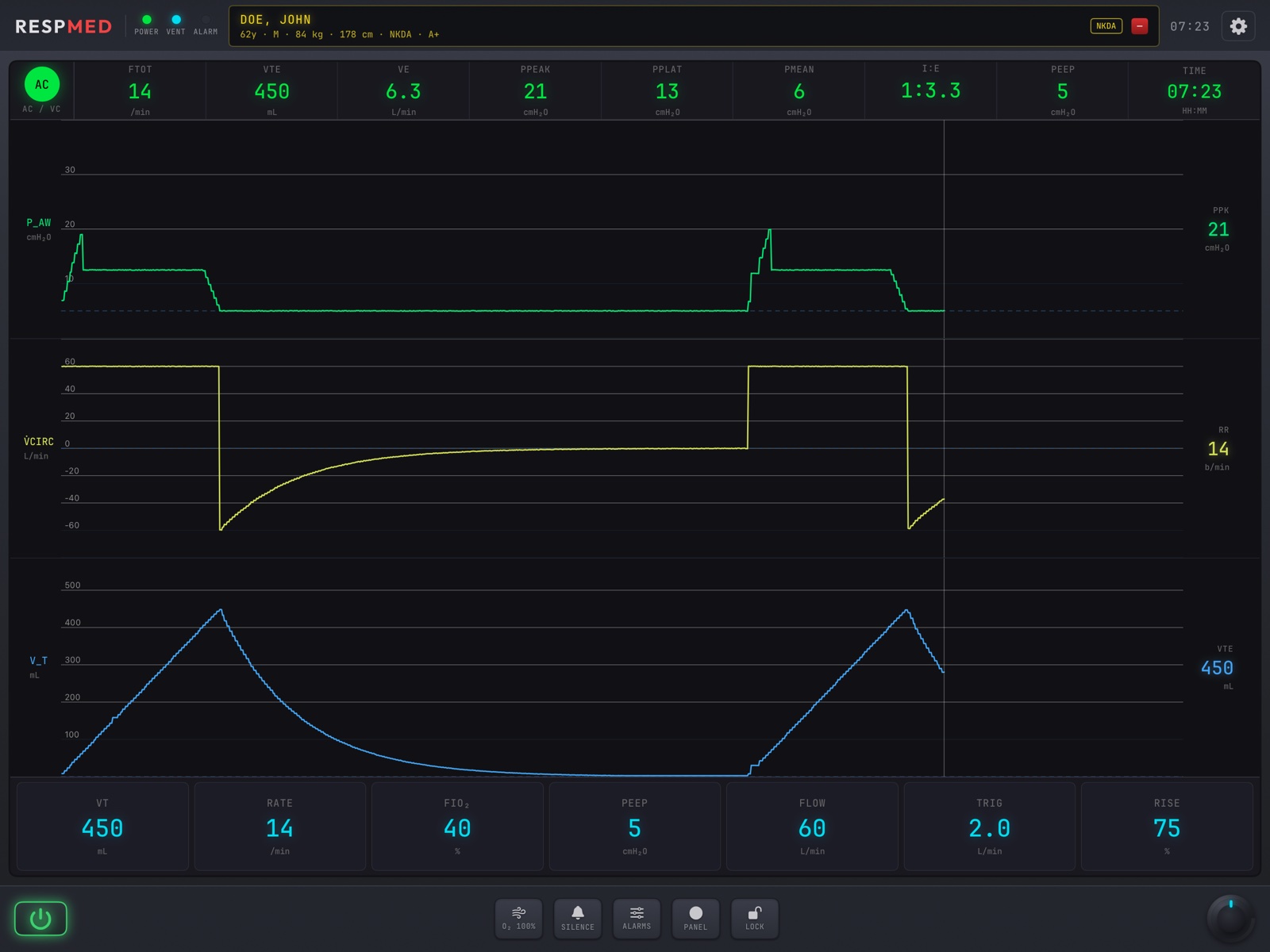
Mode circle — AC · SIMV · PRVC · PSV · CPAP · BiPAP · APRV. Tap it to change mode.
Numeric row — fTOT, VTE, VE, Ppeak, Pplat, Pmean, I:E, PEEP: what the lungs are actually doing.
Waveforms — pressure, flow and volume, breathing in real time from the compliance and resistance of the loaded lung.
Parameter tiles — only the settings the current mode uses. Tap a tile to edit it.
Bezel — ⚙ settings, plus LABS and XRAY pills when a case carries them, and the patient strip with the predicted body weight.
RESPmedAnatomy
§ 06.02 — First launch
Height and sex first — the vent needs a predicted weight
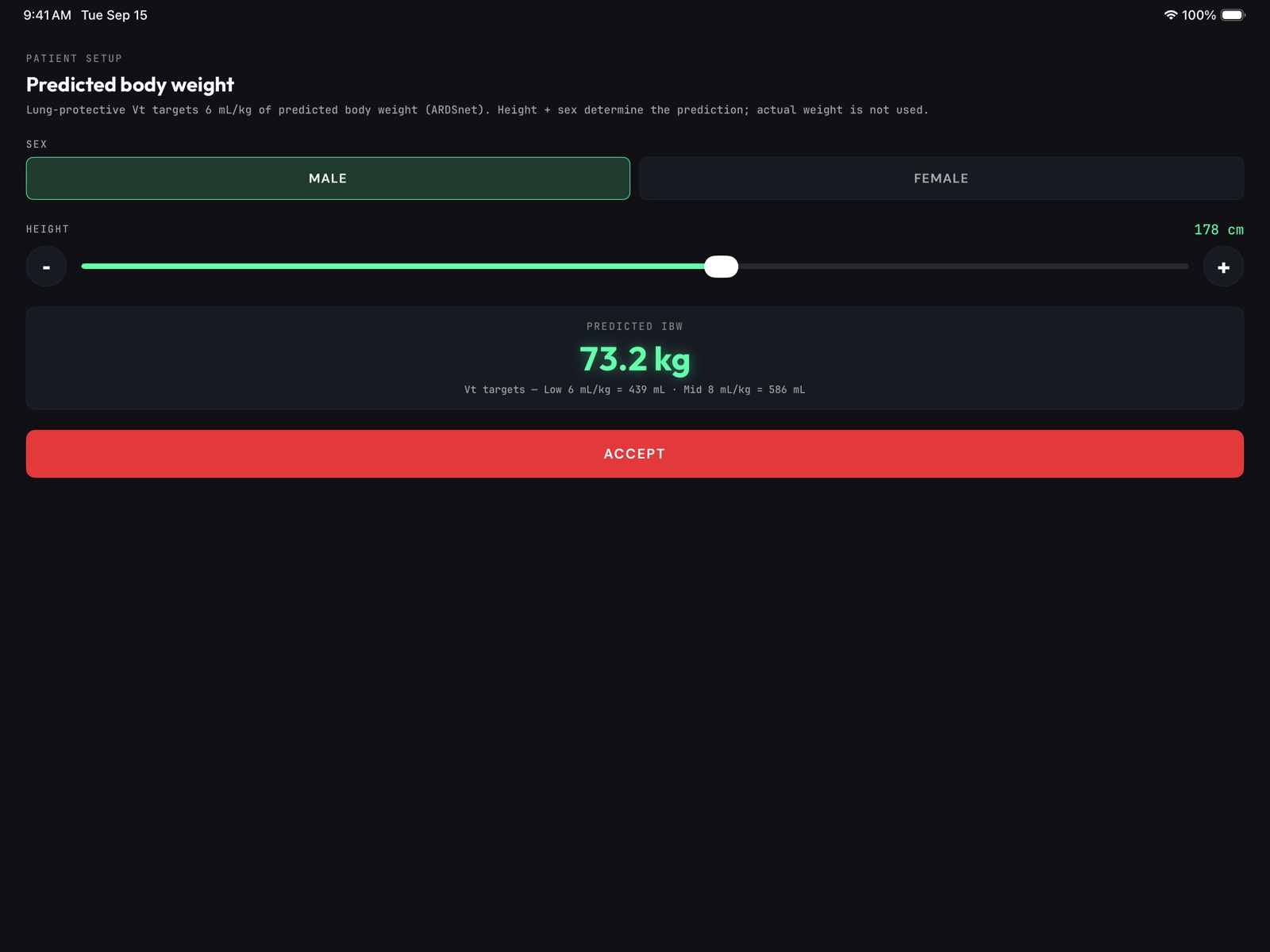
The first time RESPmed opens it asks for the patient's sex and height (120–220 cm; slider or ∓ steppers).
It shows the predicted body weight and the tidal-volume targets it implies — Low 6 mL/kg … · Mid 8 mL/kg ….
ACCEPT. The values sit in the patient strip; change them later under ⚙ → PATIENT SETUP → Re-enter height & sex.
Why actual weight is not asked
Lung-protective ventilation targets 6 mL/kg of predicted body weight; lungs do not grow with the waistline. Set an obese patient's height and let the class watch the target stay put.
RESPmedFirst launch
§ 06.03 — Buttons reference
Chassis keys & bezel
Key
Where
Press → what happens
Ignored or locked when
What you hear
⏻
lower left
Powers the ventilator on or off.
—
Chime
O₂ 100%
chassis
Two minutes of FiO₂ 100%, then it reverts by itself. The Monitor is told.
Power off
—
SILENCE
chassis
Silences vent alarms for two minutes; a banner shows the countdown.
Power off
Alarm tone stops
ALARMS
chassis
Opens the five alarm limits: High pressure (default 40), Low pressure (5), Auto-PEEP (3 cmH₂O), High rate (30), Low minute volume (3.0 L/min).
Power off
—
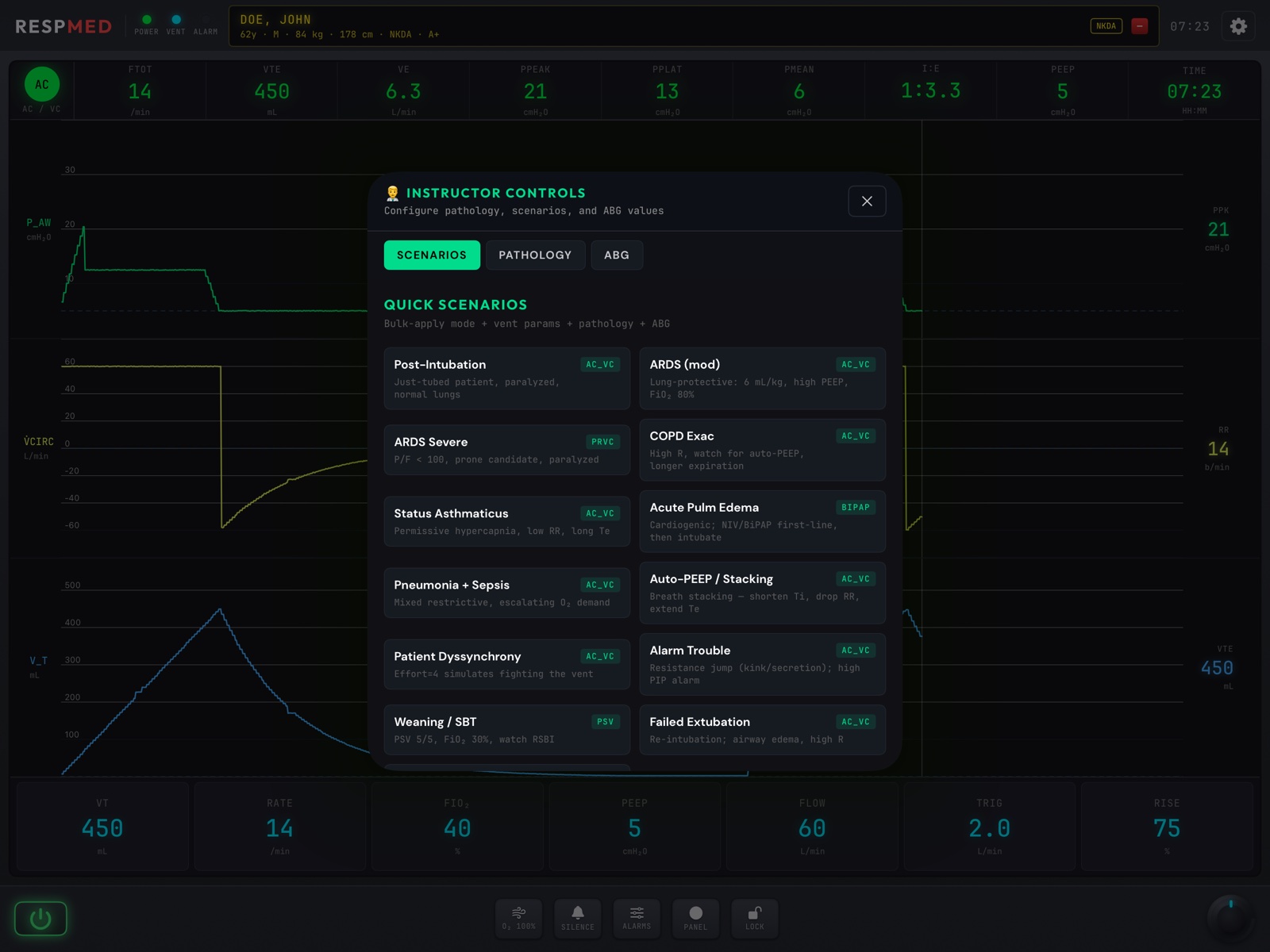
PANEL
chassis
The instructor panel — Scenarios · Pathology · ABG tabs, and OPEN ABG DRAWER (§ 06.06).
Power off
—
LOCK
chassis
Freezes the parameter tiles (they dim) so a learner cannot change settings until it is unlocked.
Ranges: VT 100–2000 mL · Rate 4–60 · PEEP 0–25 · Flow 20–120 L/min · PS 0–30 · PC 5–45 · Ti 0.3–3.0 s · IPAP 5–40 · EPAP 3–20 · P-high 15–40 · P-low 0–15 · T-high 2–8 s · T-low 0.3–1.5 s · Trig 0.5–5 L/min · Rise 25–100 · Cyc% 5–60
RESPmedModes
§ 06.05 — Changing a setting
Tap a tile, turn a number
Tap the mode circle to pick a mode first — the tiles rearrange to that mode's settings.
Tap a tile, for example VT. The editor opens with −+ steppers and chips for common values.
Watch the waveforms and the numeric row change with each step: Ppeak and Pplat follow the volume; VE follows rate × volume.
Leave the editor. If a limit is crossed the alarm banner appears and the tone loops until SILENCE or a fix.
LOCK for the learner
Set the vent up, press LOCK, and hand it over. The team can read everything and change nothing until you unlock — the way a charge nurse would have it.
RESPmedChanging a setting
§ 06.06 — PANEL
Pathologies, scenarios and the ABG
Tab
What it does
Pathology
Seventeen lungs by group — Normal; ARDS mild / moderate / severe; Obstructive COPD, asthma, bronchospasm, mucus plug; Restrictive fibrosis, pulmonary edema, pneumonia, atelectasis, pleural effusion; Mechanical pneumothorax, obesity, stiff chest wall; Vascular massive PE. Each sets a compliance and a resistance, and the waveforms change underneath every mode.
Scenarios
Thirteen QUICK SCENARIOS that set a pathology, settings and a gas together: Post-Intubation · ARDS (mod) · ARDS Severe · COPD Exac · Status Asthmaticus · Acute Pulm Edema · Pneumonia + Sepsis · Auto-PEEP / Stacking · Patient Dyssynchrony · Alarm Trouble · Weaning / SBT · Failed Extubation · DKA / Kussmaul.
ABG
Steppers for the gas the next draw will show, and OPEN ABG DRAWER.
RESPmedPANEL
§ 06.07 — The gas and the alarms
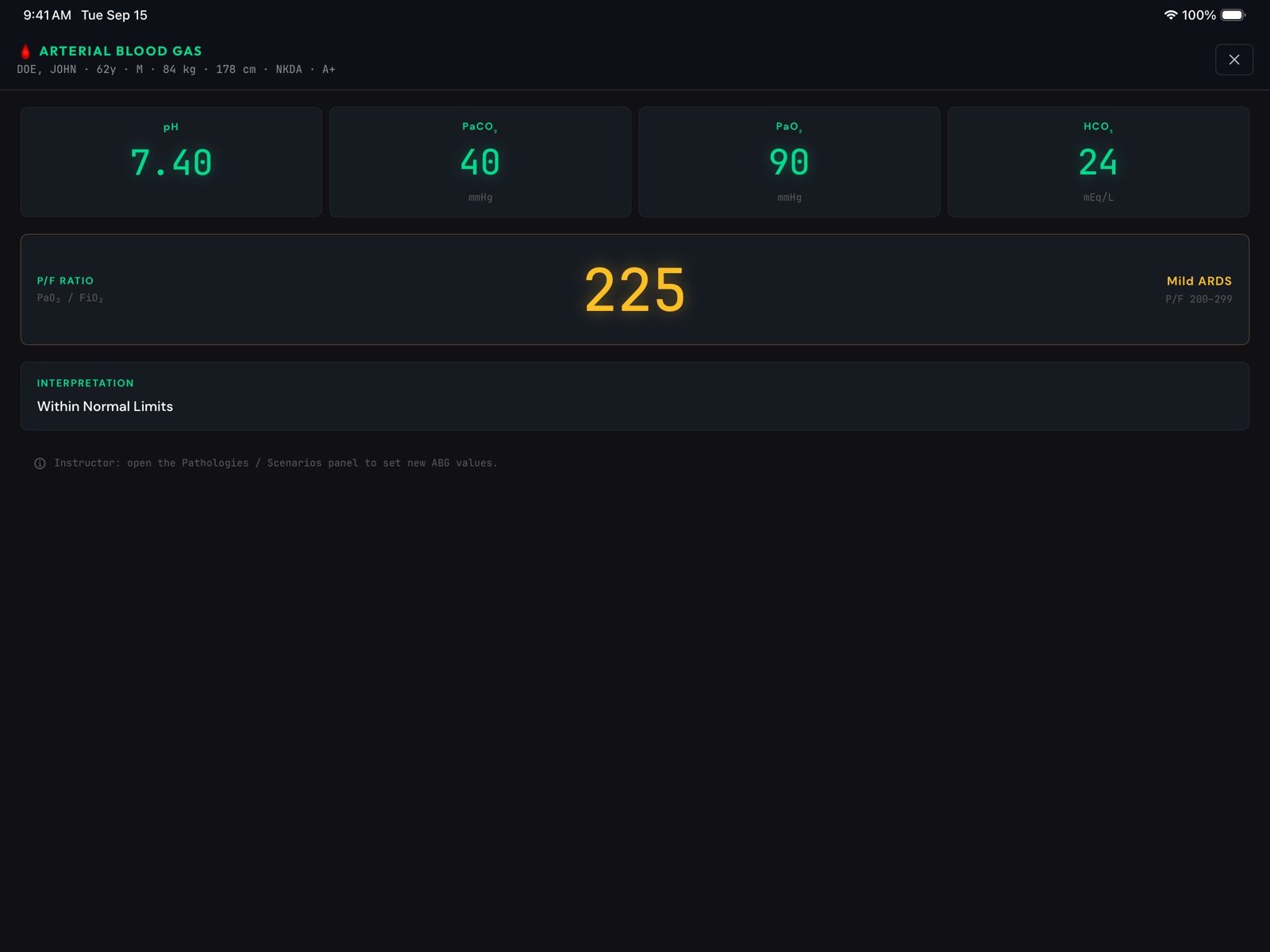
Draw a gas, read the numbers
ARTERIAL BLOOD GAS — pH · PaCO₂ · PaO₂ · HCO₃ · P/F RATIO · INTERPRETATION
Alarm
Default limit
HIGH PRESSURE
Ppeak above 40 cmH₂O
LOW PRESSURE
Ppeak below 5 cmH₂O
AUTO-PEEP
above 3 cmH₂O — incomplete exhalation
HIGH RR
above 30 /min
LOW MV
below 3.0 L/min
Change any limit under ALARMS. The banner names the alarm and its value; SILENCE buys two minutes.
The lung-protective lab
Load ARDS Severe. Ask for a tidal volume of 6 mL/kg of the predicted weight from the patient strip. Pplat should fall under 30; if the team chases the PaO₂ with volume instead of PEEP and FiO₂, the pressure alarm makes the argument for you. Draw the gas before and after.
RESPmedGas & alarms
§ 06.08 — Back on the Monitor
One patient, four screens
VENT BADGE
When a RESPmed is paired, the Monitor carries a badge over the waveforms — mode · rate · volume · PEEP · FiO₂ — so the code team reads the vent without turning round.
O₂ 100% TRAVELS
The two-minute oxygen boost is announced to the room. Whether the saturation follows is still yours to decide on the Remote.
SAME CASE, SAME LABS
The LABS and XRAY pills on the vent show the case the Remote loaded — one chart, four instruments.
Thirty-minute vent lab
Post-Intubation scenario, AC / VC, LOCK on. Learner one reads the numeric row aloud; learner two calls the first change. Unlock, let them make it, and pull the gas. Then switch the pathology to Pneumothorax without a word and watch who notices Ppeak first.
RESPmedOn the Monitor
§ 07
ACLSMED™ CPR
Six learners, six phones, one board. Free, no account — and it measures what they actually did.
§ 07.00 — Scope of use
Say this to every class
Manikin only · training only
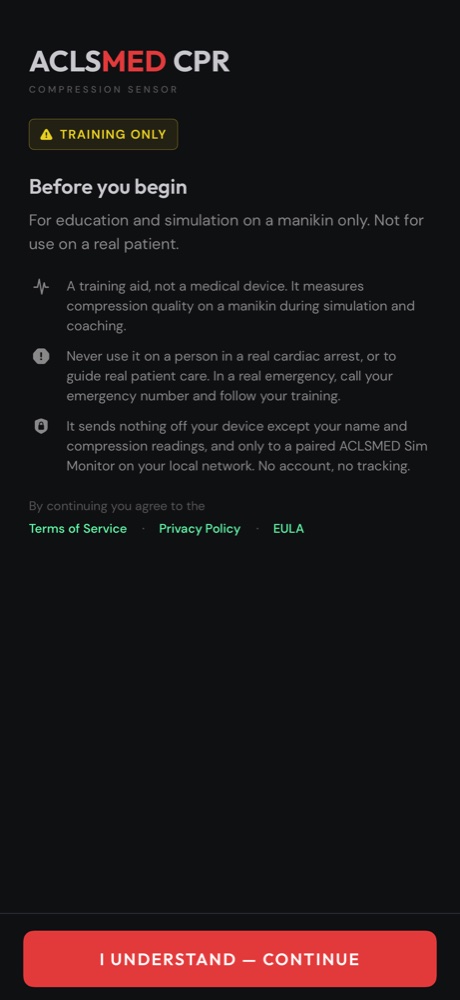
ACLSMED™ CPR is a training aid for use on a manikin only. It is not a medical device, it is not for use on or during the care of a real patient, and its readings are for education and feedback in a simulation setting.
Say it out loud before the first test — it is part of using the product correctly. The app enforces it too: every learner passes a training-only acknowledgement before they can start.
ACLSMED™ CPRScope of use
§ 07.01 — How it works
Phone measures. Board teaches.
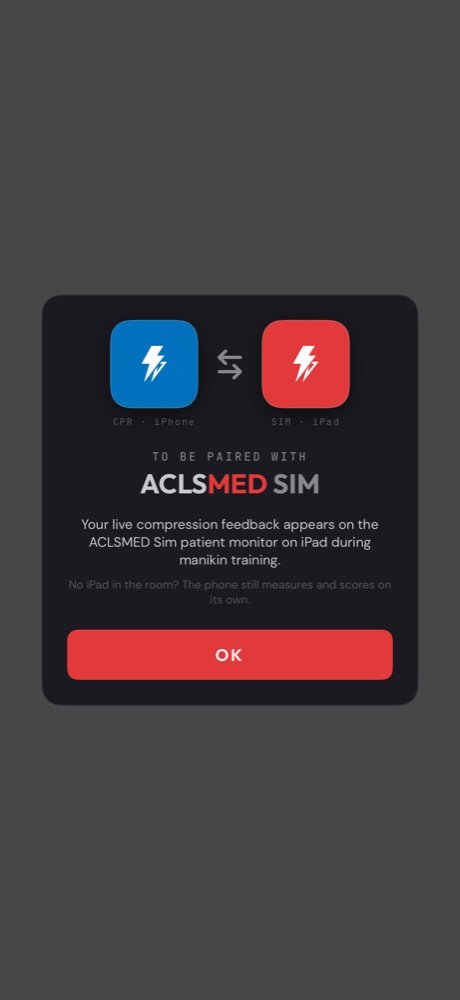
The learner's phone runs the free app. Motion sensors detect each compression; rate, depth and hands-on time are computed on the phone. Nothing is uploaded; there is no account.
Your iPad runs SIM in the CPR SIMULATOR role — up to six phones, one per slot, live side by side.
Send them home with it
The phone works without a tablet — it just has no board to stream to. So the homework is real: "practice at home, bring me your rate and depth next week."
ACLSMED™ CPRGate & pairing
§ 07.02 — On the phone
Eyes up, not on the screen
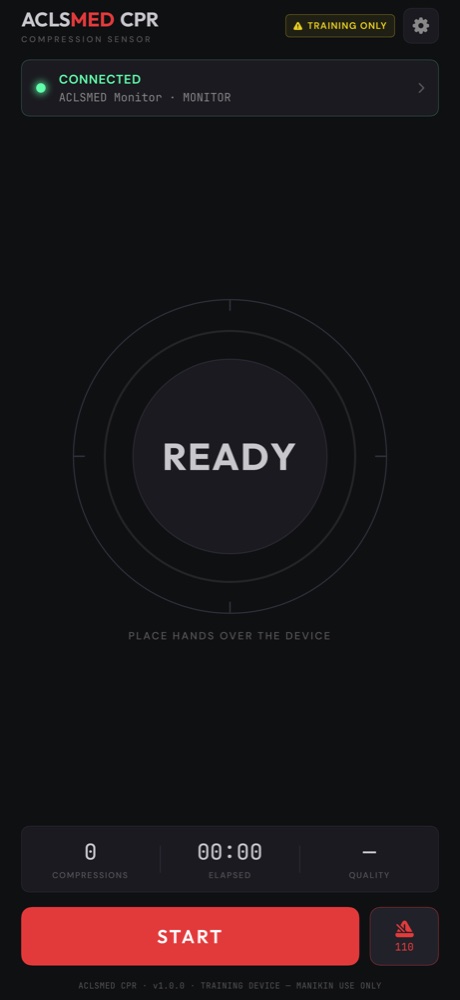
READY — connected, hands over the device
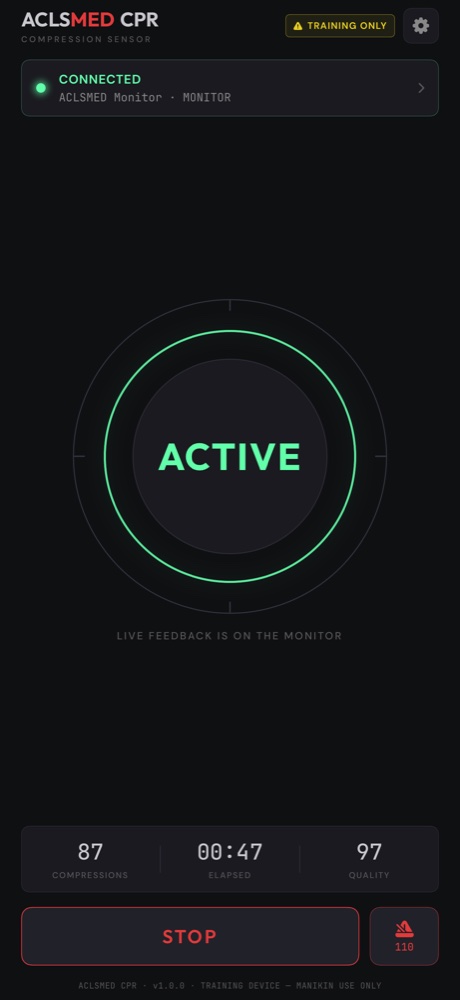
ACTIVE — compressions, time, running score
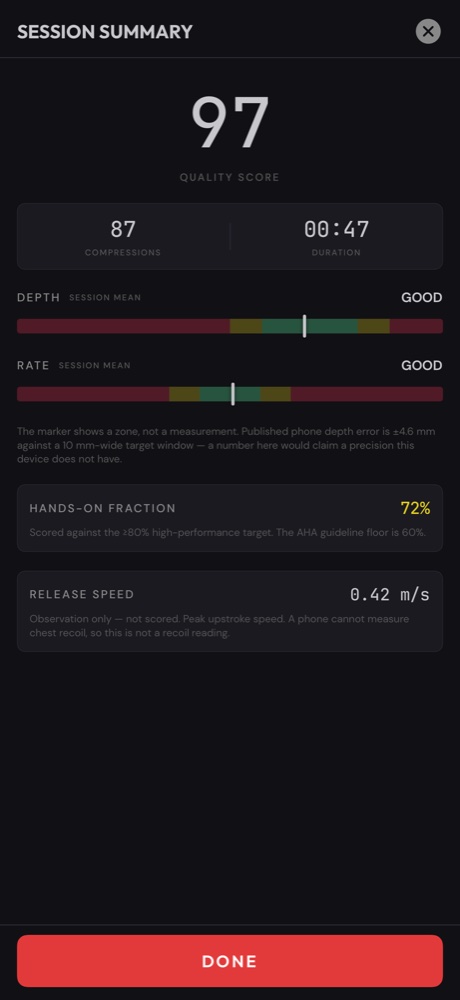
The phone deliberately shows a ring and three numbers, and tells the learner "live feedback is on the monitor" — so their eyes stay on the manikin and the room. A 110/min metronome is built in for pacing drills.
ACLSMED™ CPRPhone · live
§ 07.03 — On the phone
Scores and coaching, not fake precision
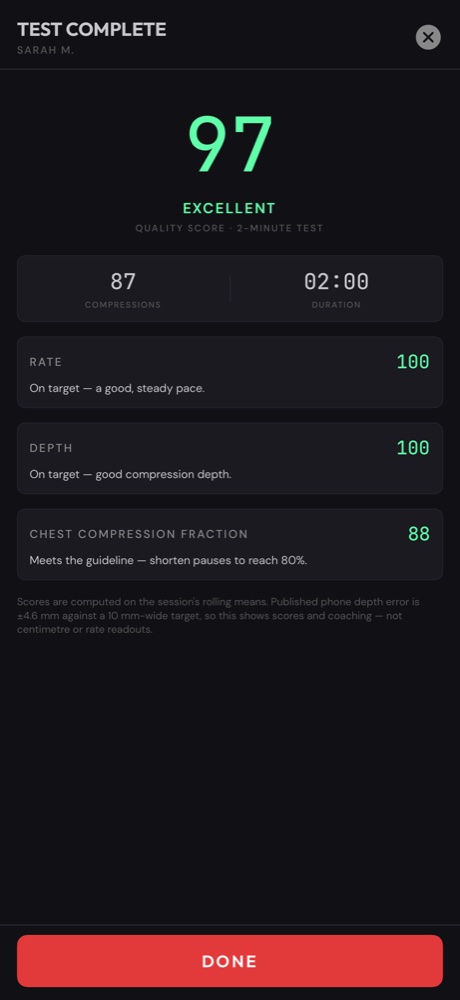
TEST COMPLETE — score, band, per-category coaching
Each category carries a sentence the learner can act on — "on target, a good steady pace"; "meets the guideline — shorten pauses to reach 80%." The app shows zones and scores rather than centimetre readouts, because a phone's honest depth error is a few millimetres against a 10 mm-wide target.
ACLSMED™ CPRPhone · results
§ 07.04 — The board
Six learners at once
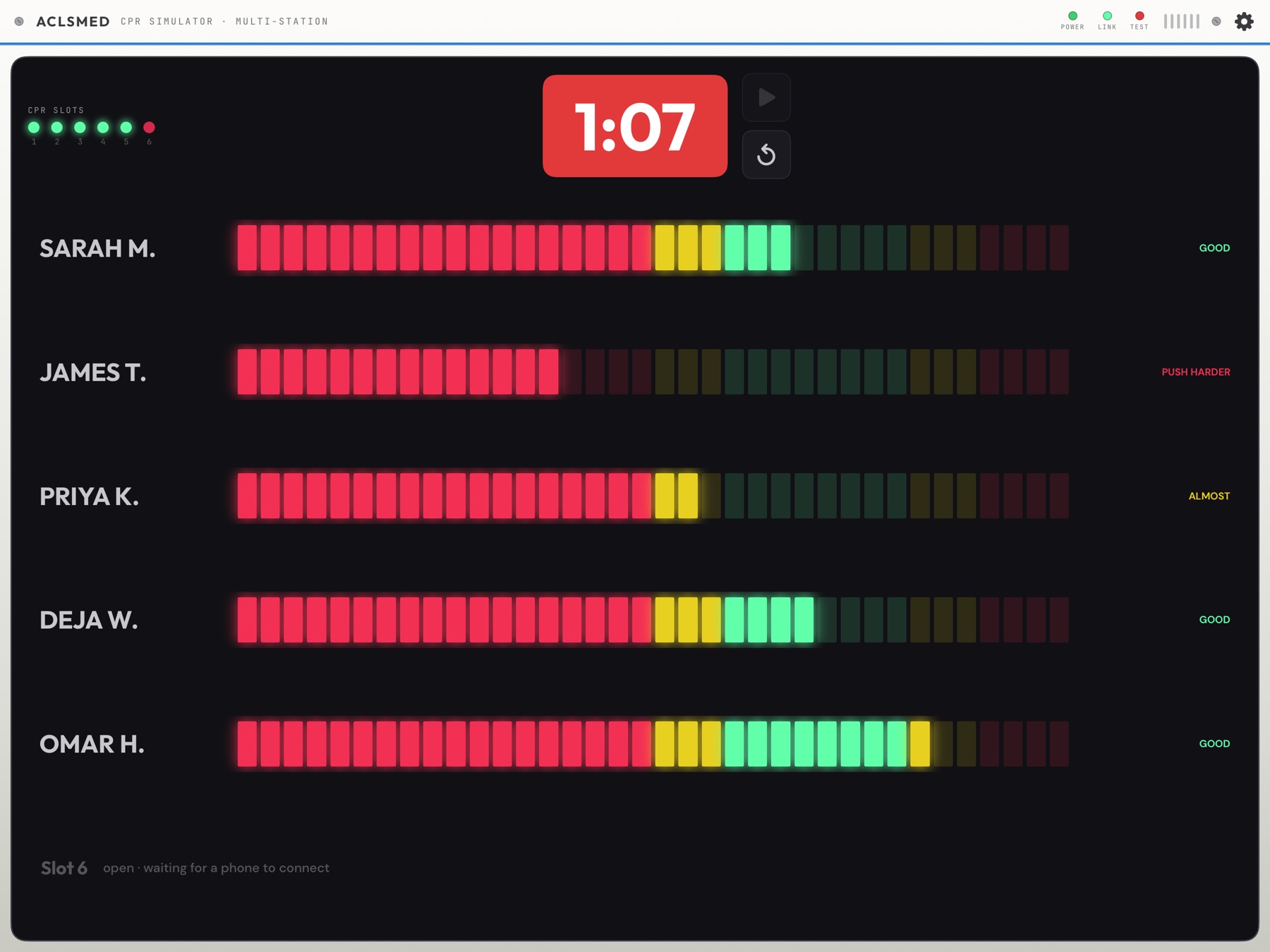
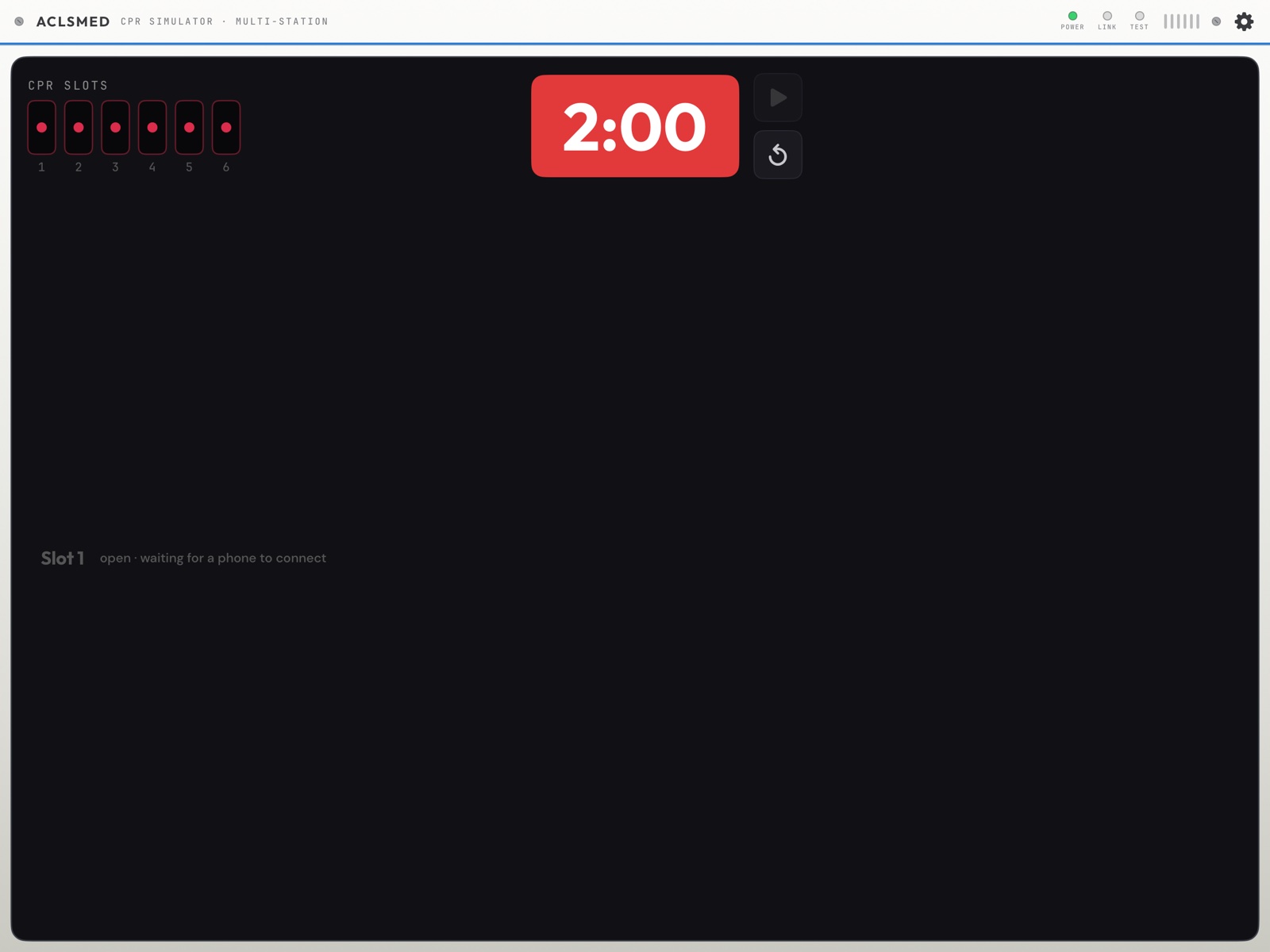
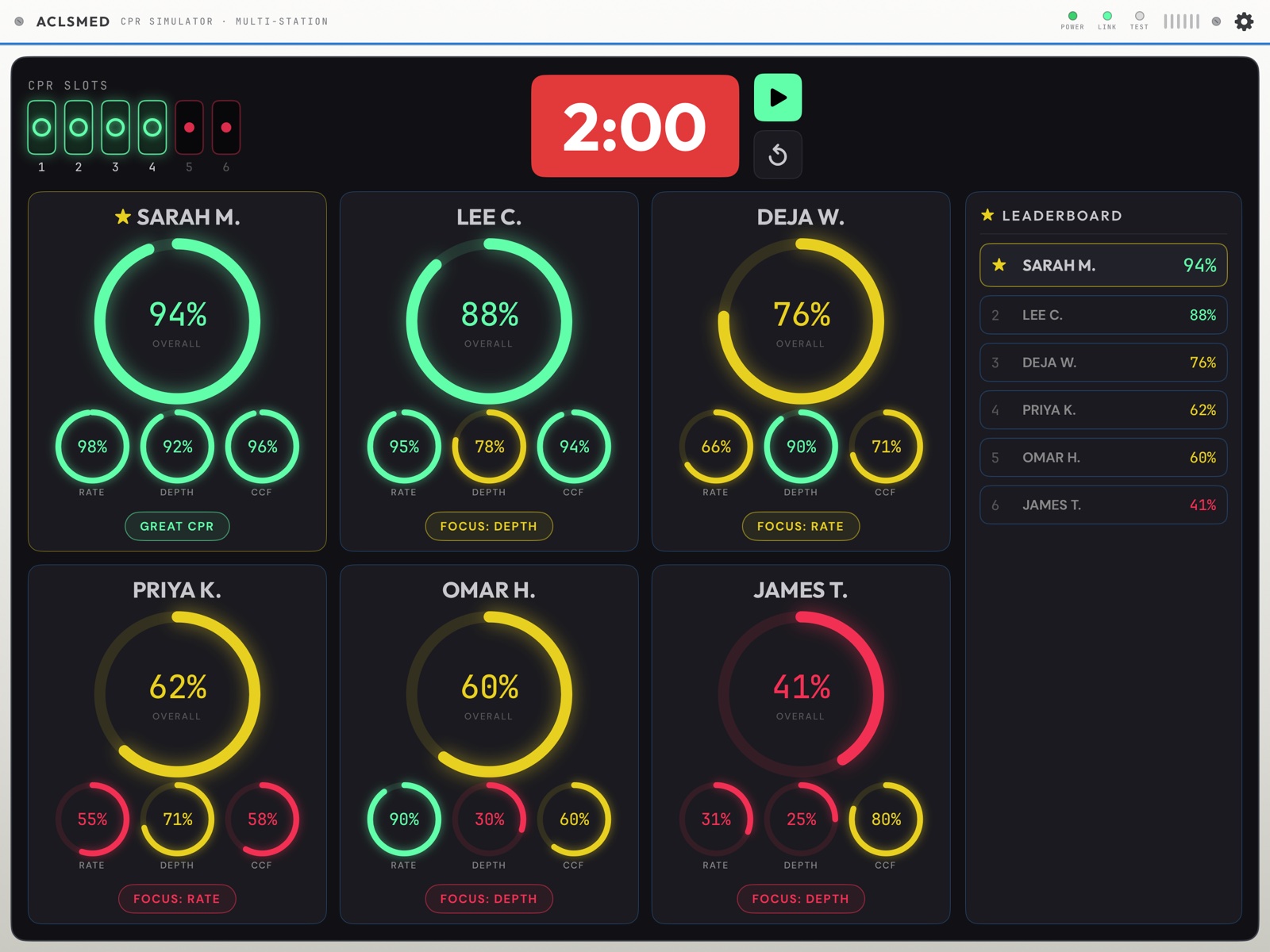
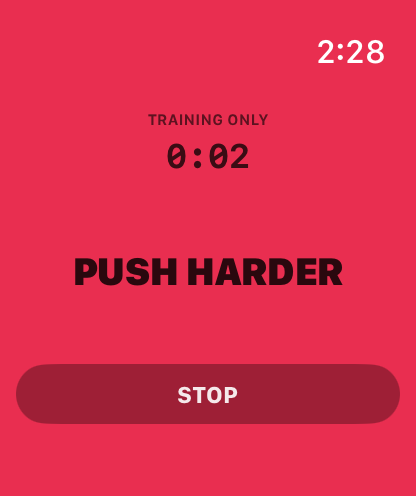
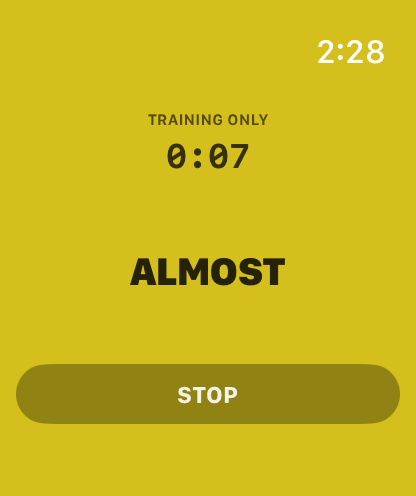
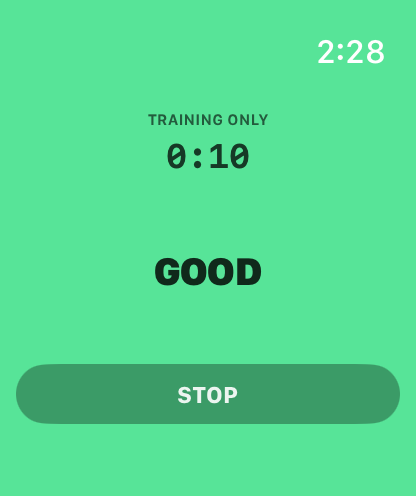
Slots 1–6 fill green as phones connect. Each row builds red → yellow → green by depth zone, with a live verdict — GOOD, ALMOST, PUSH HARDER. The countdown is the remaining test time; two minutes is one full AHA compression cycle.
ACLSMED™ CPRLive station board
§ 07.05 — Coaching
Read the bar, say the words
Bar reads
Verdict
Say this
Reaches the green band
Good
"That's the depth. Hold it — don't drift."
Stalls in the yellow band
Almost
"Nearly there. A centimetre more, same rate."
Stays in the red band
Push harder
"Straight arms, shoulders over your hands, use your body weight."
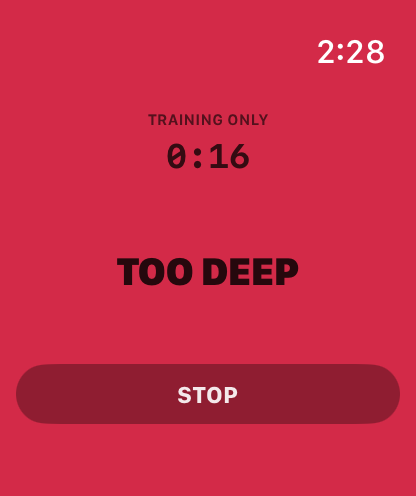
Overshoots past green
Too deep
"Ease off slightly — over 6 cm has its own harms."
The move that changes behaviour
Run the first round with the board hidden. Learners who see live feedback from the first compression never find out what their unassisted CPR looks like — and that gap is the entire lesson.
ACLSMED™ CPRCoaching words
§ 07.06 — Results
One ring each, one instruction
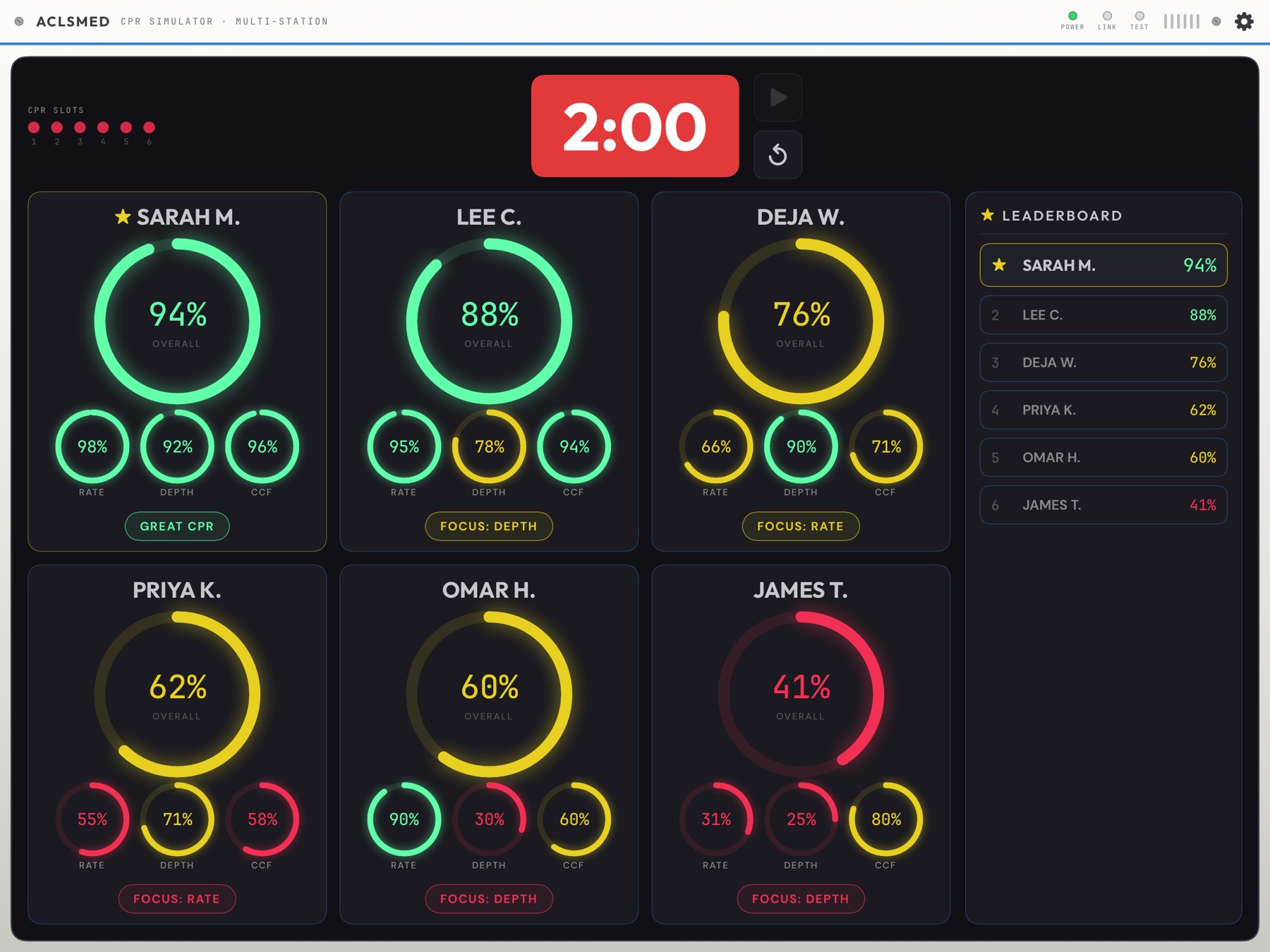
Per learner: OVERALL plus RATE / DEPTH / CCF, and one prescriptive badge — GREAT CPR, FOCUS: DEPTH, FOCUS: RATE. Note the teaching point in the data: a learner can hold a 90% rate and still finish at 60% overall because depth was 30%. Read the sub-rings aloud, then the badge — a learner told "60%" hears a grade; a learner told "push a centimetre deeper" hears an instruction.
Guideline floor 60%; full marks at the high-performance 80%.
Targets follow the AHA 2025 Guidelines, Part 7: Adult Basic Life Support. Scores use a rolling average, not a single compression — so measurement scatter doesn't dock textbook technique. The three rings you see are the score; there is no hidden fourth dimension.
ACLSMED™ CPRScoring
§ 07.08 — Honesty
Limits you must teach
Limitation
Tell learners
Recoil isn't measured
One phone sensor cannot detect leaning. Full recoil still matters enormously — you coach it by eye. The app is silent on it, not forgiving of it.
Depth is an estimate
A sensor estimate on a manikin, not a calibrated measurement. Use it to drive behaviour, not to certify a millimetre.
Placement changes it
Same technique, different phone position, different number. Standardise before comparing learners.
Surface matters
A manikin on a soft bed reads differently from one on the floor. Keep it constant within a session.
Manikin only
Never on a person. Not in a real arrest, not "just to see."
Fair leaderboards
A leaderboard is only fair when every station is identical. Strapped to the back of one hand and gripped in another's fist ranks phone position, not CPR.
ACLSMED™ CPRLimitations
§ 07.09 — CPR SIMULATOR role
Six stations on one iPad
Role picker → CPR SIMULATOR (Pro and Clinical Suite; one per account). The screen shows a CPR SLOTS rack, 1 to 6, each "open · waiting for a phone to connect".
Learners open ACLSMED™ CPR on the same Wi-Fi and tap CONNECT (§ 07.03). No account, no code: each phone takes the next free slot, first come first served, labelled with the Student name typed on that phone.
A seventh phone is ignored until a slot frees. A phone and its watch are one learner and one slot (§ 07.14).
⚙ → DEVICE SHELL picks the board's housing; DEVICE INFO shows the version.
Where the phones go
On the manikin's chest under the learner's hands (§ 07.02) — the phone is a sensor puck, the iPad is the feedback surface. Its screen is not meant to be watched.
ACLSMED™ CPRCPR SIMULATOR role
§ 07.10 — The two-minute test
Start, run, end, debrief
Moment
What happens
START
The iPad's play key (it needs at least one phone connected), or any connected phone's START — first press wins and the board sends every phone the same two-minute clock (§ 07.19).
RUNNING
The TEST lamp lights, the clock counts down from 2:00, and each slot's quality bar rides its colour band live. Bars, not numbers — on purpose (§ 07.08).
END EARLY
Only the phone that pressed START can end its own test early; an END from a different phone is refused — six learners share one surface, and one pocket tap must not stop the other five. A test you started from the iPad runs its full two minutes.
0:00
The chime; the bars run a moment longer while the last frames land; then the DEBRIEF: one ring card per learner — OVERALL with RATE · DEPTH · CCF minis and a focus chip — and the ★ LEADERBOARD. Each phone shows TEST COMPLETE with the same score (§ 07.06).
AGAIN
Start another test; slots and names persist while the phones stay connected.
ACLSMED™ CPRThe test
§ 07.11 — Android phones and Wear OS
The same trainer on Android
SAME APP, SAME SCORE
ACLSMED™ CPR for Android measures with the same method and the same rate · depth · fraction weights. No account, nothing uploaded.
ANDROID PHONE ↔ ANDROID TABLET
An Android phone streams to an Android tablet running SIM; an iPhone streams to an iPad. Rooms never mix platforms — the two cannot see each other.
WEAR OS
Mirrors the Apple Watch design: the watch measures, the phone relays, the pair is one learner and one slot. The wrist pre-flight and lamp states in § 07.17 apply.
Say it on every platform
Manikin only. Training only. Never on a person. The phone and watch apps carry the same acknowledgement on every platform, and so should your first sentence of the class.
ACLSMED™ CPRAndroid & Wear OS
§ 07 · Apple Watch
ACLSMED™ CPR on Apple Watch
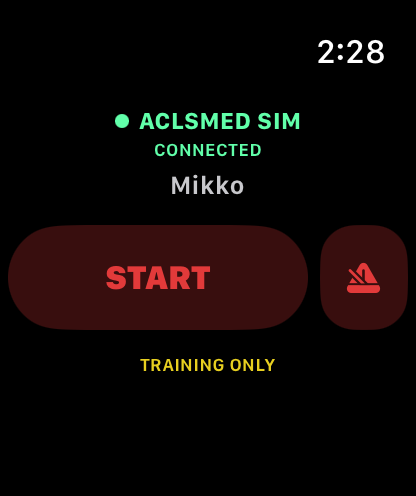
Wear the sensor instead of placing it. Same free app, same score, same slot on your board — and the rhythm cue arrives through the wrist that is doing the compressing.
§ 07.12 — How it fits together
Three devices, one chain
The watch cannot reach your iPad on its own — that link lives on the phone. So a learner on a watch still brings their iPhone to the manikin, awake and in the app. Lose the left link and the watch keeps measuring for the learner but your board loses them; lose the right link and only the learner sees anything.
ACLSMED™ CPR · Apple WatchThe chain
§ 07.13 — Install
Getting it onto the wrist
Install ACLSMED™ CPR on the iPhone. Free, no account. There is nothing separate to find on the watch — the watch app ships inside the phone app.
Let it cross over. It usually installs on the paired watch by itself. If it hasn't: on the iPhone open Watch → Available Apps → ACLSMED™ CPR → INSTALL.
Open it once on the watch and accept the training-only acknowledgement. The watch has its own gate — accepting on the phone does not accept it here.
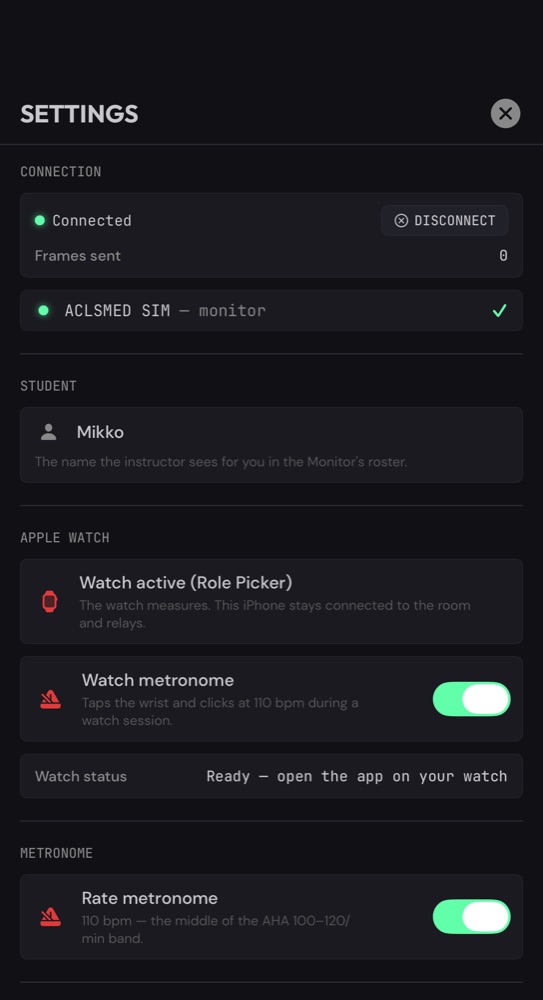
Type the learner's name on the phone — Settings (gear) → STUDENT. That is the label you will see in your roster; the watch only displays it.
Choose the sensor when the picker appears, then start teaching.
What it needs
Requirements
Apple Watch on watchOS 10 or later, paired to an iPhone on iOS 17 or later. Your iPad needs ACLSMED™ SIM 2.1.0 or later for watch students.
What it costs
Nothing
No second purchase, no separate download, no account, and no seat on your plan. The watch is part of the free companion app.
ACLSMED™ CPR · Apple WatchInstall
§ 07.14 — Sensor role
One phone, one stream
The moment the app sees a paired watch with the companion installed, it asks once per launch which device is measuring. No watch, no question — the picker never appears where the choice cannot be made.
iPHONE FOR CPR — phone on the sternum or the back of the hand, as before.
APPLE WATCH FOR CPR — watch on the compressing wrist; the phone relays.
Why it is a choice and not a toggle
One iPhone contributes exactly one stream — its watch or itself, never both. That is what stops a learner appearing twice on a six-slot board. Switching mid-class keeps the same slot and the same name.
Change it any time on the phone: the SENSOR ROLE button top-left, or Settings (gear) → APPLE WATCH.
ACLSMED™ CPR · Apple WatchSensor role
§ 07.15 — On the phone
The phone stops measuring and starts relaying
On screen
What it tells you
APPLE WATCH ACTIVE
Red watch glyph = the wrist hasn't opened the app yet. Green = it is streaming.
Watch Metronome
110 bpm wrist taps and clicks, switched from here or from the watch itself.
SIM MONITOR LINK
Green = this phone is in your room. The FRAMES counter climbing is proof the chain is carrying data, not just connected.
SENSOR ROLE
Back to the picker — one tap to hand measurement back to the phone.
There is no START on this screen — and that is deliberate
In watch mode the wrist owns the run. The phone is a relay and a settings console; it never measures at the same time.
ACLSMED™ CPR · Apple WatchPhone as relay
§ 07.16 — Settings
Set once, per learner
Section
What to do with it
CONNECTION
Your iPad should be listed as ACLSMED™ SIM — monitor with a green tick. No row = this phone is not in your room, so neither is the watch.
STUDENT
The name you will read on the board. Fill this in before the first test — an unnamed learner shows as "Slot 3".
APPLE WATCH
Which device is measuring, the wrist metronome, and Watch status — Paired → Ready, open the app on your watch → Streaming.
METRONOME
The phone's own 110 bpm click. Independent of the wrist's.
"Watch status" is the fastest diagnosis in the room
Read it before you touch anything else. Paired means the app is not open on the wrist. Ready means it is open but not measuring. Streaming means the problem is somewhere else.
ACLSMED™ CPR · Apple WatchSettings
§ 07.17 — On the wrist
The pre-flight, in four lines
● ACLSMED™ SIM CONNECTED
Green means the whole chain is up — phone reachable and your iPad receiving. Grey means the watch will still measure for the learner, but you will not see it.
The name
Pushed from the phone. Blank = nobody typed one in Settings → STUDENT.
START
Begins measuring — and asks your room to run its two-minute test (§ 07.19).
♩
Wrist taps and clicks at 110/min. Red = on.
TRAINING ONLY, on every screen
The watch carries the same manikin-only acknowledgement as the phone, and the same mark on every face. A worn device makes that boundary easier to blur — say it out loud anyway.
ACLSMED™ CPR · Apple WatchPre-flight
§ 07.18 — On the wrist
The whole screen is the verdict
Push harderToo shallow
AlmostA centimetre short
GoodIn the band — hold it
Too deepPast 6 cm — ease off
Same four words and the same four colours as the CPR quality bar on your Monitor — the wrist computes the zone and ships it with every frame, so the wrist and the wall cannot disagree. The timer above the word is how long this compressor has been going. Mid-compression the wrist faces the sternum and nobody reads it; the lamp is built for the glance between cycles, and for everyone else in the room.
ACLSMED™ CPR · Apple WatchThe lamp
§ 07.19 — Running a test
Who owns the clock
Who presses
What happens
Who can end it early
You, on the iPad
The two-minute window opens for every connected station at once.
You only — a student device cannot end an instructor-started test.
A learner, on the watch or phone
Their START asks the room to run its test; your iPad opens the window for everyone.
That device — STOP finishes early and jumps to their debrief.
Six learners at once
First press wins. The rest are already in the test they just asked for — nobody restarts anyone's clock.
The one who started it.
The watch debrief
When the window closes
Overall score with a band — EXCELLENT · GOOD · KEEP PRACTISING · NEEDS WORK — then RATE · DEPTH · HANDS-ON out of 100. Scores, never centimetres.
It cannot be lost
Even on a dark screen
The wrist's grade is sent with guaranteed delivery, so a watch that dimmed mid-test still lands its result on your board.
Let them start their own
Student-started tests turn a queue into a station. You watch the board and coach; each learner runs their own two minutes when the manikin is free.
ACLSMED™ CPR · Apple WatchStarting a test
§ 07.20 — On your iPad
You cannot tell which is which
A watch learner takes a normal slot, under their normal name, with the same bar, the same verdict words and the same debrief as a phone learner — mixed classes just work. That is deliberate: nothing on your board sorts people by hardware. Verify the chain end to end before the first test — phone Settings shows Streaming, the watch reads ACLSMED™ SIM · CONNECTED, and their name appears in a slot. All three, or you are teaching blind.
ACLSMED™ CPR · Apple WatchThe board
§ 07.21 — Honesty & fixes
What the wrist changes, and what to do
Symptom
Fix
Watch says NOT CONNECTED
Open ACLSMED™ CPR on the phone and check it is in your room. The watch reports the whole chain, and the room end is the phone's.
Learner vanishes from the board mid-test
Their phone locked or they left the app. Keep it awake, on screen, beside the manikin.
Screen dims while compressing
Expected, not a fault. The wrist is face-down so watchOS dims it; the lamp stays on and readable and the data keeps flowing.
No compressions recorded
The watch must be on the wrist that is doing the compressions, not the free arm.
Board shows a slot but no name
Phone Settings → STUDENT.
Arm movement is not counted
Reaching for a bag-valve mask, ventilating or gesturing does not inflate the count — the app rejects motion that isn't compression-shaped. A slow posture change during compressions is deliberately still counted; that's a rescuer adjusting, not an error.
Fair leaderboards, wrist edition
The wrist and the sternum are different measurement sites. Both are honest estimates; they are not the same estimate. Within one comparison round, keep everyone on the same kind of sensor — and everything else identical: same manikin, same surface, same wrist.
Every limit in § 07.08 still applies — recoil is not measured, depth is an estimate, and it is a manikin trainer, never a patient device.
ACLSMED™ CPR · Apple WatchLimits & fixes
§ 08
Teaching playbooks
Three sessions that work out of the box, and the debrief that makes any of them stick.
§ 08.01 — Playbook
60-minute ACLS refresher
Time
Block
What you run
0–5
Orient
Show the Monitor. Point at SYNC, ANALYZE, SILENCE. They work the machine; you are the patient.
5–15
Rhythm drill
Step the catalog, call each cold. Fast, high-repetition recognition.
15–25
Skill isolation
One skill each: charge/shock · sync cardioversion · pace to capture.
25–45
Two MegaCodes
One shockable, one not — Pulseless VT, then PEA — Hypovolemia. Five-beat structure.
45–60
Debrief
Open CODE SUMMARY, walk the timeline. One keep + one change per learner.
PlaybooksACLS refresher
§ 08.02 — Playbook
30-minute CPR quality lab
Time
Block
What you run
0–5
Scope + setup
State manikin-only scope. Install, fill slots, standardise phone placement.
5–10
Baseline
Two-minute test. No coaching, board hidden. The honest starting point.
10–18
Coached round
Board visible. Coach live off the bars with the verdict words. Rotate compressors.
18–25
Re-test
Two minutes again — same placement, same surface. Compare to baseline.
25–30
Debrief
Sub-rings and focus badges. Name the limits. One target each for next time.
PlaybooksCPR quality lab
§ 08.03 — Playbook
Full mock code & the debrief
Four tablets + phones on the compressors.
Assign real roles — leader, compressor, airway, drugs, recorder (on paper).
Load a reversible-cause case — Hyperkalemia → VF or Tension Pneumo → PEA.
Run straight through. No stopping, no coaching. Let mistakes happen.
Layer task load: pump on IVmed, vent on RESPmed, during the code.
Debrief from three sources: Code Summary, CPR board, recorder's sheet.
Debriefing that lands
Learner first — "walk me through what you saw." They usually name their own error.
Then the data — timeline, shock count, compression scores. Timestamped and unarguable.
One change each — not five, stated as an action.
Close on competence — they remember the last thing you said.
PlaybooksMock code & debrief
§ 08.04 — Playbook
20-minute IVmed titration lab
Time
Block
You do
0:00
Set the scene
Remote: load Sepsis → Septic Shock (#30). Pressure 75/41, HR 118. IVmed on its own tablet, care area Critical Care.
3:00
Program
Learner one programs norepinephrine on Line A at the starting dose (§ 05.05). Weight first. Confirm, START.
6:00
Titrate
They ask for a higher dose; you raise the pressure on the Remote only when the dose is right. Push a SOFT LIMIT on purpose (§ 05.06).
12:00
Line B
Add a fluid bolus on Line B; delivery mode concurrent. Let the VTBI run out and hear the KVO alarm (§ 05.07).
16:00
Debrief
Remote LOG beside the pump: dose changes against pressure changes. Who was leading whom?
What it tests
Weight-based maths under time pressure, respect for the guardrail prompt, and whether anyone watched the patient while the pump was being programmed.
PlaybooksIVmed lab
§ 08.05 — Playbook
30-minute RESPmed vent lab
Time
Block
You do
0:00
Set up
Height and sex for the patient (§ 06.02). PANEL → Scenarios → Post-Intubation. AC / VC. LOCK on.
5:00
Read the vent
Learner one reads the numeric row aloud — fTOT, VTE, VE, Ppeak, Pplat, PEEP. Learner two names the first change they would make.
10:00
Make it
Unlock. They set VT to 6 mL/kg of the predicted weight, then draw a gas (§ 06.07).
17:00
Change the lung
PANEL → Pathology → Pneumothorax, without a word. Watch who notices Ppeak. Then ARDS Severe: PEEP and FiO₂ before volume.
25:00
Debrief
Two gases side by side, the alarm banner history, and the Monitor's vent badge (§ 06.08).
What it tests
Whether the team reads the ventilator before touching it, and whether a rising pressure sends them to the patient or to the settings.
PlaybooksRESPmed lab
§ 09
Reference
Troubleshooting by chapter, the pre-class checklist, one button card per role, the 33-case catalog, and what every icon means.
§ 09.01 — Troubleshooting · SIM
When it goes wrong live — SIM
Symptom
Fix
See
Can't sign in on a new iPad · "ACCOUNT FULL"
All seats held. RELEASE the retired iPad from the picker, or RELEASE ALL DEVICES from Settings → ACCOUNT.
§ 01.11
Paywall shows again on a tablet that was working
Sign in with the room account, then Restore purchases; a web purchase needs one sign-in with internet.
§ 01.07
"RECONNECT WITHIN N DAYS" · yellow dot on the gear
Get the tablet online once; the 14-day clock resets silently.
§ 01.13
Instructor and Monitor won't link
Same Wi-Fi · Bluetooth on · Airplane off · Local Network allowed · same account. Relaunch Monitor first.
§ 02.05
Worked yesterday, fails on hospital Wi-Fi
Guest/enterprise networks block device-to-device. Phone hotspot, or Wi-Fi off and pair directly.
§ 02.05
Monitor sleeps mid-scenario
Auto-Lock → Never, on every tablet, before class.
§ 02.01
Remote changes don't land
CONNECTION strip; Settings → CONNECTIONS → RECONNECT; confirm with one rhythm change.
§ 04.13
"It won't charge" · "12-LEAD is dark" · "The shock didn't fire"
Pads · no perfusing rhythm · SYNC waiting for an R-wave.
§ 03.19
Selected a rhythm, nothing changed
Nothing auto-plays: PLAY, PLAY NOW, or TRIGGER on the next shock.
§ 04.07
Patient voice line plays nowhere
Monitor's Patient sounds switch is off — TURN ON from the VOICE folder.
§ 04.11
Code Summary is empty
Wiped by power-off and Reset Scenario — capture it first.
§ 03.16
IVmed refuses the dose
HARD LIMIT: Clear and re-enter. Weight-based drugs need a weight first.
§ 05.06
RESPmed tiles won't change
LOCK is on, or the ventilator is off.
§ 06.03
ReferenceTroubleshooting · SIM
§ 09.01 — Troubleshooting · CPR
When it goes wrong live — CPR
Symptom
Fix
See
A phone won't take a slot
All six full, the phone is on another network, or it is an Android phone and this is an iPad room.
§ 07.09
The phone reads SEARCHING FOR MONITOR forever
Same Wi-Fi as the iPad; Local Network allowed on the phone; Settings → CONNECT.
§ 07.03
Depth reads implausibly low or high
Re-seat the phone flat against the back of the hand, screen up. Keep the surface identical between learners.
§ 07.08
A learner's END does nothing
Only the phone that started the test can end it; an instructor-started test runs to 0:00.
§ 07.10
Start does nothing on the iPad
No phone is connected yet — the board needs at least one.
§ 07.10
A watch learner never reaches the board
The chain runs watch → their iPhone → your iPad. Check the phone is in your room first.
§ 07.12
A watch learner drops out mid-test
Their phone locked or they switched apps. Keep it awake, in the app, beside the manikin.
§ 07.21
Two bars for one learner
They switched from phone to watch mid-class on a fresh install; the pair is one identity only when the phone relays.
§ 07.14
"Why no depth in centimetres?"
By design: a single phone's depth error is about half the acceptable band. The bar and the post-test averages are honest; a live number would not be.
§ 07.08
ReferenceTroubleshooting · CPR
§ 09.02 — Reference
Keep this beside the tablet
Parameter
Target
Scored
Compression rate
100–120/min
37.5%
Compression depth
5.0–6.0 cm
37.5%
Compression fraction
≥60% · 80%
25%
Full chest recoil
Every one
Coach by eye
Test length
2:00
One cycle
Stations per tablet
6
One phone each
Sensor per learner
Phone or watch
Never both
Monitor baseline
Sinus 60 · 120/80 · 100 · 40
150 J · DEFIB
Pacer capture
≥ 40 mA
Rate 30–180
Pre-class checklist
▢ Tablets >80%, Auto-Lock off, DND on
▢ Every tablet signed into the room account; plan active; seats free
▢ One network; Local Network allowed on every device
▢ Roles assigned; CONNECTION all green
▢ Reset Scenario before the first case; beats planned
▢ Suite: IVmed care area chosen · RESPmed height & sex set
▢ CPR: app installed, names typed, slots filled, placement standardised
▢ Watch learners: phones awake & in the room
▢ Scope stated: manikin only, training only
Support support@aclsmed.com · Downloads aclsmed.com/download · Plans aclsmed.com/#pricing
ReferenceQuick reference
§ 09.03 — Button cards · print and tape to the iPad
Every case ships a patient chart, dispatch scene, history, opening rhythm and vitals, expected monitor interpretation, learning objectives and a lab panel; the seven marked cases add a chest film. Case #26's lab panel is empty in 2.5.0.
ReferenceAppendix A · 2 / 2
§ 09.07 — Icon glossary
What the icons mean
Icon looks like
Means
ECG trace
MONITOR role · 12-LEAD · RHYTHMS tab
Three sliders
INSTRUCTOR role · RESPmed ALARMS
Drop
IVmed role · SpO₂ pulse switch
Lungs
RESPmed role · X-RAY · patient sounds
Heart with a down arrow
CPR SIMULATOR role
Gear
Settings; a yellow dot = reconnect soon
Metronome
110/min click
Clock
Code timer
Bell with a slash
SILENCE / SILENCED
Dashed circle
PADS
Vial with a cross
MEDS drawer
Two test tubes
LABS
Gauge
NIBP cuff
Icon looks like
Means
House · 2×2 grid · pills · list
HUB · CODES · MEDS · LOG tabs
Speech bubble
VOICE — patient lines
Television / crossed television
SHOW on the Monitor / CLEAR
Tray with arrow · lightning · play
QUEUE · TRIGGER · PLAY
Crossed lightning
DISARM the trigger
Two arrows swapping
REPLACE the queued rhythm
Speaker
SOUNDS sheet
Power symbol
Monitor / ventilator power
Padlock
Role not in your plan · RESPmed LOCK
Wi-Fi with a mark
Reconnect-within-N-days banner
Door with an arrow
SIGN OUT
Cloud with an X
RELEASE ALL DEVICES
Wind
RESPmed O₂ 100%
ReferenceIcon glossary
Fin
Now go run a code.
ACLSMED™ SIM and ACLSMED™ CPR are education and simulation software for use with simulated patients and training manikins. Neither is a medical device; neither is intended for use on, or during the care of, a real patient; and neither replaces an accredited AHA course or your own clinical judgment. Clinical targets follow the AHA 2025 Guidelines for CPR and ECC.
 ACLSMED
Est. 2013
ACLSMED
Est. 2013
 ACLSMED™ SIM
 ACLSMED™ CPR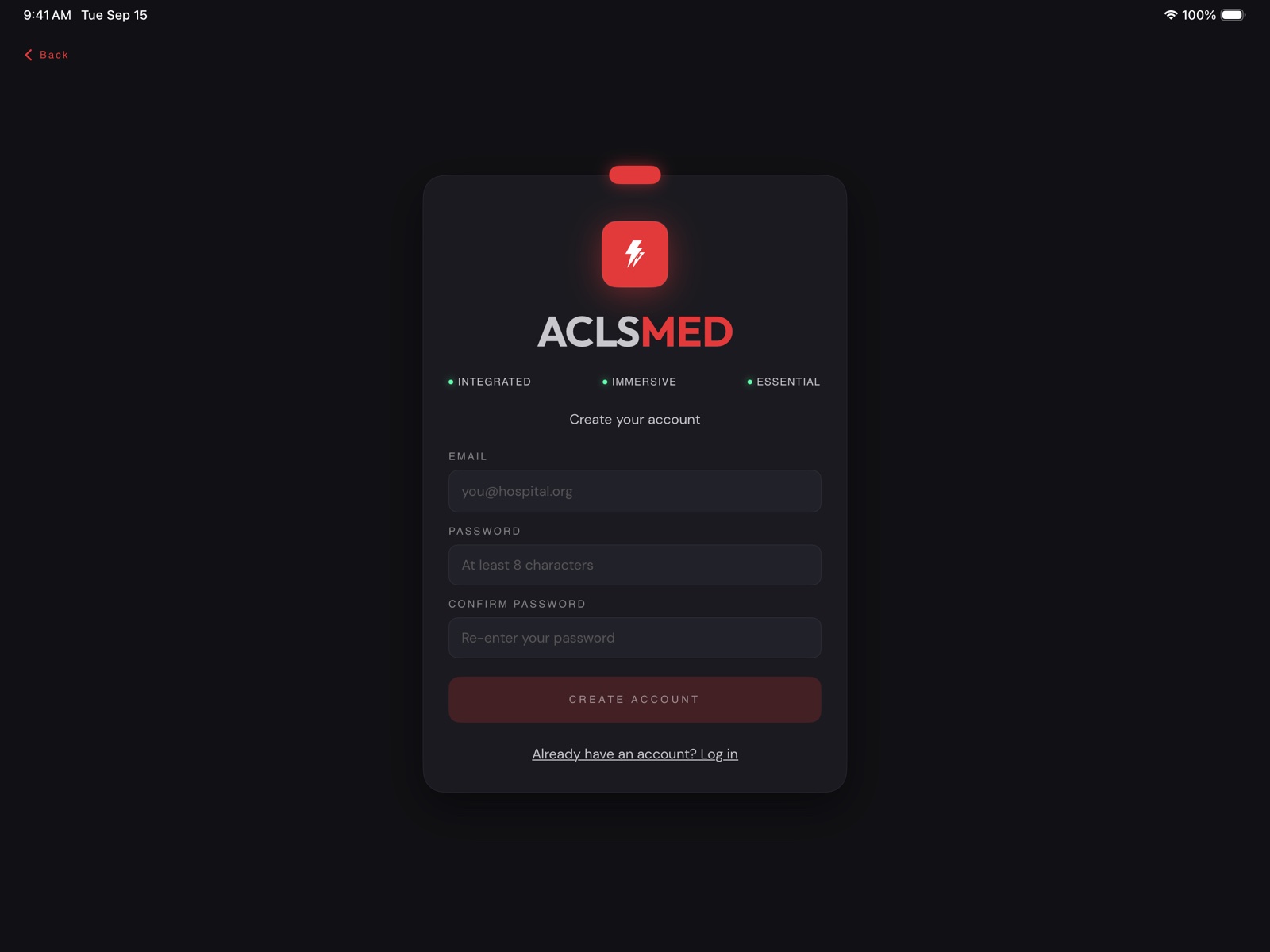
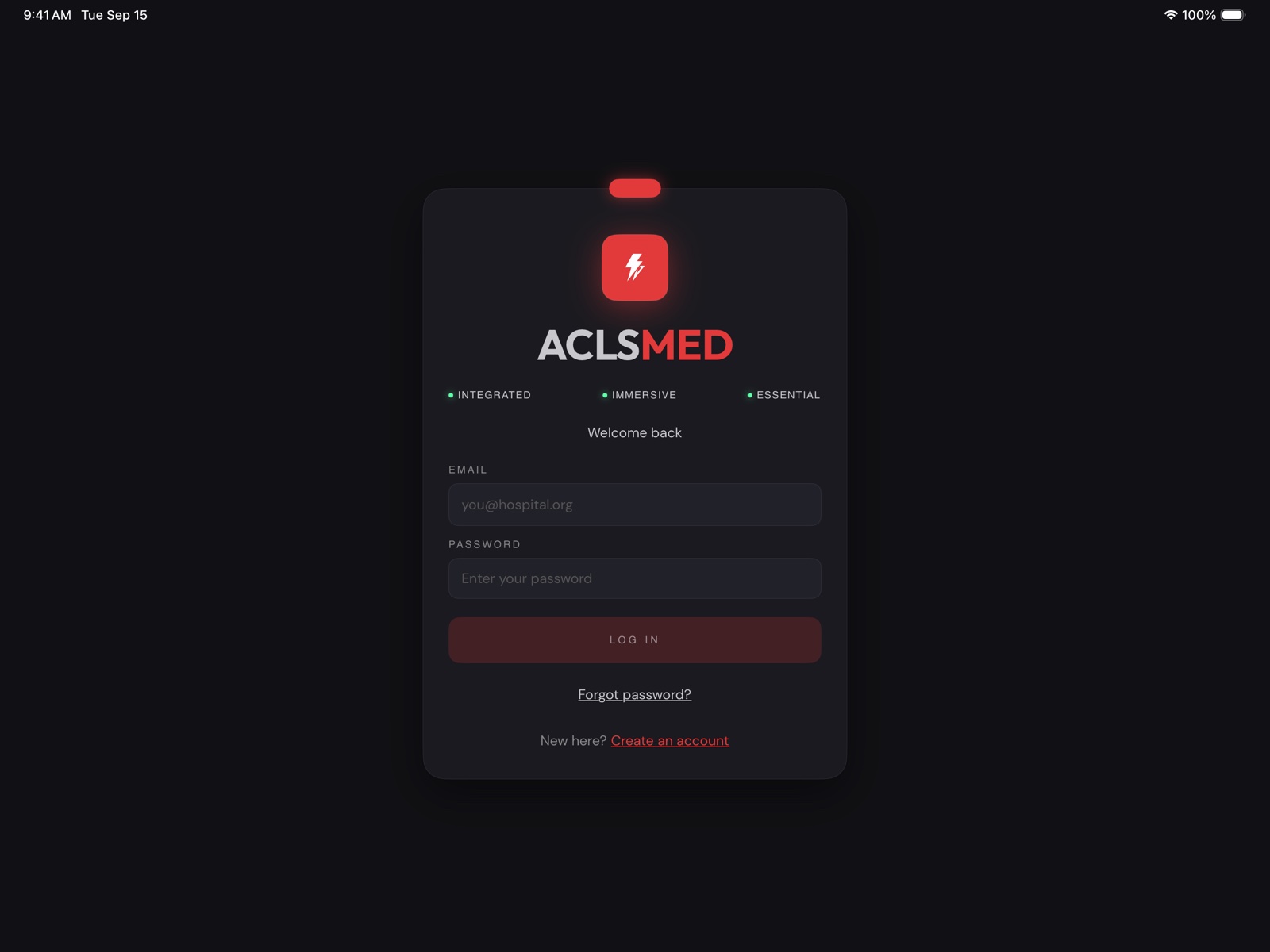
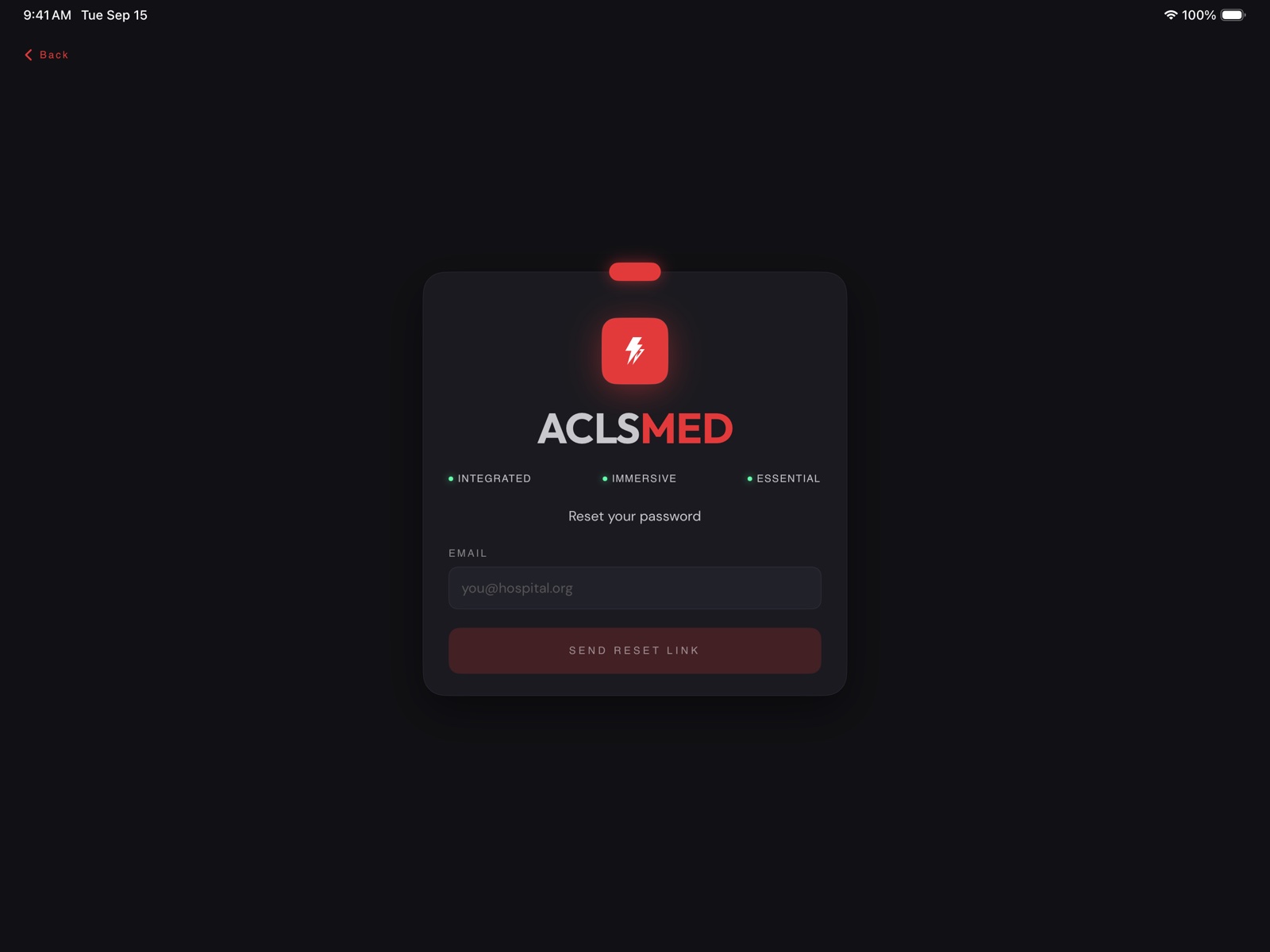
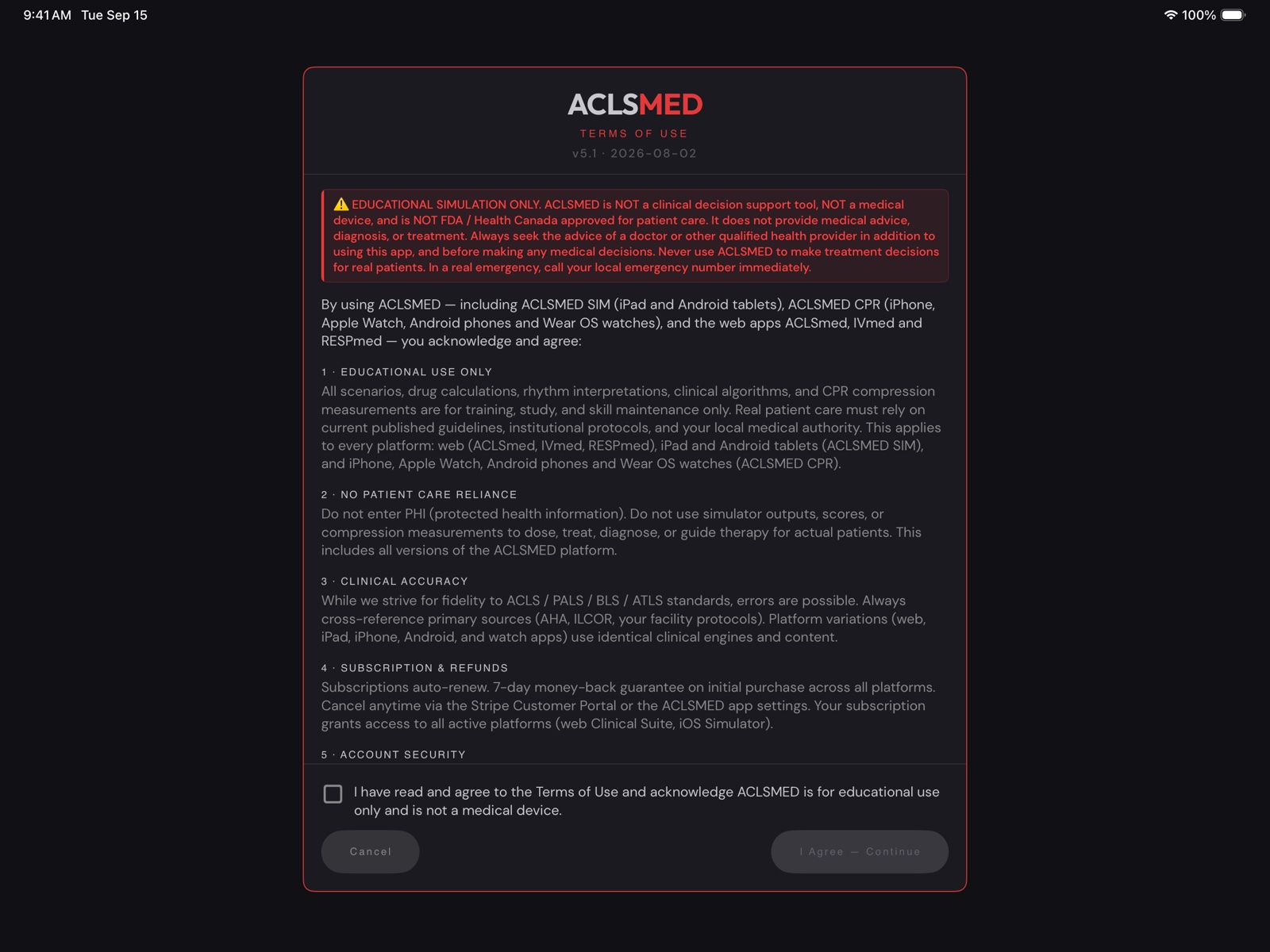
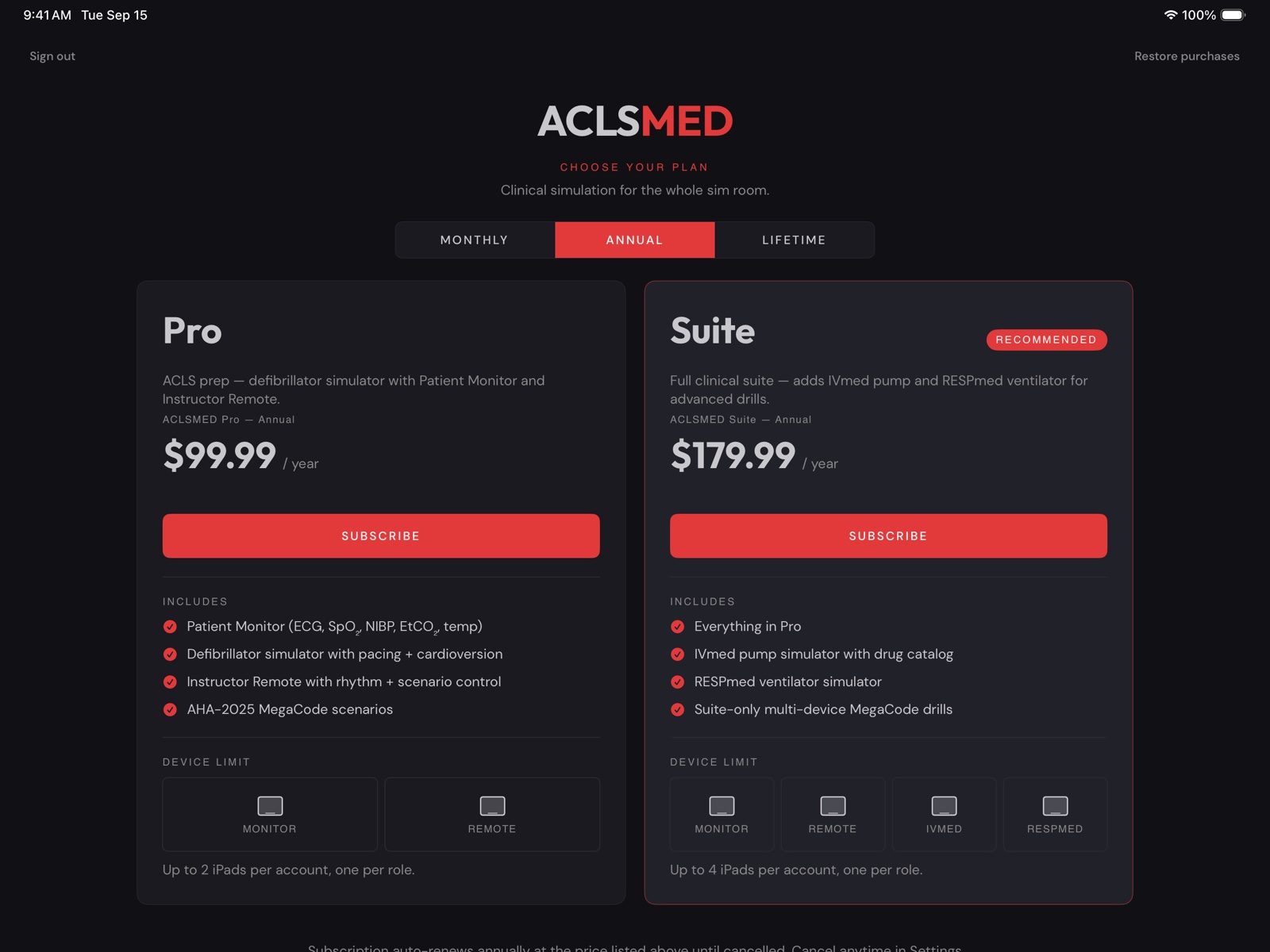
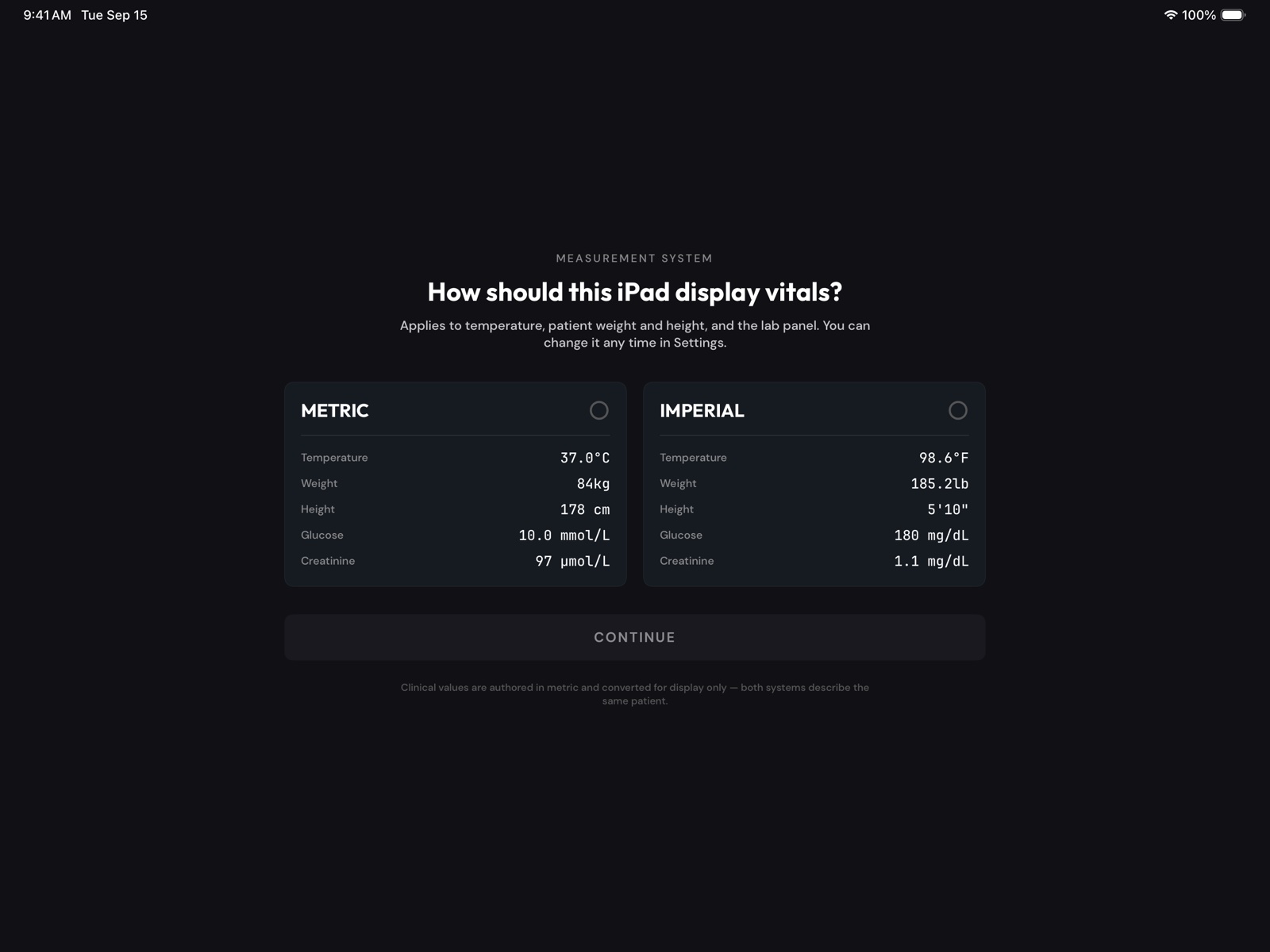
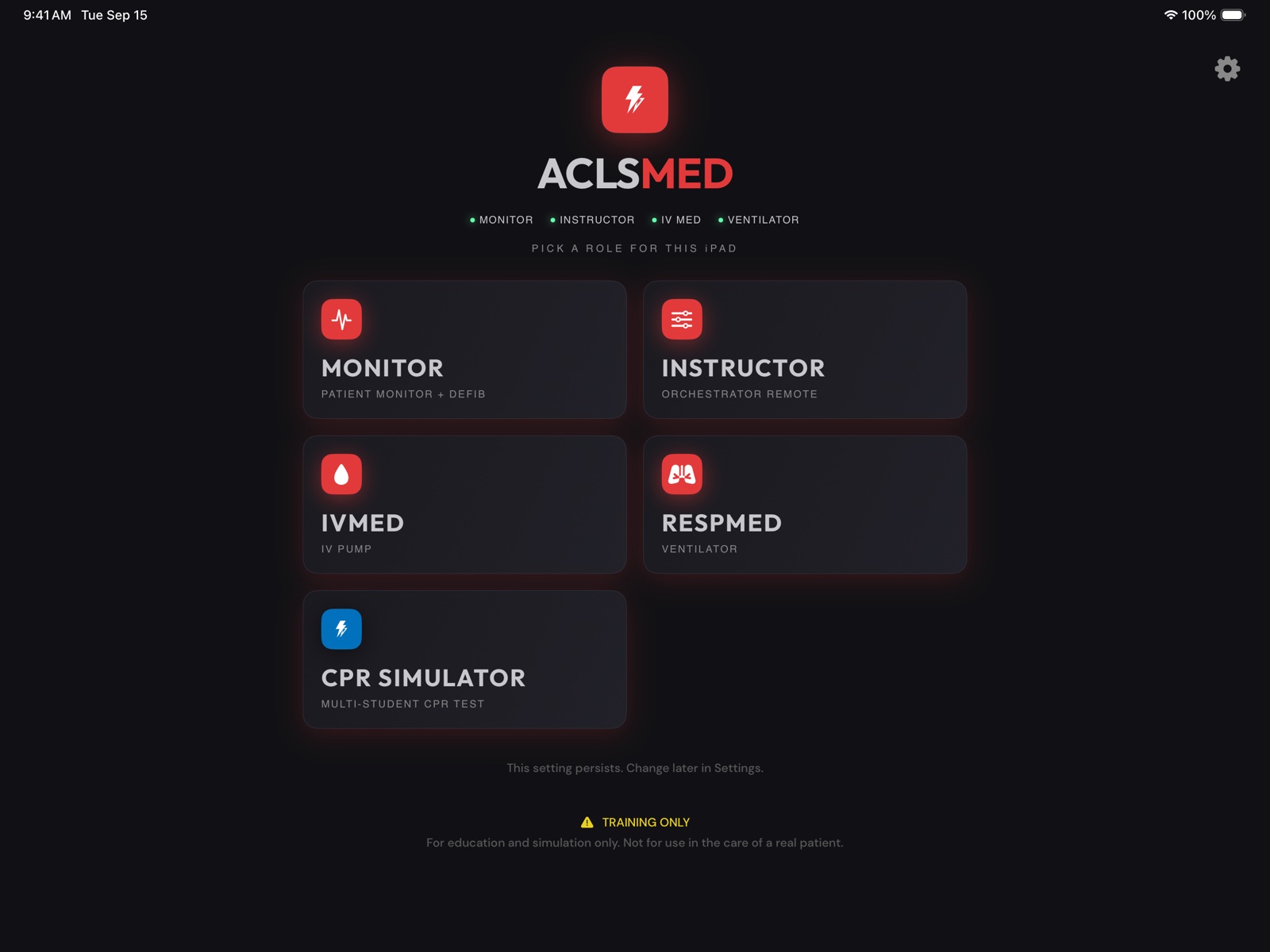
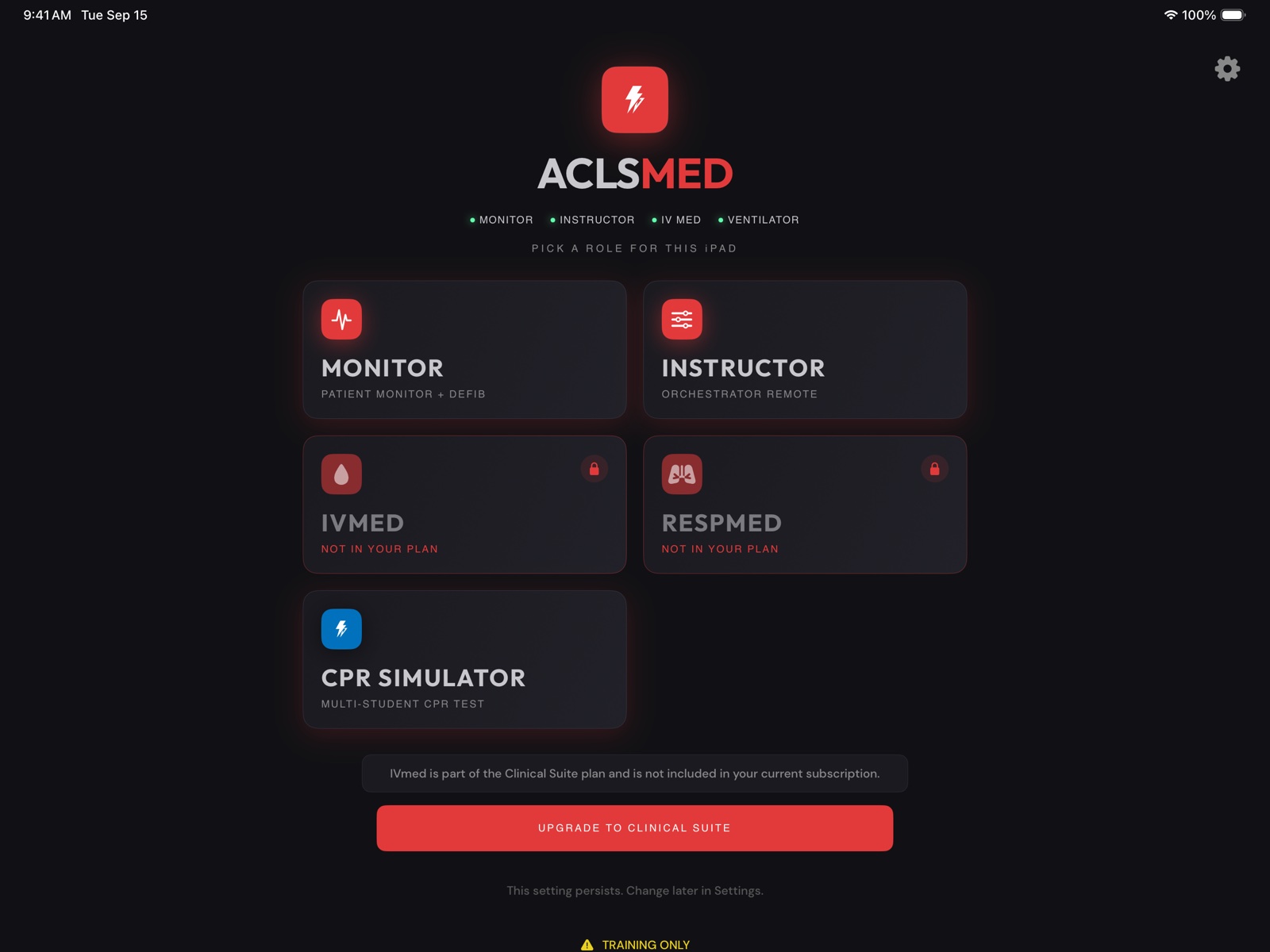
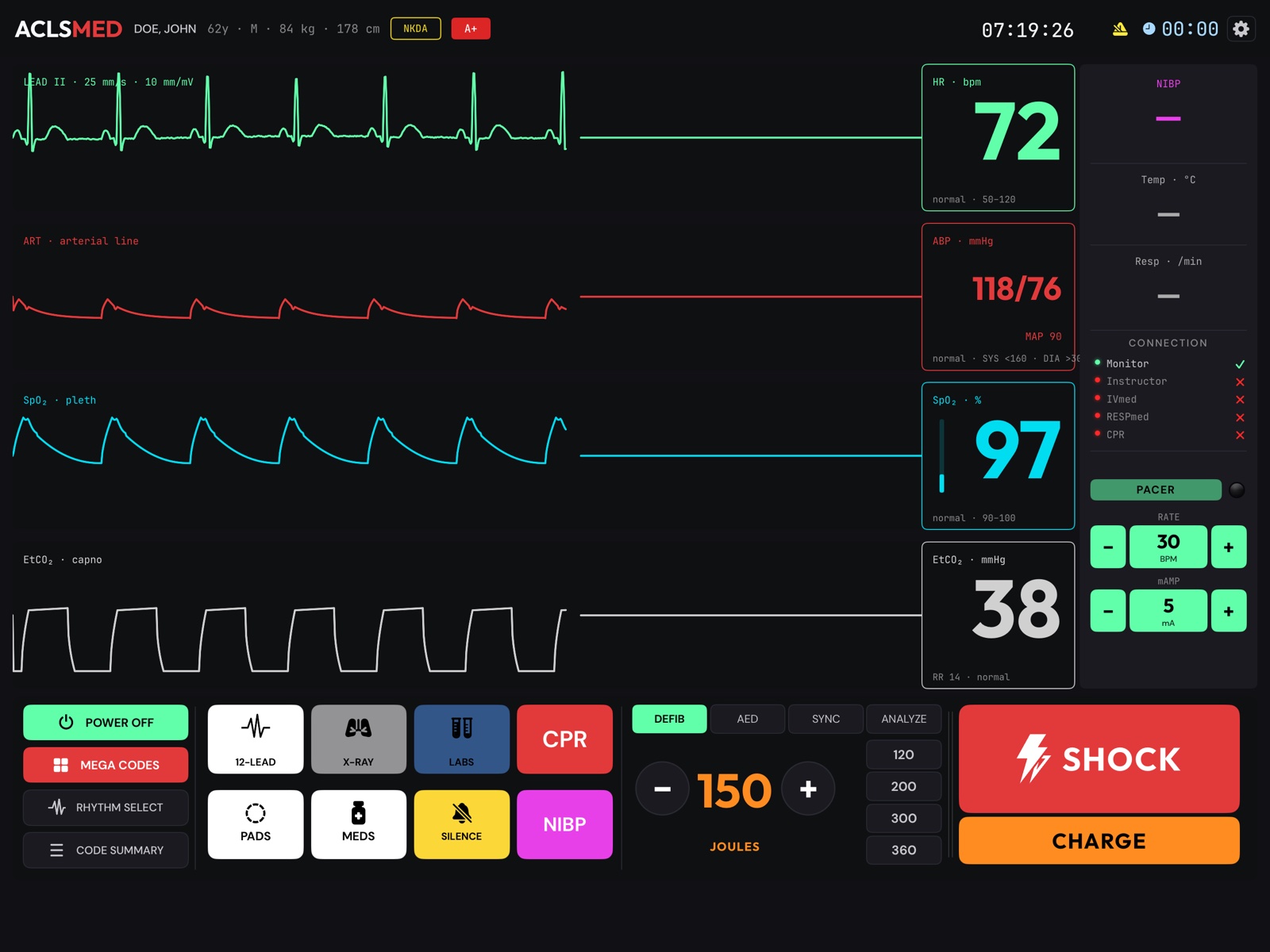 12345678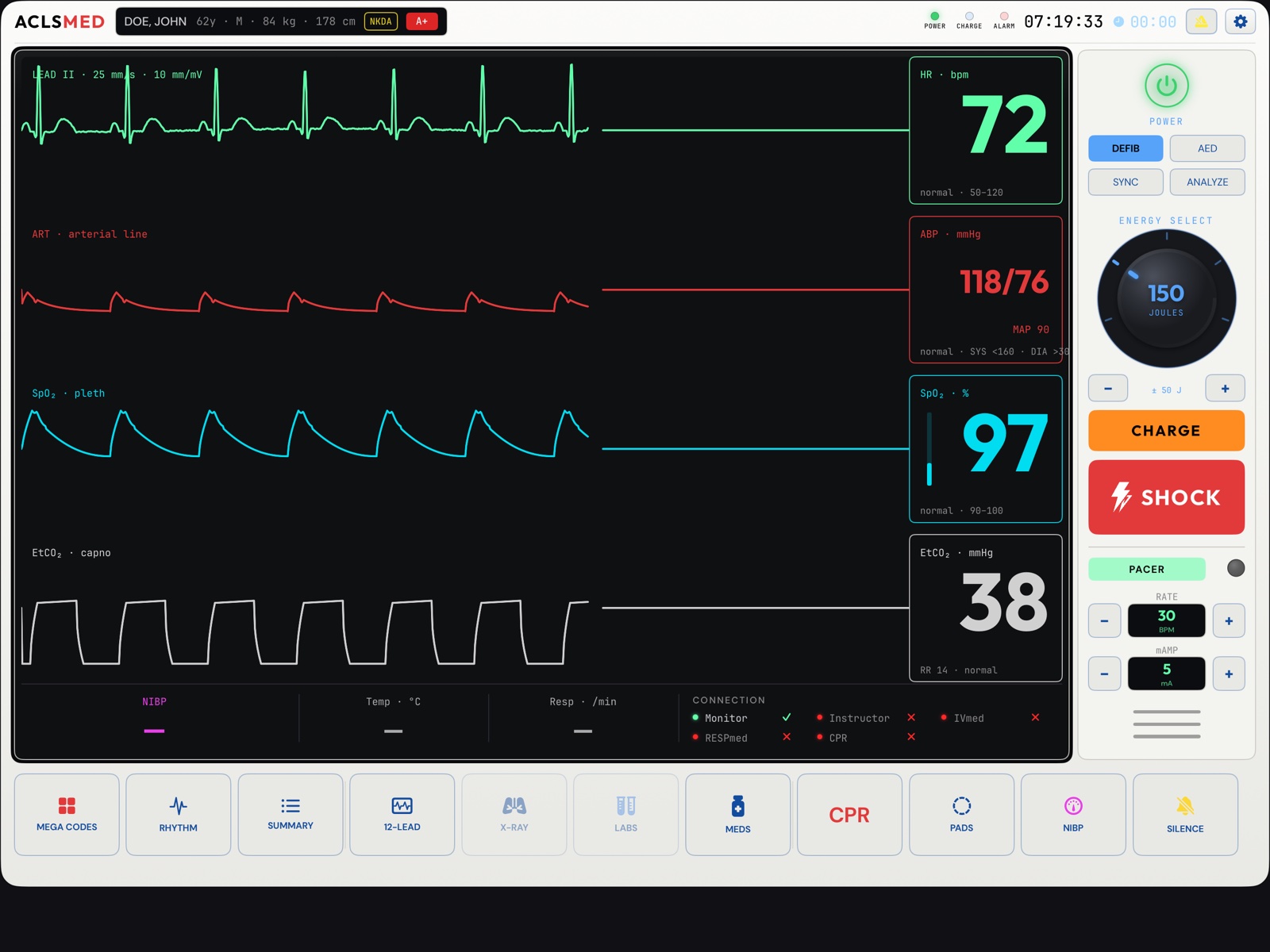
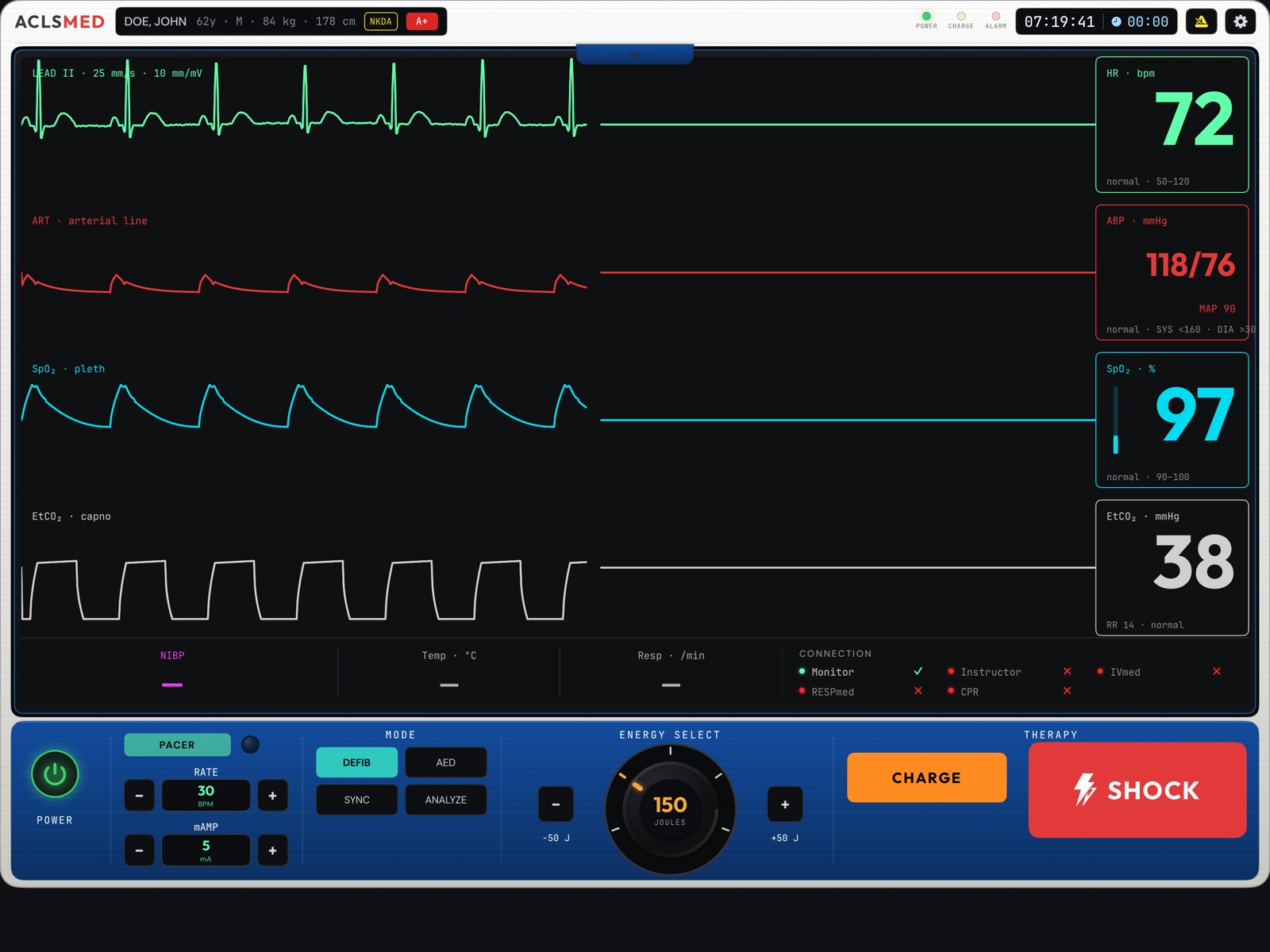
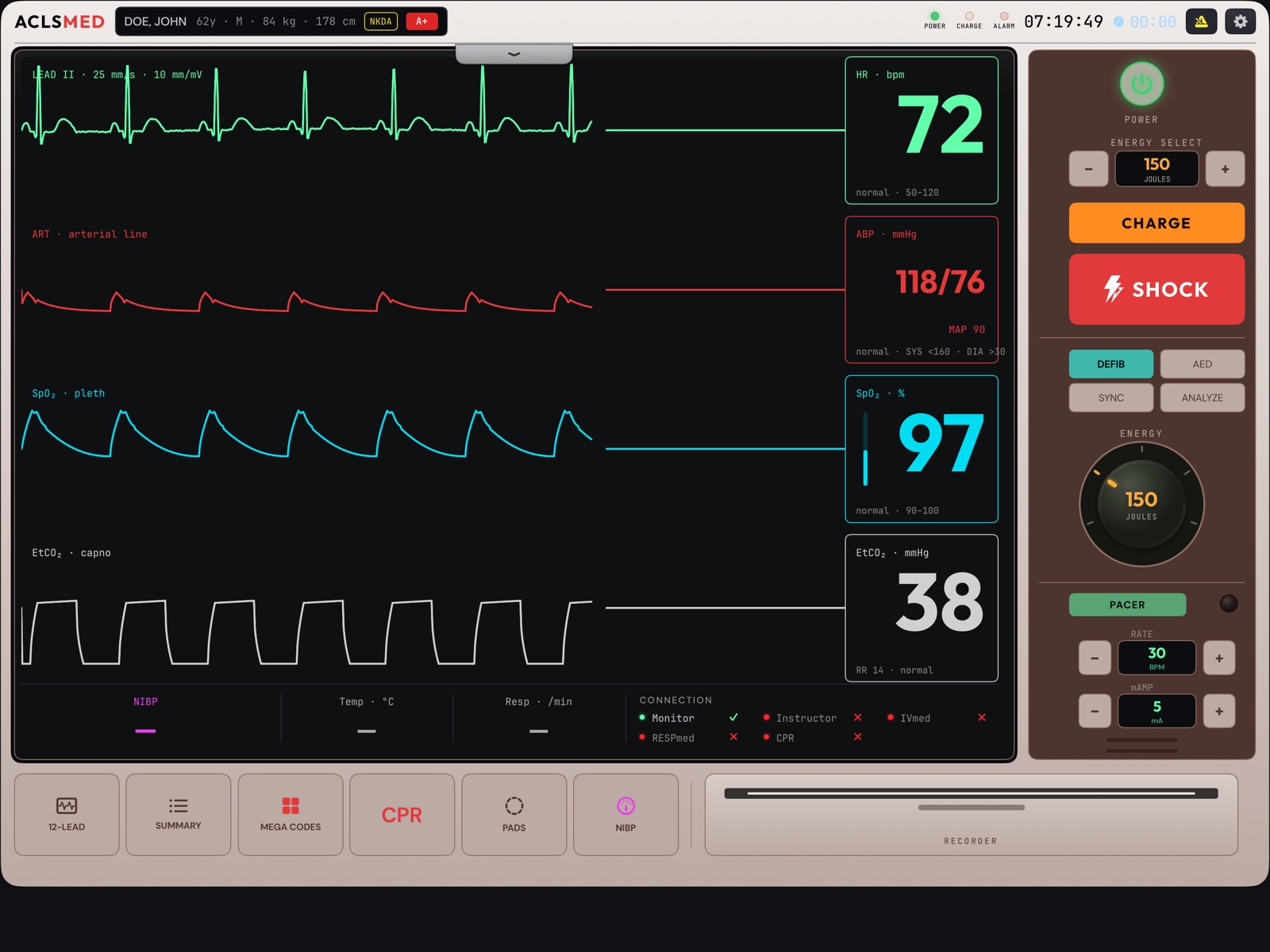
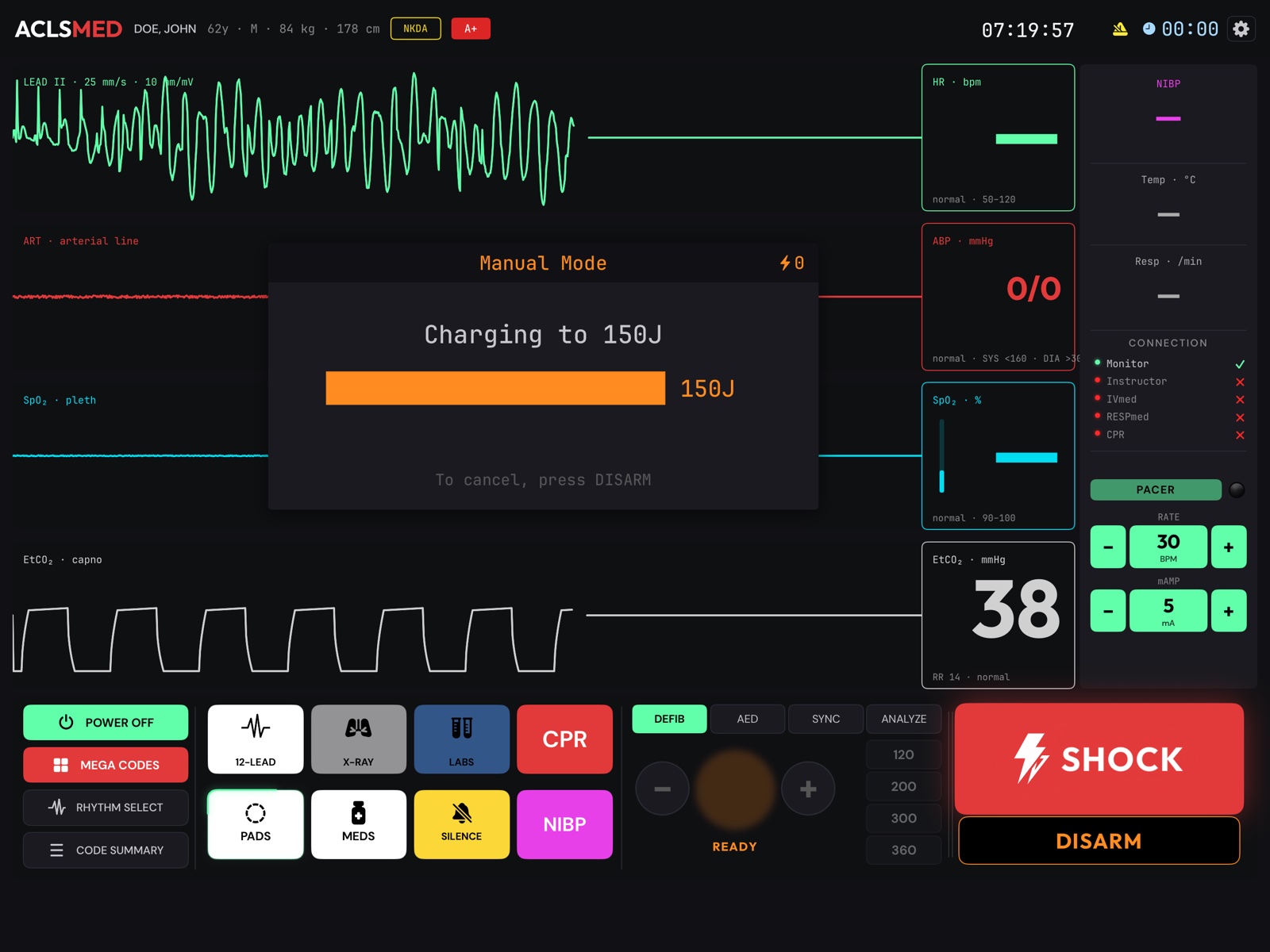
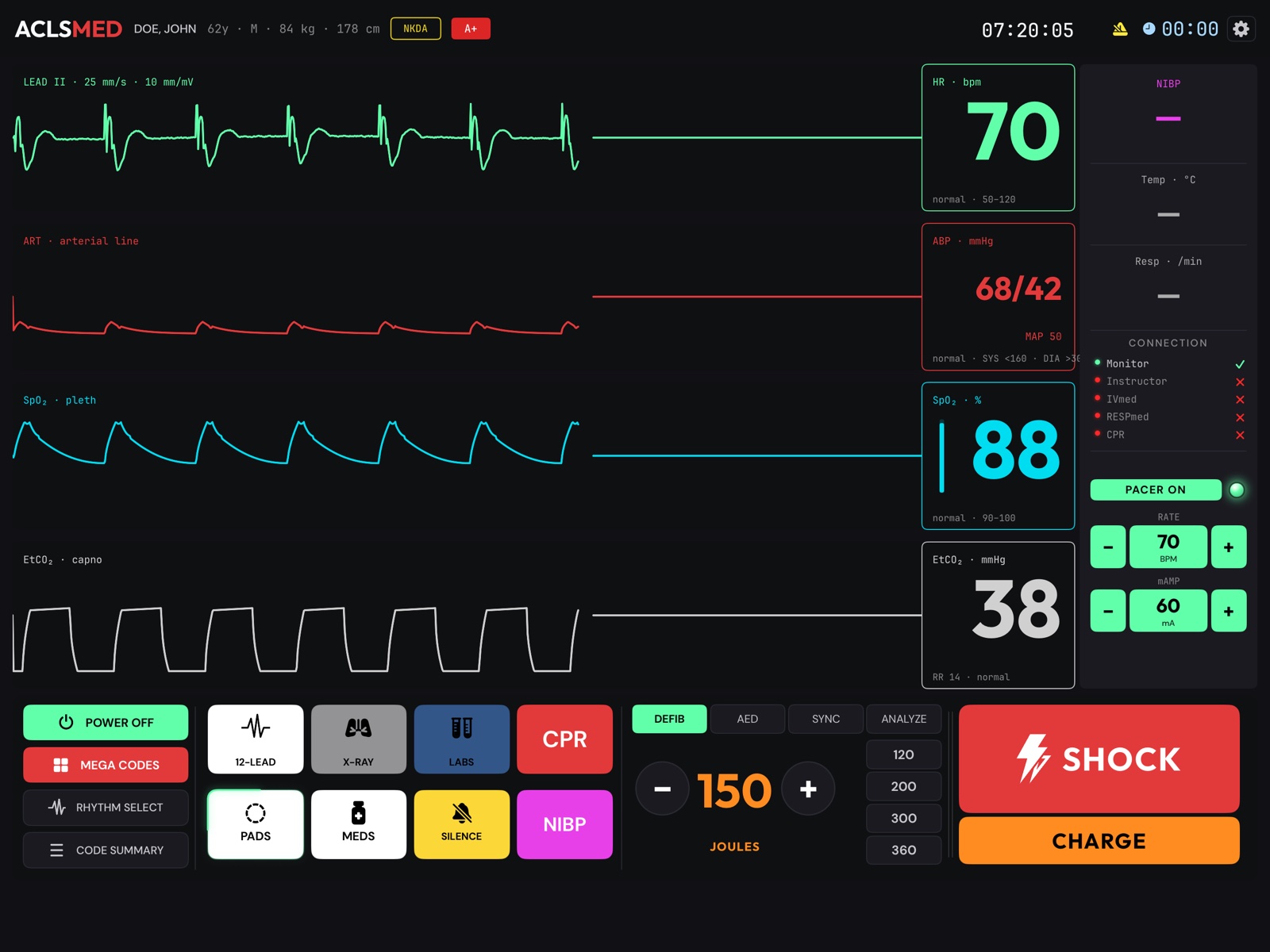
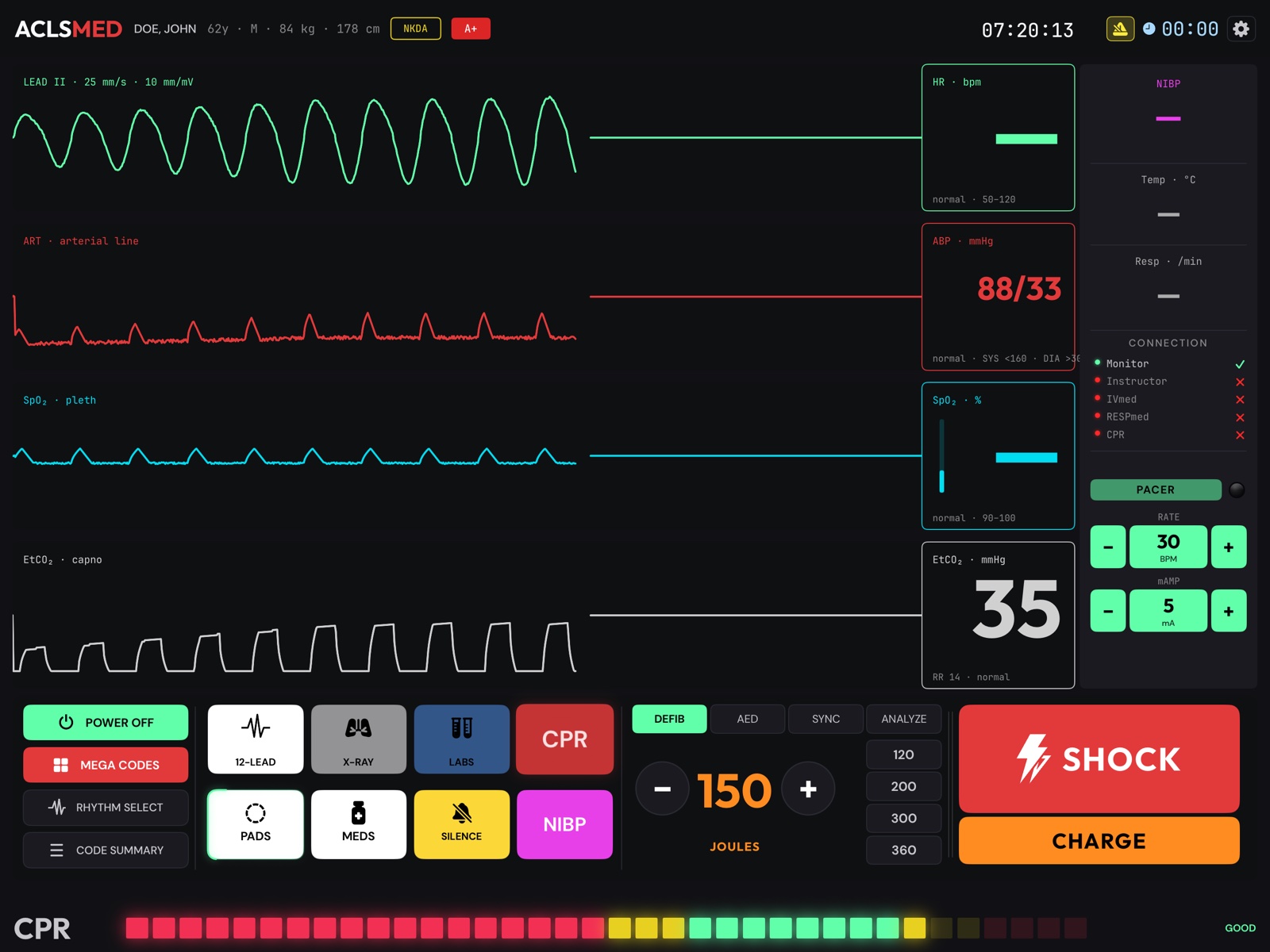
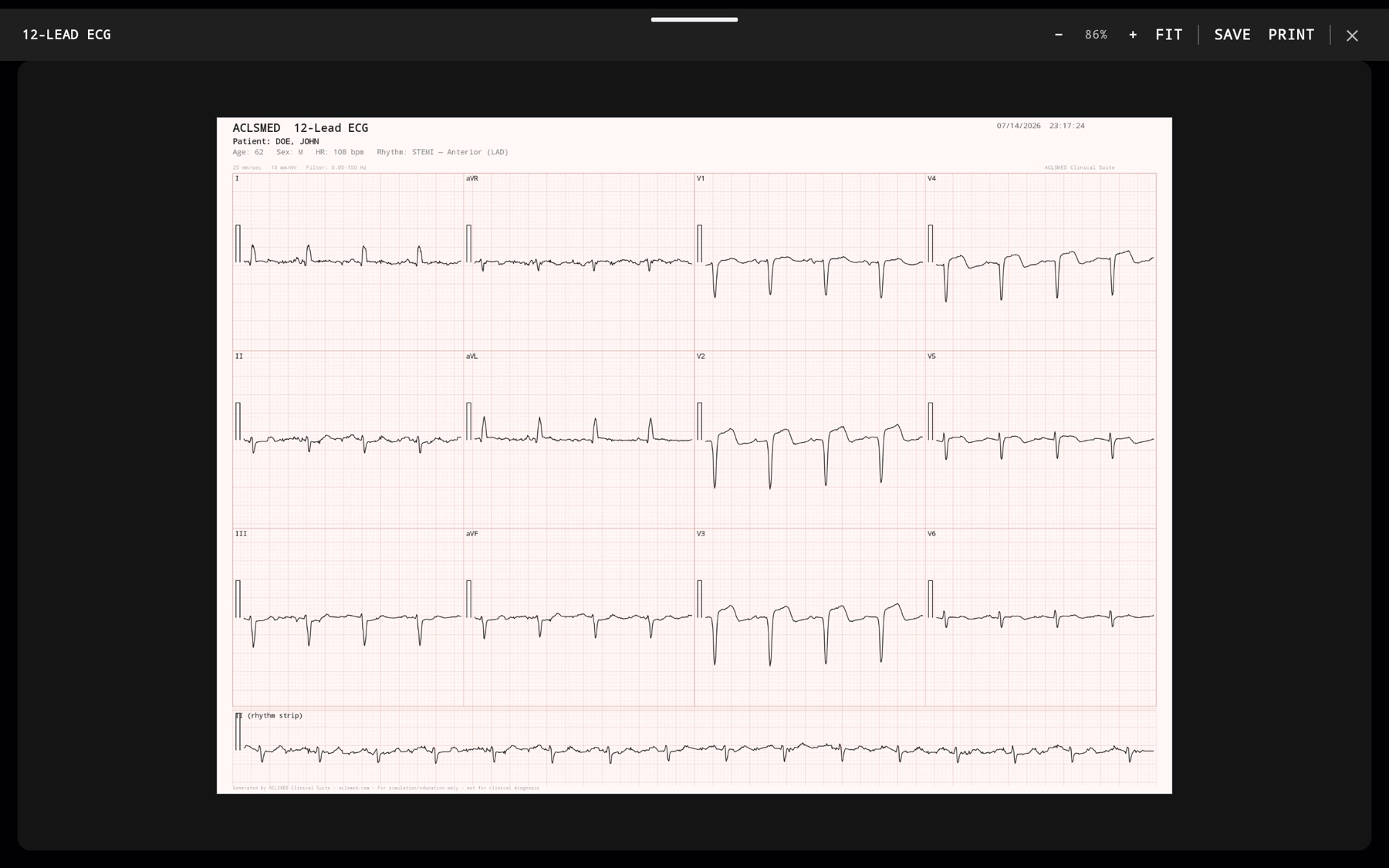
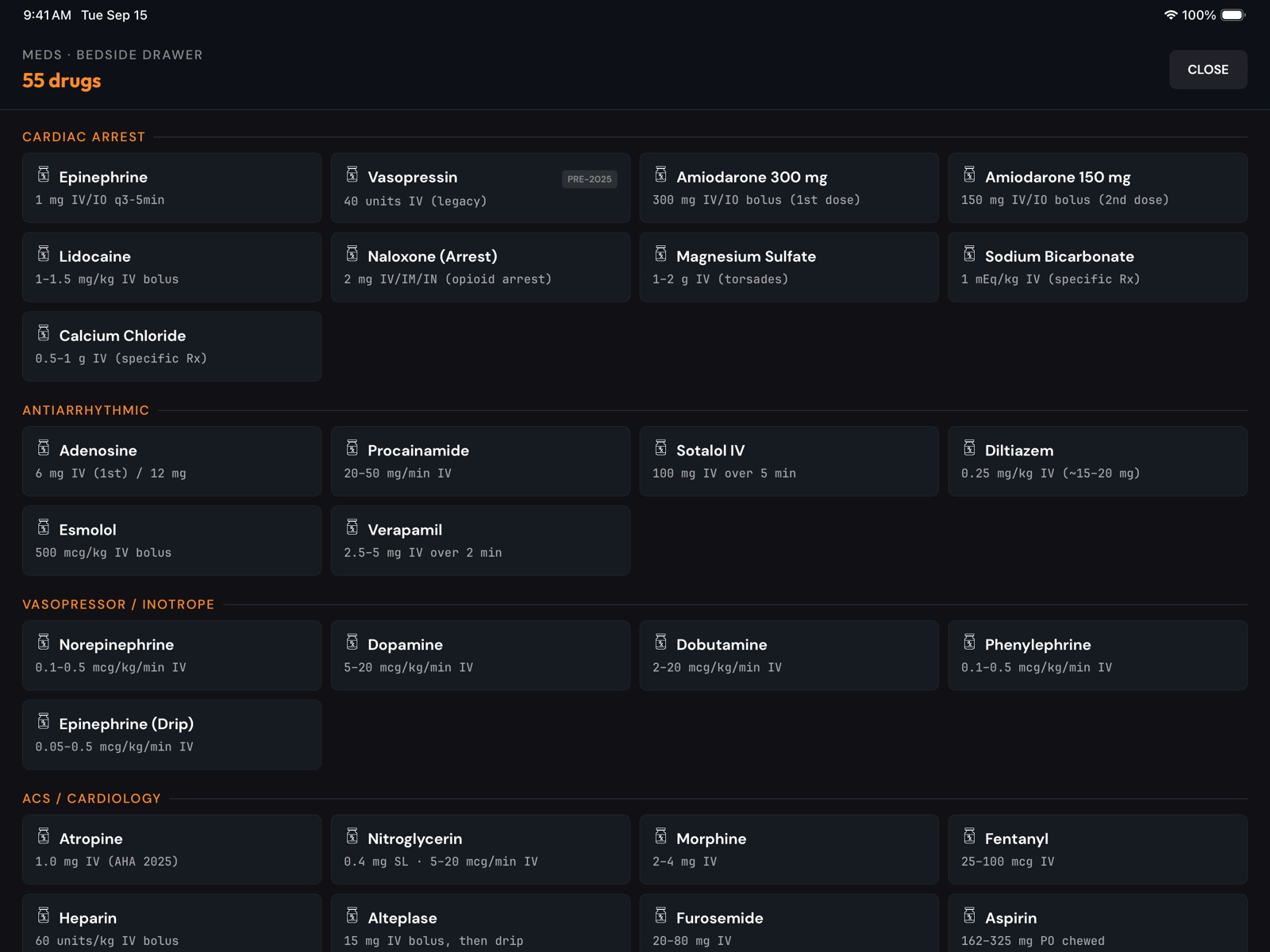
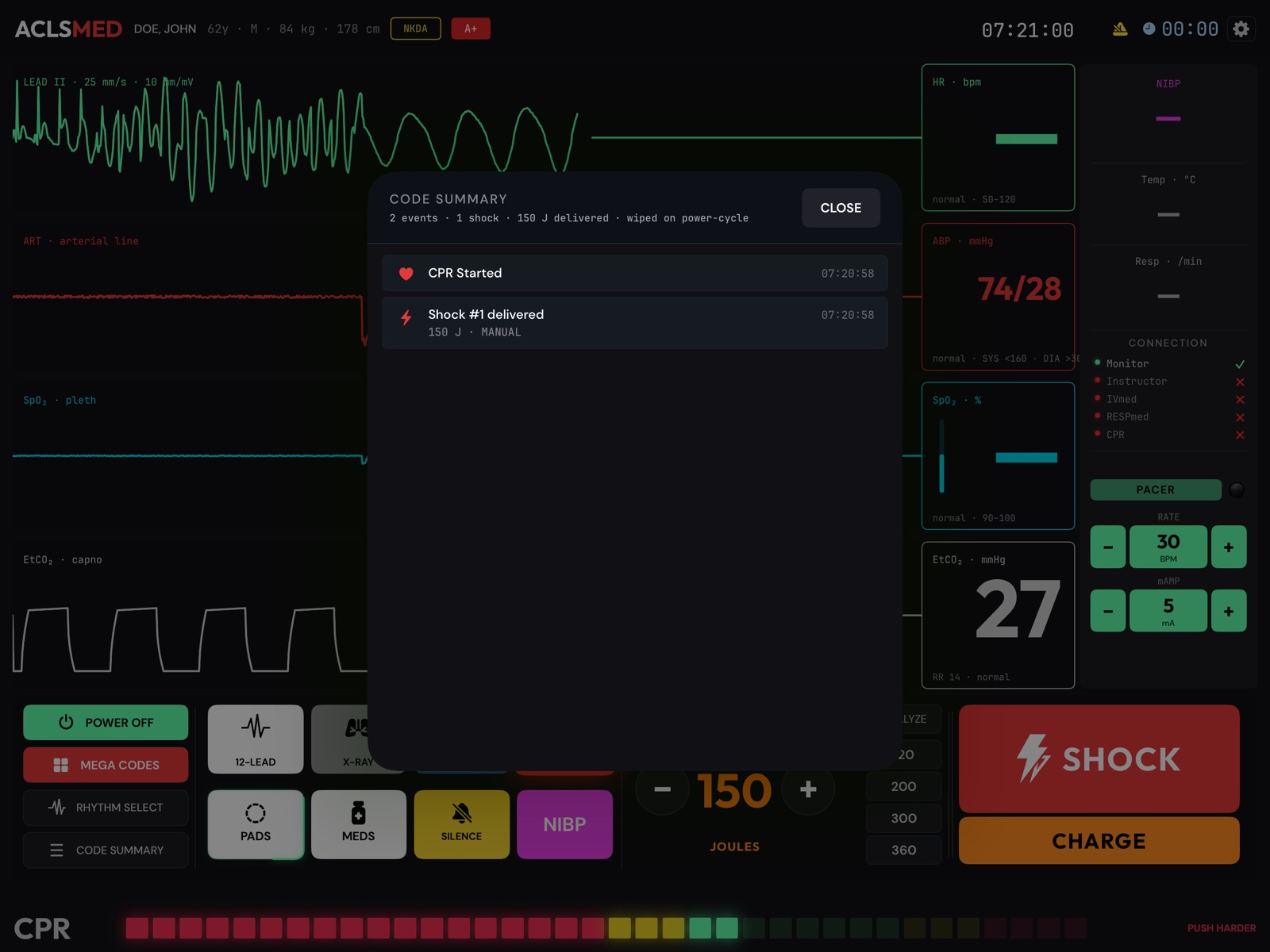
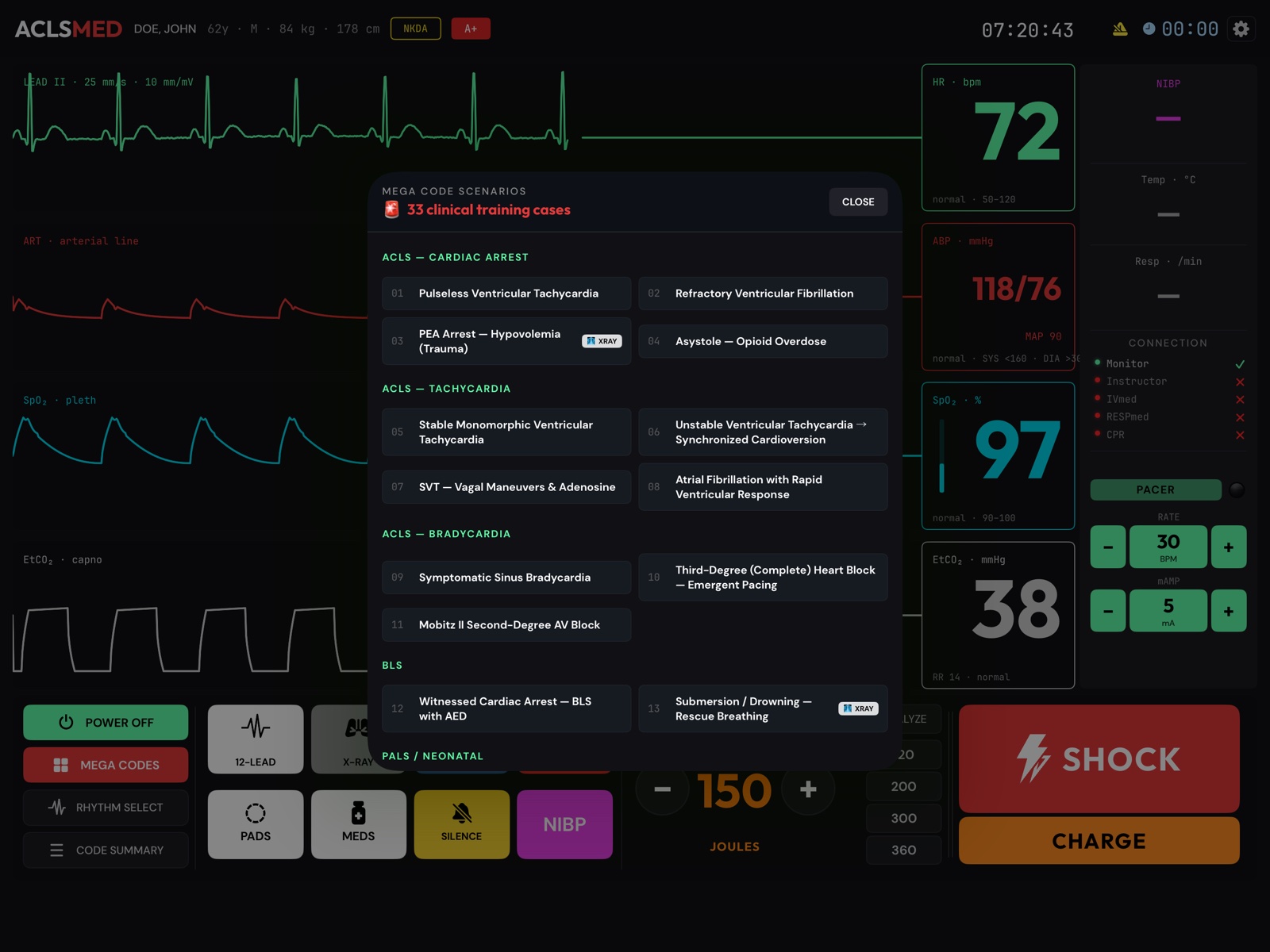
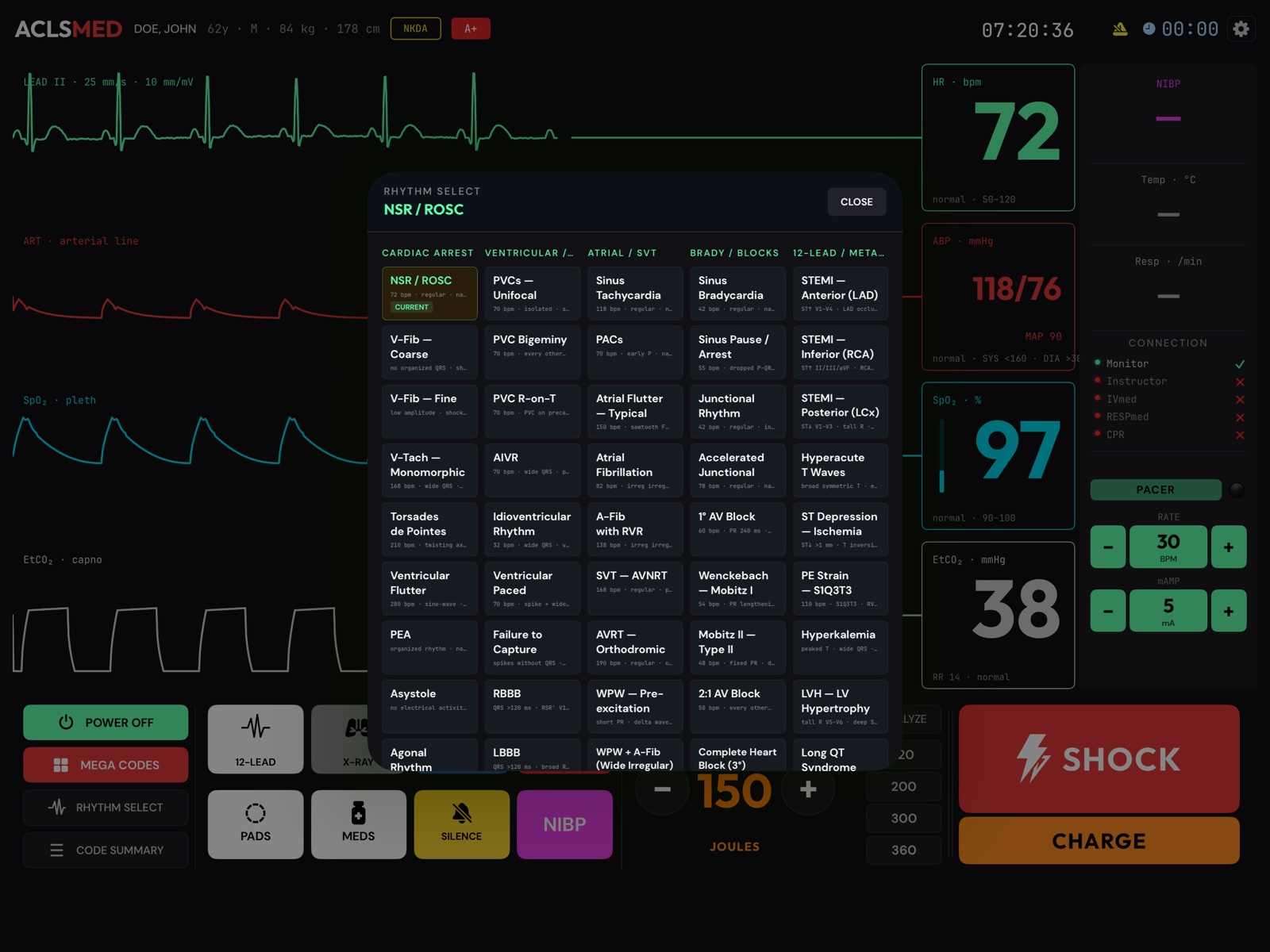
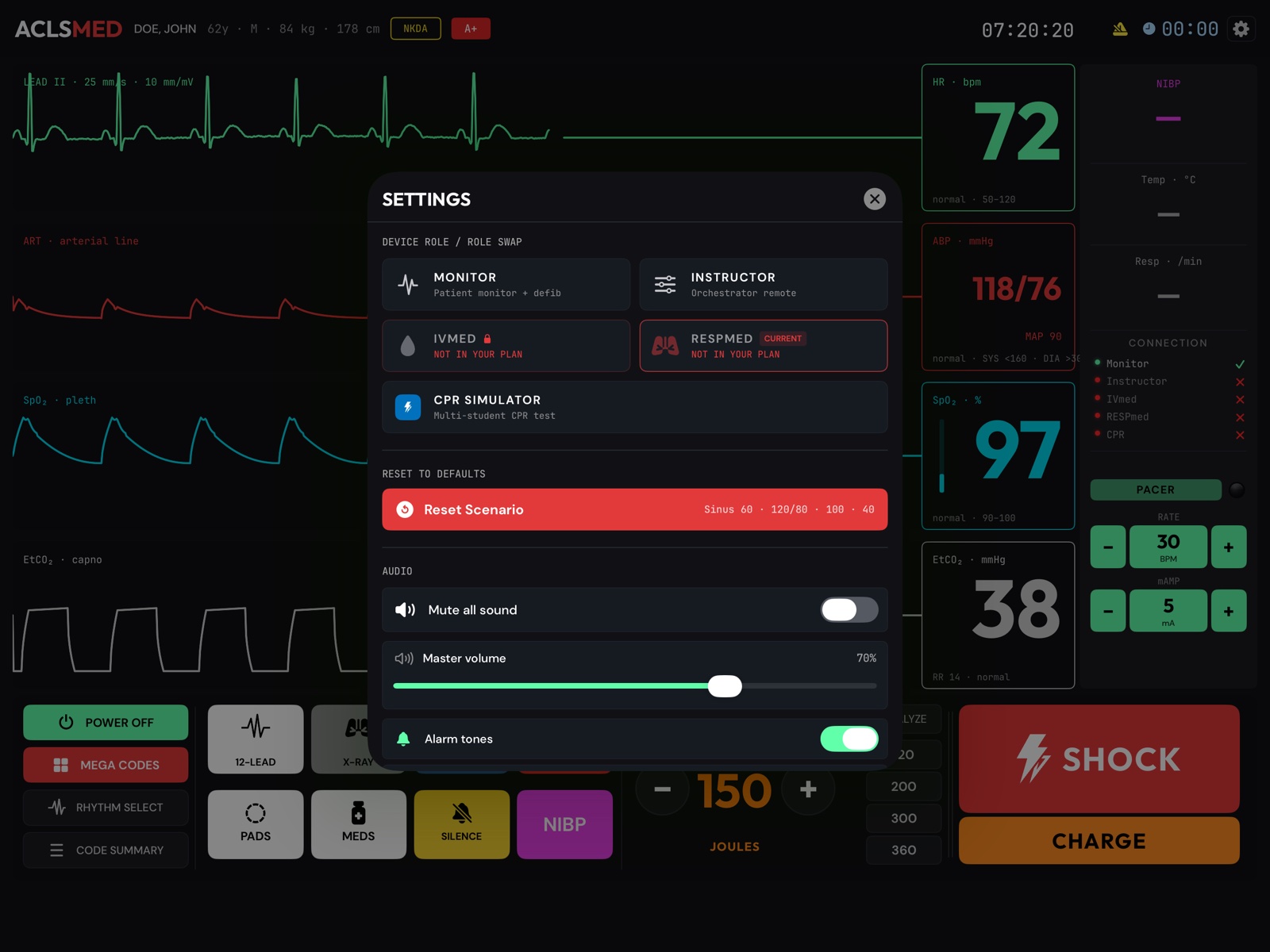
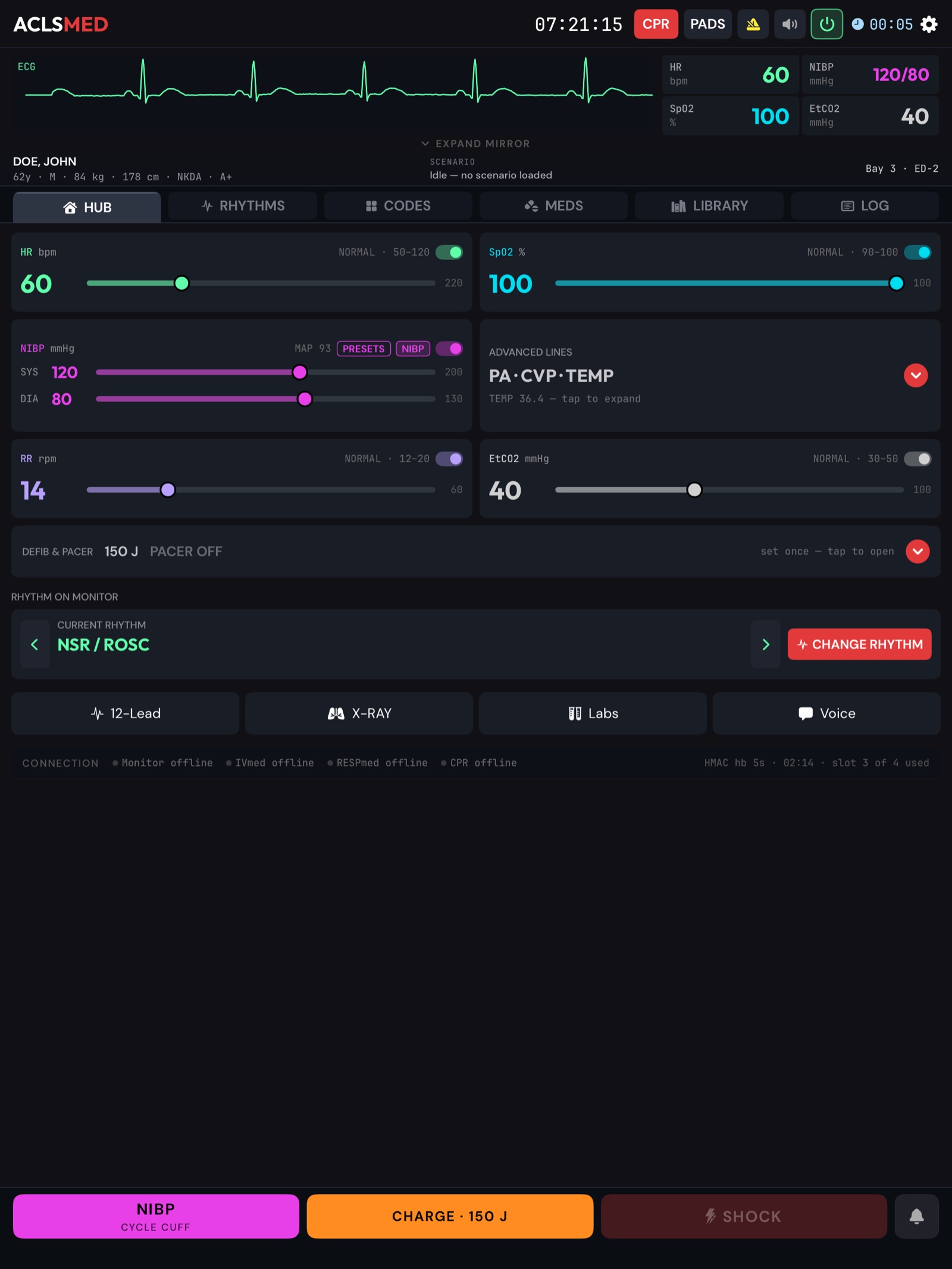 12345678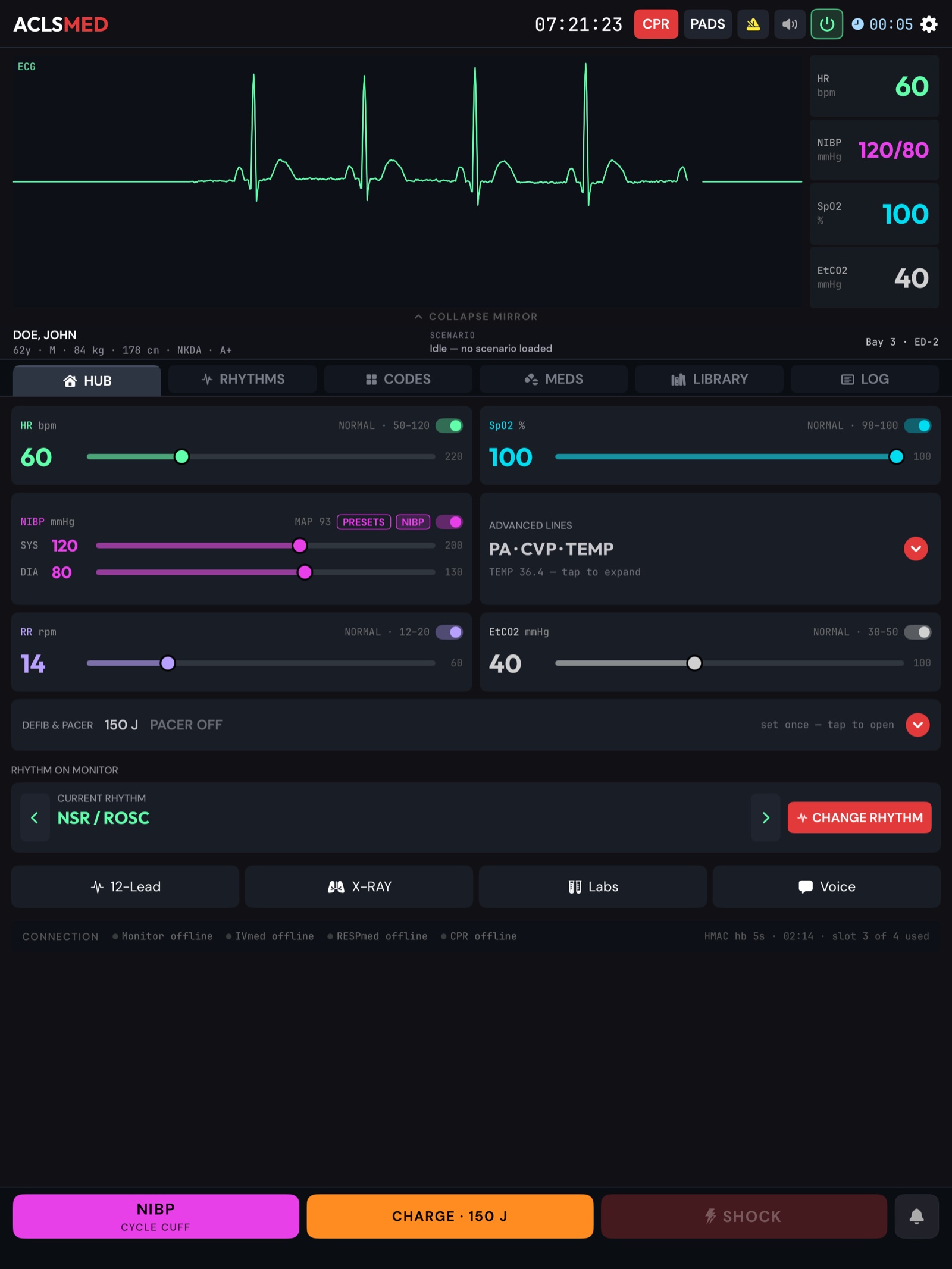
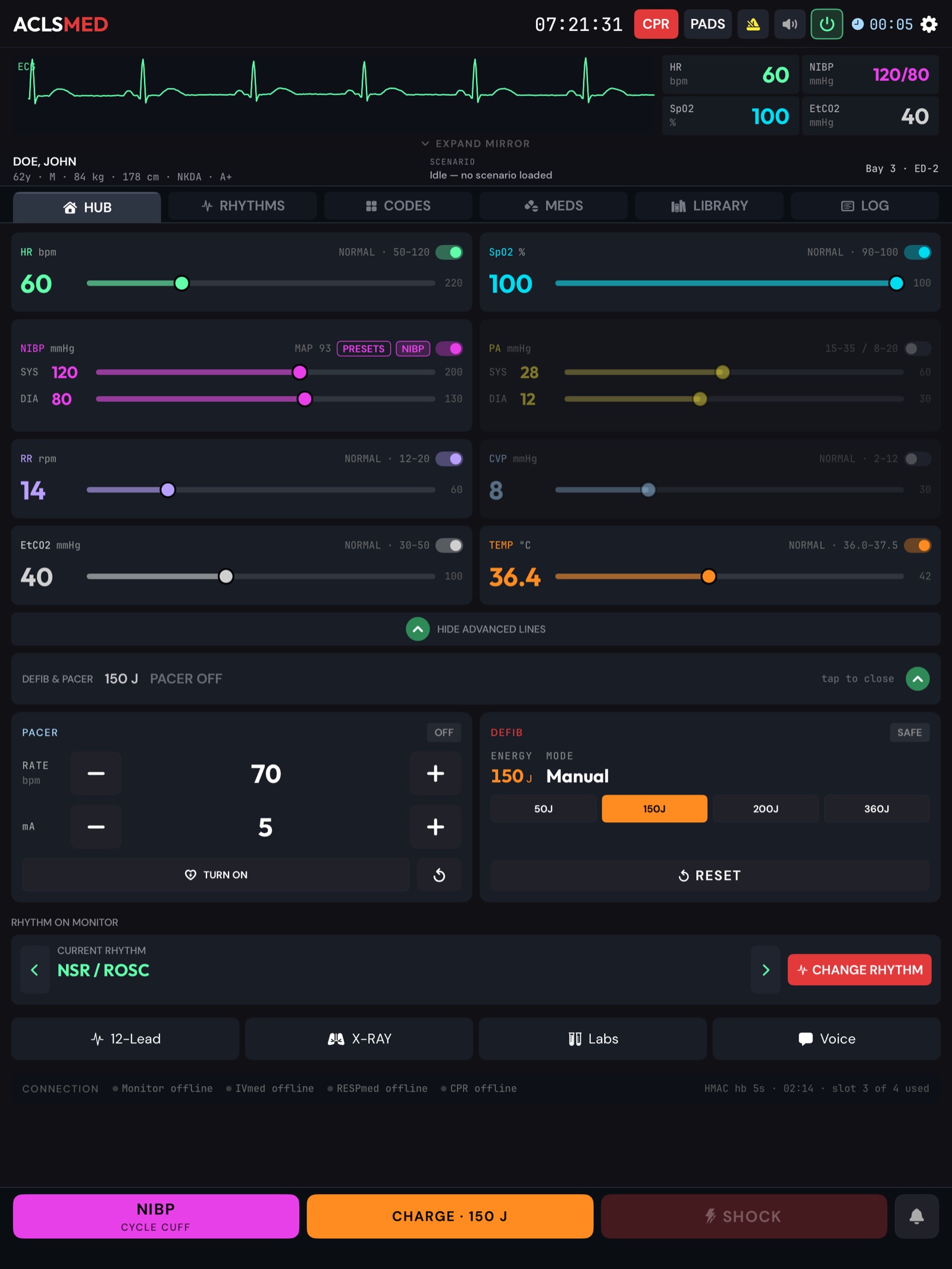
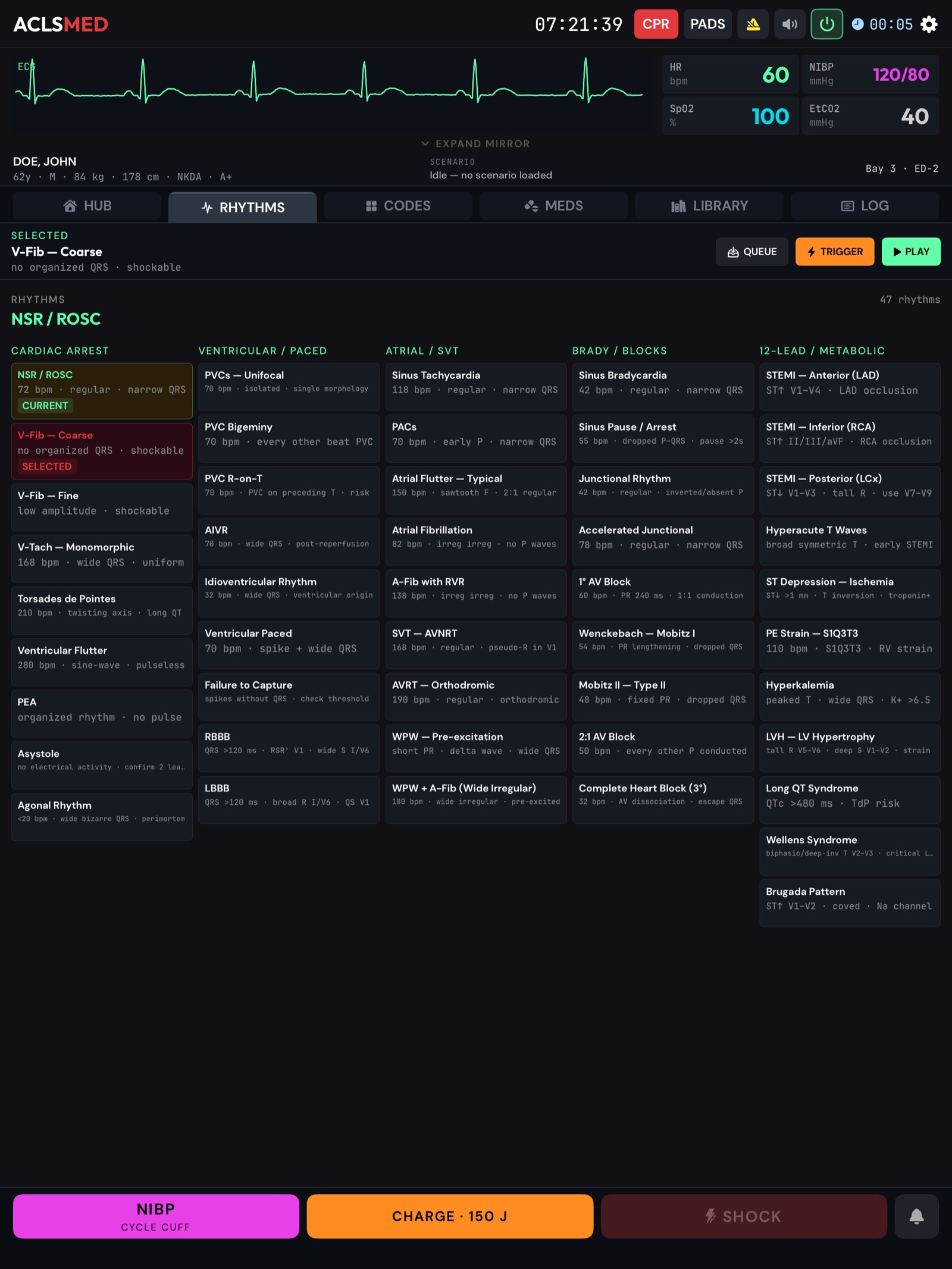
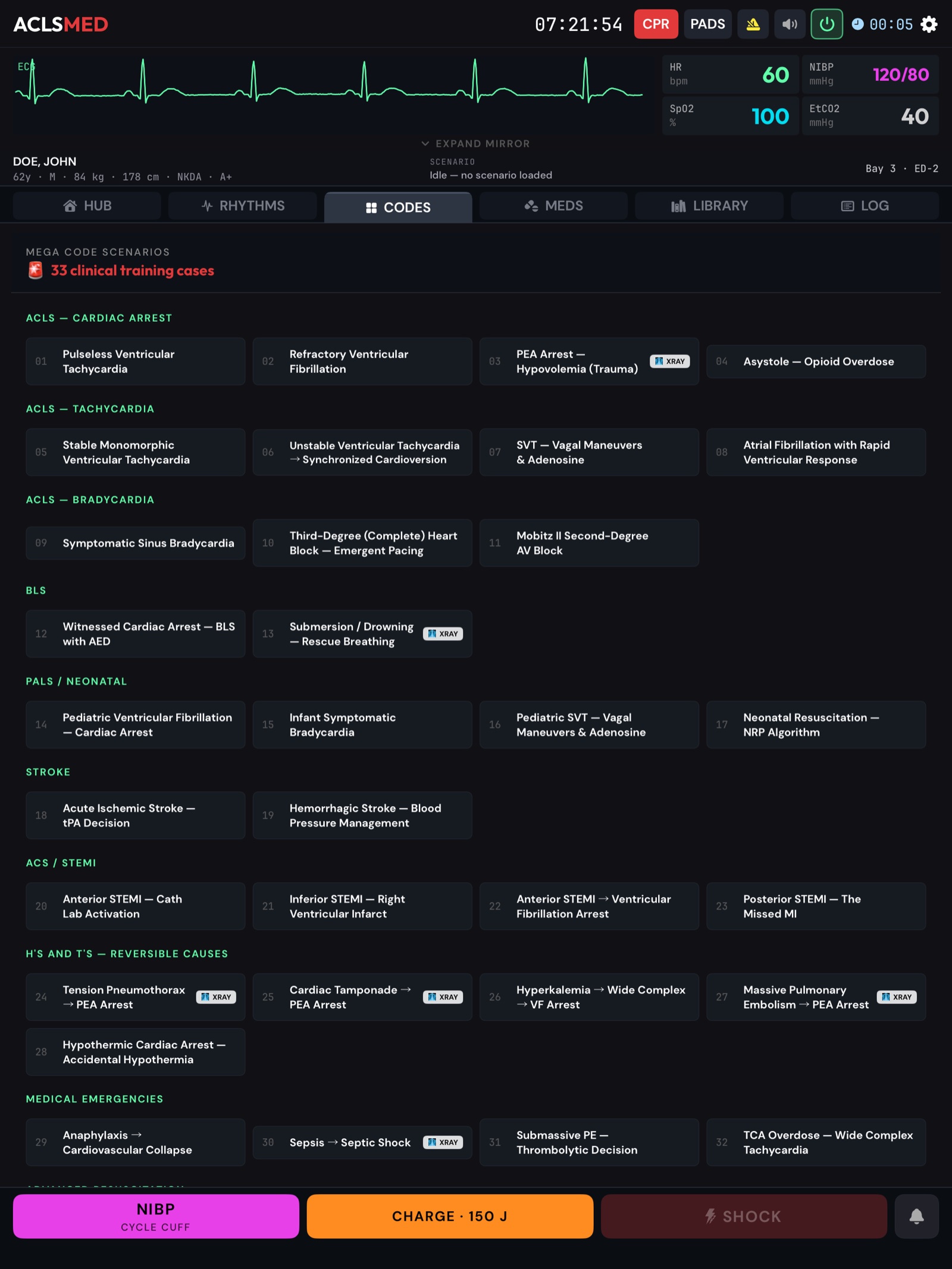
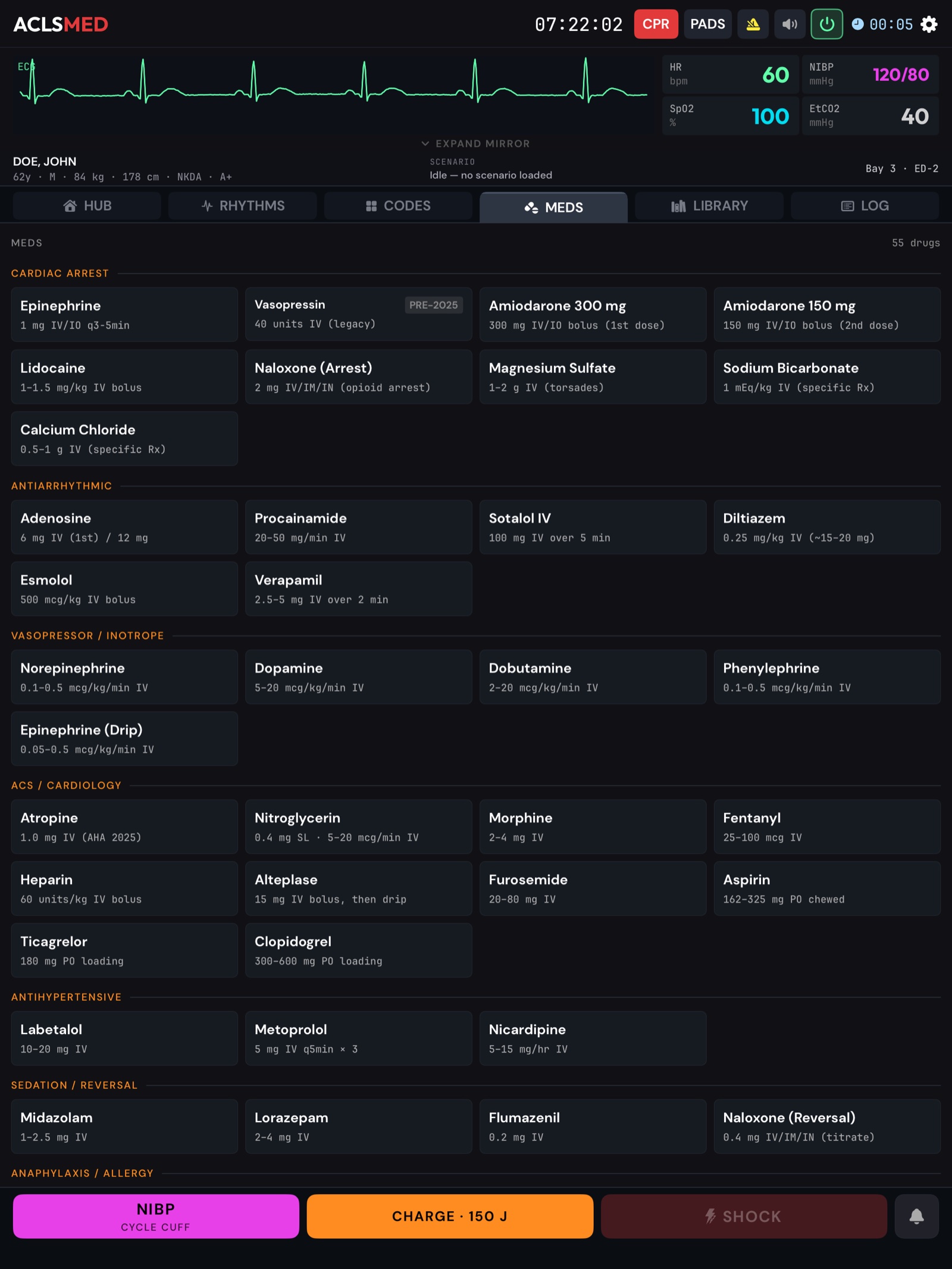
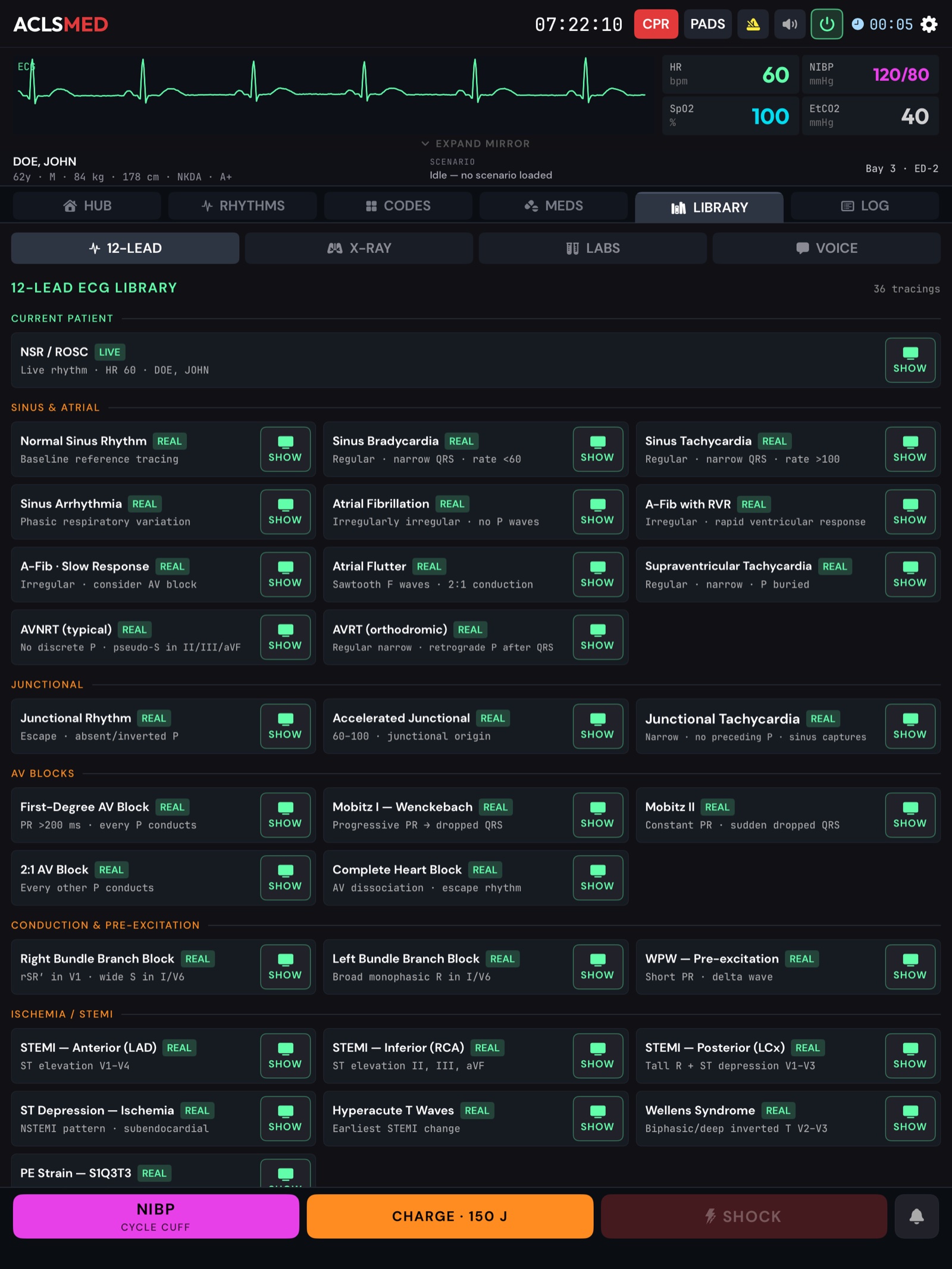
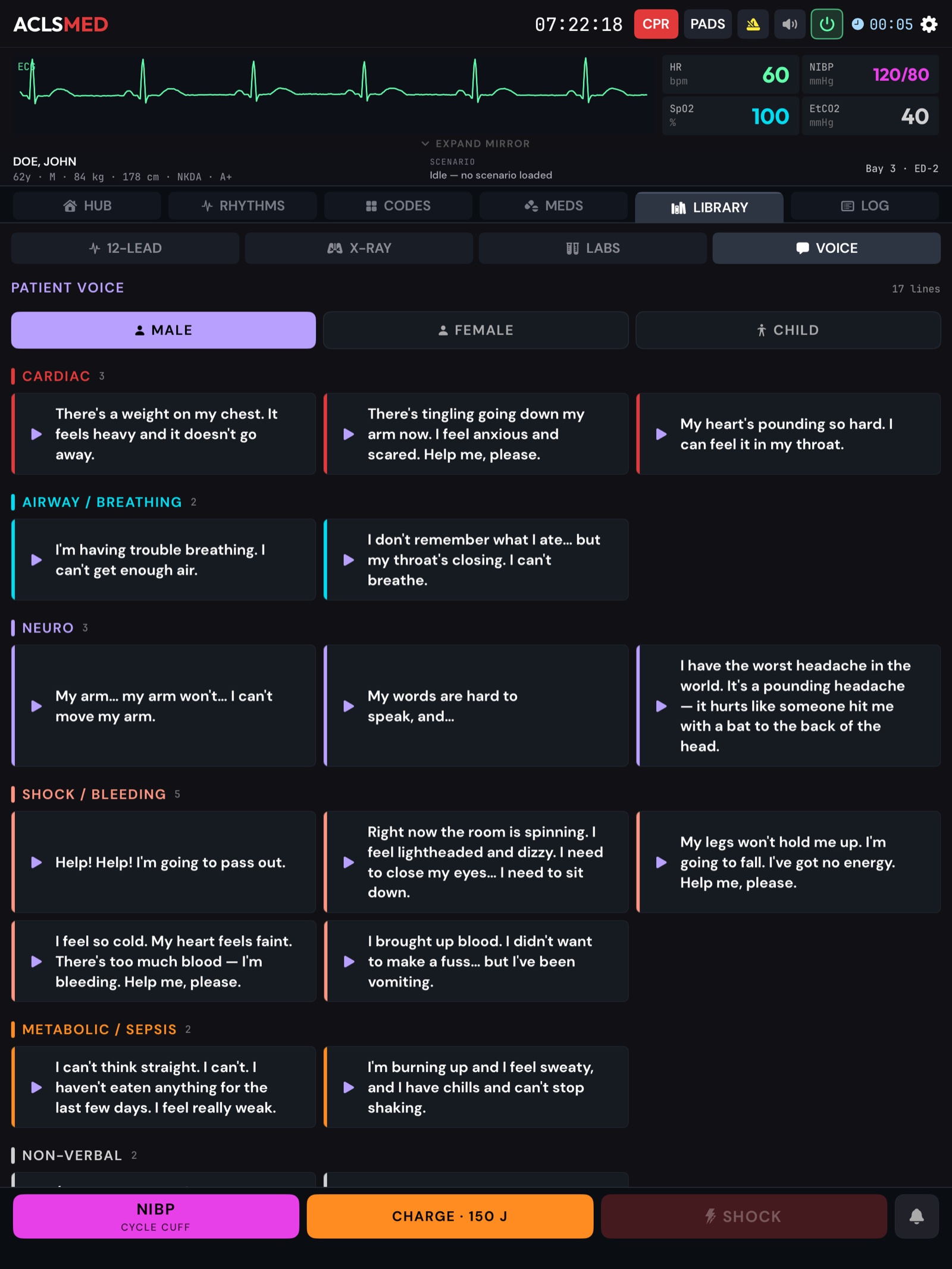
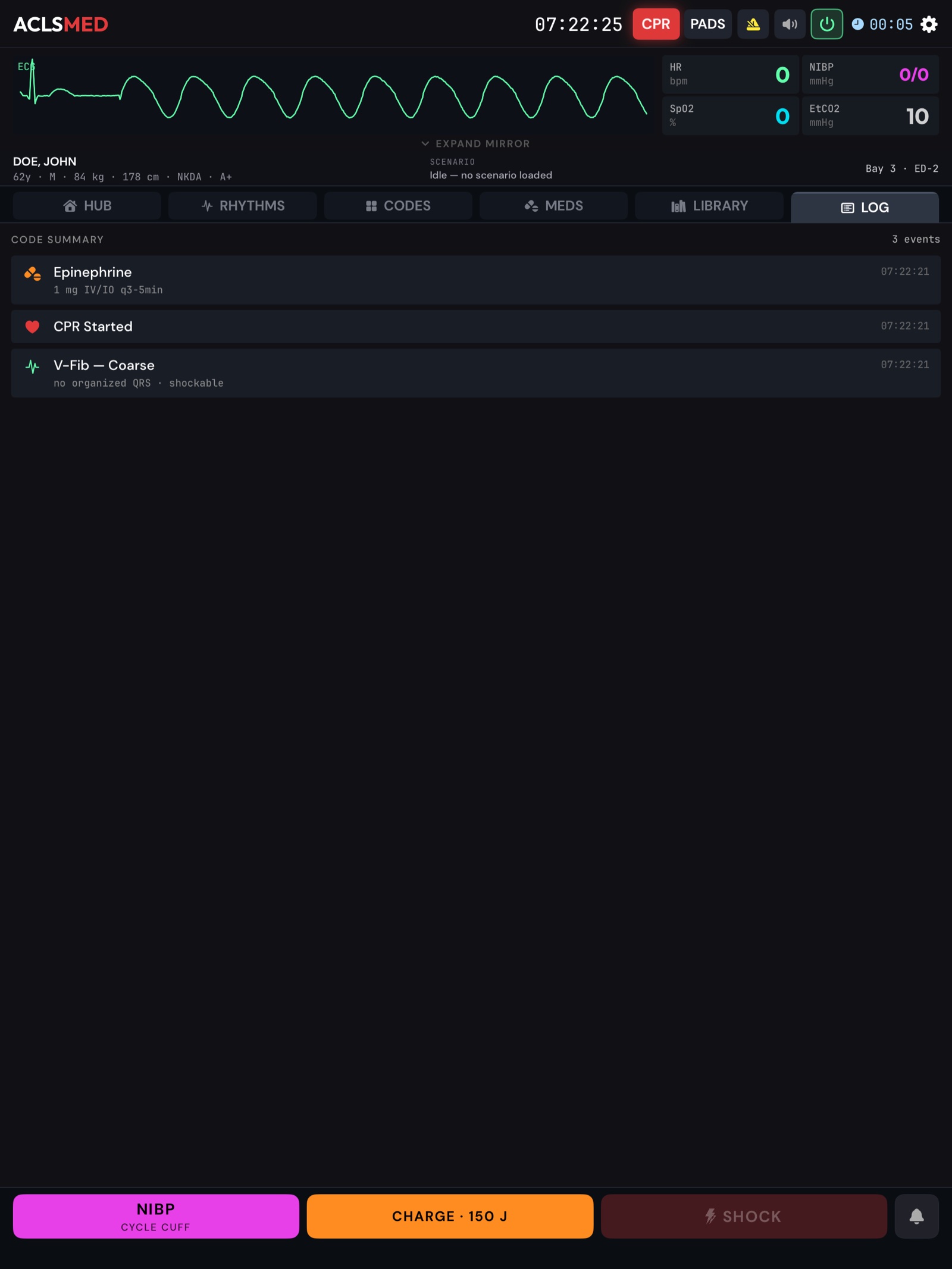
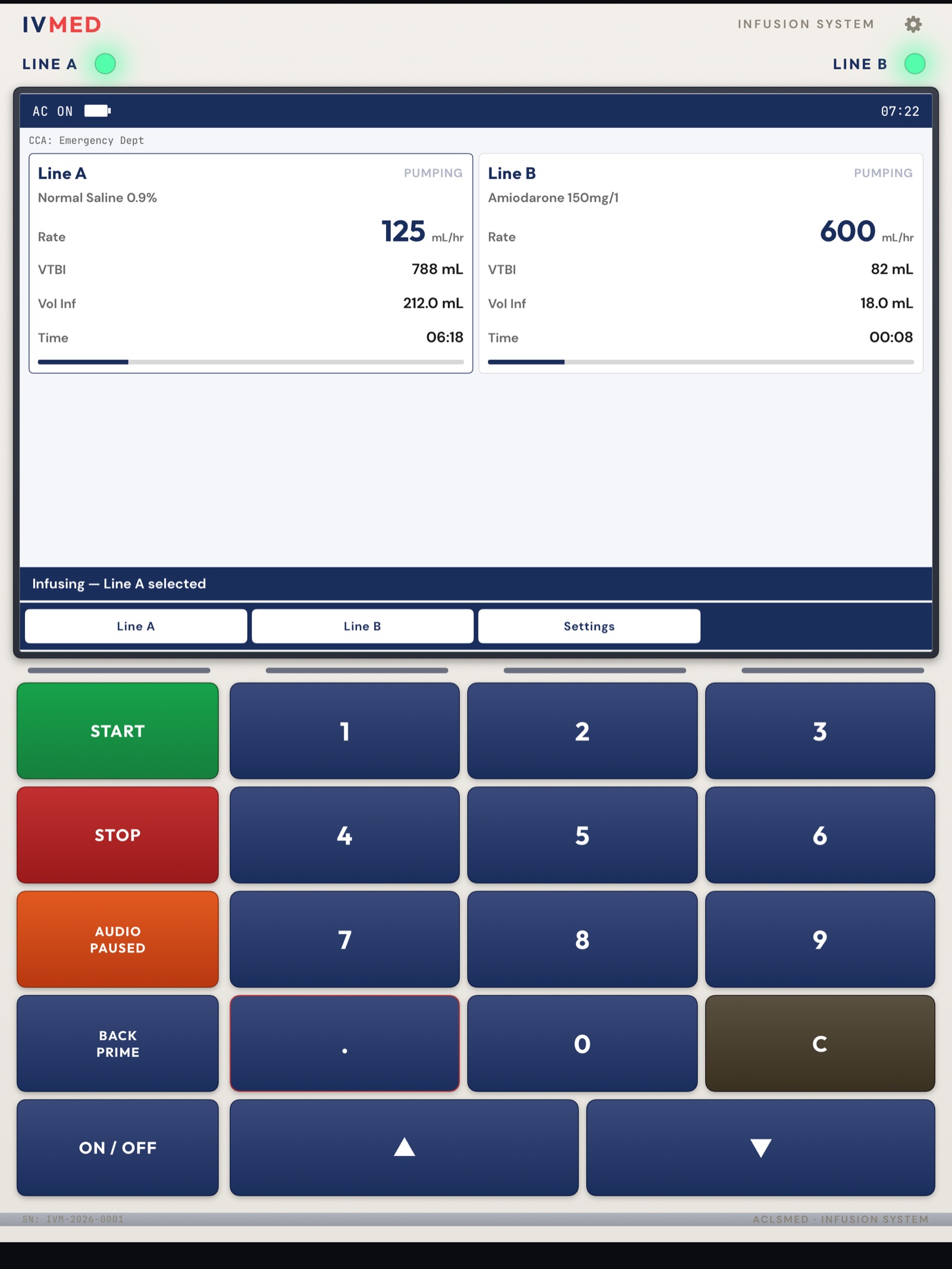 12345
12345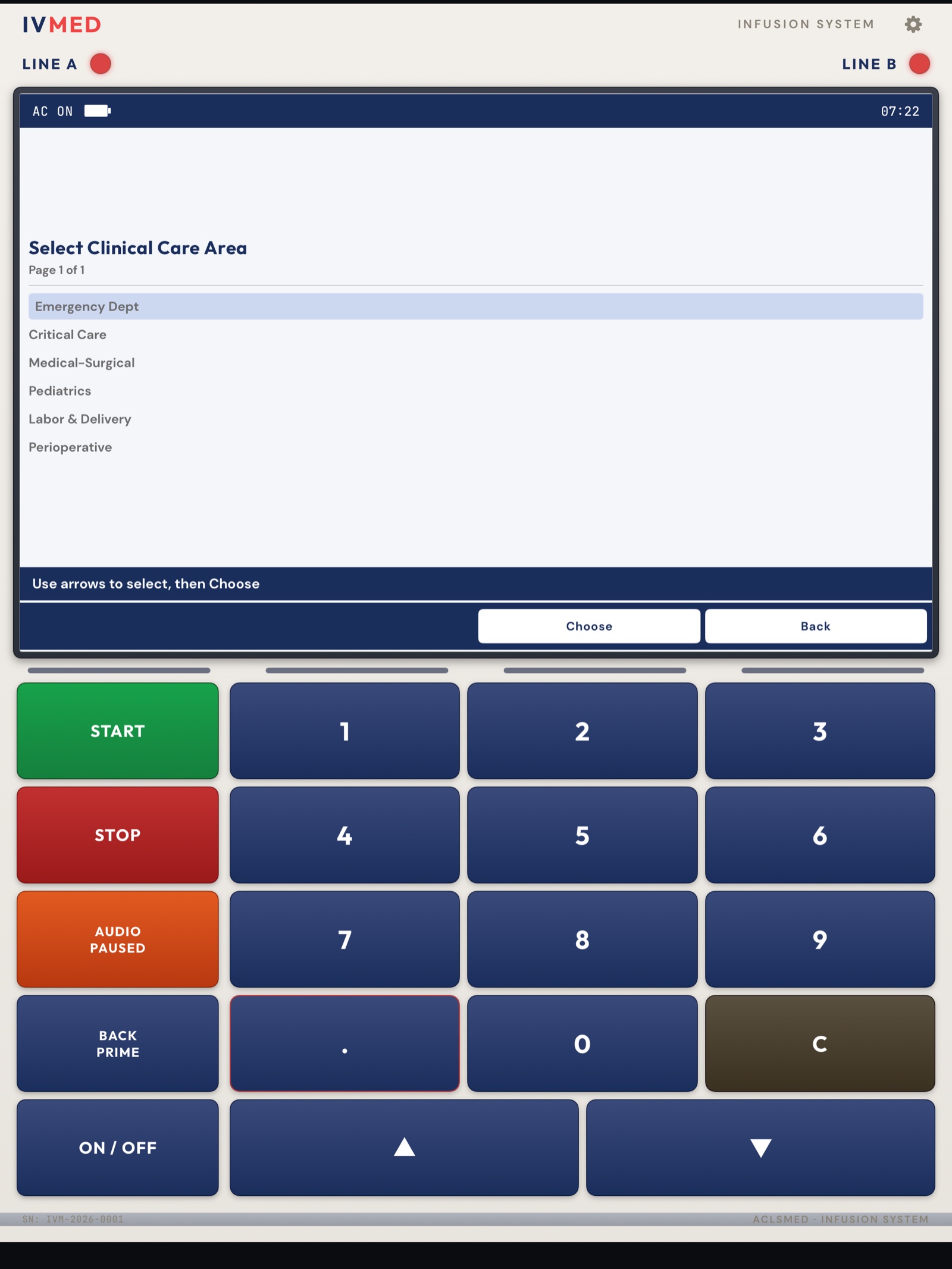
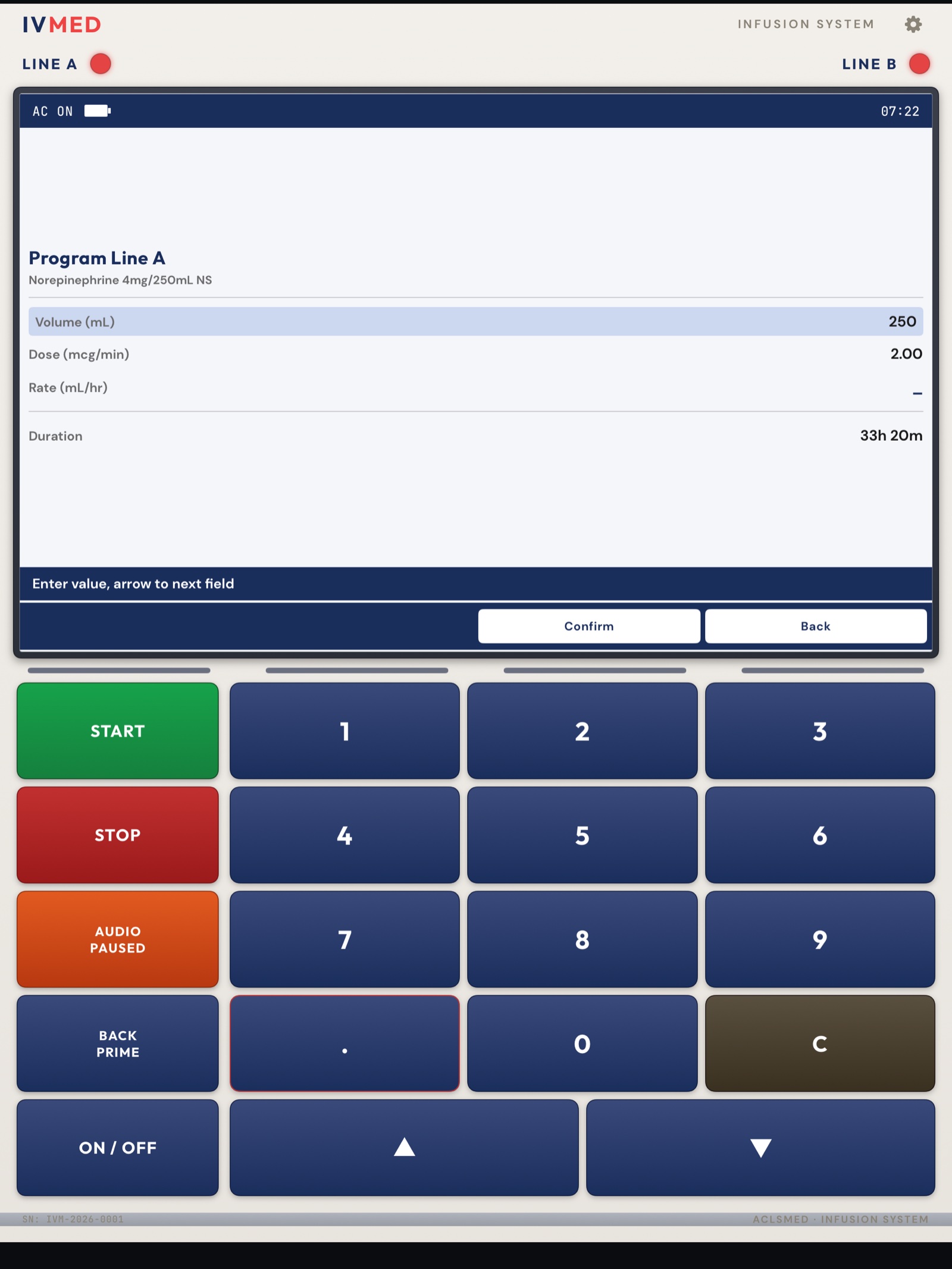
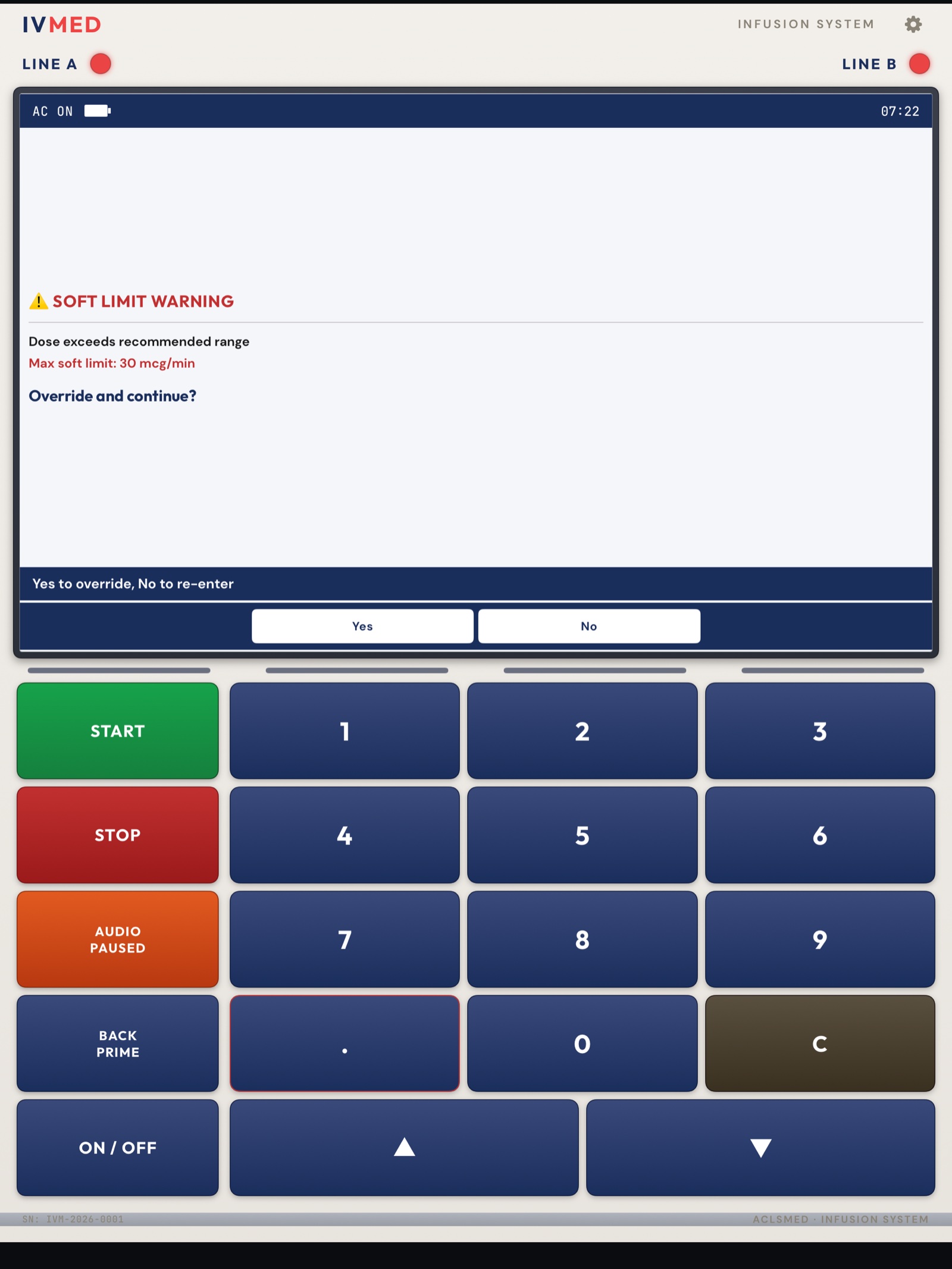
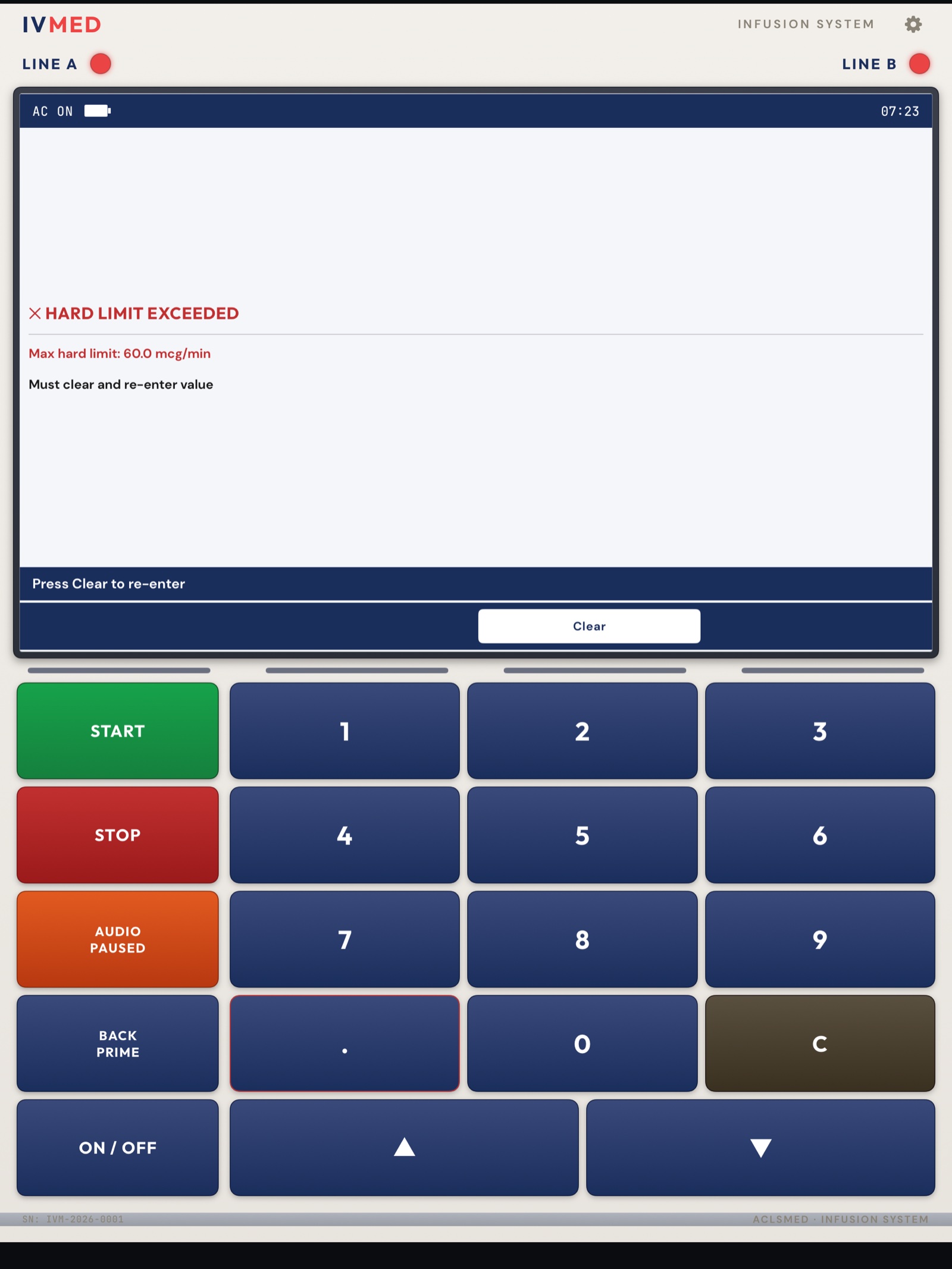
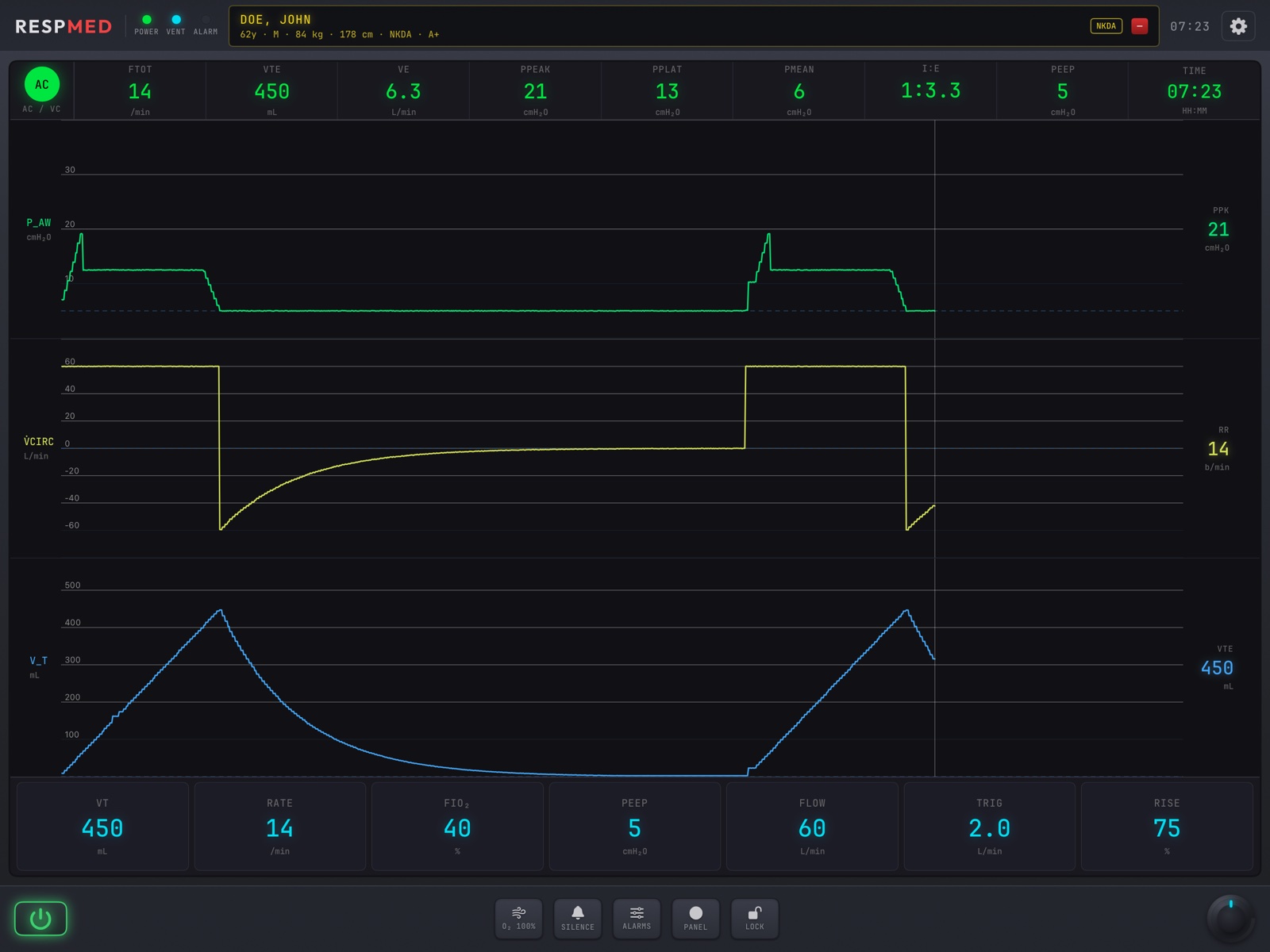 1234567