The instructor guide to ACLSMED™ IABP, the intra-aortic balloon pump timing trainer for iPad and Android tablets. The console key by key, Practice and the Instructor drawer, 8 lessons, 24 scored scenarios, the timing drill and the debrief, then how to run a class with it.
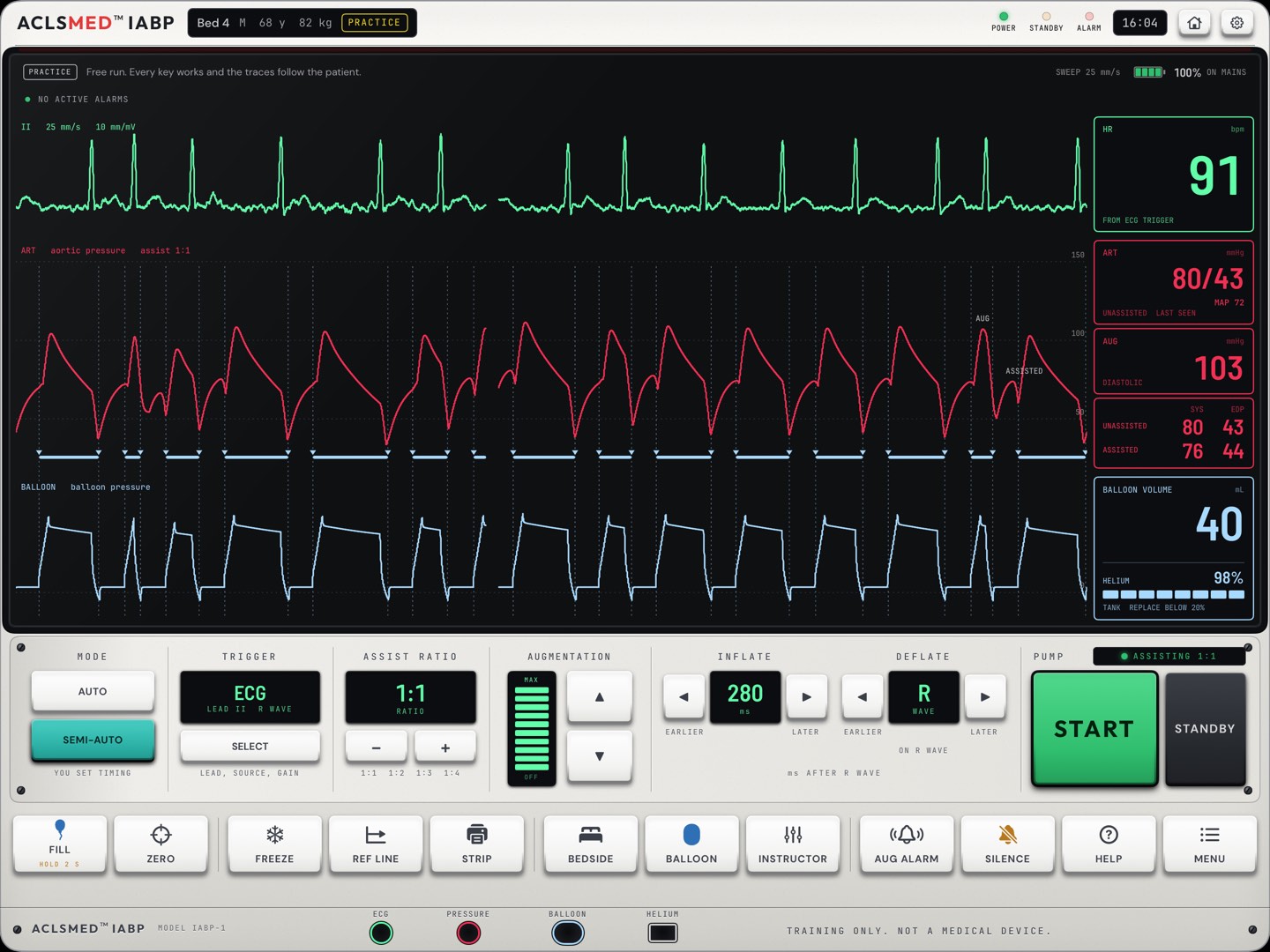
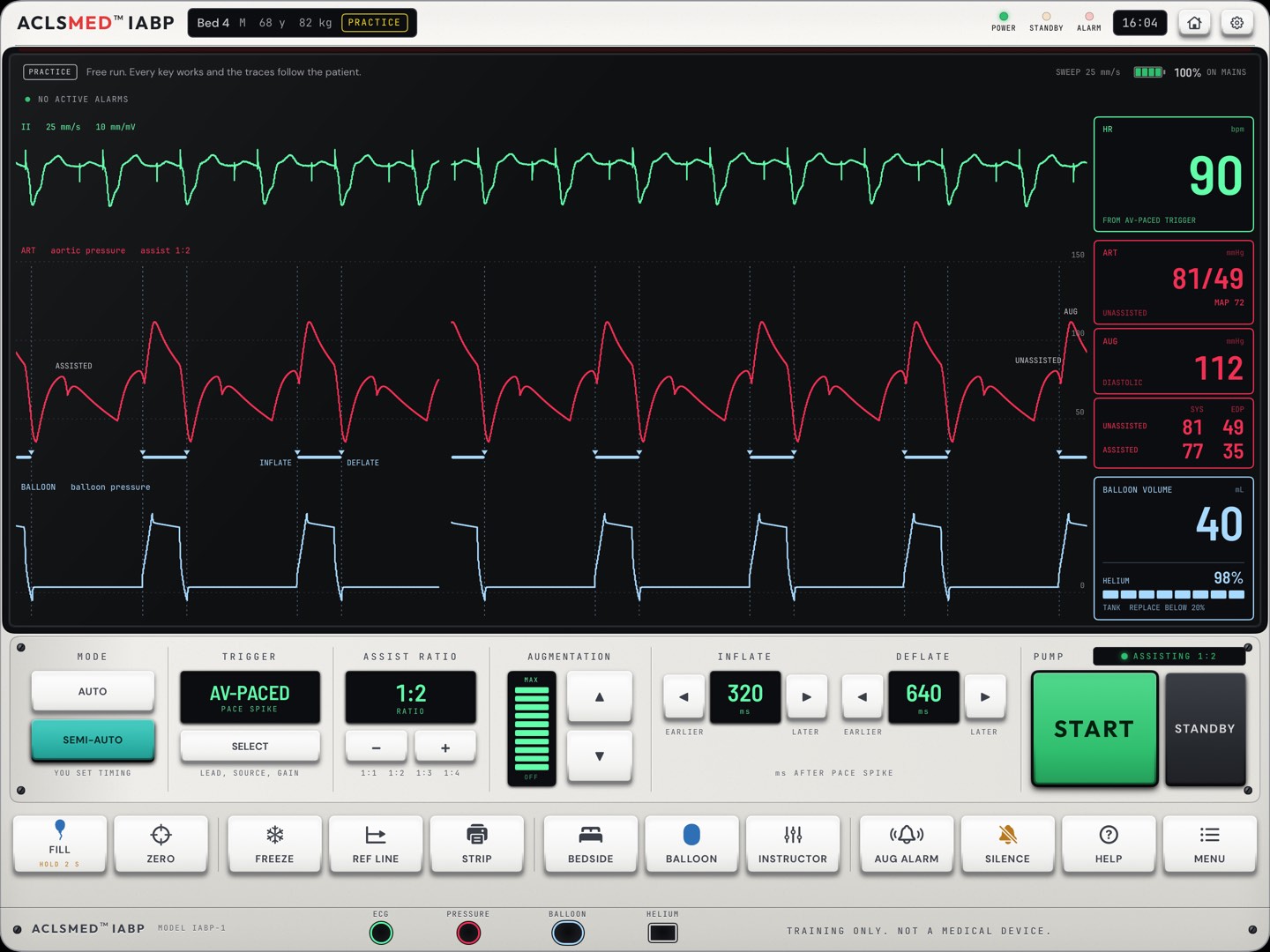
A generic balloon pump console and a patient, both driven by a physiology model that runs on the tablet. Move inflation and deflation and the arterial and balloon pressure traces change beat by beat.
FOUR MODES ON ONE CONSOLE
Learn · Practice · Scenarios · Timing drill
8 guided lessons, a free run with an Instructor drawer, 24 scored cases with a debrief, and a drill of ten timing strips a round.
NO ACCOUNT, NOTHING COLLECTED
Works offline
No sign-in, no server, no analytics. Scores stay on the tablet. Only App Store or Google Play purchases leave it.
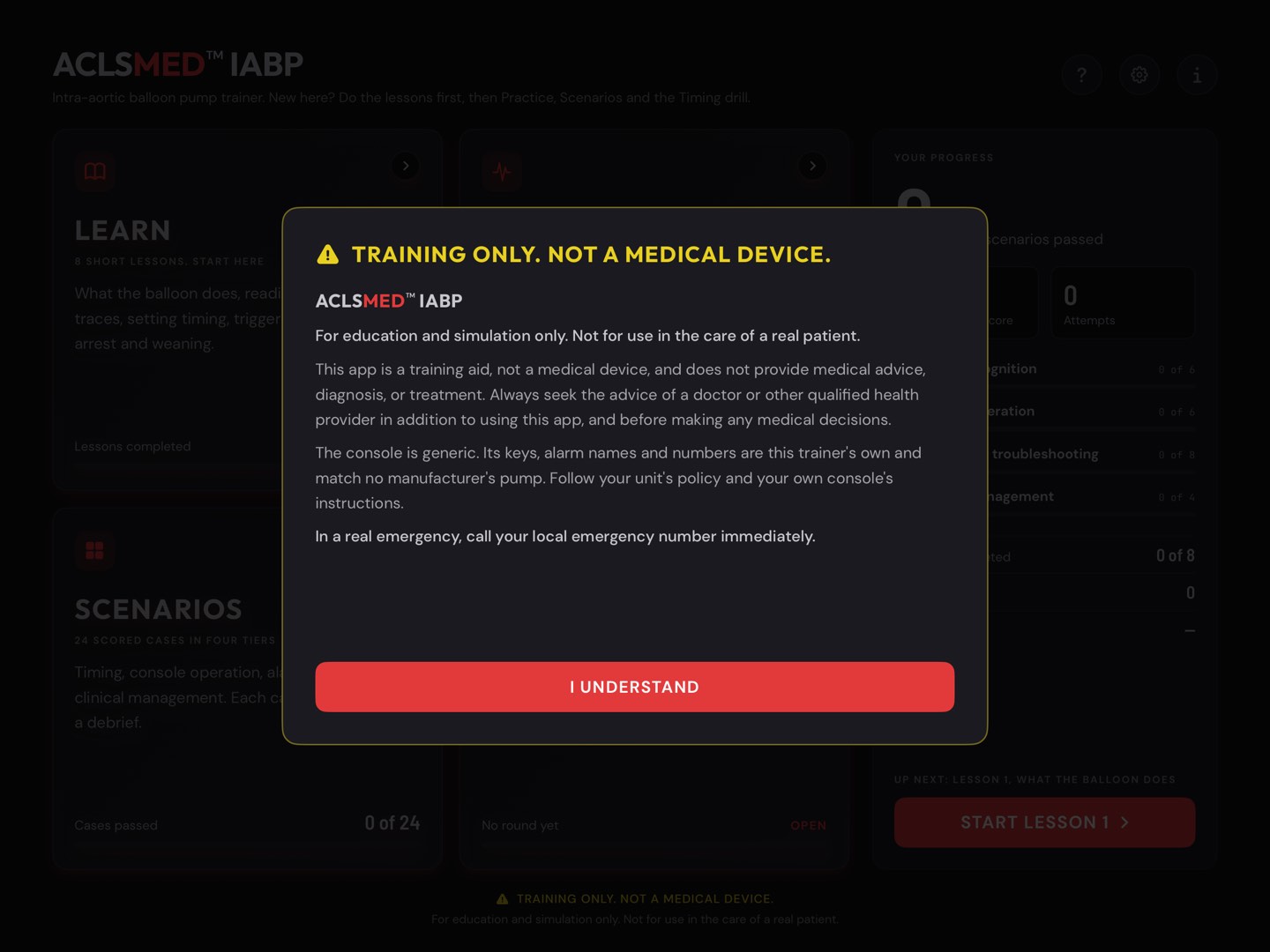
Training only. Not a medical device.
ACLSMED™ IABP is education software for practice on a simulated patient. It does not connect to any balloon pump or patient, does not give medical advice, and must never be used for a decision about a real patient.
A generic console
The console is the trainer's own design. Its keys, alarm names and numbers match no manufacturer's pump. Real consoles differ. Your unit policy and the operator's manual for your own console always come first.
Separate from ACLSMED™ SIM
IABP is its own app with its own purchase. It is not part of an ACLSMED™ SIM plan, Pro or Suite, and it needs no ACLSMED account.
ACLSMED™ IABP Instructor ManualStart here
Start here · Features 1 / 2
A pump that answers back
Three live traces
ECG, arterial pressure and balloon pressure, on one time base. The timing keys move inflation and deflation and the traces respond.
§ 02
You change the patient
The Instructor drawer, on the same tablet: rhythm, heart rate, blood pressure, contractility, and five faults at one tap.
§ 03
Lessons on the live console
8 short lessons, step by step, each ending in check questions. All of them are free.
§ 04
Work the alarm at the bedside
24 scored cases in four tiers. A bedside panel for pulses, both legs, the site, the tubing, the head of the bed and the chest X-ray.
§ 05
ACLSMED™ IABP Instructor ManualFeatures
Start here · Features 2 / 2
Scored, debriefed, repeatable
A debrief after every case
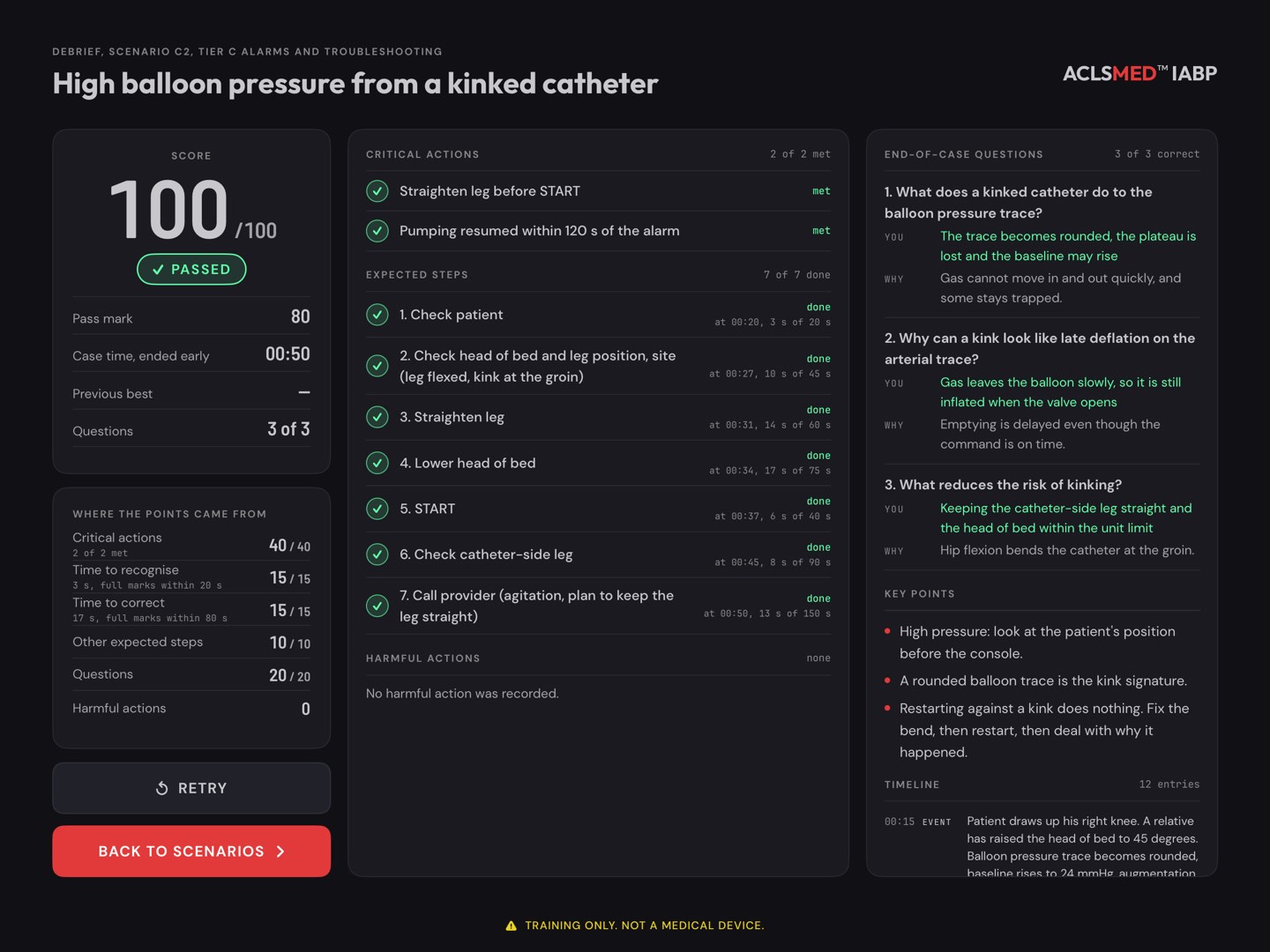
The score, the critical actions met or missed, each expected step and when it was done, harmful actions, the questions with their reasoning, and a timeline.
§ 05.08
Name the error, then fix it
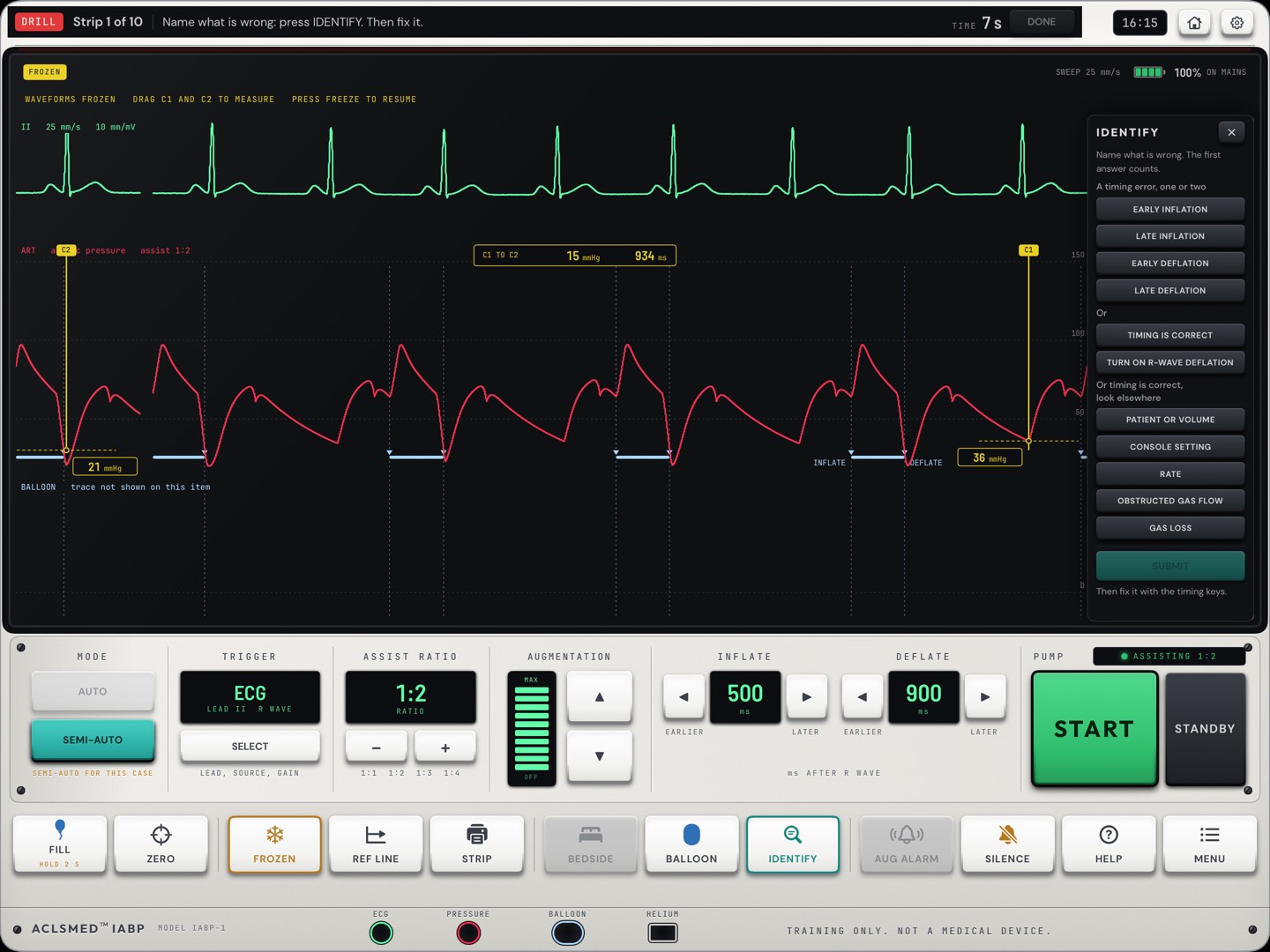
The timing drill: ten strips a round. Points for the right name, the right fix and speed.
§ 06
See the balloon itself
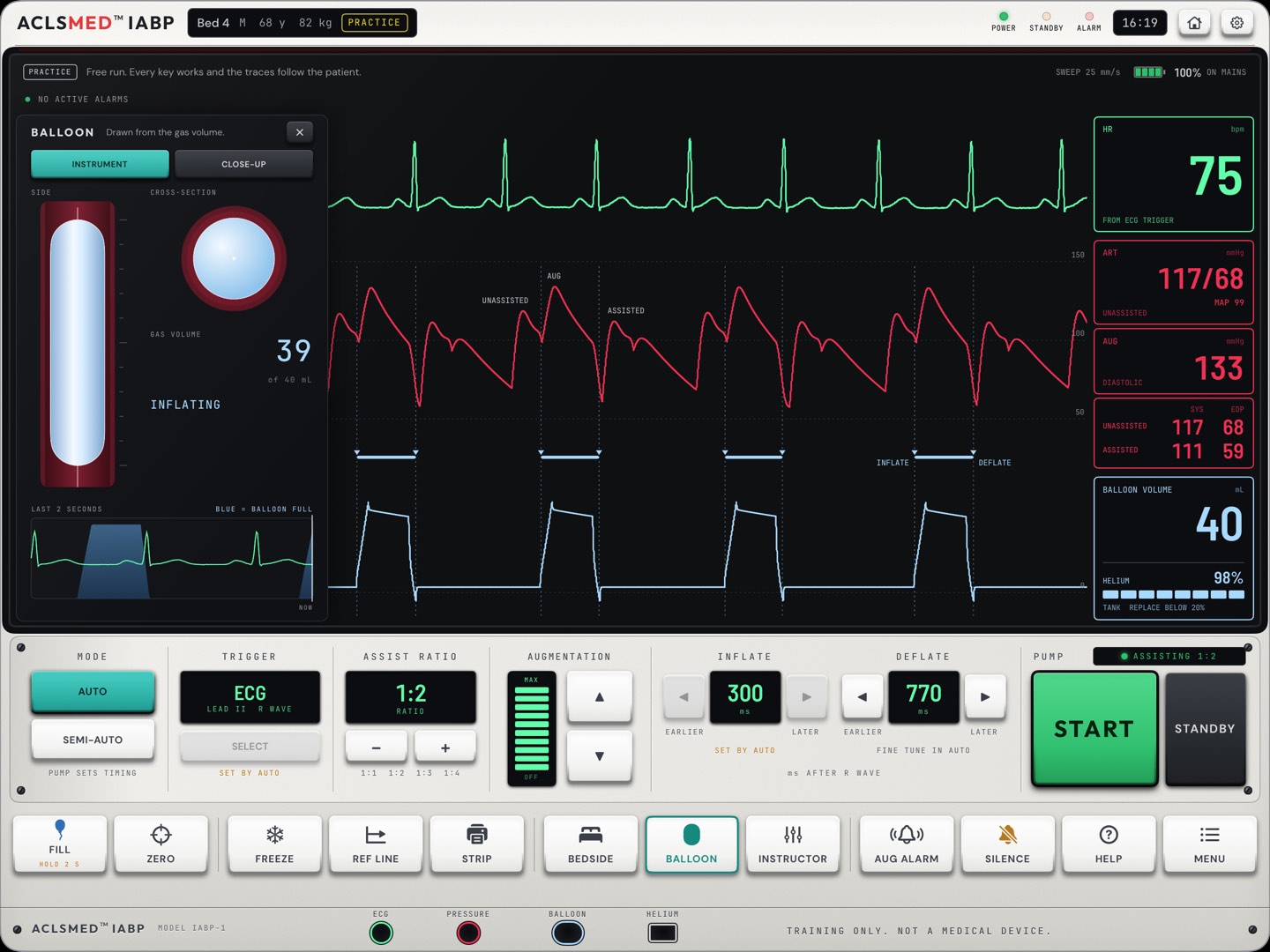
The BALLOON panel draws the balloon from the model's own gas volume, beat by beat, in two views.
§ 02.11
Private and offline
No account and no data collected. Progress stays on the tablet. Free to start; Pro adds every case and unlimited drill rounds.
§ 01 · § 09.03
ACLSMED™ IABP Instructor ManualFeatures
Start here
How this manual is built
§
Chapter
Read it when
01
Getting started
Installing, first launch, Home, Free and Pro
02
The console
Every trace, number, key, panel and alarm
03
Practice & the Instructor drawer
Running the patient yourself
04
Learn
The 8 lessons and their check questions
05
Scenarios & the debrief
The 24 cases, scoring and the debrief
06
Timing drill
Rounds, feedback and the round score
07
Settings, sound & demo
Silent, sound levels, shell, demo mode
08
Running a class
Lesson plans built on the app
09
Reference
Troubleshooting, privacy, scenario catalog
Reading on screen
←→ or space to move · Home / End · P prints or saves a PDF · F fullscreen. Add #n to the address to open slide n.
Every figure is real
Each picture is a capture of the app on a 13-inch iPad, not a mockup. Numbered markers on a figure match the numbered list beside it. The Android app has the same screens.
Clinical content
What the app teaches comes from its own clinical specification and is written for practice on a simulated patient. Where hospitals differ, the app says to follow unit policy, and so does this manual.
ACLSMED™ IABP Instructor ManualHow to read
§ 01
Getting started
Install, accept the notice, and you are on the console. No account, no pairing, no network.
§ 01.01 · Devices
One tablet per learner
iPad
App Store · iPadOS 17 or later
iPad only; there is no iPhone version, because the console needs the width. Any orientation works. Held upright, the console screens show Turn your iPad sideways for a bigger console.
ANDROID TABLET
Google Play · Android 8.0 or later
The same four modes, console and scoring as the iPad. The app runs in landscape. Purchases go through Google Play.
NOTHING TO PAIR
Learner and instructor share one screen
The patient, the pump and the Instructor drawer all live on the one tablet. There is no remote, no class code and no Wi-Fi to set up.
WORKS OFFLINE
After the install
Every mode runs with no connection. The store is needed only to buy, restore or manage Pro.
For a room
Give each learner or pair their own tablet. Each tablet keeps its own scores, and each one needs Pro for the Pro cases (§ 01.04). A tablet on a stand or a classroom screen can run demo mode for a walk-in display (§ 07.03).
Getting startedDevices
§ 01.02 · First launch
The training notice
Open ACLSMED™ IABP. The first launch shows the training notice: education and simulation only, not for use in the care of a real patient, not a medical device, no medical advice.
Read it with the learner, then tap I UNDERSTAND. It does not come back on its own.
Home opens. The i key on Home (About this trainer) and Settings > Guides > Training notice show it again at any time.
Say it out loud
The notice is the app's labelling. Before a class, say the same thing: this is a generic teaching console, and the console on your unit, its manual and your policy come first.
Getting startedFirst launch
§ 01.03 · Home
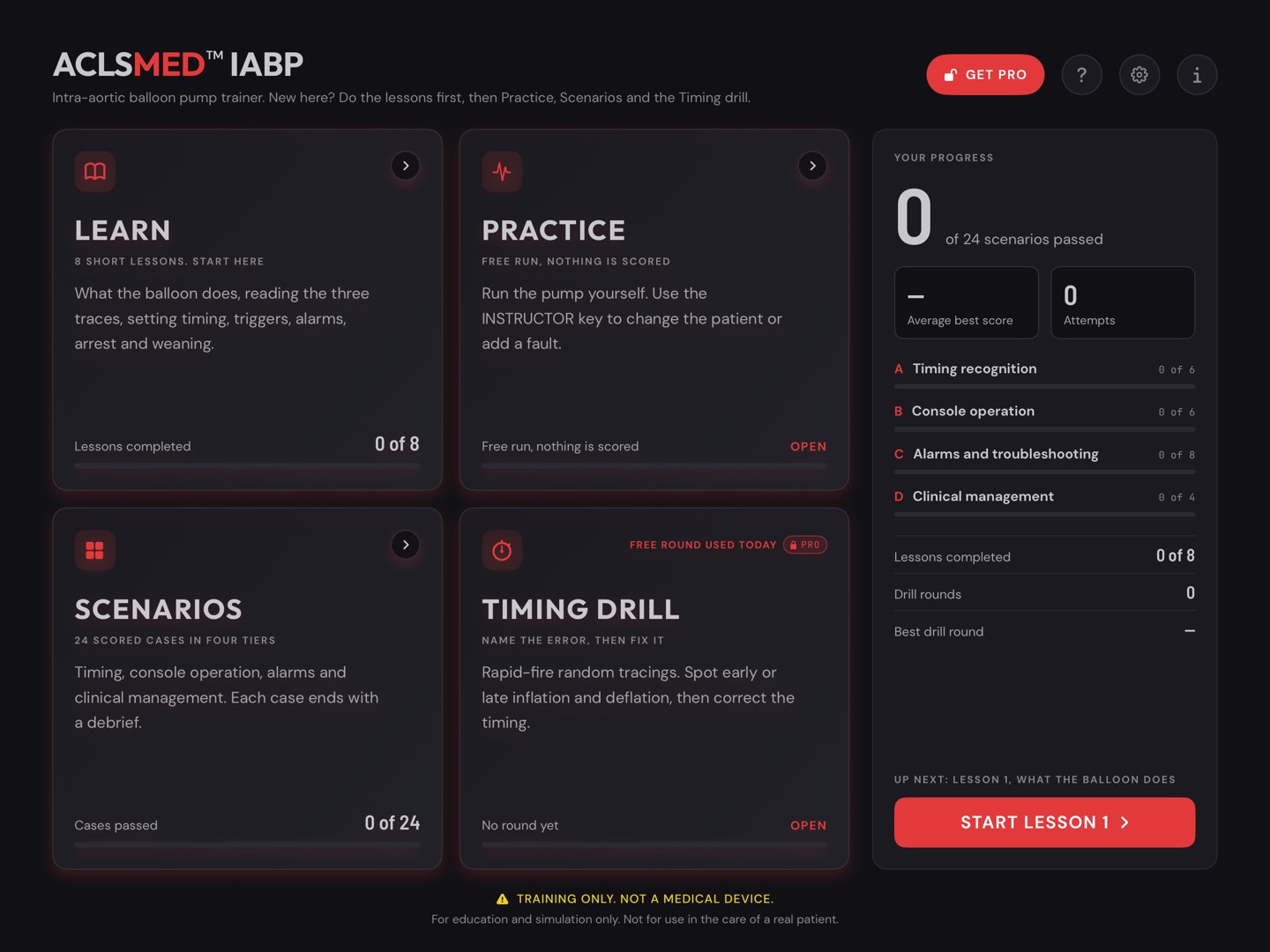
Home: four modes and the progress
GET PRO opens the paywall. Hidden once Pro is active.
? opens Help: every key, trace and number, how each mode is scored, and a glossary (§ 07.04).
Gear opens Settings (§ 07).
i shows the training notice again.
LEARN · lessons completed, of 8. The app says: start here.
PRACTICE · the free run. Nothing is scored.
SCENARIOS · cases passed, of 24.
TIMING DRILL · the best round. Free shows FREE ROUND USED TODAY once the day's round has started.
YOUR PROGRESS · cases passed, average best score, attempts, lessons, drill rounds, and an UP NEXT button.
123456789
Getting startedHome
§ 01.04 · Free and Pro
What is free, and what Pro adds
Free
Pro
Practice with the Instructor drawer
Yes
Yes
Learn: all 8 lessons
Yes
Yes
Scenarios
4 cases: A1, A2, B1, C1
All 24
Timing drill
One round a calendar day, counted when it starts
Unlimited
Scores & best results
Kept and shown
Kept and shown
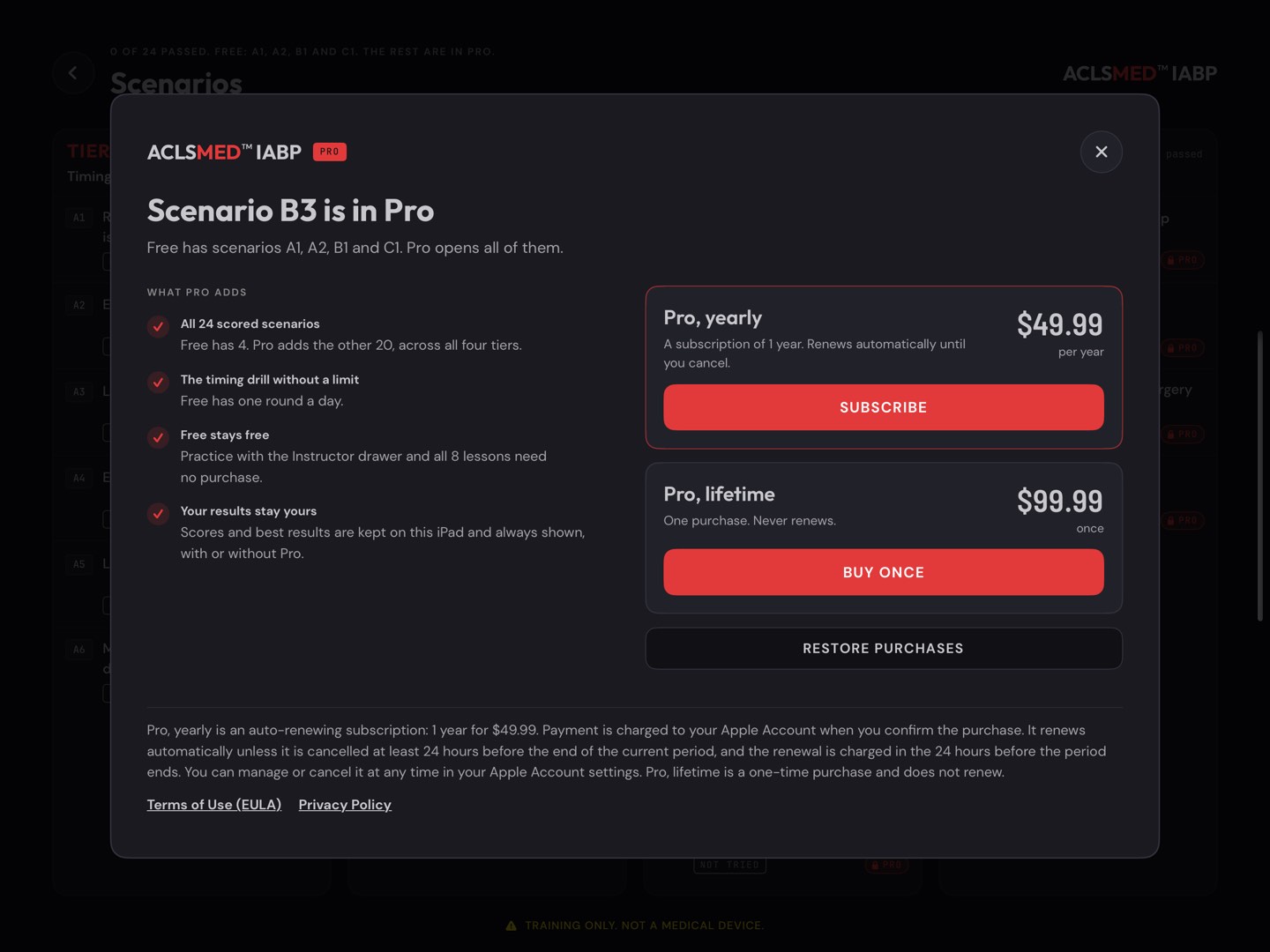
PRO, YEARLY
USD 49.99 a year
Auto-renewing subscription. Renews unless cancelled at least 24 hours before the end of the period.
PRO, LIFETIME
USD 99.99 once
One purchase. Never renews.
No trial: the free tier does not expire. Prices in US dollars; the store shows the local price. A locked case keeps its results and best score on the list.
Getting startedFree and Pro
§ 01.05 · Buying, restoring, managing
Pro lives on the store account
Open the paywall from GET PRO on Home, from a locked case on the Scenarios list, from a second drill round on the same day, or from Settings > Pro > Get Pro.
Choose SUBSCRIBE (yearly) or BUY ONCE (lifetime) and confirm with the store.
All 24 cases open at once. Settings reads Pro is active on this Apple Account.
New tablet, same account? Tap RESTORE PURCHASES on the paywall or in Settings.
Cancel or change the yearly plan with Manage subscription in Settings, or in the store's account settings.
Read from the store, never stored
The app asks the App Store (or Google Play) whether Pro is active at launch, each time the app comes back to the front, and on every purchase update. A refund, a revoked purchase or an expired year closes Pro.
Not an ACLSMED™ SIM plan
ACLSMED™ SIM Pro, the Clinical Suite and their seats do not unlock IABP, and IABP Pro does not unlock SIM. There is no ACLSMED account to sign in to.
Android
On Android the plans are bought and managed in Google Play, under its terms. Restore re-reads the Play record. Family Sharing does not apply.
Getting startedBuying and restoring
§ 02
The console
One generic pump console runs all four modes. Learn it once here; every lesson, case and drill strip uses the same glass and the same keys.
§ 02.01 · Anatomy
The console, top to bottom
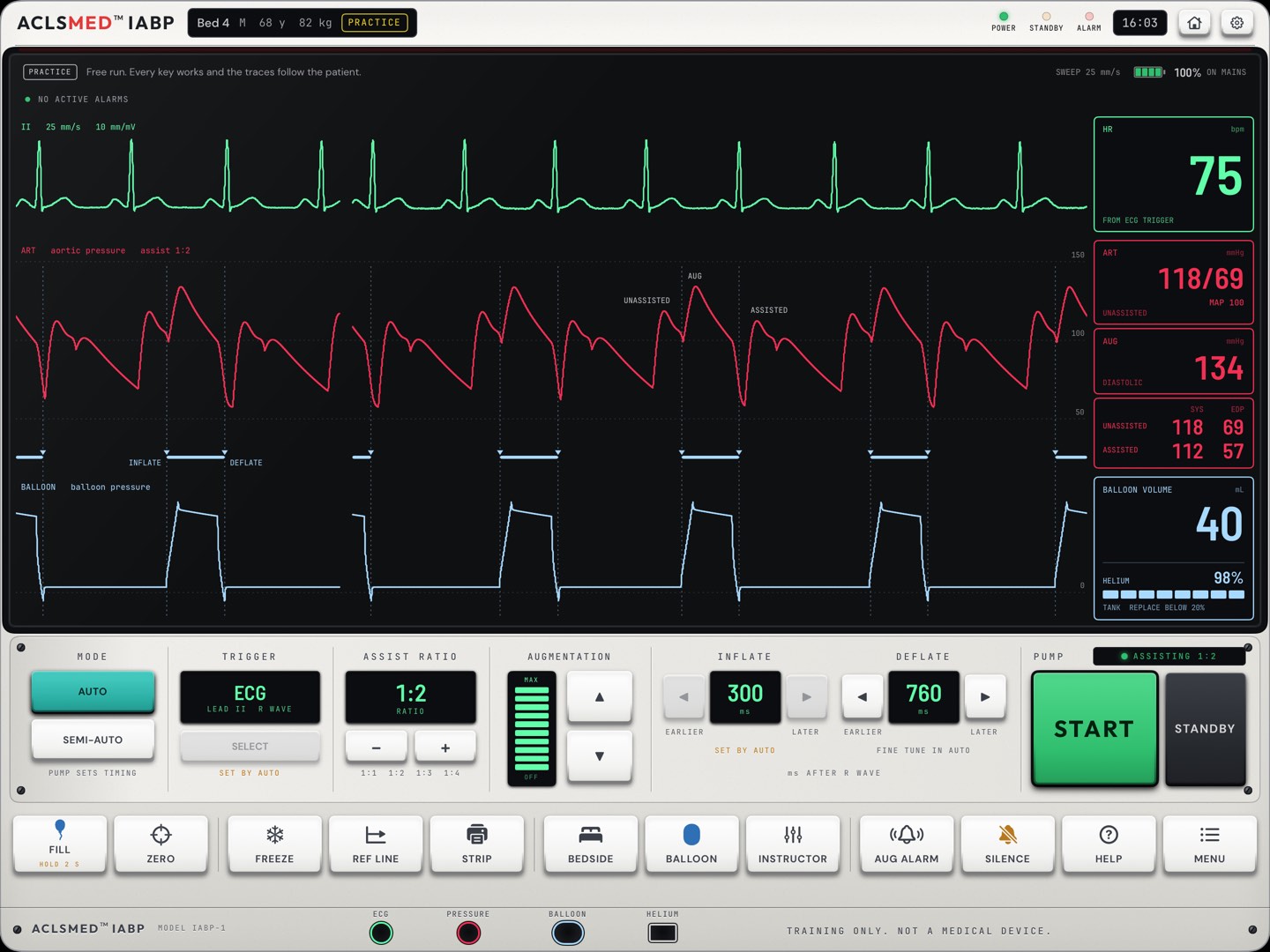
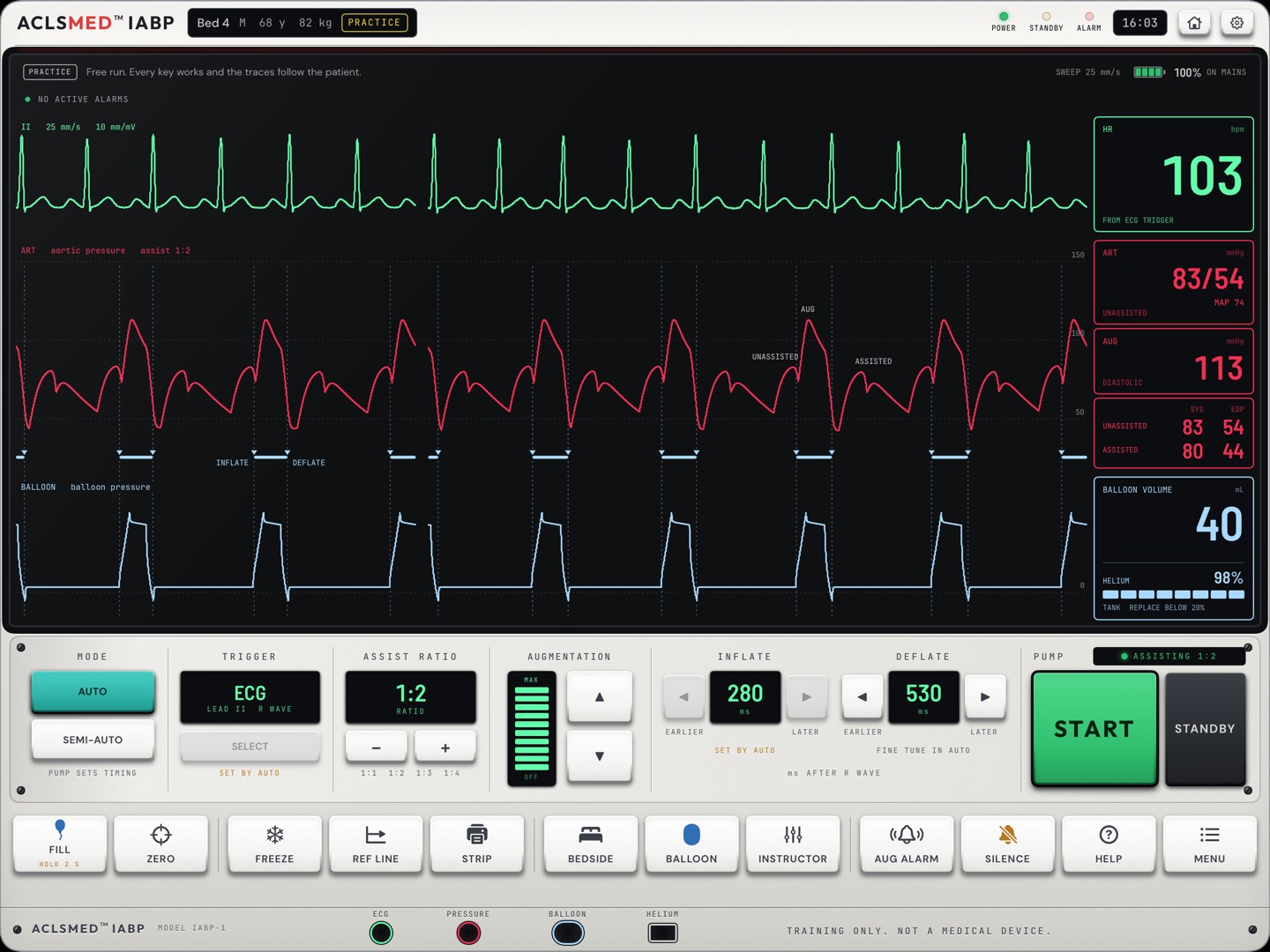
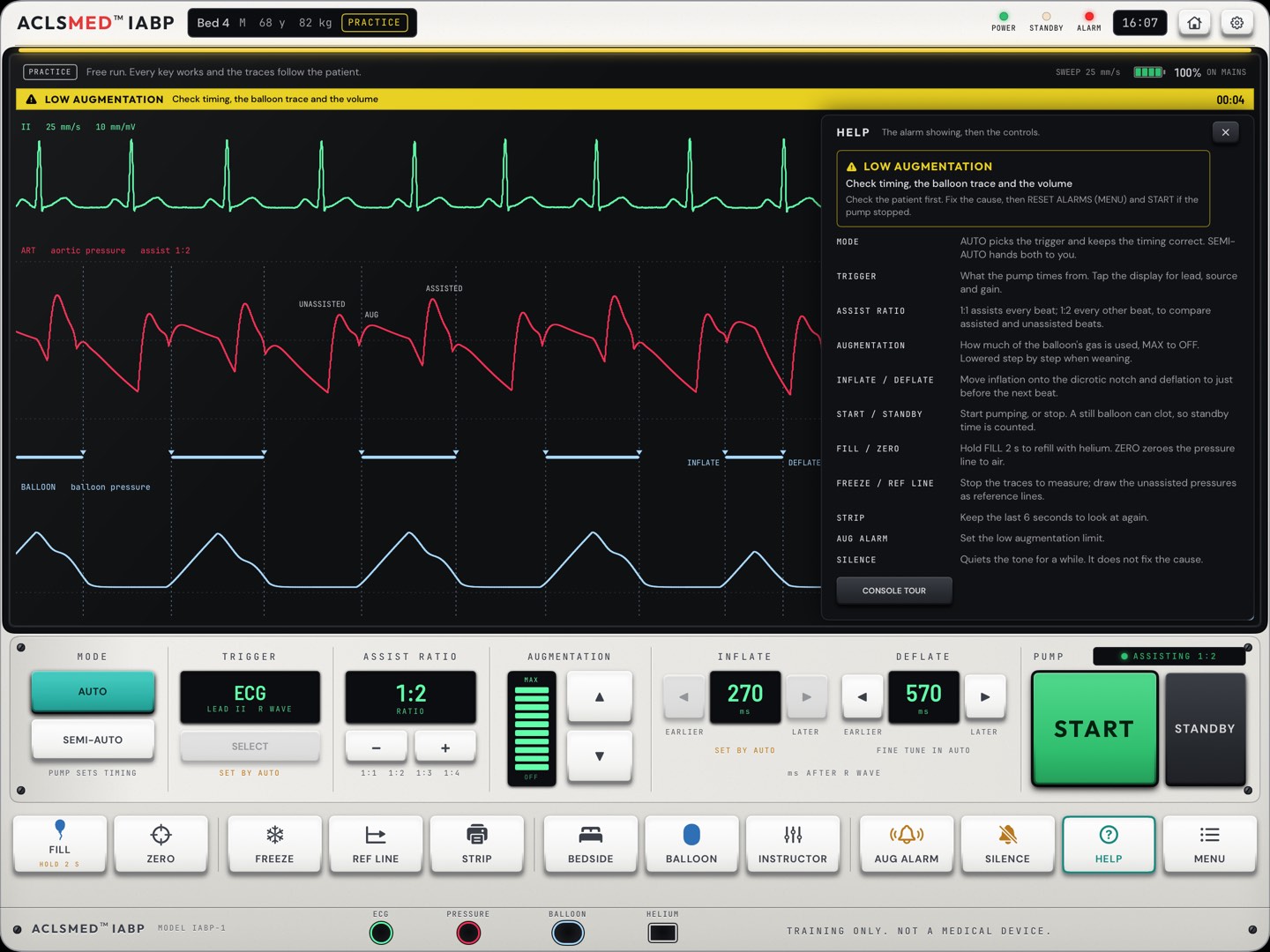
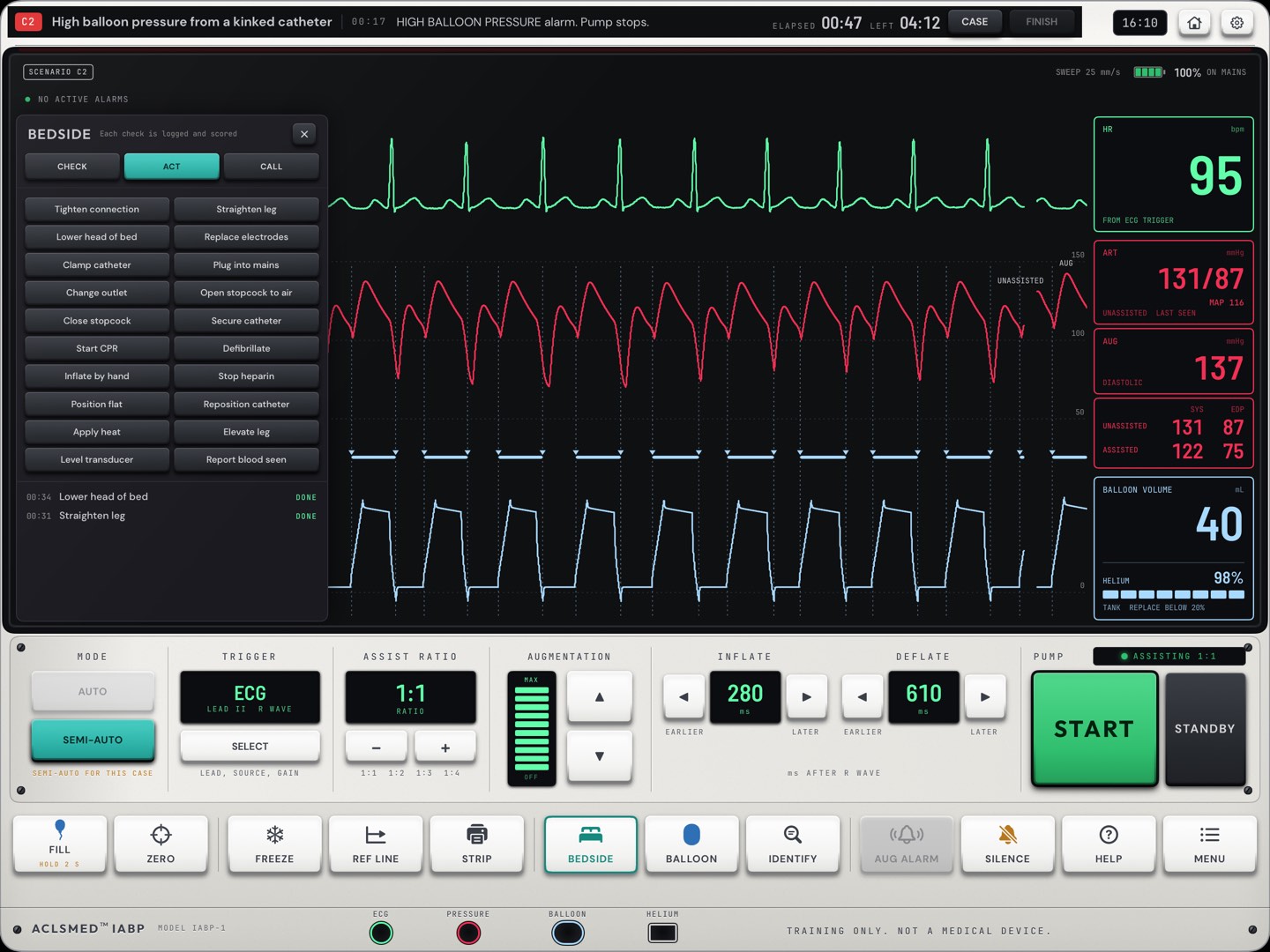
Top bar · bed and patient, the mode chip (PRACTICE, or the case), POWER, STANDBY and ALARM lamps, the clock, Home and Settings.
Alarm line · NO ACTIVE ALARMS, or the alarm with what to check. Sweep speed and battery at the right.
ECG · green, lead II. The pump times from the R wave.
Arterial pressure · red, with the UNASSISTED, AUG and ASSISTED labels and the INFLATE and DEFLATE marks.
Balloon pressure · blue, the gas pressure in the balloon.
Number tiles · heart rate, arterial pressure, augmentation, assisted and unassisted pressures, balloon volume and helium.
Control deck · MODE, TRIGGER, ASSIST RATIO, AUGMENTATION, INFLATE, DEFLATE and the PUMP keys.
Key row · twelve keys, FILL to MENU.
The shell comes in four colors: white (the default), ivory, blue and graphite. The keys are the same in each.
12345678
The consoleAnatomy
§ 02.02 · The three traces and the numbers
What each trace shows
Green · ECG, lead II. The pump times each inflation and deflation from the R wave it finds here.
Red · arterial pressure. With correct timing the balloon fills at the dicrotic notch and makes a second, higher peak: augmentation. The AUG and ASSISTED labels and the dashed inflation marks sit on this trace.
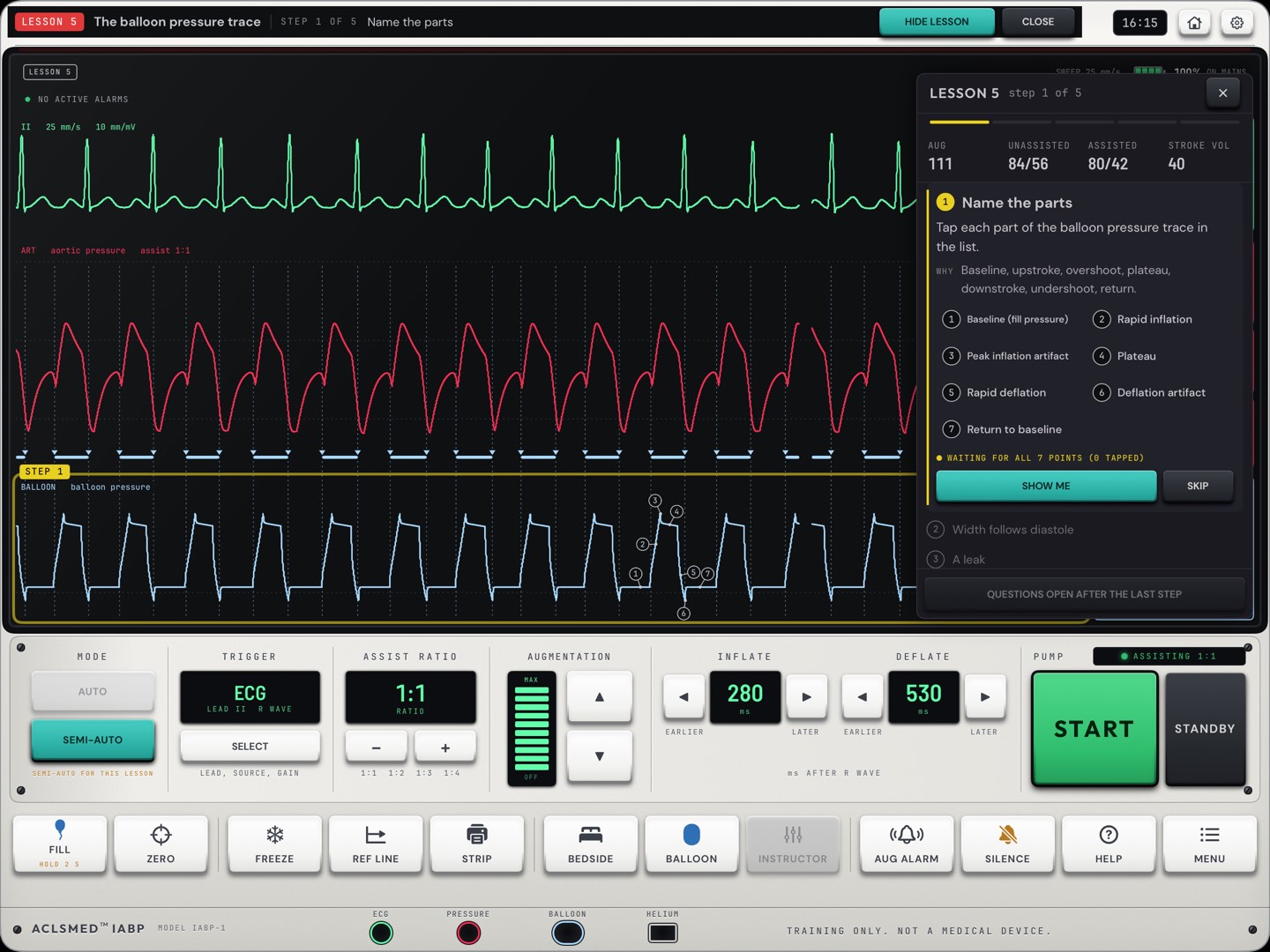
Blue · balloon pressure. A sharp rise, a flat plateau while the balloon is full, then a drop below zero as it empties. Leaks, kinks and fill problems change its shape.
Sweep. Left to right at 25 mm/s. The gap is where new trace is being drawn.
Tiles. Heart rate, arterial pressure and mean, augmentation, unassisted and assisted systolic and end-diastolic pressures, balloon volume and helium.
Teach at 1:2
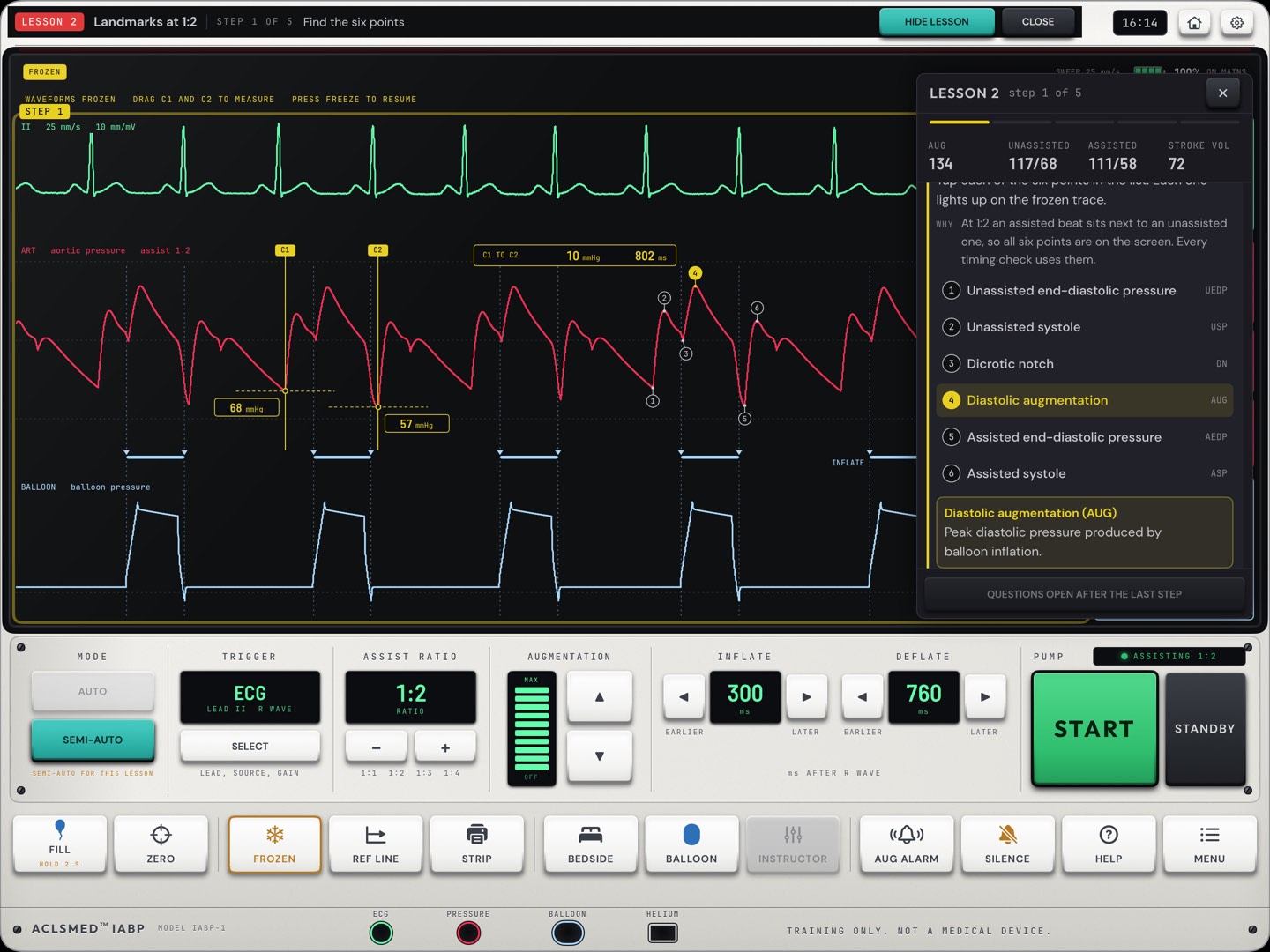
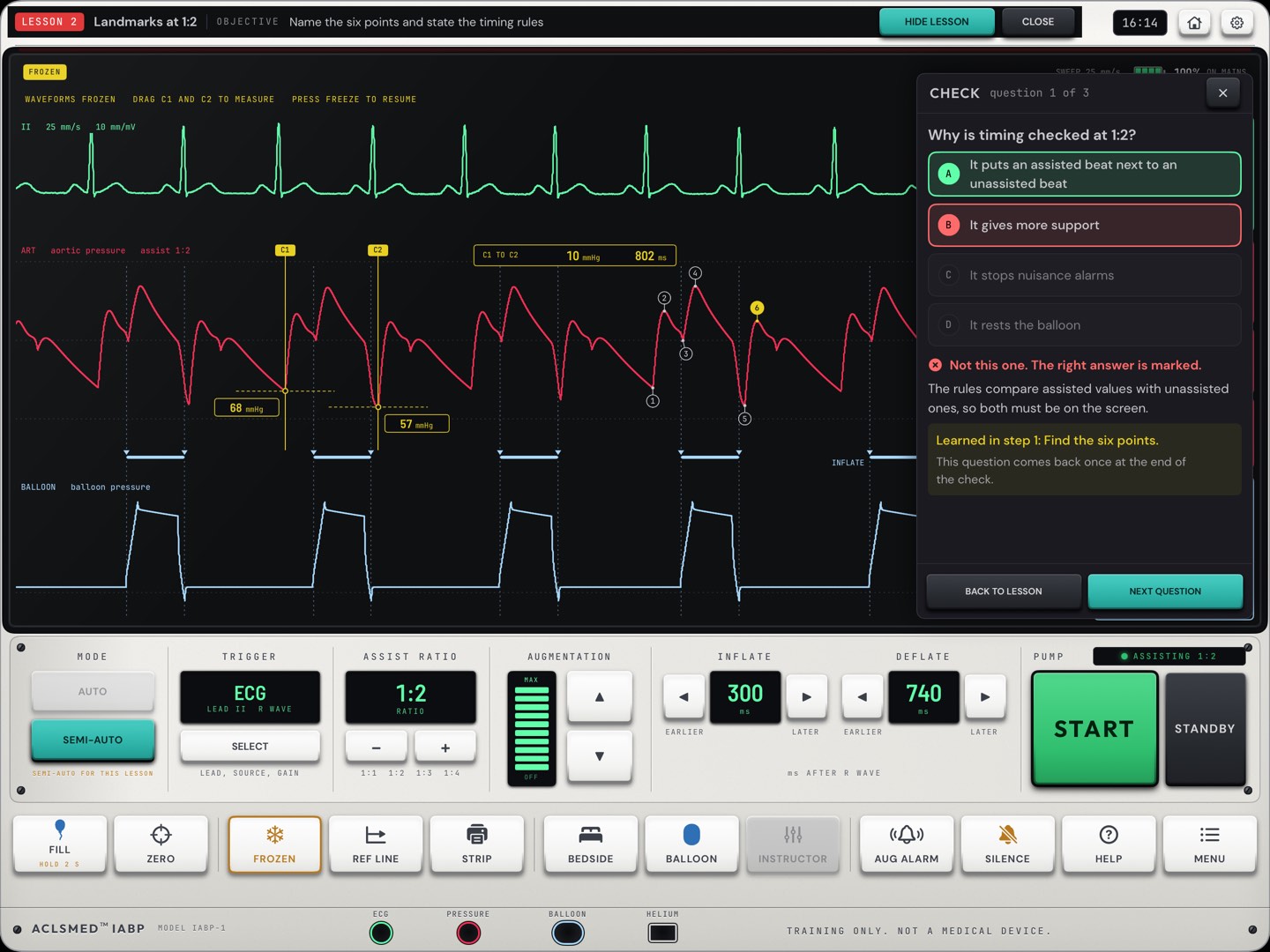
At 1:2 an assisted beat sits next to an unassisted one, so all six landmarks are on the screen at once. That is where Lesson 2 and every timing check start.
The consoleTraces and numbers
§ 02.03 · Buttons reference · control deck
The control deck, left to right
Control
Keys
What it does
Note
MODE
AUTO · SEMI-AUTO
AUTO picks the trigger and keeps the timing correct; deflation can still be fine-tuned. SEMI-AUTO hands trigger and timing to the learner.
Lessons, scenarios and the drill run in SEMI-AUTO
TRIGGER
display · panel
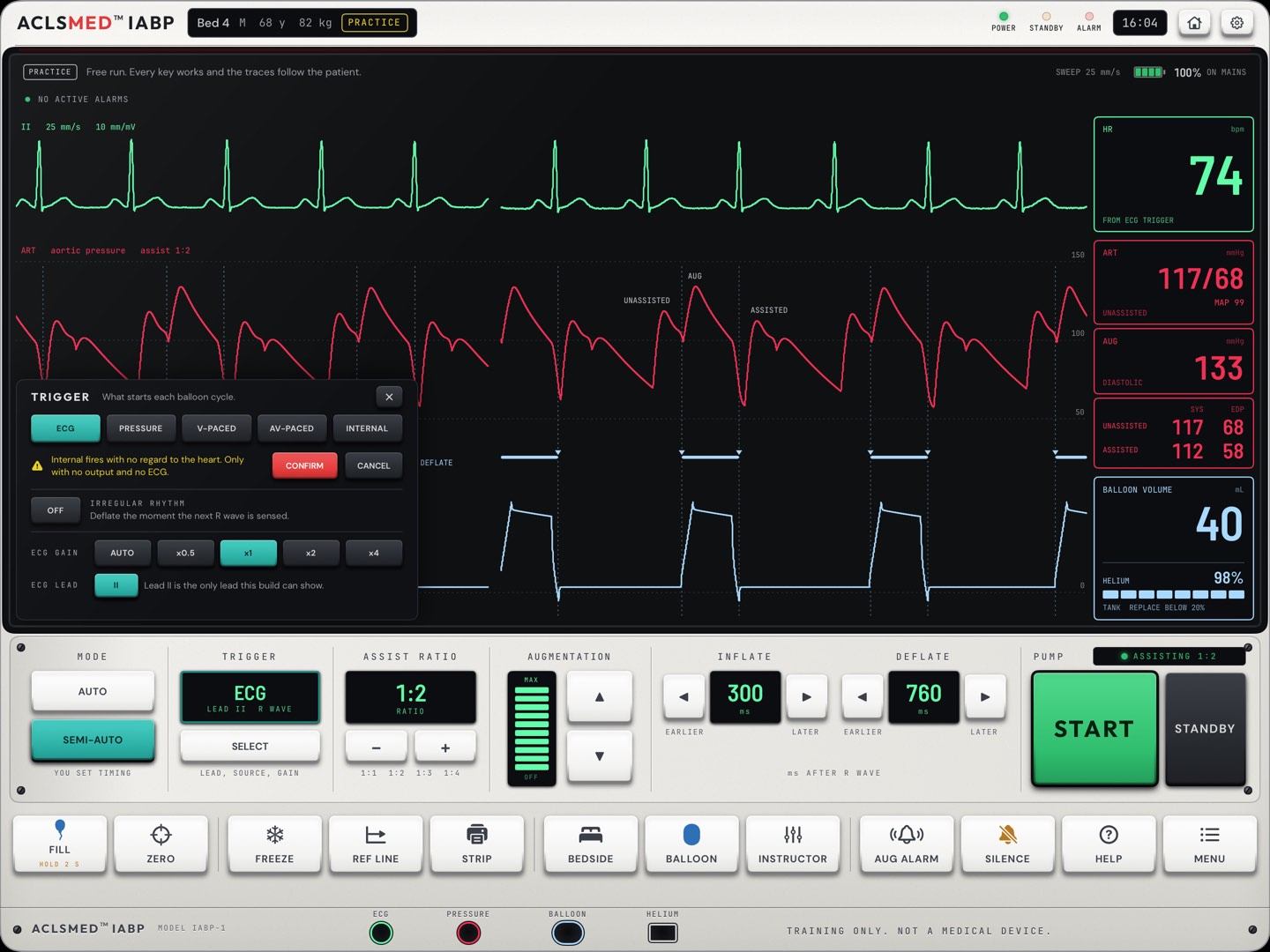
What the pump times from: ECG, pressure, a pacer or an internal rate. Tap the display for lead, source and gain (§ 02.05).
Choosing a source is SEMI-AUTO's job
ASSIST RATIO
− · +
1:1 assists every beat, 1:2 every other beat, then 1:3 and 1:4.
Check timing at 1:2, then go back to the ordered ratio
AUGMENTATION
− · +
How much of the balloon's gas is used, from MAX down to OFF. Stepped down when weaning.
A caution shows when it is set low
INFLATE
EARLIER · LATER
Moves inflation, in milliseconds after the trigger, 10 ms a press. Hold the key to move faster.
Locked in AUTO
DEFLATE
EARLIER · LATER
Moves deflation the same way.
Fine-tune works in AUTO
START
pump keys
Starts pumping. After a pump-stopping alarm: fix the cause, RESET ALARMS (MENU), then START.
Confirm the patient first
STANDBY
pump keys
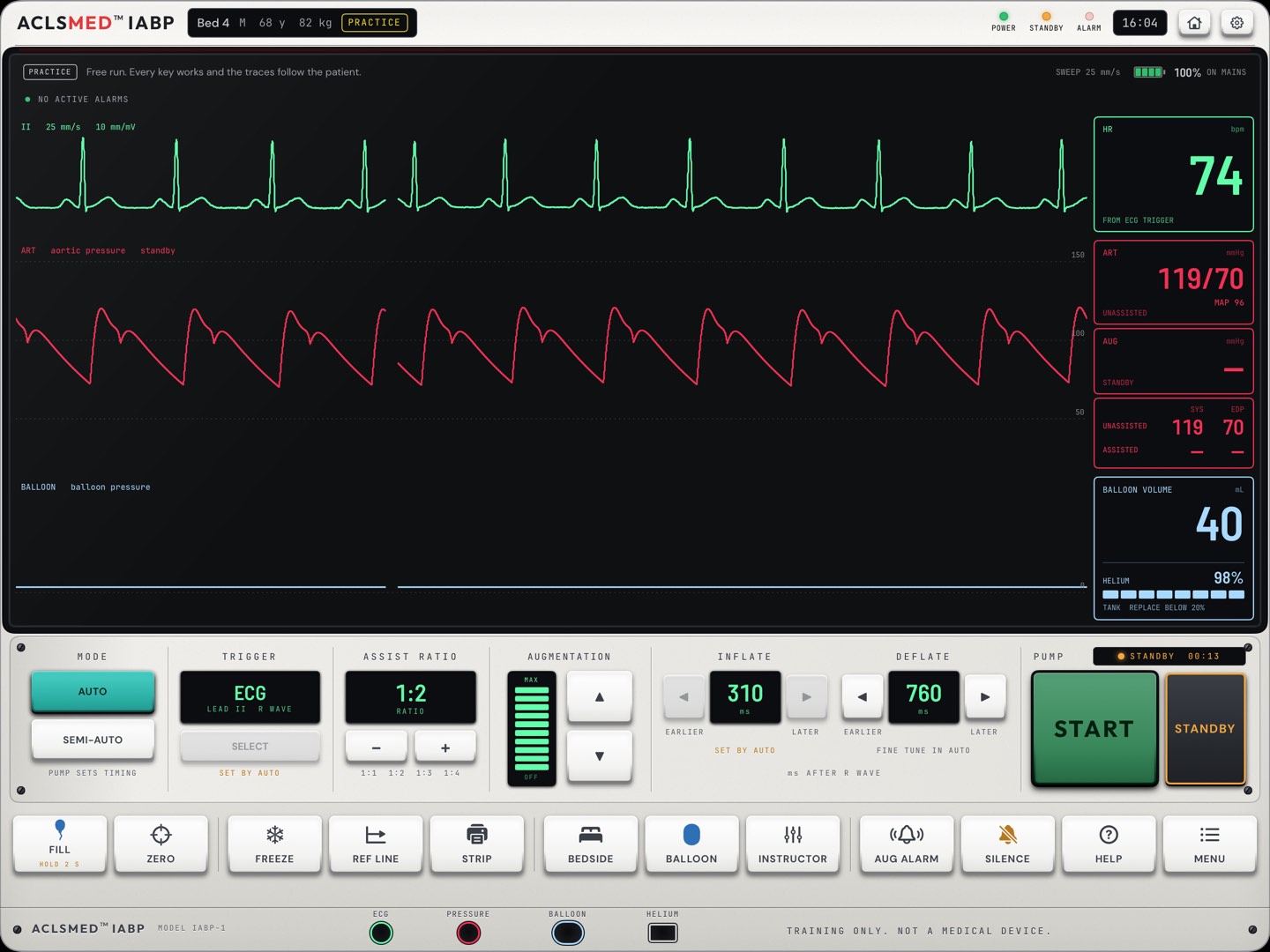
Stops pumping and holds the balloon still. The console counts the standby time, because a still balloon can clot.
STANDBY TIME alarm if left too long
The consoleControl deck
§ 02.04 · Buttons reference · key row
The twelve keys along the bottom
Key
What it does
Note
FILL
Hold 2 s to refill the balloon with helium.
A fill needs a trigger, helium and an intact connection
ZERO
Opens the zero panel: zero the arterial pressure line to air (§ 02.07).
Open the stopcock to air first
FREEZE
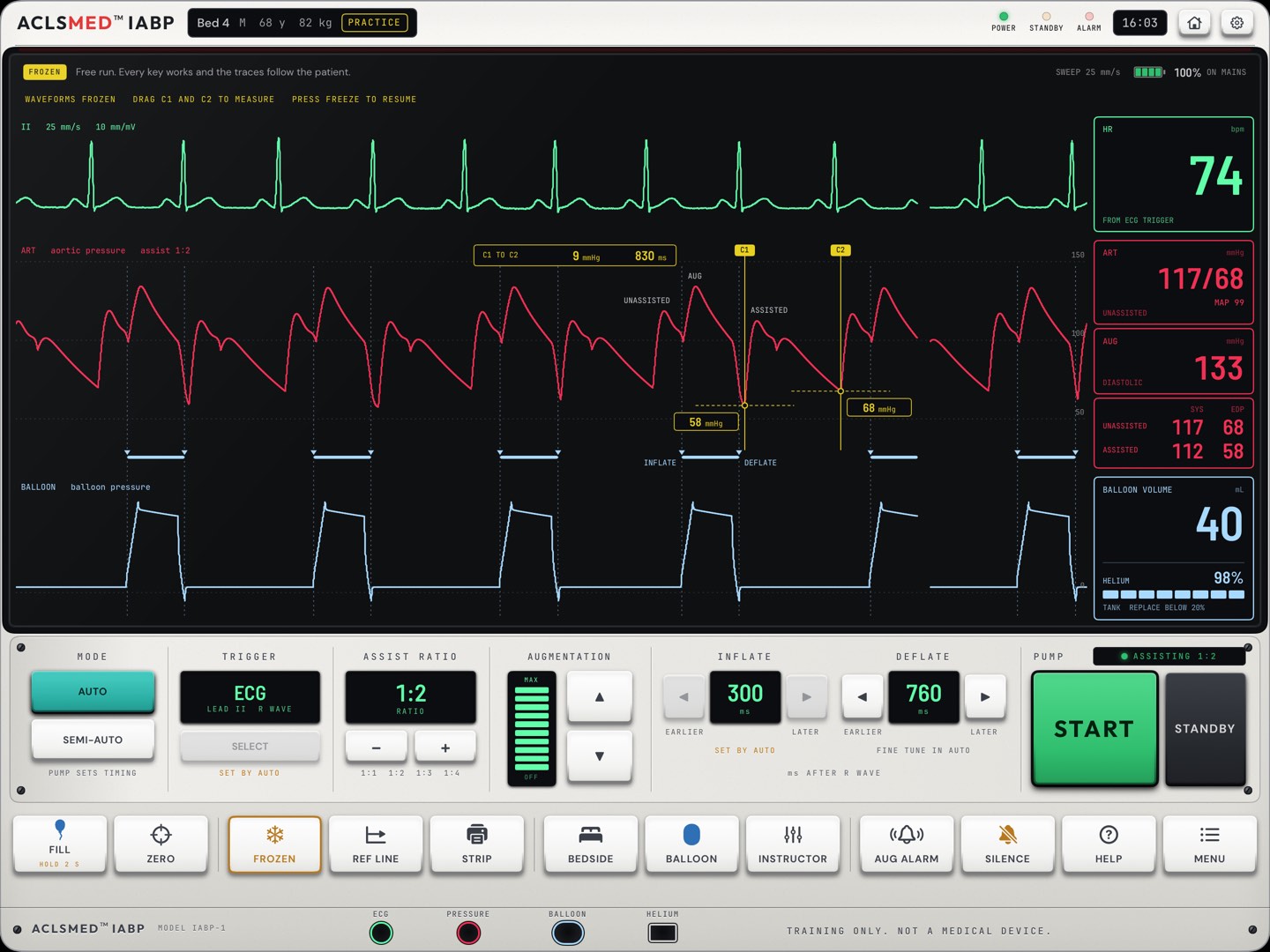
Stops the traces. Drag the cursors C1 and C2 to measure. Pumping goes on.
§ 02.06
REF LINE
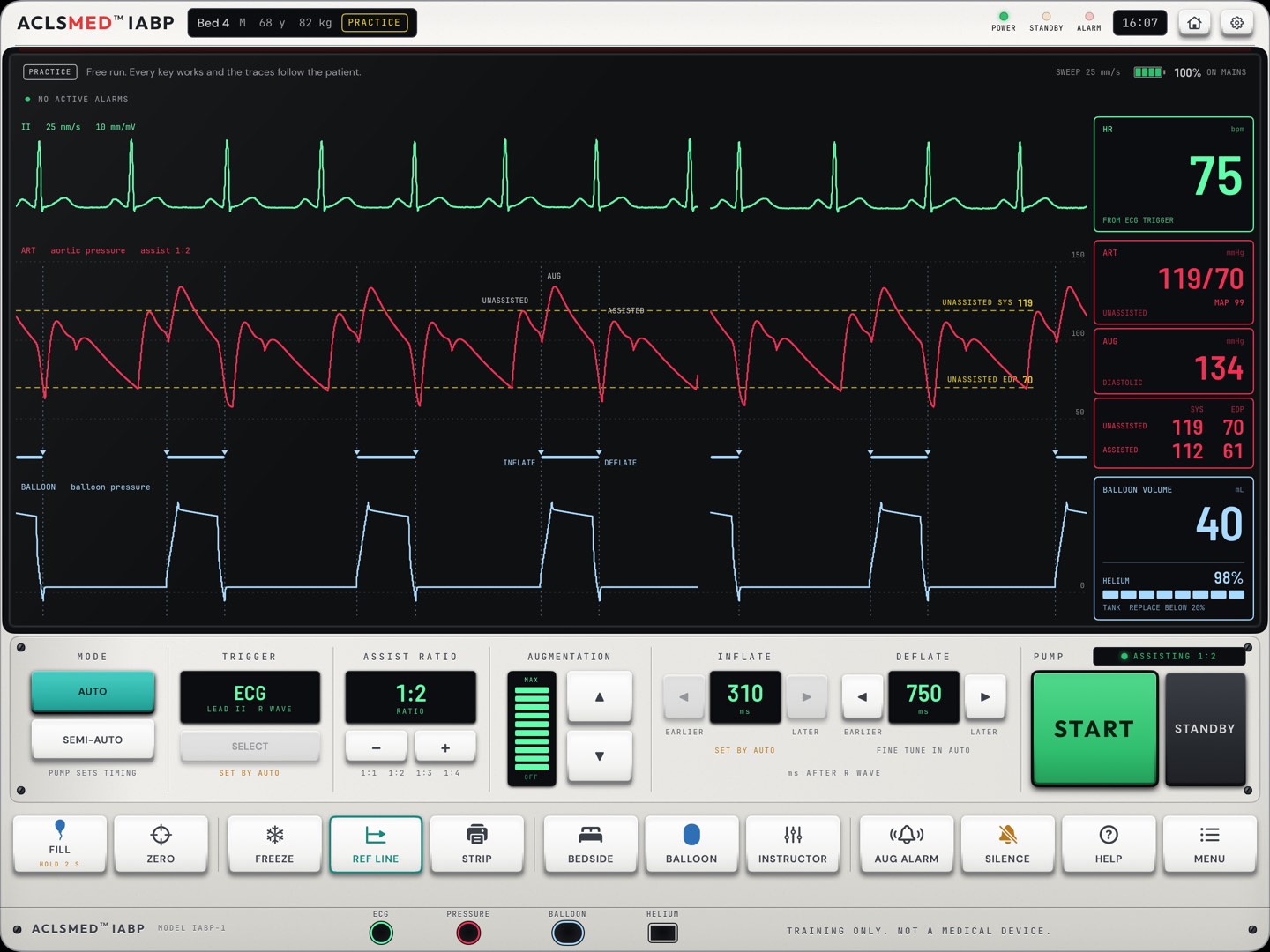
Dashed lines across the trace at the unassisted systolic and end-diastolic pressures.
Makes the four timing rules visible
STRIP
Keeps the last 6 seconds to look at again. Up to five per session.
BEDSIDE
Checks on the patient. Each check is logged with its time (§ 02.08).
Scored in a case
BALLOON
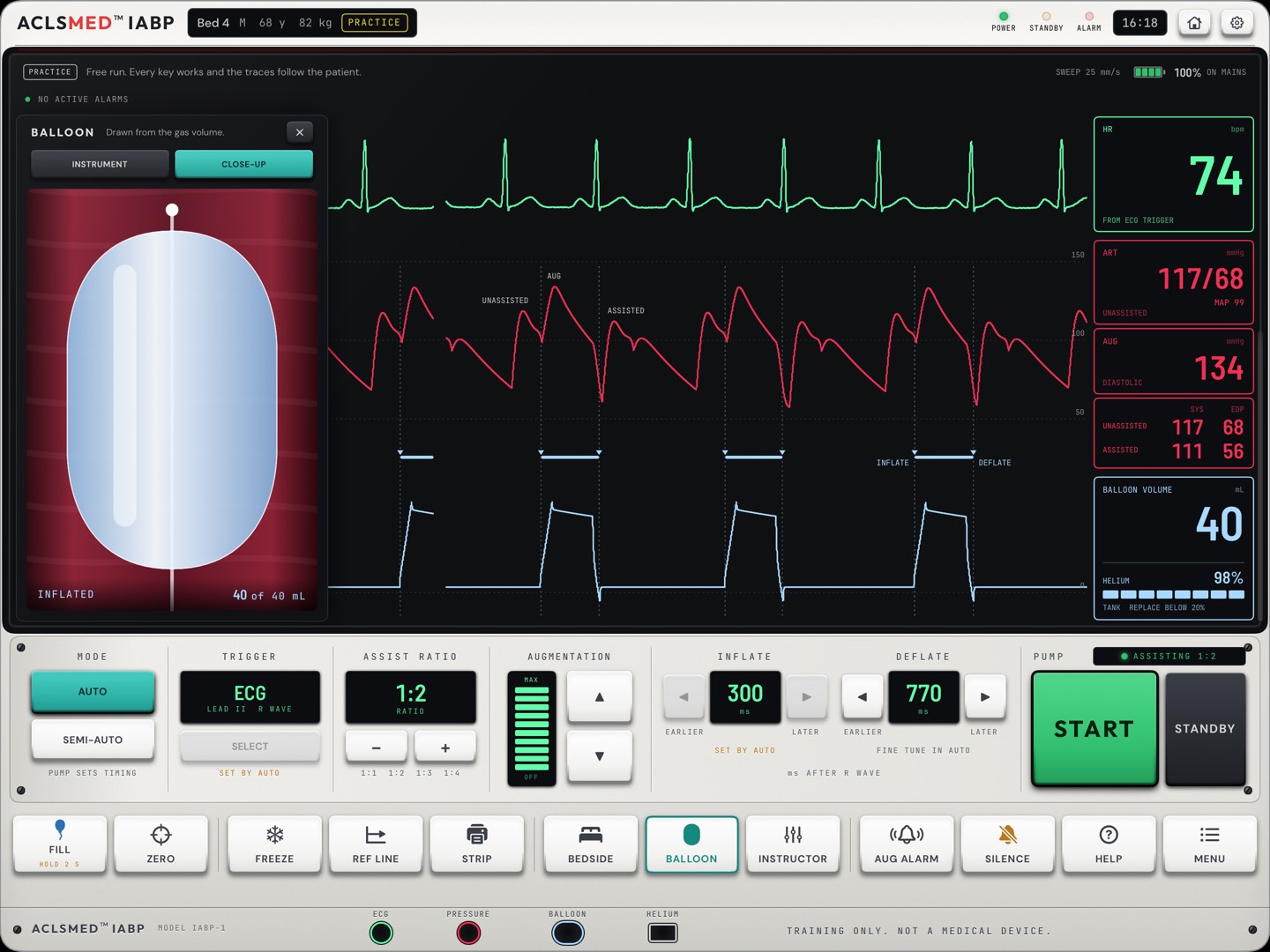
The balloon itself, live, in INSTRUMENT and CLOSE-UP views (§ 02.09).
INSTRUCTOR
Practice only: change the patient or add a fault (§ 03).
Becomes IDENTIFY in a case or the drill
AUG ALARM
The low augmentation limit (§ 02.10).
SILENCE
Quiets the alarm tone for 60 seconds. It does not fix the cause; the alarm stays on the glass.
Silence with no other action costs points in a case
HELP
What to do for the alarm showing, then what each control does.
No alarm steps in a scored case
MENU
Sound, balloon volume and alarms, patients, shell color, RESET ALARMS and the CONSOLE TOUR.
No patient keys in a case
The consoleKey row
§ 02.05 · Trigger
Lead, source and gain
Source
What starts each cycle
ECG
The R wave. The default whenever the ECG is clean.
PRESSURE
The arterial upstroke. Needs a pulse pressure of 15 mmHg or more.
V-PACED
Every pacing spike. Only when every beat is ventricular paced.
AV-PACED
The second spike of each AV pair. Only when every beat is paced.
INTERNAL
A fixed rate, with no regard to the heart. Only with no output and no ECG. Needs a second, confirming press.
IRREGULAR RHYTHM · ON R WAVE deflates the moment the next R wave is sensed (R-wave deflation).
ECG GAIN sets the size of the signal the pump reads. ECG LEAD: this build shows lead II only.
The consoleTrigger
§ 02.06 · FREEZE, REF LINE, STRIP
Stop the trace and measure
FREEZE · drag C1 and C2 for pressure and time
REF LINE · unassisted systole and end-diastole as dashed lines
With REF LINE on, the four rules read at a glance: augmentation above the systolic line, assisted end-diastole below the end-diastolic line. STRIP keeps the last 6 seconds for review, up to five per session.
The consoleFreeze and measure
§ 02.07 · ZERO
Zeroing the pressure line
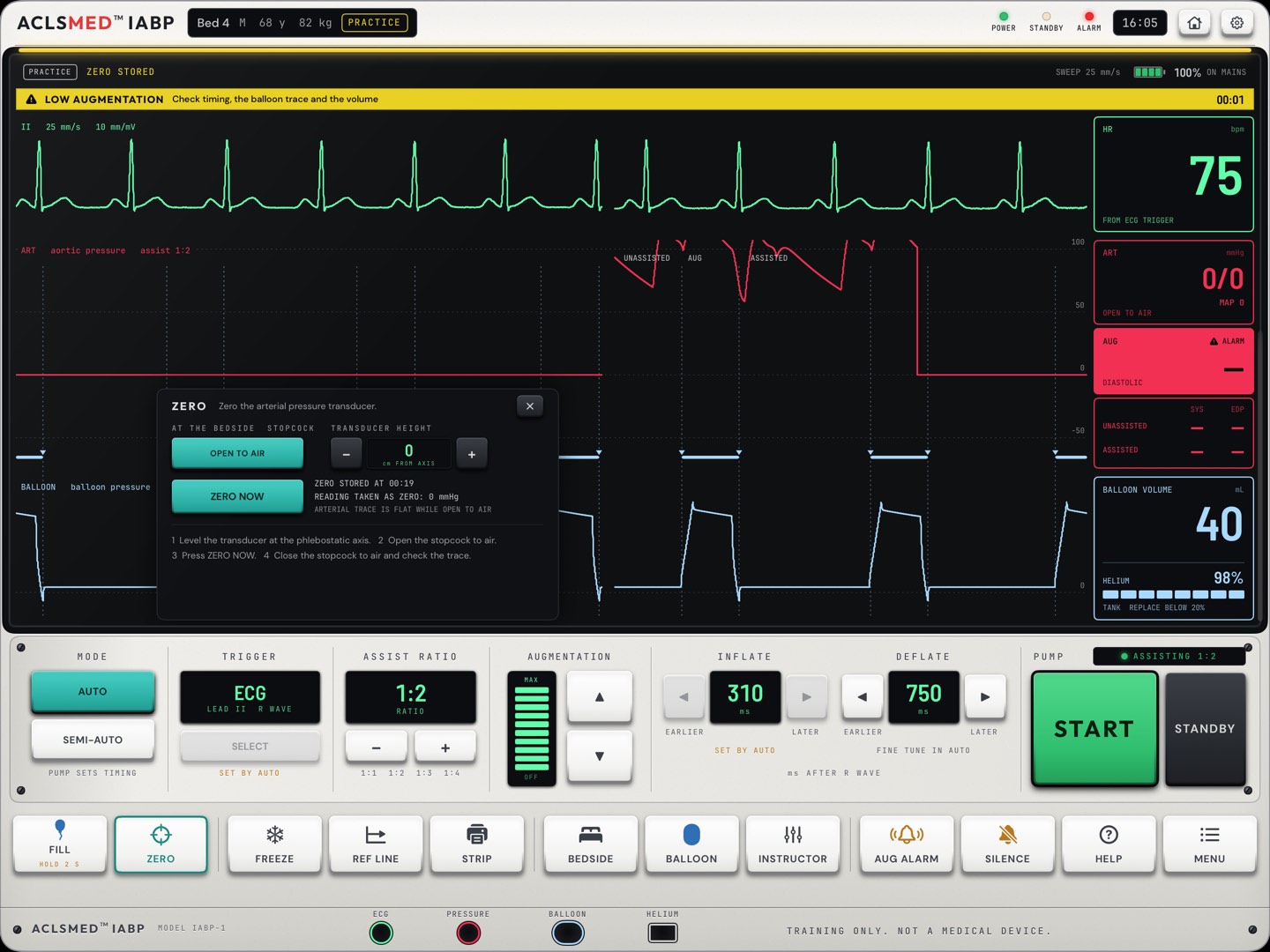
Press ZERO. The panel shows the stopcock, the transducer height in cm from the axis, and the last zero.
Level the transducer at the phlebostatic axis with − and +.
Open the stopcock to air: OPEN TO AIR. The arterial trace goes flat while it is open.
Press ZERO NOW. The panel reads ZERO STORED and the reading taken as zero.
Close the stopcock to air and check the trace.
A teachable mistake
Zero with the stopcock still closed to air and the console takes the patient's pressure as zero: every pressure after that is wrong. Set it up on purpose in Practice and ask the learner what changed.
The consoleZero
§ 02.08 · BEDSIDE
Look at the patient
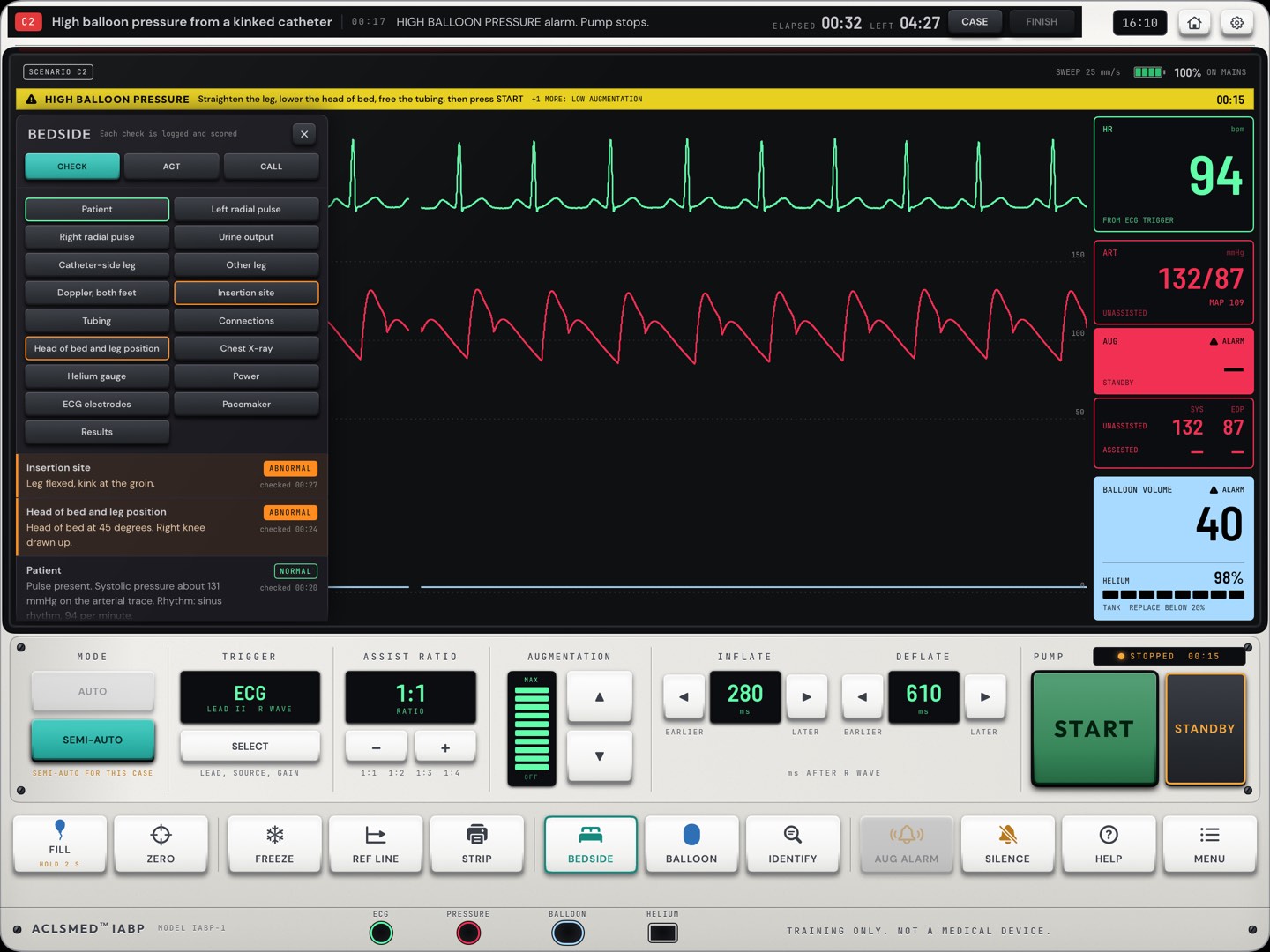
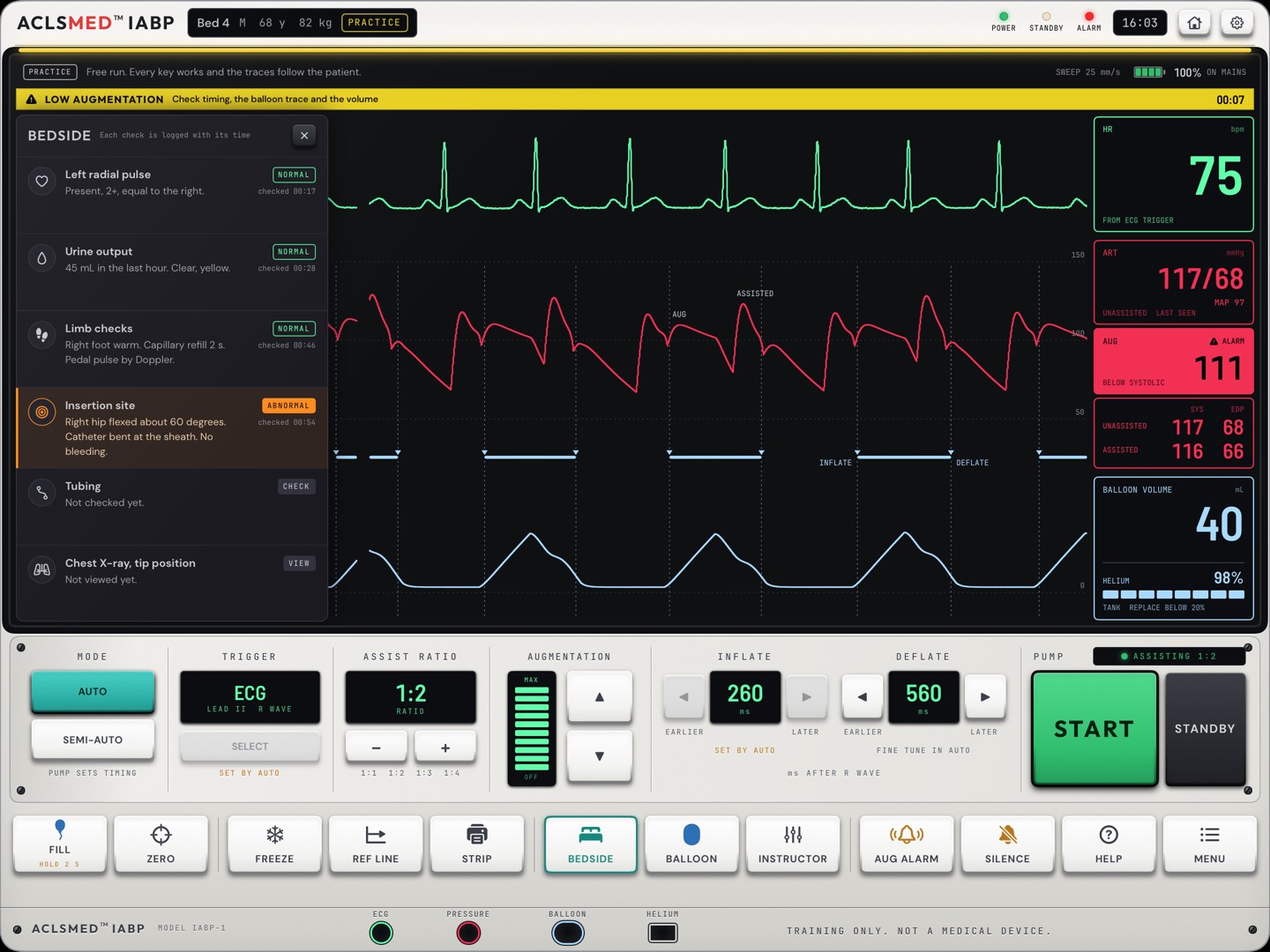
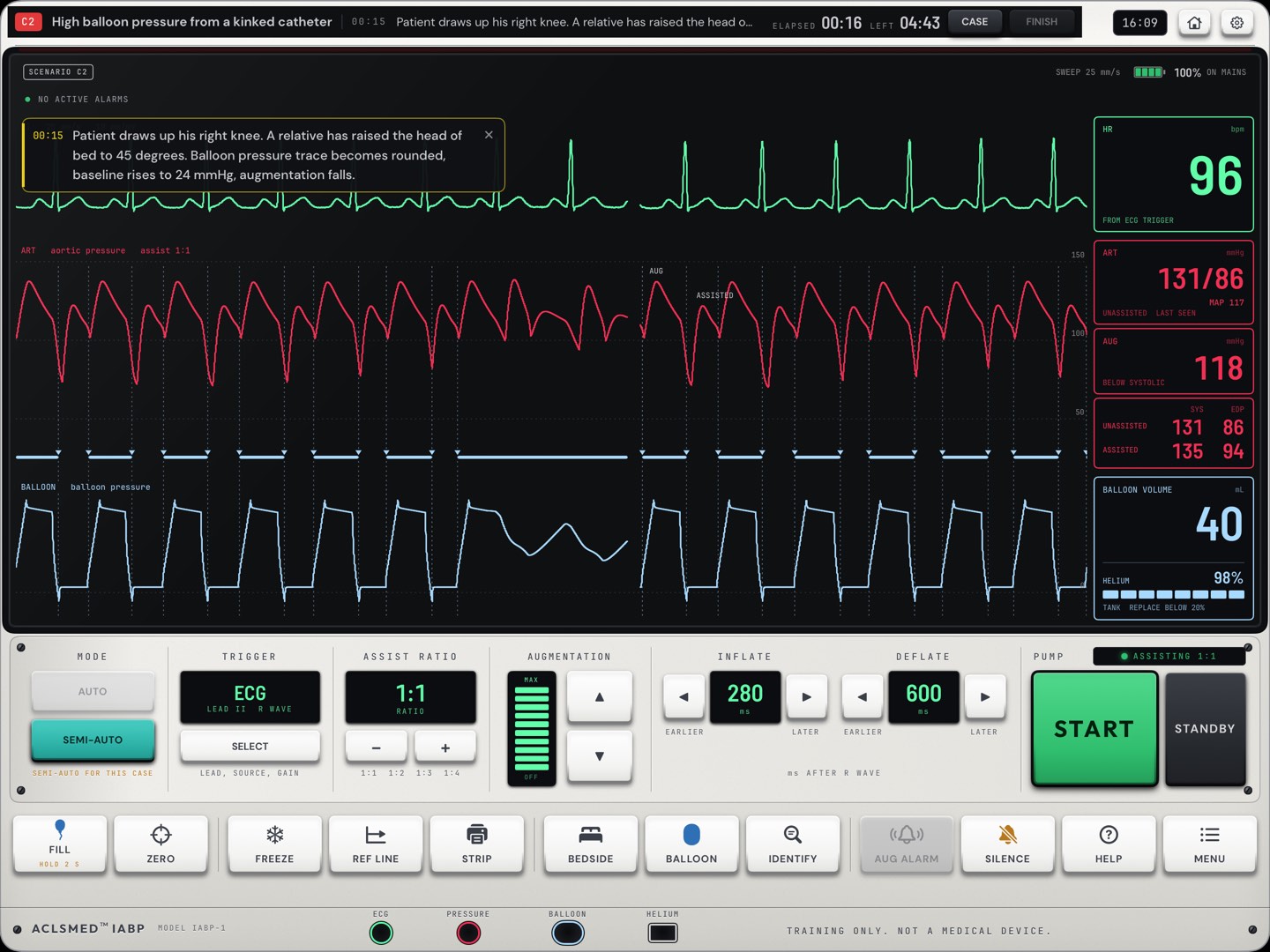
BEDSIDE opens six checks on the glass. Tap an item to look at it: the finding appears with the time it was checked, marked NORMAL or ABNORMAL. Here a kink shows at the insertion site: hip flexed, catheter bent at the sheath.
Insertion site: the hip, the catheter at the sheath, bleeding
Tubing: kinks, connections, blood in the gas line
Chest X-ray, tip position
In a case
The panel adds acts and calls such as straighten the leg, lower the head of bed and call the provider. Every check, act and call is logged and scored (§ 05.05).
The consoleBedside
§ 02.09 · BALLOON
The balloon, live
INSTRUMENT view
CLOSE-UP view
Drawn from the model's own gas volume, beat by beat: folded flat on the catheter when empty, filling most of the aorta when full. Settings > Console chooses which view the panel opens on.
The consoleBalloon
§ 02.10 · MENU and AUG ALARM
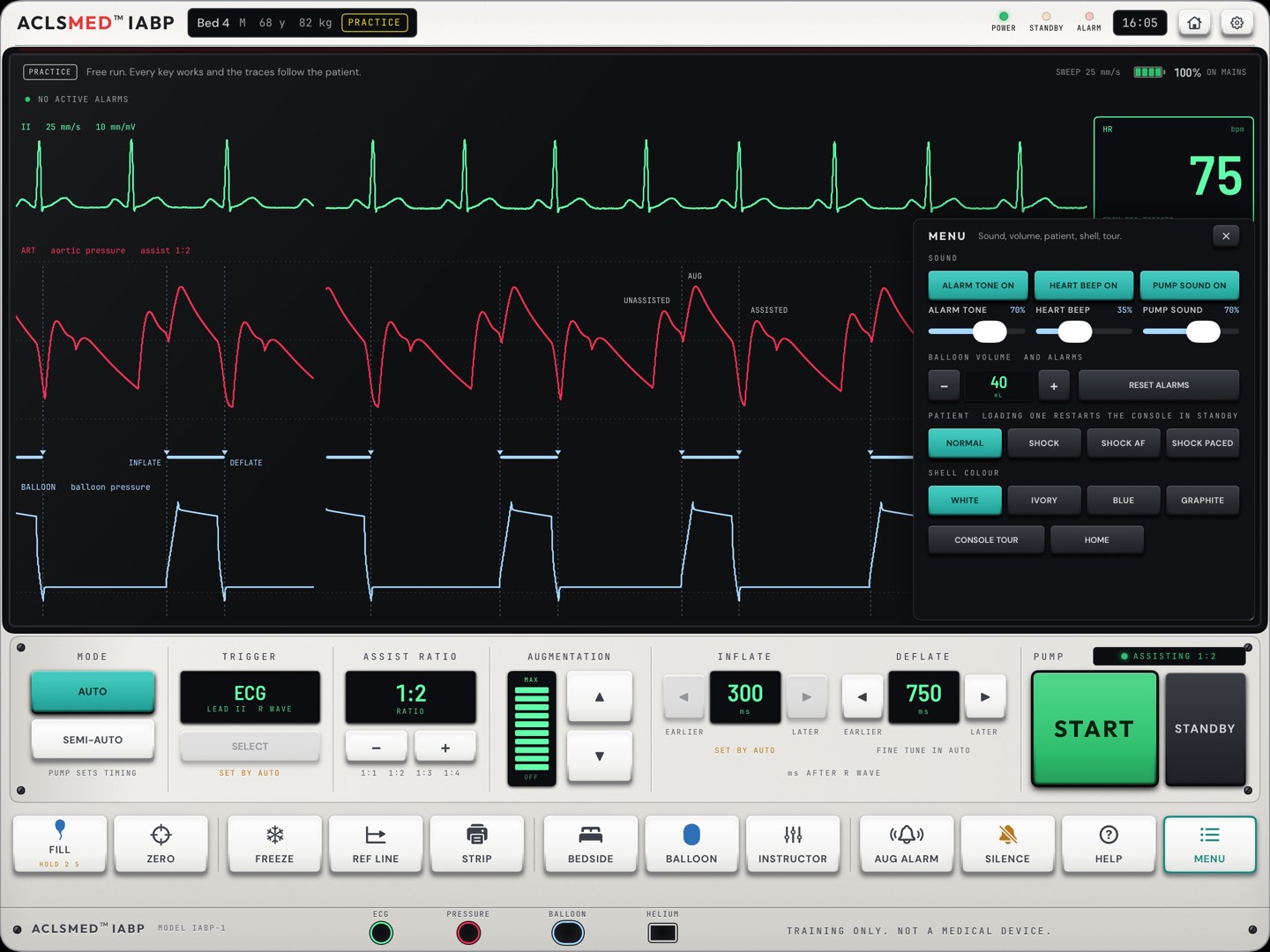
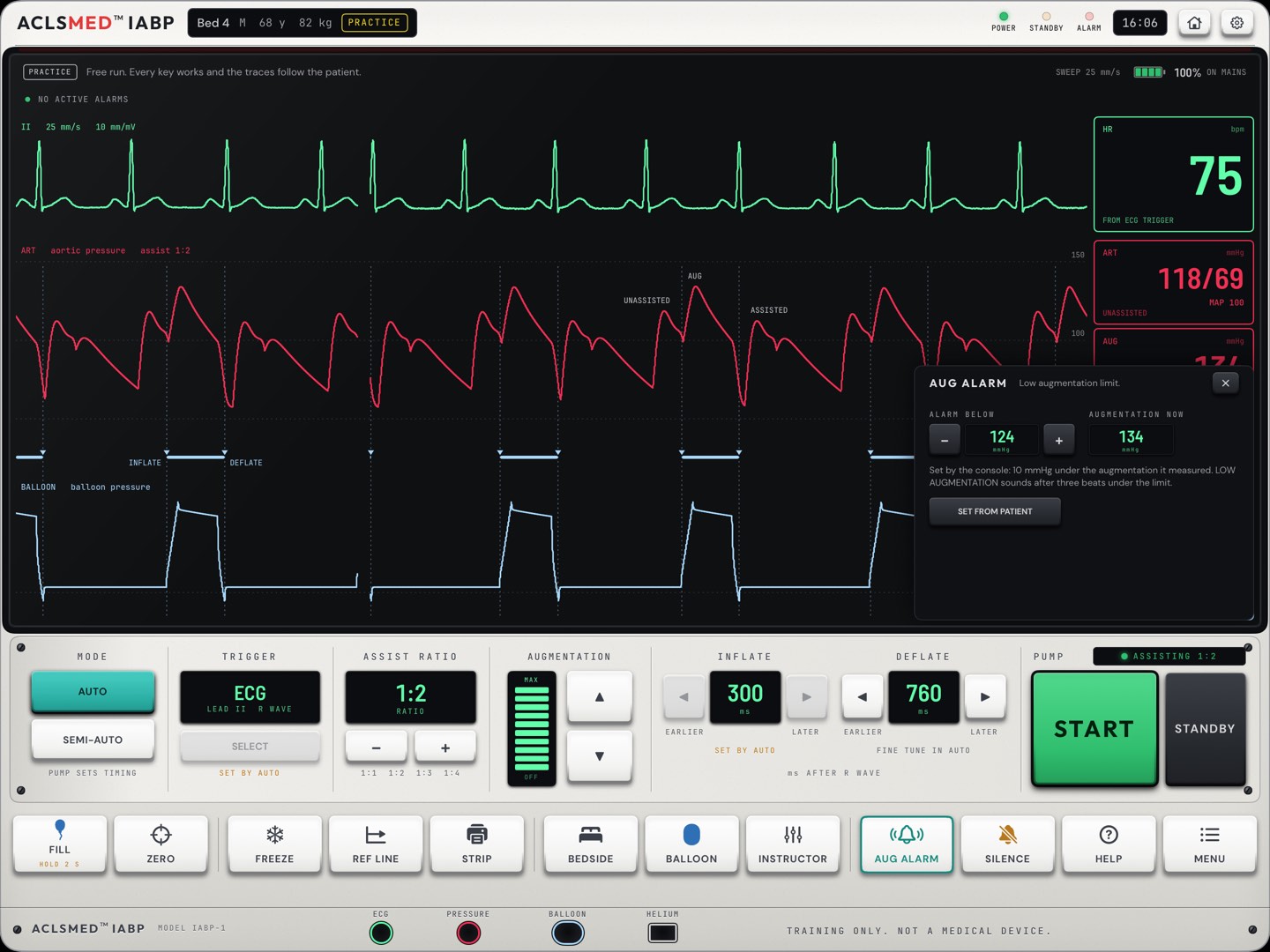
Sound, volume, patients, limits
MENU
AUG ALARM
SOUND: alarm tone, heart beep and pump sound, each on or off with a level. BALLOON VOLUME AND ALARMS: the balloon size and RESET ALARMS. PATIENT (Practice only): NORMAL, SHOCK, SHOCK AF, SHOCK PACED; loading one restarts the console in standby. Then SHELL COLOUR, CONSOLE TOUR and HOME.
The console sets the low augmentation limit 10 mmHg under the augmentation it measured, or the learner sets it by hand. LOW AUGMENTATION sounds after three beats under the limit. In a case, the case sets the limit.
The consoleMenu and limits
§ 02.11 · Alarms
An alarm, and what to do
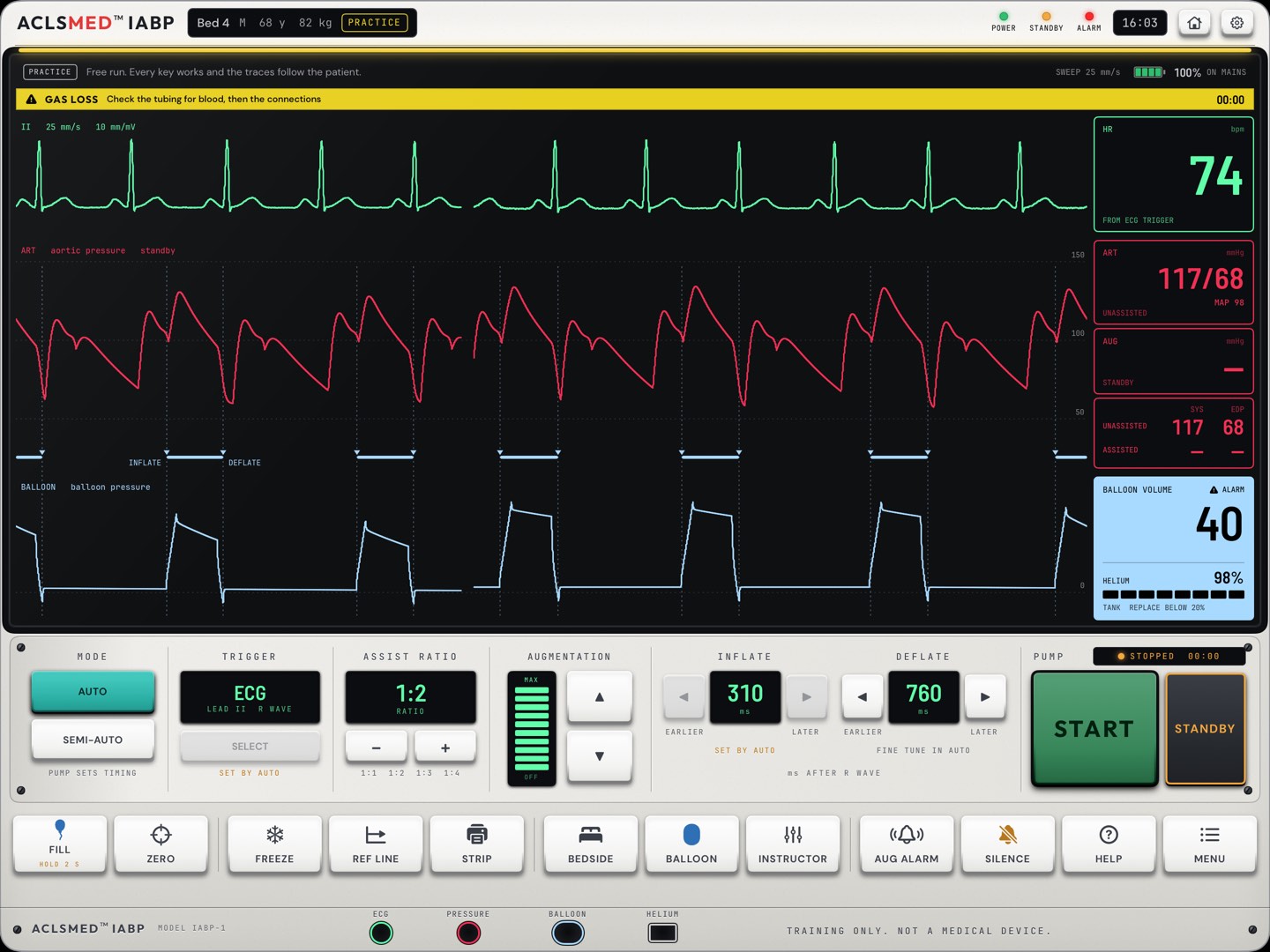
The alarm line · what to check, then the restart
HELP · the steps for the alarm showing
The light bar above the glass blinks for a high-priority alarm and stays lit for a medium one. A pump-stopping alarm stays on the list after its cause has gone: find and fix the cause, RESET ALARMS in MENU, then START. The patient comes before the console.
The consoleAlarms
§ 02.12 · Alarm reference
The eleven alarms
Alarm
Priority
Pump
What the console says
GAS LOSS
High
Stops
Check the tubing for blood, then the connections
HIGH BALLOON PRESSURE
High
Stops
Check the catheter and tubing for a kink
BLOOD IN TUBING
High
Stops
Do not restart or fill. Call the provider now
FILL FAILURE
High
Stops
Check trigger, helium and connections, then FILL
NO TRIGGER
High
Stops
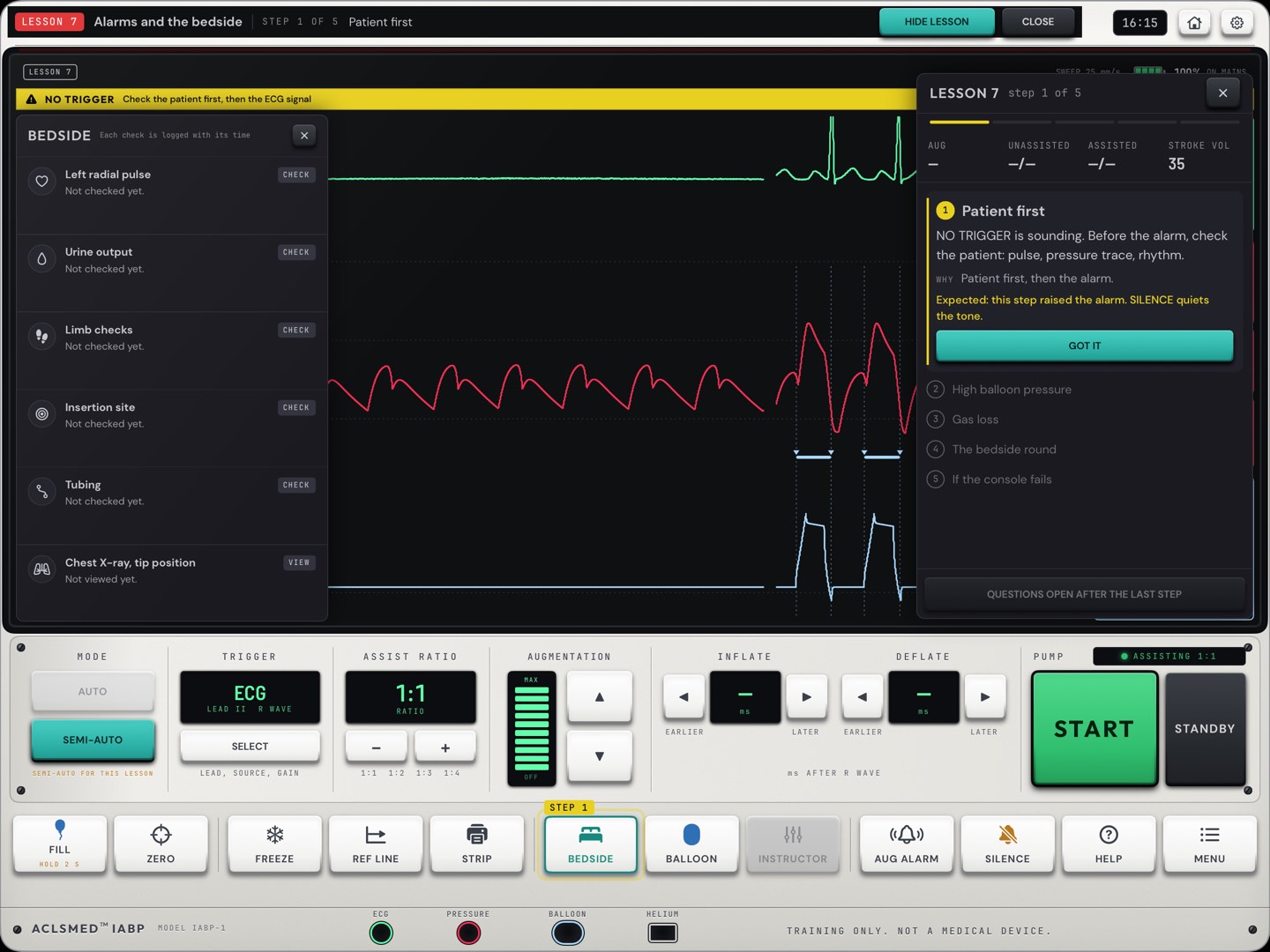
Check the patient first, then the ECG signal
BATTERY LOW
High
Runs
Connect mains power now
ECG DETECTED IN INTERNAL MODE
High
Runs
Select a patient trigger now
HELIUM LOW
Medium
Runs
Arrange a tank change. Avoid extra fills
LOW AUGMENTATION
Medium
Runs
Check timing, the balloon trace and the volume
STANDBY TIME
Medium
Still
Balloon still too long. Restart only if safe
ON BATTERY
Advisory
Runs
Mains power lost. Check the plug and outlet
Alarm names and advice are the trainer's own. Once blood has been seen in the tubing, every other alarm reads Blood in the tubing. Do not restart or fill, so nothing on the glass invites a restart.
The consoleAlarm reference
§ 02.13 · The console tour
Every key in about a minute
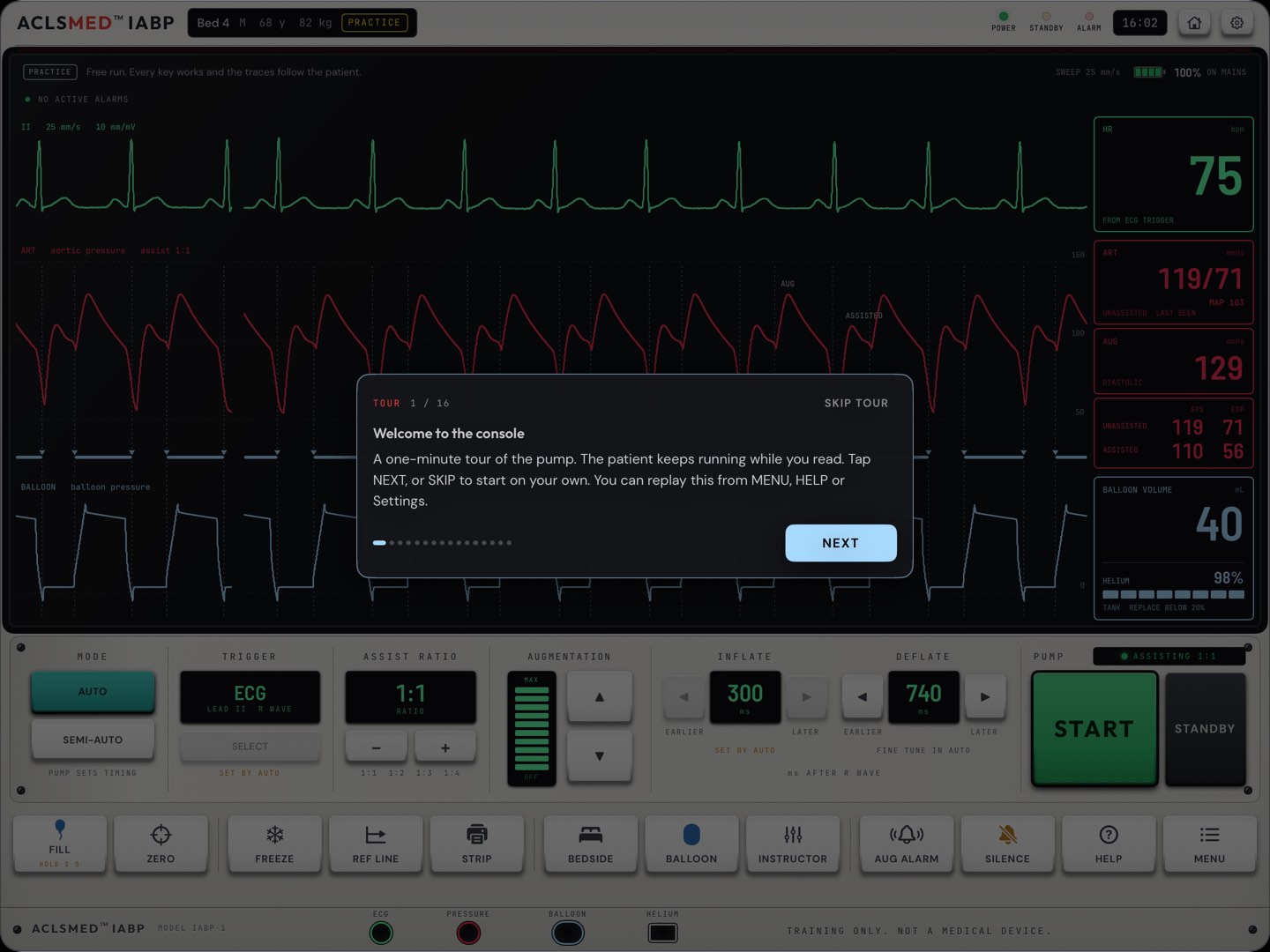
The welcome card · NEXT or SKIP
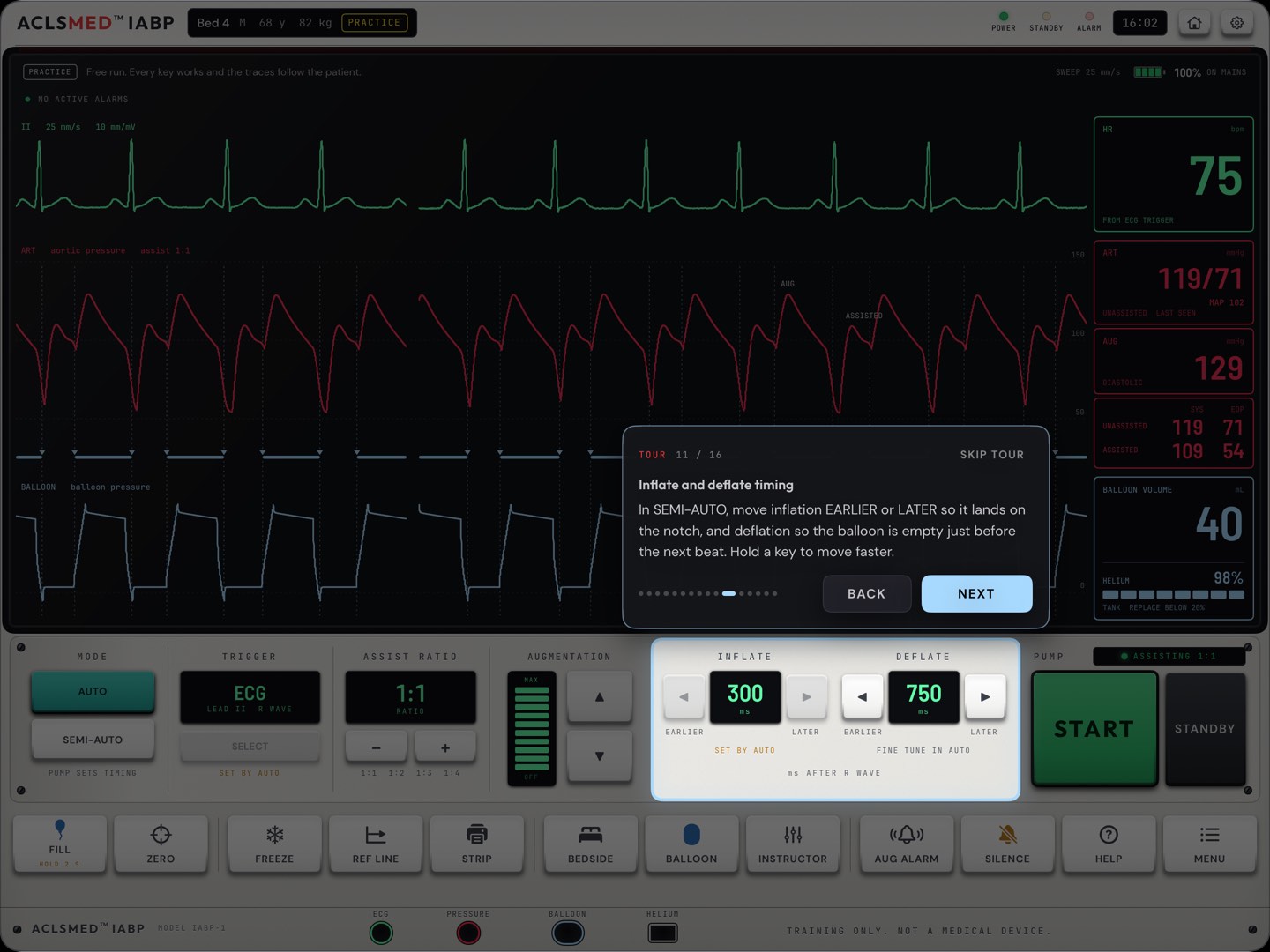
Step 11 of 16 · inflate and deflate timing
16 steps with a spotlight and a caption, on a live patient: the three traces, the numbers, alarms, each deck control, then the key row. It opens by itself the first time Practice opens. Replay it from MENU > CONSOLE TOUR or Settings > Guides. Nothing in the tour changes the patient.
The consoleTour
§ 03
Practice & the Instructor drawer
The free run. Nothing is scored, every key works, and you change the patient from a drawer on the same tablet.
§ 03.01 · Practice
How Practice opens
Home > PRACTICE. The console opens pumping 1:1 in AUTO, with the pump sound on.
Settings > Console > Practice opens changes that to PUMPING 1:2 or STANDBY. STANDBY starts with the balloon empty, so the learner starts the pump.
Switch MODE to SEMI-AUTO to set the timing by hand; back to AUTO to have it set again.
The first Practice runs the console tour (§ 02.13).
The house key at the top right goes back to Home. Nothing in Practice is saved.
Show the error, then the fix
In SEMI-AUTO, press INFLATE EARLIER eight times (80 ms) and ask the learner to name what changed on the red trace. Then press AUTO and watch it come back to the notch.
PracticeOpening Practice
§ 03.02 · The Instructor drawer
Change the patient, live
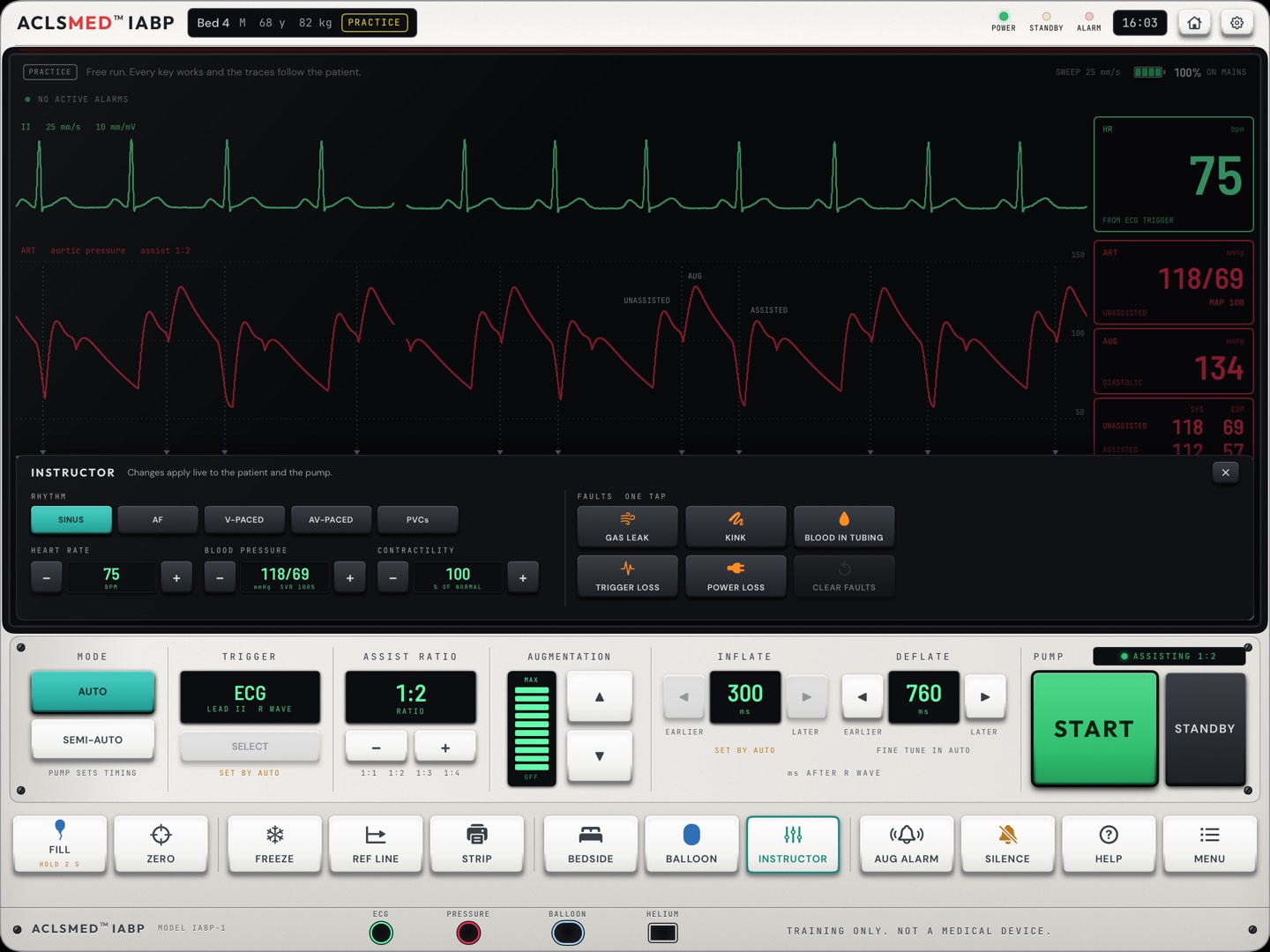
RHYTHM · SINUS, AF, V-PACED, AV-PACED, PVCs.
HEART RATE · − and +, beats a minute.
BLOOD PRESSURE · − and +, through vascular resistance as a percentage of the patient's own.
CONTRACTILITY · − and +, as a percentage of a normal ventricle.
FAULTS, ONE TAP · GAS LEAK, KINK, BLOOD IN TUBING, TRIGGER LOSS, POWER LOSS. Tap again to clear one.
CLEAR FAULTS · clears them all.
Changes apply live to the patient and the pump. The drawer opens from the INSTRUCTOR key, in Practice only. Load a whole patient (NORMAL, SHOCK, SHOCK AF, SHOCK PACED) from MENU.
123456
PracticeInstructor drawer
§ 03.03 · What each fault does
Five faults, five conversations
Fault
What the console shows
What a good learner does
GAS LEAK
The balloon trace baseline falls beat by beat; augmentation falls; GAS LOSS stops the pump.
Patient first. Inspect the tubing for blood, then the connections. Fix, FILL, RESET ALARMS, START, watch the baseline.
KINK
A rounded balloon trace that loses its plateau, and falling augmentation. The console alarms: LOW AUGMENTATION, and HIGH BALLOON PRESSURE stops the pump when the balloon pressure stays high.
Straighten the leg, lower the head of bed, free the tubing, then restart.
BLOOD IN TUBING
Gas is lost fast and the pump stops. The tubing check shows blood. BLOOD IN TUBING follows 20 seconds later if nobody looked.
Stop and stay stopped: no FILL, no START. Call the provider now.
TRIGGER LOSS
The ECG shrinks to a lead-off signal; NO TRIGGER stops the pump.
Patient first: pulse, arterial trace, rhythm. Fix the electrodes or choose another valid trigger, restart, recheck timing.
POWER LOSS
Mains is lost and the console runs on battery: ON BATTERY, later BATTERY LOW.
Find out why and plug into working mains before the battery runs out.
Ask before you fix
Inject a fault while the learner looks away, then ask for the order: patient, console, cause. The same five faults are scored as cases in Tier C (§ 09.05), so Practice is the rehearsal.
PracticeFaults
§ 03.04 · Rhythms and patients
Irregular and paced
AF at 1:1 · R-wave deflation on
AV-paced at 1:2 · AV-PACED trigger
With an irregular rhythm the pump cannot predict the next beat, so the irregular rhythm setting deflates on the R wave. Paced triggers are for patients paced on every beat. Lesson 6 and cases B2 and B3 teach both.
PracticeRhythms
§ 04
Learn
8 short lessons, each on a live console, each ending in check questions. All free. Start every new learner here.
§ 04.01 · How a lesson works
The lesson card on the console
Home > LEARN lists the 8 lessons with COMPLETED, NOT TRIED and an UP NEXT marker. Open one.
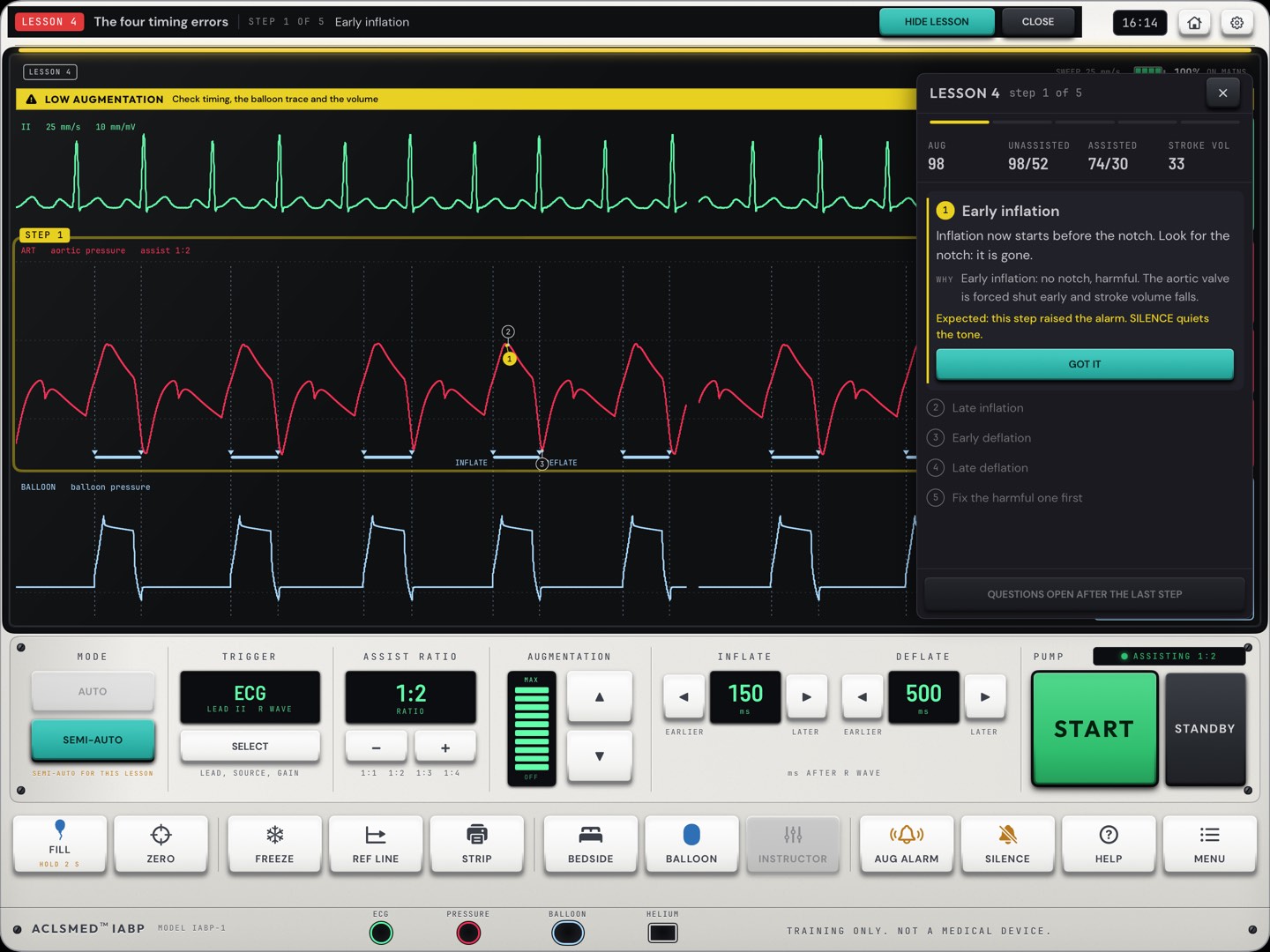
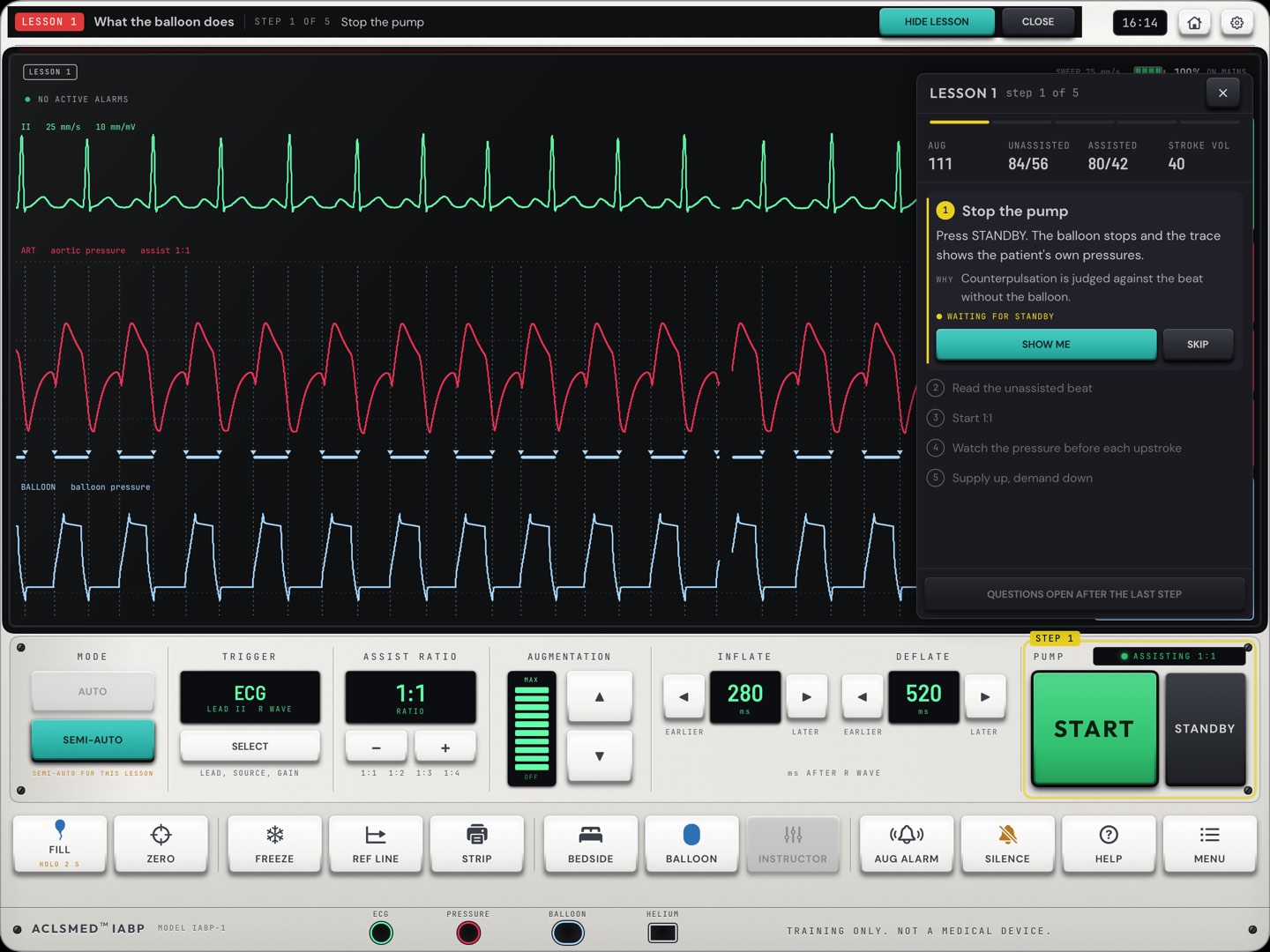
The lesson card sits on the right of a live console, with the numbers the lesson is about along its top. Each step says what to do and why, then waits for a key on the console or for GOT IT. A step ticks itself when the console reaches it.
SHOW ME spotlights where to look. HIDE LESSON shows the tiles underneath; the console keeps running.
After the last step come the check questions. The first tap is the answer.
Lessons run in SEMI-AUTO, except Lesson 3, which opens in AUTO and hands the timing over in its second step.
LearnLesson card
§ 04.02 · The 8 lessons
Eight lessons, in order
#
Lesson
Objective
Steps
1
What the balloon does
Explain counterpulsation and its two separate effects
Stop the pump · read the unassisted beat · start 1:1 · watch the pressure before each upstroke · supply up, demand down
2
Landmarks at 1:2
Name the six points and state the timing rules
Find the six points · V at the notch · augmentation above systole · assisted end-diastole lower · assisted systole a little lower
3
Setting timing
Set inflation and deflation by hand and return to the ordered ratio
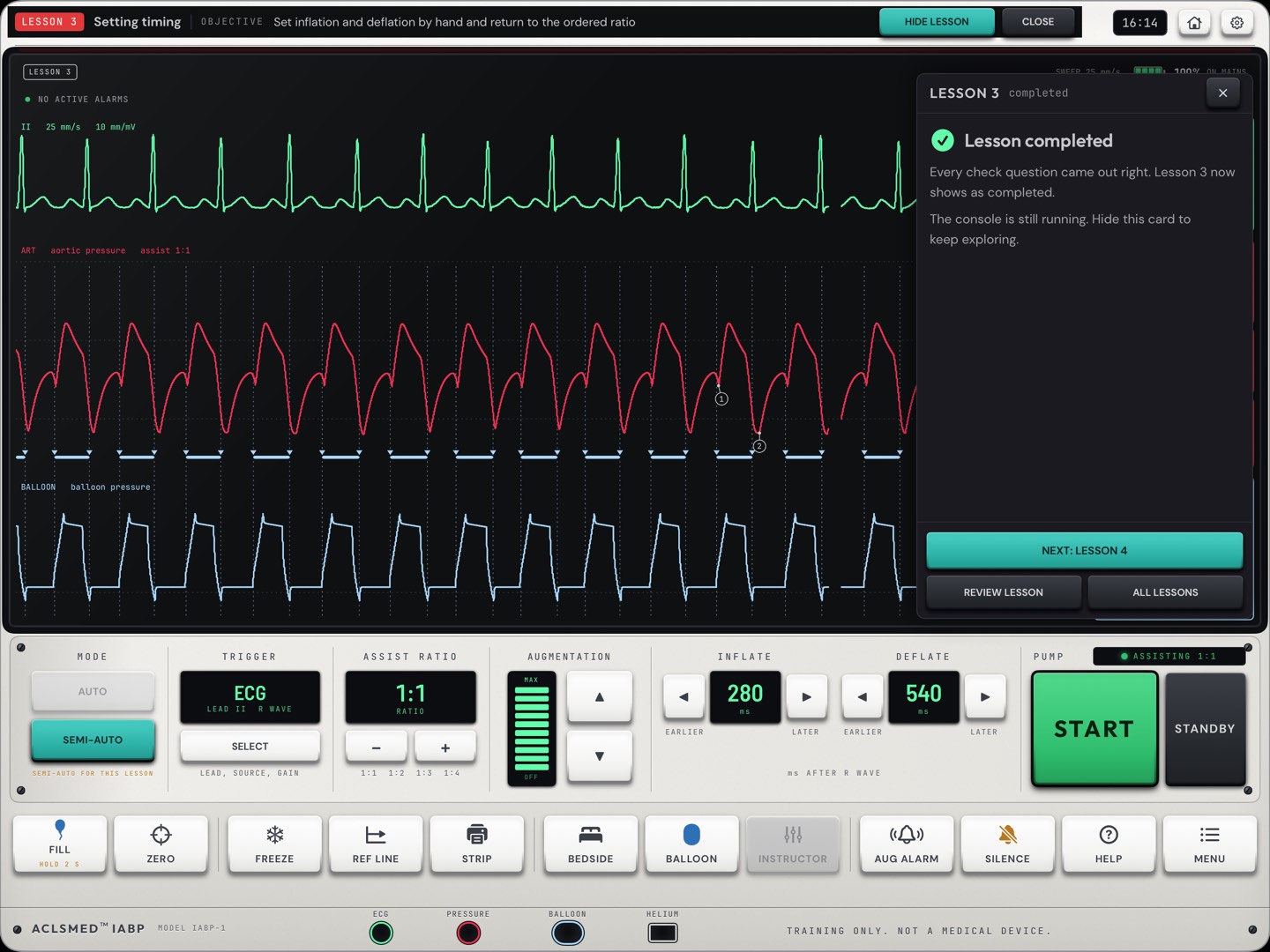
Go to 1:2 · hand the timing to yourself · inflation onto the notch · deflation to just before the upstroke · recheck the four rules · back to the ordered ratio
4
The four timing errors
Recognize each error and its consequence
Early inflation · late inflation · early deflation · late deflation · fix the harmful one first
5
The balloon pressure trace
Name the parts of a normal trace and read the common faults
Name the parts · width follows diastole · a leak · a kink · constrained or too large
6
Triggers
Choose a trigger for the situation and name what defeats each
Open the trigger panel · atrial fibrillation · a paced rhythm · a poor ECG · back to ECG
7
Alarms and the bedside
Respond to alarms in a safe order and run the bedside checks
Patient first · high balloon pressure · gas loss · the bedside round · if the console fails
8
Arrest, weaning, removal, transport
State the pump settings for an arrest and the steps of weaning and removal
Arrest · compressions · return of circulation · wean by ratio · stop only when ready · transport
Each lesson has three check questions, drawn from the scenarios it prepares for. In Lesson 5 the balloon trace is shown at its usual size with its parts numbered.
LearnThe 8 lessons
§ 04.03 · Lessons on the glass
What the learner sees
Lesson 1 · What the balloon doesLesson 2 · Landmarks at 1:2Lesson 5 · The balloon pressure traceLesson 7 · Alarms and the bedside
LearnLesson gallery
§ 04.04 · Check questions
A lesson counts when the check is right
A miss · the right answer is marked
Lesson completed
The first tap is the answer. A missed question comes back once at the end of the check. A lesson is completed when every check question is answered right; if one is still wrong, the app names the step it comes from and asks the learner to go over it and try again. Completed lessons show on Home.
LearnCheck questions
§ 05
Scenarios & the debrief
24 scored cases in four tiers. Each one is a briefing, a few minutes on the console, three questions and a debrief.
§ 05.01 · The list
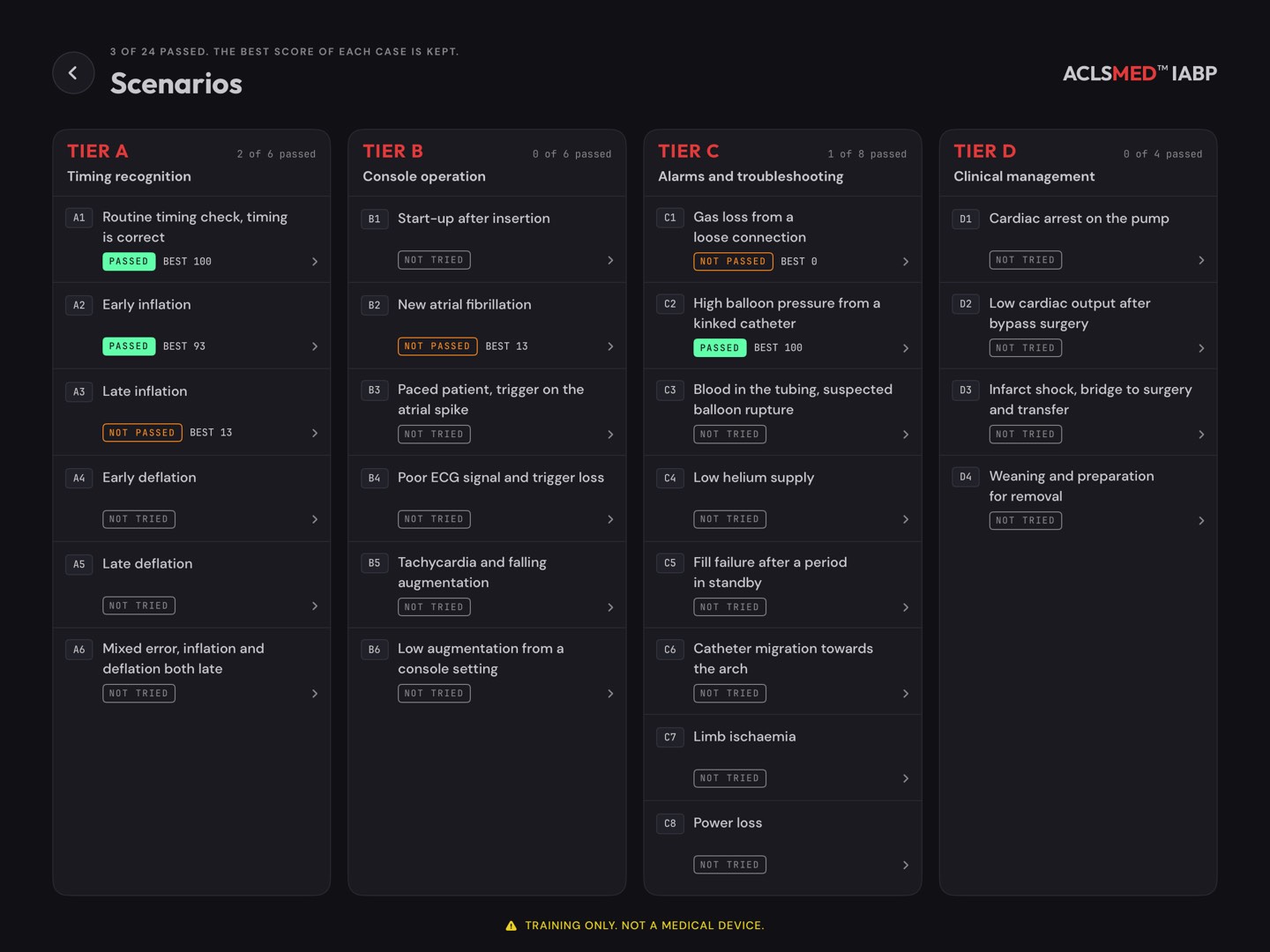
Four tiers, 24 cases
Tier
Topic
Cases
A
Timing recognition
A1–A6
B
Console operation
B1–B6
C
Alarms and troubleshooting
C1–C8
D
Clinical management
D1–D4
Each case shows PASSED, NOT PASSED or NOT TRIED and the best score. Each tier counts its cases passed.
Free: A1, A2, B1 and C1. A Pro case shows Locked, in Pro; tapping it opens the paywall.
The full catalog is in § 09.04 and § 09.05.
ScenariosThe list
§ 05.02 · The briefing
Read the case first
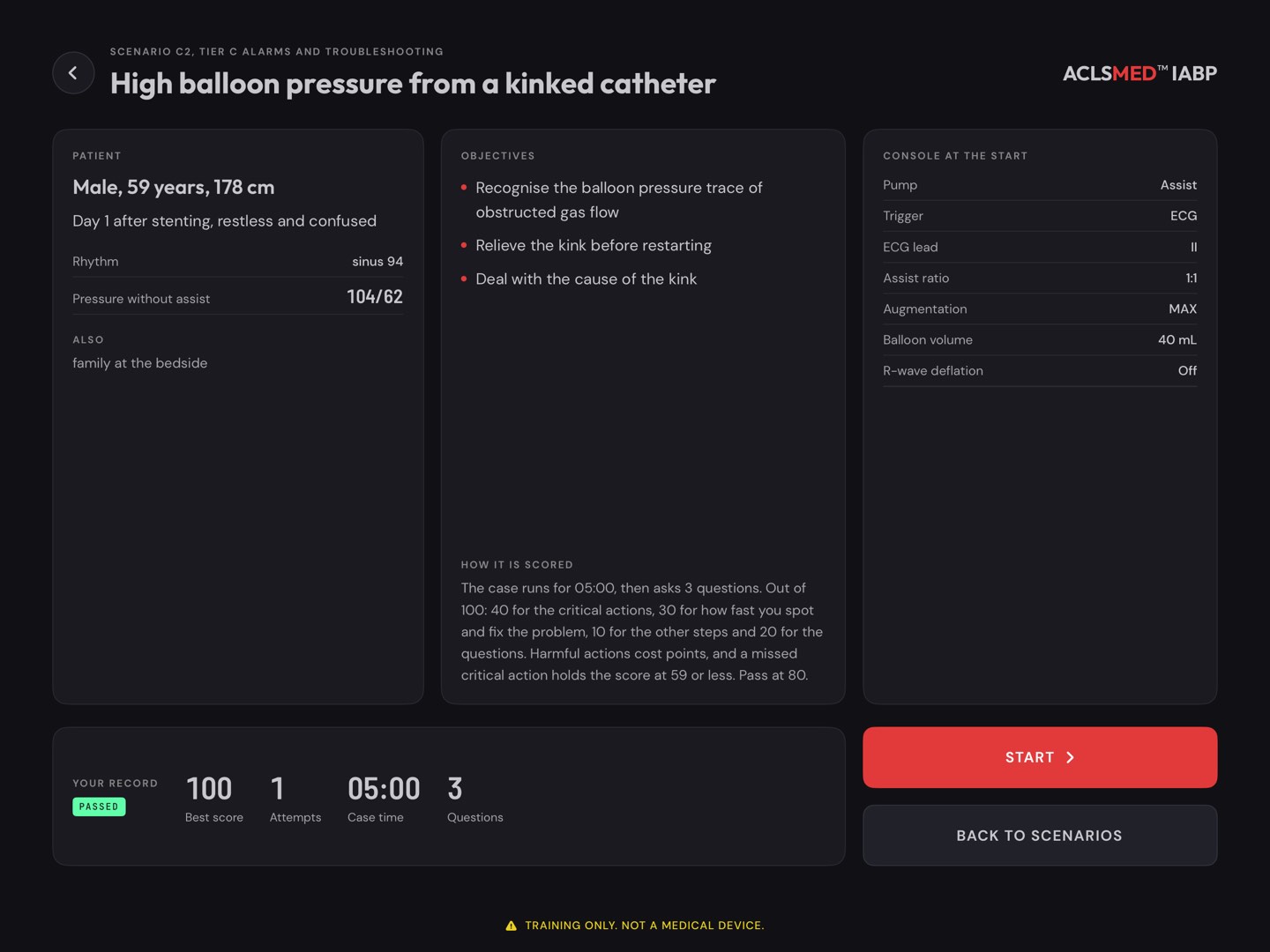
Patient · age, sex, height, the story, the rhythm and the pressure without assist.
Objectives · what the case teaches.
Console at the start · ratio, trigger, augmentation, balloon volume and the rest.
How it is scored · the case length, the number of questions, and the point split (§ 05.07).
Your record · best score and attempts.
For a group
Read the briefing aloud and ask for a plan before anyone presses START. It sets up the debrief: did the plan survive the case?
ScenariosBriefing
§ 05.03 · Running a case
The same console, now scored
The scenario bar across the top shows the case, the latest event, the time elapsed and left, CASE (the case card again) and FINISH. Each event also arrives as a card under the alarm line.
Every key press is logged with its time and scored.
INSTRUCTOR becomes IDENTIFY: name what the traces show (§ 05.04).
BEDSIDE adds the acts and calls of the case (§ 05.05).
MODE is held in SEMI-AUTO. AUG ALARM is greyed: the case sets the limit. MENU has no patient keys, and HELP has no alarm steps: finding what to do is part of the score.
Lead II only. A lead change is refused and says so.
FINISH ends the case at any time. Leaving with the house key asks first, and saves nothing.
Cases run in real seconds, 3 to 6 minutes each. Slow events, such as an hour of urine output or a weaning step, are compressed and the case says so.
ScenariosRunning a case
§ 05.04 · IDENTIFY
Name it, then fix it
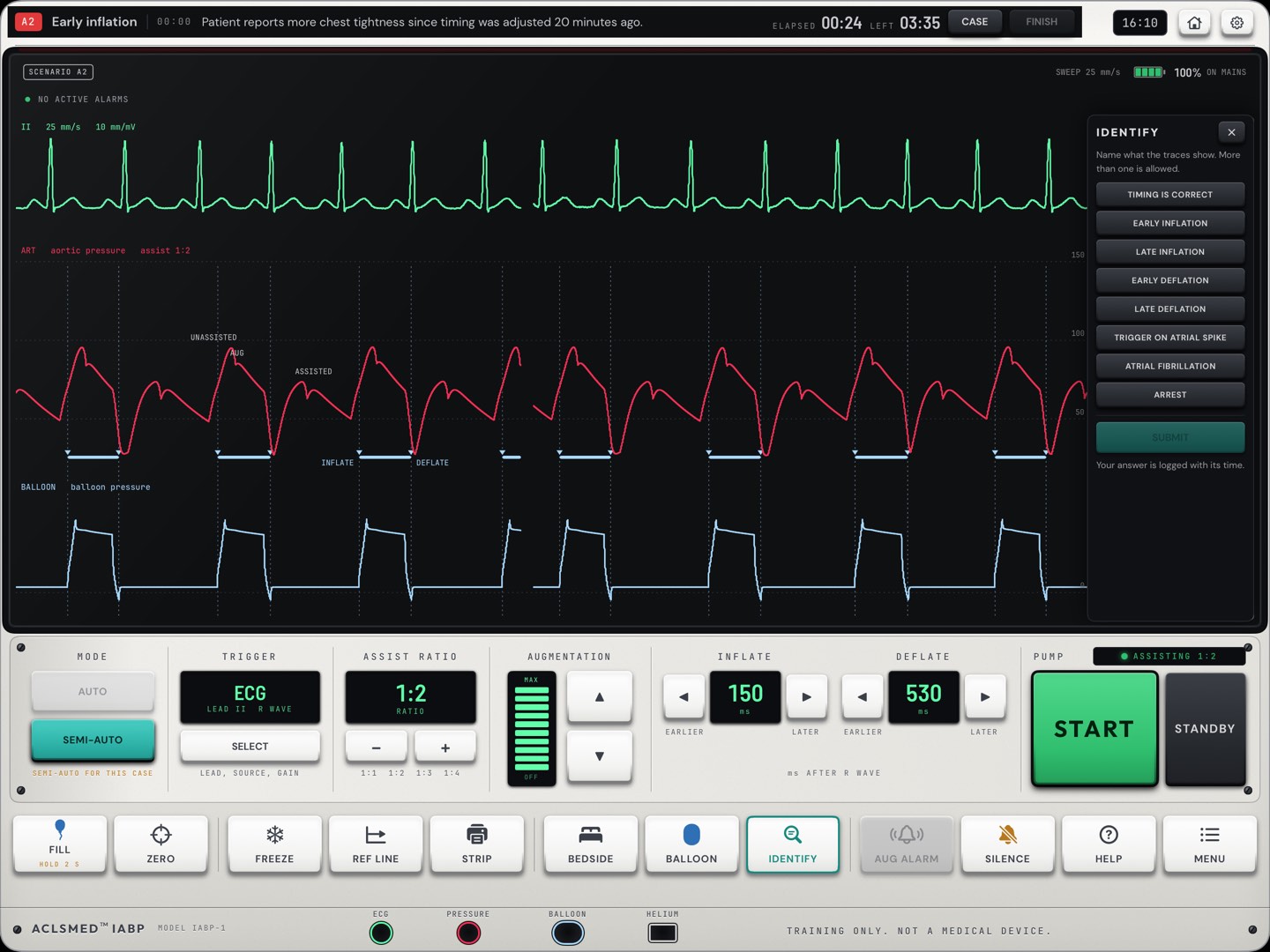
IDENTIFY opens a list of findings: correct timing, early or late inflation, early or late deflation, a trigger on the atrial spike, atrial fibrillation, arrest. More than one can be chosen. Press SUBMIT.
Naming is scored, and so is how fast. A learner cannot pass by turning keys until the trace looks right.
The answer is logged with its time, and the debrief shows whether it matched.
Wrong names that match no step are listed in the debrief too.
The timing check, in four moves
Go to 1:2 · name what you see · correct it · go back to the ordered ratio. Every Tier A case scores those four.
ScenariosIdentify
§ 05.05 · Checks, acts and calls
The bedside in a case
CHECK · each finding with its time
ACT · 20 actions, each logged with its time
In a case BEDSIDE has three tabs. CHECK has 17 items, from the patient, both radial pulses and both legs to the helium gauge, power, ECG electrodes, pacemaker and results. ACT and CALL hold the actions and the people to call. The case's own findings answer each check. Some choices are there to be wrong, and a harmful one costs points or fails the case (§ 05.10).
ScenariosBedside in a case
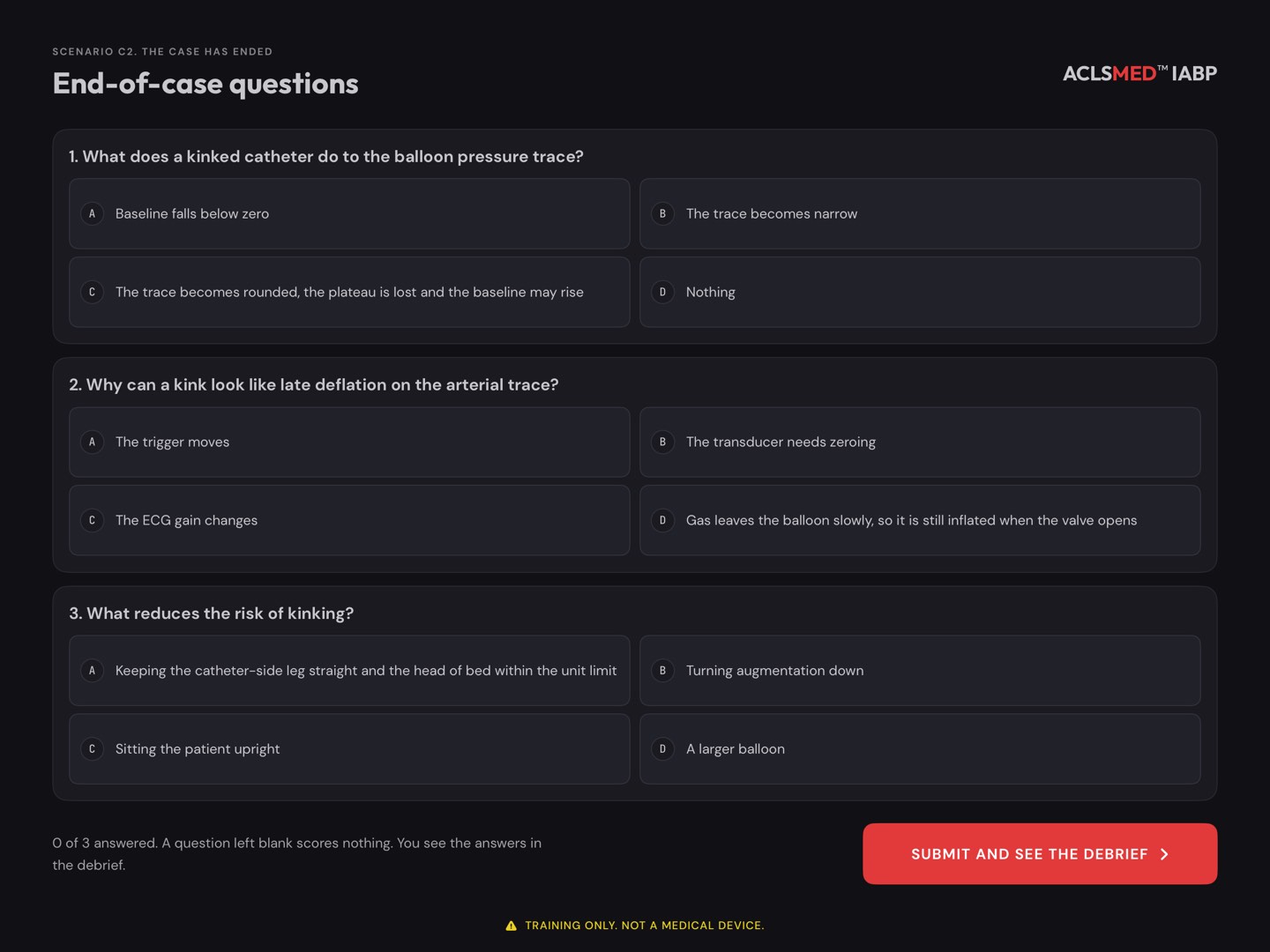
§ 05.06 · End-of-case questions
Three questions, then the debrief
When the case ends, by FINISH or by the clock, three questions about it appear on one page, four options each.
A choice can be changed until the page is submitted. A question left blank scores nothing.
SUBMIT AND SEE THE DEBRIEF scores and saves the attempt. The answers are shown in the debrief.
Pause here with a group
Ask the room to commit to an answer out loud before the learner taps. The debrief then shows the reasoning for each one.
ScenariosQuestions
§ 05.07 · Scoring
Out of 100, passed at 80
Part
Points
How it is earned
Critical actions
40
Shared between the case's critical items. Each is all or nothing.
Time to recognize
15
From the event to the first correct naming or check.
Time to correct
15
From recognition to the fixed state the case defines.
Other steps
10
Expected steps done, in an order that breaks no rule.
Questions
20
Shared between the three questions.
Harmful actions
−
Each listed penalty is taken off. Never below zero.
PASSED = every critical action + no never-event + score ≥ 80
Time earns full marks inside the case's window, then falls in a straight line to zero at twice the window.
A missed critical action or a never-event holds the score at 59 or less, and the debrief gives the reason first.
The best score of each case is kept.
What the score is
A measure of performance on this trainer's own cases and rules. It is not a competency assessment on a real console.
ScenariosScoring
§ 05.08 · The debrief
Know why it passed
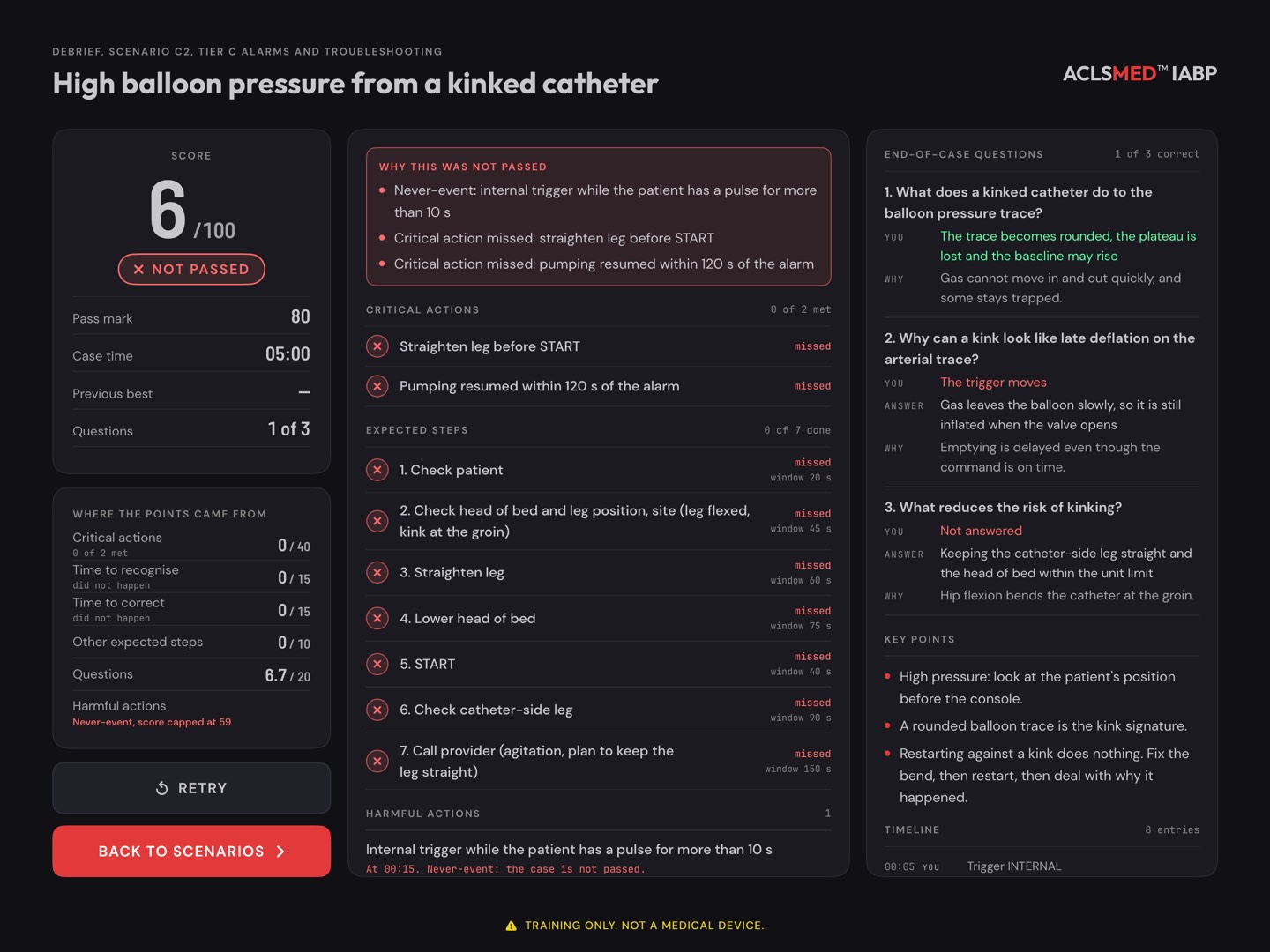
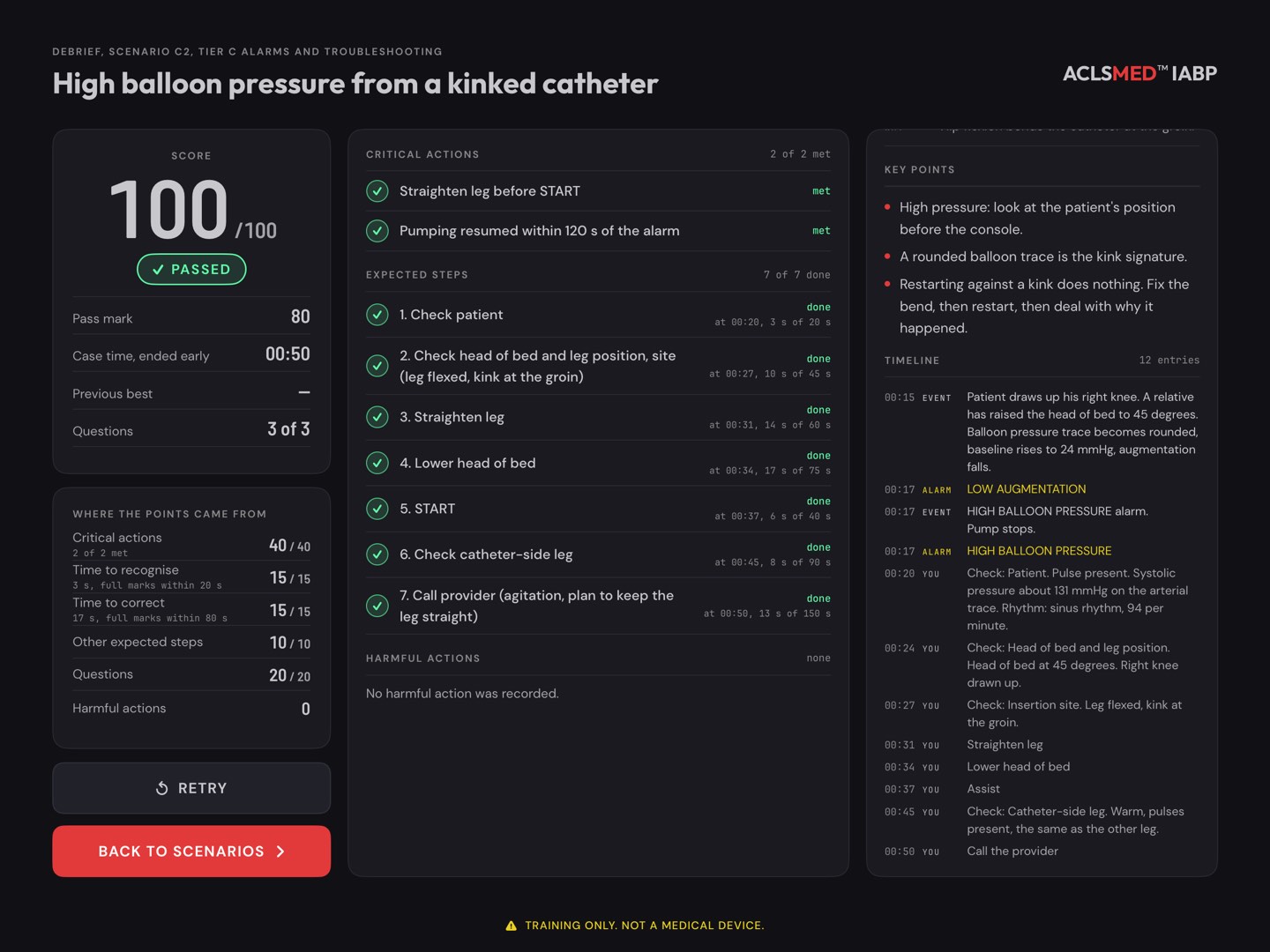
Score · out of 100, PASSED or NOT PASSED, the pass mark, the case time, the previous best.
Where the points came from · each part of the score, with the times it was judged on.
Critical actions · each met or missed.
Expected steps · each step, when it was done, and against what window.
Harmful actions · each one, when, and what it cost.
End-of-case questions · what the learner chose, and why the answer is right.
Key points and timeline · the case's lessons, then every event and action in order.
RETRY runs the case again; BACK TO SCENARIOS returns to the list.
The attempt is saved when the debrief opens. The best score of each case is kept.
12345678
ScenariosDebrief
§ 05.09 · Not passed, and the timeline
The reason comes first
NOT PASSED · Why this was not passed
Timeline · every event and action in order
The failed attempt here selected the internal trigger while the patient had a pulse: a never-event, so the score is capped and the case is not passed whatever else went right. The timeline is the backbone of a group debrief.
ScenariosNot passed
§ 05.10 · Never-events and penalties
What fails a case outright
Never-event
Where
Internal trigger selected for more than 10 seconds while the patient has a pulse
Every case
FILL or START after blood has appeared in the tubing
C3
Internal trigger still selected 15 seconds after return of circulation
D1
A never-event fails the case and caps the score at 59.
Penalty in most cases
Points
Unordered STANDBY held for more than 20 seconds
−10
SILENCE with no other action in the next 30 seconds
−10
Each case adds its own harmful actions. Tier A, for example, takes 15 points when the timing keys push correct timing out of the band. The debrief names every one.
ScenariosNever-events
§ 06
Timing drill
Ten strips a round. Name the error first, then fix it with the timing keys. Points for naming, fixing and speed.
§ 06.01 · A round
Ten strips, one at a time
Home > TIMING DRILL. The app sets up strip 1 of 10 on the console.
Read the strip. FREEZE and the cursors help.
Press IDENTIFY and name what is wrong, one error or two, or timing is correct, look elsewhere. The first answer counts.
Make the fix with INFLATE and DEFLATE, then press DONE.
Read the feedback, then NEXT STRIP.
At 1:1
Some strips run at 1:1. The drill asks for 1:2 before it takes an answer. In atrial fibrillation with R-wave deflation off, the accepted fix is to turn it on.
Timing drillA round
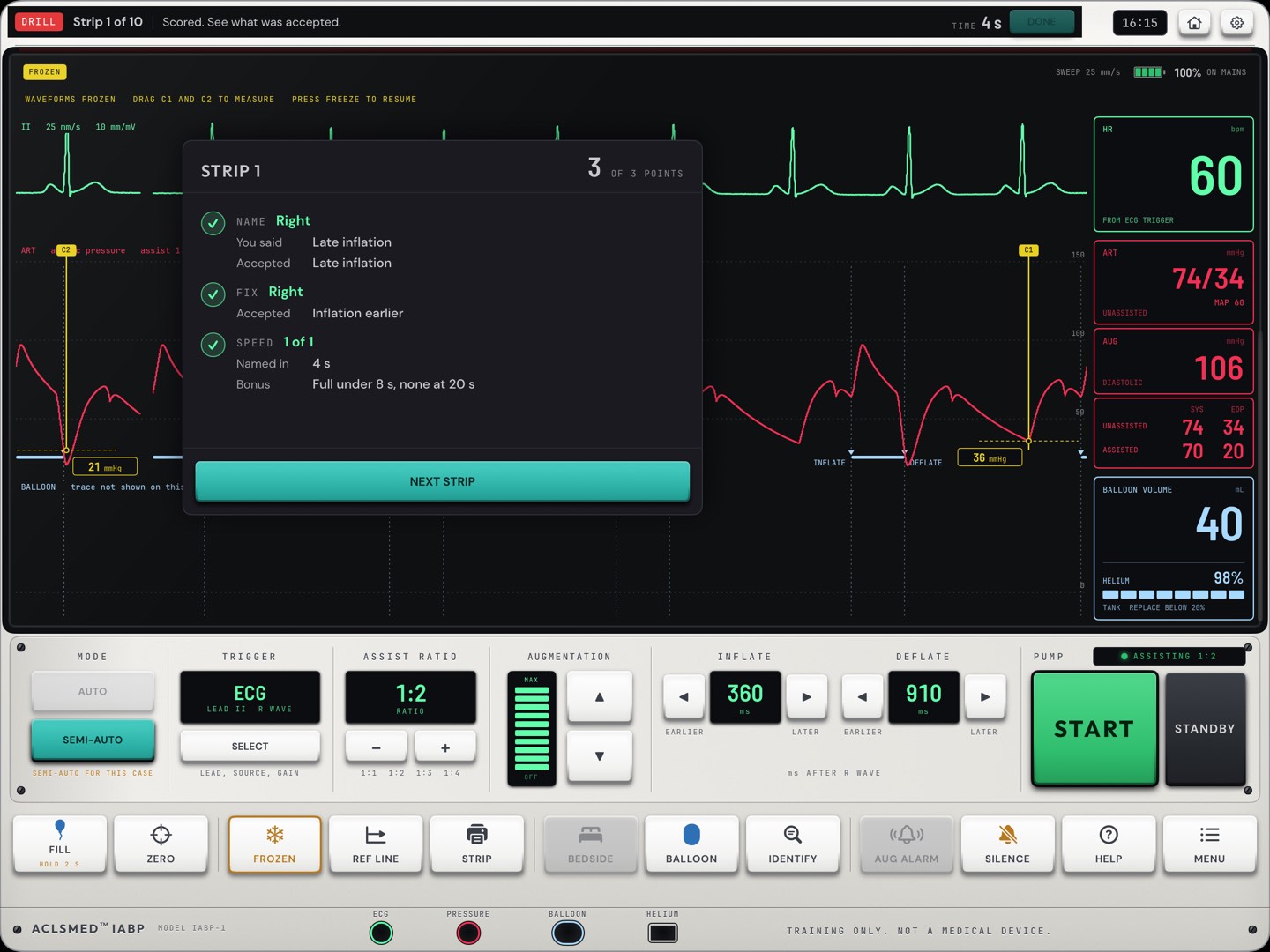
§ 06.02 · Feedback
Scored, with what was accepted
NAME · what the learner said, and what was accepted.
FIX · right or not, and the fix that was accepted.
SPEED · how fast it was named, and the bonus earned.
Points for the strip, out of 3. The strip stays frozen with its cursors for a second look.
When two keys were needed, the order is noted but not scored.
Coach the name
The fix only scores with the right name. Ask what the learner saw on the trace before they reach for a key.
Timing drillFeedback
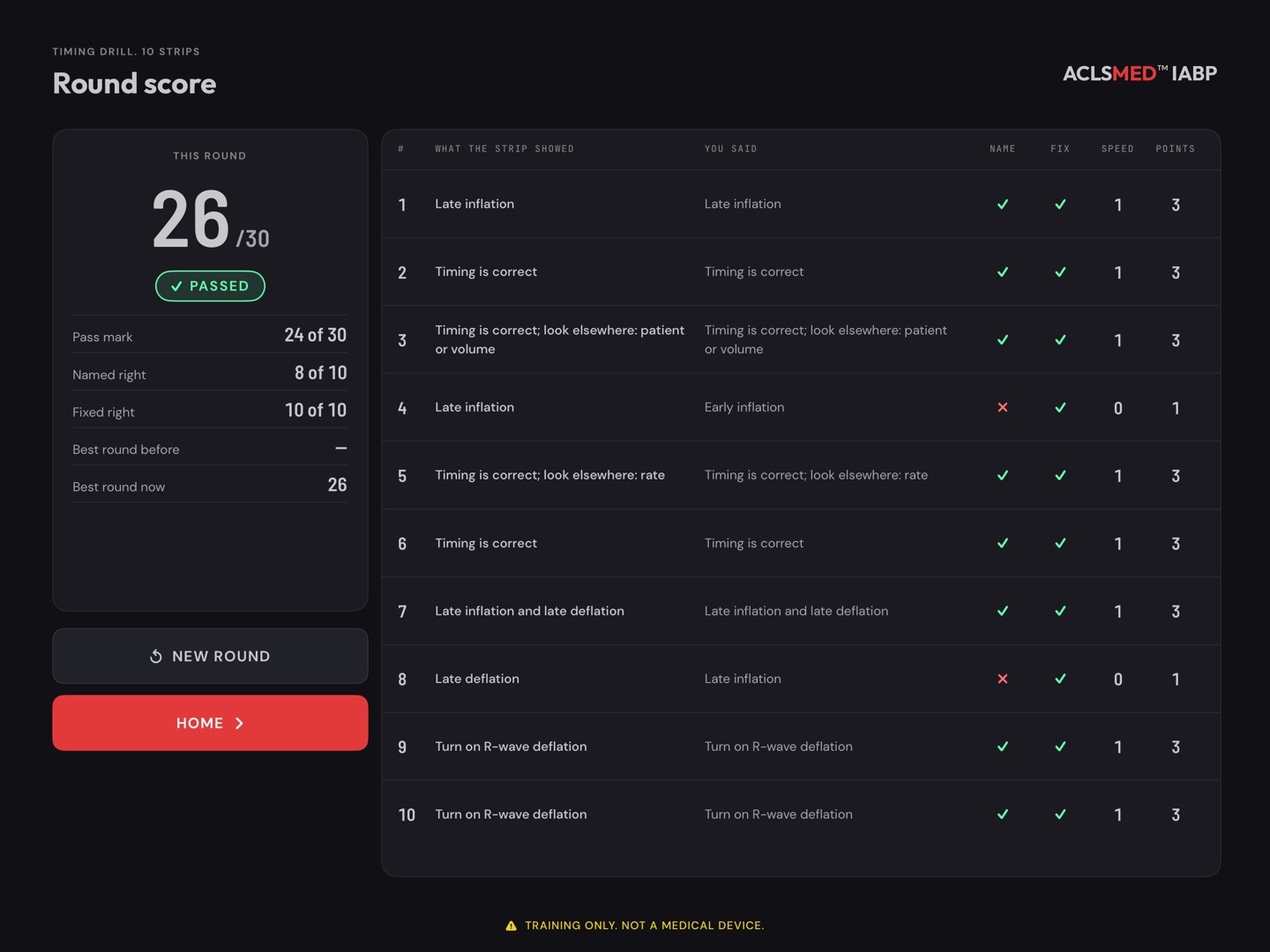
§ 06.03 · The round score
30 points a round, passed at 24
strip = 1 name +1 fix + up to 1 speed
Name · the right finding.
Fix · timing back in the pass band, only with the right name, and nothing else moved.
Speed · full under 8 seconds, none at 20 seconds, a straight line between.
Round · ten strips, 30 points, passed at 24. The best round shows on Home.
Free · one round a calendar day, counted when it starts. Pro is unlimited.
Strips cover correct timing, each single error, the mixed pairs, a whole window early or late, and strips where the timing is right and the problem is elsewhere.
Timing drillRound score
§ 07
Settings, sound & demo
The gear on Home. Sound for a quiet room, the console's look, a self-running demo, the guides, Pro and progress.
§ 07.01 · Settings
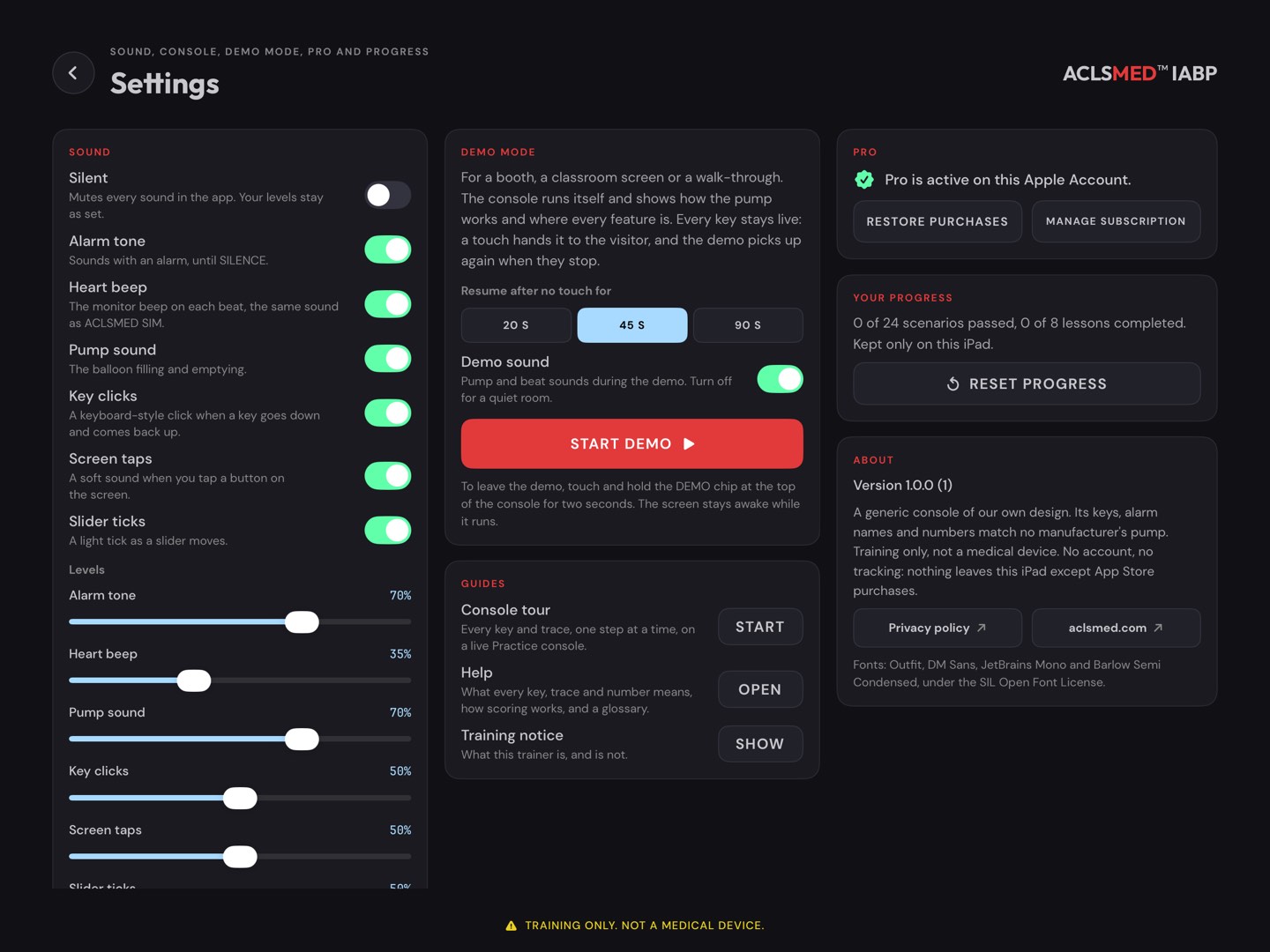
One page, seven sections
Sound · Silent, each sound on or off, and its level (§ 07.02).
Console · shell color (WHITE, IVORY, BLUE, GRAPHITE), the view the BALLOON panel opens on, and how Practice opens.
Demo mode · a self-running console (§ 07.03).
Guides · Console tour, Help, Training notice.
Pro · status, Get Pro, Restore purchases, Manage subscription.
Your progress · cases passed and lessons completed, kept only on this tablet, and RESET PROGRESS.
About · version, privacy policy, aclsmed.com.
Reset progress
Clears every scenario score, drill round and completed lesson on this tablet, after two confirmations. It cannot be undone. Pro is not affected.
SettingsOverview
§ 07.02 · Sound
Silent for a quiet room
Setting
What it plays
Silent
Mutes every sound in the app. The levels stay as set.
Alarm tone
With an alarm, until SILENCE.
Heart beep
The monitor beep on each beat, the same sound as ACLSMED™ SIM.
Pump sound
The balloon filling and emptying.
Key clicks
A keyboard-style click as a console key goes down and comes back up.
Screen taps
A soft sound on a tap of an on-screen button.
Slider ticks
A light tick as a slider moves.
Levels · a slider for each sound. Let go of a slider to hear it.
The tablet's volume buttons set the overall loudness.
On the console, MENU > SOUND has the alarm, beep and pump switches and sliders.
SILENCE on the console quiets only the alarm tone, for 60 seconds.
Several tablets in one room
Turn the heart beep and key clicks off, keep the alarm tone and the pump sound low. Learners then hear their own console without hearing the next one.
SettingsSound
§ 07.03 · Demo mode
A console that runs itself
For a booth, a classroom screen or a walk-through. The console runs a patient and shows how the pump works and where every feature is, in about three minutes, then starts again.
The script presses the console's own keys: timing set by AUTO, early inflation and late deflation shown and corrected, 1:2, a kinked catheter worked at the bedside, the four shell colors.
Every key stays live. A touch hands the console to the visitor; the demo picks up again after no touch for 20, 45 or 90 seconds.
Demo sound turns the pump and beat sounds off for a quiet room.
Settings > Demo mode: choose the resume time and the sound.
Tap START DEMO. The screen stays awake while it runs.
To leave, touch and hold the DEMO chip at the top of the console for two seconds.
Your settings come back
The demo changes the shell and the balloon view as it runs, and puts the learner's own choices back when it ends.
SettingsDemo mode
§ 07.04 · Help
The manual inside the app
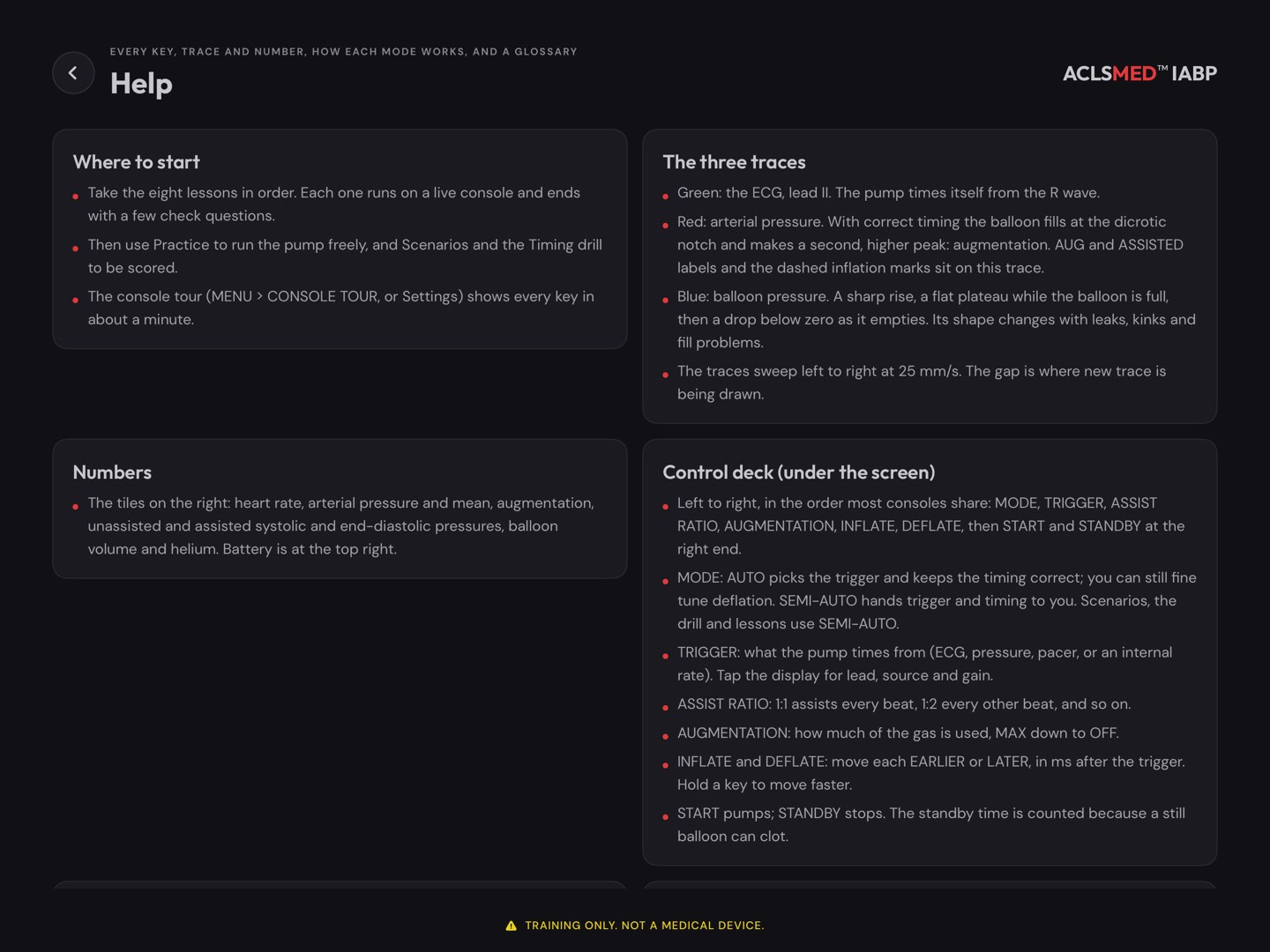
The ? key on Home and Settings > Guides > Help open one page of topic cards:
Where to start
The three traces · numbers
The control deck · the keys along the bottom
Alarms
Lessons · scenarios and scoring · timing drill · Practice
A glossary · what is saved
Point learners here between classes. This manual follows the same order.
SettingsHelp
§ 08
Running a class
The app is built for one learner at a time. These plans put it to work in a room: lessons first, then Practice with you on the drawer, then scored cases and the debrief.
§ 08.01 · Before class
The ten-minute check
Install and open the app on every tablet, and tap I UNDERSTAND on the notice, so nobody starts the class on a store page.
Pro, if the plan uses Pro cases. Buy or restore on each tablet. Free covers Practice, all lessons, A1, A2, B1, C1 and one drill round a day per tablet.
Sound. In a shared room, set the sound per § 07.02, or Silent for a demonstration you narrate.
Practice opens in STANDBY if the class starts with starting the pump.
Scores. Each tablet keeps its own. If tablets are shared between groups, decide whether to Reset progress between them.
Charge the tablets. Nothing else is needed: no network, no accounts.
One screen for the room
To show your console to everyone, mirror the tablet to the room display with the tablet's own screen mirroring. The Instructor drawer then shows on the big screen too, so open it before the learners look up, or turn the display away.
Say it at the start
Training only. Not a medical device. A generic console: the keys, alarm names and numbers on your unit's console differ, and your policy and its manual come first.
Running a classBefore class
§ 08.02 · Playbook · Timing, first hour
From the six landmarks to a fixed trace
Min
What happens
On the app
0–5
The notice, then the console tour together
Settings > Guides > Console tour
5–30
Lessons 1 to 4 in pairs, check questions included
Learn > Lessons 1–4
30–45
You drive: show each timing error in SEMI-AUTO at 1:2; the room names it before you fix it
Practice · INFLATE / DEFLATE · REF LINE
45–55
Each pair runs one drill round and reads the feedback
Timing drill
55–60
Scored check: case A1 or A2 (both free)
Scenarios > A1 · A2
What to listen for
The four moves of every timing check, in order: go to 1:2, name what you see, correct it, go back to the ordered ratio. If a learner reaches for a key before naming the error, stop and ask for the name.
Running a classPlaybook · Timing
§ 08.03 · Playbook · Alarms and the bedside
Patient, console, cause
Min
What happens
On the app
0–20
Lessons 5 and 7: the balloon pressure trace, alarms and the bedside round
Learn > Lessons 5 · 7
20–45
You inject each of the five faults in turn. The learner talks through patient first, then the console, then the cause, and restarts only when it is safe
Practice · INSTRUCTOR > FAULTS · BEDSIDE
45–60
Scored: case C1, gas loss from a loose connection. Debrief on the timeline
Scenarios > C1 (free)
TURN UP THE PRESSURE
Pro
Run C2 (kink), C3 (blood in the tubing), C5 (fill failure) and C8 (power loss) as a station rotation, one case per tablet.
THE QUESTION THAT MATTERS
Blood in the tubing
What must not happen next? The answer is in the never-events (§ 05.10): no FILL and no START.
Running a classPlaybook · Alarms
§ 08.04 · Playbook · Scored case stations
Stations, scores and a shared debrief
Set one case per tablet, for example B2, B3, B4 and D1, and put a pair at each.
Brief (2 min): the pair reads the briefing aloud and states a plan.
Run (3 to 6 min): one learner hands, one learner voice. Swap roles on the next station.
Questions: the pair agrees each answer before tapping.
Debrief at the tablet (5 min): read the result, then the timeline. Rotate.
Debriefing from the screen
Start with Why this was not passed if it is there. Then walk the timeline: when did the problem show, when was it named, when was it fixed? Compare that with the plan from the briefing. End on the reasoning under each question.
Repeat to learn
The best score is kept, so a second attempt costs nothing. A case run twice, with a debrief between, teaches more than two different cases.
Running a classPlaybook · Stations
§ 08.05 · Between classes
Self-study on the learner's own tablet
THE ORDER THE APP SUGGESTS
Home says it too
The lessons first, then Practice, Scenarios and the Timing drill. Home's UP NEXT button walks a learner through it.
A ROUND A DAY
Free
One drill round each day keeps timing sharp between classes. Ask for the best round at the next session.
PROGRESS ON HOME
Shown, not sent
Cases passed, average best score, lessons completed and the best drill round are on Home. The app sends nothing anywhere: ask the learner to show you.
What the app does not do
It has no class roster, no instructor dashboard and no export. Each tablet keeps its own results, and only on that tablet.
Running a classSelf-study
§ 09
Reference
Troubleshooting, questions instructors ask, privacy, the 24-case catalog and a glossary.
§ 09.01 · Troubleshooting
When something does not work
What you see
Why, and what to do
INFLATE keys do nothing
The console is in AUTO, which sets inflation. Press SEMI-AUTO. Deflation can still be fine-tuned in AUTO.
START does nothing after an alarm
A pump-stopping alarm stays latched. Fix the cause, RESET ALARMS in MENU, then START. With blood in the tubing, the right answer is to stay stopped.
FILL fails
A fill needs a trigger, helium and an intact connection. Check those in that order.
Pressures look wrong after zeroing
It was zeroed with the stopcock closed to air. Open to air, ZERO NOW, close to air.
Lead I or III is refused
This version shows lead II only.
A case opens the paywall after buying Pro
Tap RESTORE PURCHASES on the paywall or in Settings. The tablet must be signed in to the store account that bought Pro.
The drill asks for Pro
Free is one round a calendar day, counted when the round starts. It is back tomorrow.
No sound
Check Silent in Settings, the sound switches in MENU, and the tablet's volume.
The console is small
The tablet is upright. Turn it sideways.
Demo mode will not stop
Touch and hold the DEMO chip at the top of the console for two seconds.
"Saved results could not be read"
The saved file was damaged. The app set it aside and progress starts again from there. It says so once.
ReferenceTroubleshooting
§ 09.02 · Questions instructors ask
Frequently asked
IS IT A MEDICAL DEVICE?
No. It is training software for a simulated patient. It does not connect to any pump or patient and gives no medical advice.
DOES IT MATCH OUR CONSOLE?
No, on purpose. It is a generic console that copies no manufacturer. Teach the principles here and the specifics on your unit's console.
DOES IT NEED THE INTERNET?
No. Every mode runs offline. The store is needed only to buy or restore Pro.
IS THERE AN IPHONE VERSION?
No. The console needs a tablet's width: iPad or an Android tablet.
DOES ACLSMED™ SIM PRO INCLUDE IT?
No. IABP Pro is its own purchase inside the app, separate from SIM plans and seats.
CAN ONE PURCHASE COVER SEVERAL TABLETS?
Pro belongs to the store account that bought it. A tablet signed in to that account can restore it. There are no seats or class codes.
CAN I SEE MY LEARNERS' SCORES?
Only on their tablet. The app has no accounts, no dashboard and no export.
IS THERE A TRIAL?
No trial. The free tier never expires: Practice, all 8 lessons, 4 cases and a drill round a day.
ReferenceFAQ
§ 09.03 · Privacy and what is saved
Nothing leaves the tablet
NO ACCOUNT, NOTHING COLLECTED
No sign-in, no server, no analytics and no tracking. The app collects no data about the learner or the tablet.
PURCHASES
Handled by the App Store or Google Play. The app only asks the store whether Pro is active.
THE FULL POLICY
aclsmed.com/privacy.html, also linked from Settings > About.
Saved on the tablet
Cleared by
Each case's attempts and best score
Settings > Reset progress
Drill rounds and the best round
Settings > Reset progress
Lessons completed
Settings > Reset progress
Sound, shell, balloon view, how Practice opens, demo settings
Changing them
Whether the notice and the tour were seen
Deleting the app
Learner names are never asked for. Deleting the app deletes everything it saved.
ReferencePrivacy
§ 09.04 · Appendix A · Scenario catalog 1 / 2
The 24 cases, Tiers A and B
#
Case
Patient
Length
A1
Routine timing check, timing is correct
58 M · anterior infarct, stented 6 h ago
3:00
FREE
A2
Early inflation
67 F · inferior-posterior infarct with shock
4:00
FREE
A3
Late inflation
71 M · refractory unstable angina, awaiting bypass
4:00
PRO
A4
Early deflation
62 M · day 0 after bypass, low cardiac output
4:00
PRO
A5
Late deflation
74 F · anterior infarct with cardiogenic shock
3:30
PRO
A6
Mixed error, inflation and deflation both late
66 M · back from the cath lab, timing not checked
4:30
PRO
B1
Start-up after insertion
60 M · inferior infarct with shock, new balloon
6:00
FREE
B2
New atrial fibrillation
76 F · day 1 after mitral valve replacement
4:30
PRO
B3
Paced patient, trigger on the atrial spike
69 M · day 0 after bypass and valve surgery, AV paced
5:00
PRO
B4
Poor ECG signal and trigger loss
80 F · anterior infarct with shock, sweating heavily
5:00
PRO
B5
Tachycardia and falling augmentation
55 M · day 1 after anterior infarct with shock
5:30
PRO
B6
Low augmentation from a console setting
66 M · day 1 after stenting, ordered full support
4:30
PRO
Tier A: timing recognition. Tier B: console operation. Every case has three end-of-case questions and its own critical actions.
ReferenceAppendix A · 1 / 2
§ 09.05 · Appendix A · Scenario catalog 2 / 2
The 24 cases, Tiers C and D
#
Case
Patient
Length
C1
Gas loss from a loose connection
63 F · day 2, just repositioned in bed
4:30
FREE
C2
High balloon pressure from a kinked catheter
59 M · day 1 after stenting, restless and confused
5:00
PRO
C3
Blood in the tubing, suspected balloon rupture
72 F · day 3, heavily calcified aorta
4:00
PRO
C4
Low helium supply
68 M · day 2 of support, stable
5:00
PRO
C5
Fill failure after a period in standby
61 F · day 1, portable chest X-ray just taken
5:00
PRO
C6
Catheter migration toward the arch
70 M · day 2, helped to sit up for a meal
5:30
PRO
C7
Limb ischemia
78 F · day 2, peripheral arterial disease, diabetes
5:00
PRO
C8
Power loss
64 M · day 1, bed moved for cleaning
5:00
PRO
D1
Cardiac arrest on the pump
66 M · day 1 after stenting, coronary care unit
6:00
PRO
D2
Low cardiac output after bypass surgery
71 F · two hours after four-vessel bypass, AV paced
6:00
PRO
D3
Infarct shock, bridge to surgery and transfer
57 M · anterior infarct with shock, going to theatre
6:00
PRO
D4
Weaning and preparation for removal
63 M · day 3 after stenting, improving
6:00
PRO
Tier C: alarms and troubleshooting. Tier D: clinical management. Titles are shown in US spelling here; the app's own screens use British spelling (for example "ischaemia", "towards").
ReferenceAppendix A · 2 / 2
§ 09.06 · Glossary
The words on the screen
Term
Meaning in the app
Counterpulsation
Inflating in diastole and deflating before systole, the opposite of the heart's own pulse.
Augmentation
The diastolic pressure peak the balloon makes.
Dicrotic notch
The small dip when the aortic valve closes, the start of diastole. The landmark for inflation.
Assisted / unassisted
A beat the balloon has worked on, or not. Seen side by side at 1:2.
End-diastolic pressure
The lowest pressure just before the next beat. Assisted should be lower than unassisted.
Trigger
The signal the pump times from.
R-wave deflation
Deflating on the R wave itself, used when the rhythm is irregular.
Label
The six landmarks at 1:2
UEDP
Unassisted end-diastolic pressure
USP
Unassisted systole
DN
Dicrotic notch
AUG
Diastolic augmentation
AEDP
Assisted end-diastolic pressure
ASP
Assisted systole
These abbreviations are the app's own. Textbooks and consoles use several other sets of letters for the same six points.
ReferenceGlossary
Fin
Now go time a balloon.
ACLSMED™ IABP is education and simulation software for practice on a simulated patient. It is not a medical device, does not connect to any balloon pump or patient, is not intended for use on or during the care of a real patient, and does not give medical advice. The console is a generic teaching console: its keys, alarm names and numbers match no manufacturer's pump. Your unit policy and the operator's manual for your own console always come first. In a real emergency, call your local emergency number.
 ACLSMEDIABP
Training only